
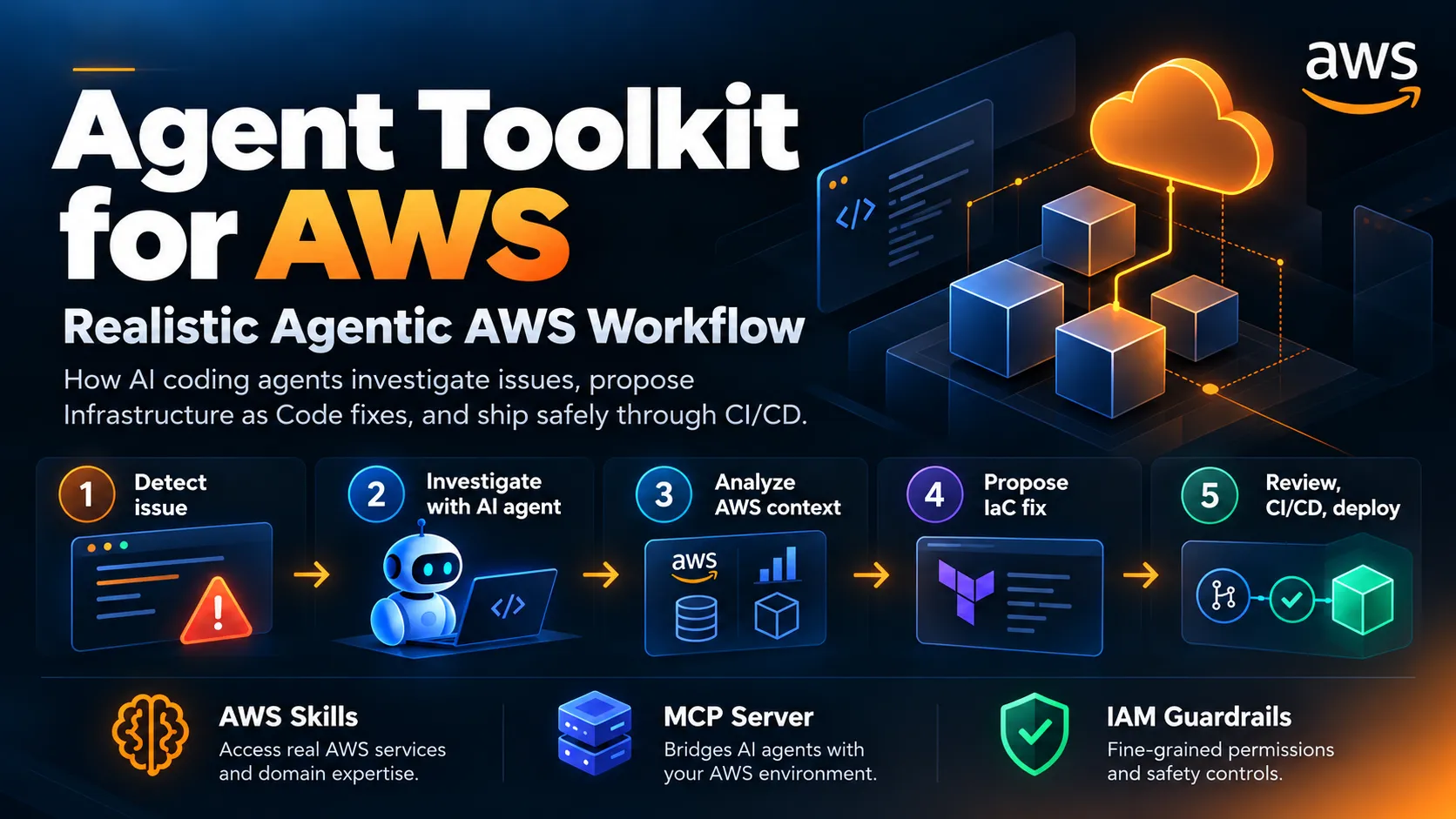
Hands-On with Agent Toolkit for AWS: Giving AI Coding Agents Real AWS Context
The blog explores how Agent Toolkit for AWS gives AI coding agents real-time AWS context through MCP, AWS-specific skills, APIs, and IAM-controlled access. It demonstrates a practical production troubleshooting workflow where an agent investigates AWS issues, recommends least-privilege Infrastructure-as-Code fixes, and operates within defined security guardrails rather than directly modifying production.

AI coding agents are becoming part of the normal developer workflow. I increasingly use them not only for generating application code, but also for infrastructure, debugging, security reviews, and operational tasks.
However, there is an important difference between asking an agent to:
“Write a Python function.”
and asking it to:
“Find out why my application is failing in AWS and fix the infrastructure.”
The second request requires much more than code generation.
The agent needs current AWS documentation, knowledge of AWS APIs, awareness of the resources running in your account, appropriate IAM permissions, and guardrails around what it should and should not change.
This is exactly the problem Agent Toolkit for AWS is designed to address.
AWS introduced Agent Toolkit for AWS as a production-ready collection of tools and guidance for AI coding agents. It includes a managed AWS MCP Server, AWS-specific skills, plugins, and project-level rules files.
In this post, I’ll walk through the setup and then use a practical example:
Troubleshooting a production-like serverless application where an API is returning errors after a deployment.
What is Agent Toolkit for AWS?
At a high level, the architecture looks like this:

Figure 1: How an AI coding agent connects to AWS using Agent Toolkit for AWS.
Agent Toolkit currently consists of four major components:
- AWS MCP Server — managed Model Context Protocol access to AWS.
- Skills — curated AWS procedures and reference material.
- Plugins — packaged MCP configuration and collections of skills.
- Rules files — persistent instructions describing how the agent should work with AWS.
The key point for me is that the agent no longer has to rely only on knowledge embedded in the underlying model. It can retrieve current AWS information and, when authorized, interact with AWS APIs.
AWS states that the MCP interface supports thousands of AWS APIs, while IAM remains responsible for determining which actions the agent can actually perform.
Step 1: Install the Agent Toolkit
If you’re using AWS CLI, this is probably the easiest way to get started.
First, verify your AWS CLI:
1
aws --version
Agent Toolkit requires a recent AWS CLI version that includes the Agent Toolkit integration.
Then run:
1
aws configure agent-toolkit
The setup wizard detects supported coding agents installed on your system and configures the MCP connection and default AWS skills.
After installation, restart your coding agent.
You can also inspect the available skills:
1
aws agent-toolkit list-available-skills
Or search for skills relevant to your workload:
1
2
aws agent-toolkit search-skills \
    --search-query serverless
An interesting part of the design is that skills don’t necessarily need to remain permanently loaded into the model context.
The agent can identify a relevant skill, load its instructions when needed, follow the workflow, and release that context after completing the task.
That becomes important when working with large AWS environments because unnecessary context translates directly into unnecessary tokens.
Step 2: Verify the MCP Connection
Start a new coding-agent session and ask:
1
What AWS Regions are currently available?
This provides a simple test that the agent can retrieve current AWS information through the MCP connection.
Next, confirm which AWS identity you’re using:
1
aws sts get-caller-identity
Before allowing an AI agent anywhere near an AWS environment, I consider this step essential.
The permission chain should always be clear:

Figure 2: Understanding which AWS identity and permissions the AI agent is operating with.
You should know exactly which account, IAM role, permission set, and environment the agent will be operating against.
Real-World Example: Troubleshooting a Serverless Production Issue
Now let’s move away from the demo commands.
Imagine we have a fairly common architecture:

Figure 3: Example serverless document-upload application used in the troubleshooting scenario.
Our application was working normally until the latest deployment.
Immediately after the release:
1
POST /documents
starts returning:
1
HTTP 500
The Lambda code changed, some IAM permissions changed, and a new environment variable was introduced.
Normally my troubleshooting workflow might look like this:
- Open CloudWatch.
- Find the correct log group.
- Search Lambda logs.
- Find the error.
- Inspect the Lambda configuration.
- Check environment variables.
- Inspect the IAM role.
- Check the latest CloudFormation/CDK/Terraform change.
- Search AWS documentation.
- Create the fix.
This is exactly the kind of multi-step workflow where an AWS-aware agent becomes interesting.
Step 3: Ask the Agent to Investigate
Instead of immediately navigating through multiple AWS consoles, I can start with:
1
2
3
4
5
6
7
Investigate why the document upload API is returning HTTP 500.
Architecture:
API Gateway -> Lambda -> DynamoDB/S3
Start with read-only investigation.
Do not change any AWS resources.
Check the relevant Lambda configuration and available
CloudWatch information and explain the most likely root cause.
Notice something important here:
I explicitly tell the agent not to change anything.
Agentic workflows work much better when we separate investigation from execution.

Figure 4: Separating investigation, recommendation, approval, and execution.
This is much safer than a workflow where the agent receives a vague instruction such as “fix production” and immediately starts modifying resources.
Step 4: Let the Agent Gather AWS Context
Through the AWS MCP Server, an appropriately authorized agent can interact with AWS APIs using your IAM credentials.
The investigation could look something like this:

Figure 5: AWS context gathered by the coding agent during troubleshooting.
The exact investigation depends on the permissions assigned to the agent.
For example, assume the logs reveal:
1
2
3
AccessDeniedException:
User is not authorized to perform:
s3:PutObject
Now we have moved from:
“The API is broken.”
to:
“Lambda is executing successfully, but its execution role no longer has permission to write objects to the application S3 bucket.”
That’s a much more actionable problem.
Step 5: Ask for a Fix — But Not a Deployment
My next prompt would be something like:
1
2
3
4
5
6
7
Based on the investigation, generate the infrastructure
change required to fix the missing S3 permission.
Do not modify AWS directly.
Update the Infrastructure as Code definition and show me
the proposed diff first.
Use least-privilege permissions and restrict access to
the application's upload bucket.
This changes the AI agent’s role from:
Autonomous production administrator
to:
AWS-aware engineering assistant.
For production systems, I generally prefer the second model.
The desired IAM scope should look conceptually like this:
Press enter or click to view image in full size

Figure 6: HTTP 500 caused by a missing s3:PutObject permission.
Instead of broad access such as:
1
2
3
4
5
{
"Effect": "Allow",
"Action": "s3:",
"Resource": ""
}
the agent should generate a least-privilege change restricted to the specific bucket and required operation.
Then the normal engineering process continues:

Figure 7: Restricting Lambda access to only the required S3 operation and bucket.
Agent Toolkit doesn’t need to replace the software delivery lifecycle.
It can become another participant within it.
Step 6: Add Project Rules
This is where I think Agent Toolkit becomes particularly useful for platform teams. Project-level rules help AWS-specific behavior remain consistent across sessions.
This is where I think Agent Toolkit becomes particularly useful for platform teams. Project-level rules help AWS-specific behavior remain consistent across sessions.
For example, my project instructions could contain:
AWS Engineering Rules
- Use Infrastructure as Code for infrastructure changes.
- Never modify production resources unless explicitly asked.
- Start production troubleshooting using read-only operations.
- Follow least-privilege IAM principles.
- Search current AWS documentation when working with
unfamiliar AWS APIs. - Prefer existing application architecture before
introducing another AWS service. - Show proposed infrastructure changes before applying them.
- Tag supported resources with:
Application
Environment
Owner
CostCenter
Depending on the coding agent, these instructions can live in files such as:
1. CLAUDE.md2. AGENTS.mdor the equivalent configuration used by the agent.
This helps turn organizational AWS practices into instructions the agent can repeatedly follow.

Figure 8: AI-generated infrastructure changes still follow the normal software delivery process.
Step 7: Separate Human and Agent Permissions
One of the most important design decisions is ensuring that a developer’s permissions and an AI agent’s permissions do not automatically have to be identical.
A practical model could look like this.
For development environments, you might allow a broader scope:

Figure 9: Separate permission models for developers and AI agents.
This creates a more controlled model:
- Production can remain largely read-only for the agent.
- Development can allow selected write actions.
- Infrastructure changes can still move through pull requests.
- CloudTrail can provide auditing.
- IAM remains the enforcement layer.

Figure 10: Different agent permission levels across development and production environments.
This is much more interesting than simply connecting an LLM to a high-privilege AWS access key.
A More Realistic Agentic AWS Workflow
Putting everything together, our production incident workflow becomes:

Figure 11: Production-safe agentic AWS troubleshooting workflow using Agent Toolkit for AWS.
To me, this is where AI coding agents start becoming genuinely useful in cloud engineering.
It isn’t about asking:
“Generate a Lambda function.”
We’ve been able to do that for years.
The more interesting question is:
“Can the agent understand my AWS environment, investigate the problem, use current AWS guidance, respect my organization’s guardrails, and produce a change that fits my existing engineering workflow?”
Agent Toolkit moves much closer to that model.
=============================================================================
Skills Make Specialized Workflows More Practical
Another useful aspect is the ability to add AWS expertise as your workload evolves.
For example:
1
2
aws agent-toolkit search-skills \
    --search-query vectors
A matching skill can then be added using the toolkit CLI.
Conceptually, the skill discovery model looks like this:

Figure 12: How an AI agent discovers and loads AWS-specific skills.
That allows teams to progressively equip agents for areas such as:
- Serverless
- Containers
- Data analytics
- Storage
- Observability
- Infrastructure as Code
- AI/ML
- DevSecOps
rather than building one enormous system prompt containing every AWS best practice.
Security Still Matters
Agent Toolkit does not remove the need for good AWS security practices.
If anything, agentic access makes them even more important.
A sensible baseline looks like this:

Figure 13: Recommended security controls around an AWS-aware coding agent.
The tooling is only as safe as the permissions and workflow surrounding it.
For production environments, I would avoid giving agents broad administrative access unless there is a very specific reason to do so.
Cost
Agent Toolkit for AWS itself is available without an additional toolkit charge.
You still pay normal AWS pricing for the services and resources that the agent creates or interacts with.
That distinction is important.
An agent may be inexpensive to connect, but a prompt that provisions expensive infrastructure is still provisioning expensive infrastructure.
Cost guardrails should therefore be treated just like security guardrails.

Figure 14: Adding cost awareness before agent-generated infrastructure reaches AWS.
This is especially useful when agents are allowed to create resources such as:
- EC2 instances
- EKS clusters
- NAT Gateways
- RDS databases
- OpenSearch domains
- GPU instances
- Bedrock workloads
Final Thoughts
What I like about Agent Toolkit for AWS is that AWS isn’t trying to introduce another standalone AI coding environment.
Instead, the toolkit integrates AWS capabilities into tools developers may already be using.
The basic setup can be as simple as:
1
aws configure agent-toolkit
But I think the real opportunity is much bigger than the installation command.

Figure 15: Components that combine to create a controlled agentic cloud engineering workflow.
The agent doesn’t have to become the production administrator.
Instead, it can become an AWS-aware engineering teammate that investigates, proposes, builds, and automates within clearly defined boundaries.
For production environments, that’s the direction I find much more compelling.
References:
- Agent Toolkit for AWS — Product Page : Overview of AWS MCP Server, Agent Skills, plugins, rules files, security controls, supported coding agents, and pricing.
- Agent Toolkit for AWS — User Guide : Official documentation covering architecture, components, supported agents, IAM controls, and how the toolkit works.
- Getting Started with Agent Toolkit for AWS : Step-by-step setup guide covering prerequisites, installation, connection verification, rules files, and plugins.
- Agent Toolkit for AWS — AWS CLI Command Reference : Reference for commands such as
add-skill,list-available-skills,list-installed-skills,search-skills, and skill-update operations. - Get Started with Agent Toolkit for AWS in the AWS CLI : AWS Developer Tools Blog post by Andrew Asseily, published August 26, 2026. It covers installation, AWS skills, MCP configuration, and management through the CLI.
Enjoyed reading this content? Let the author know!
Your likes, comments, shares, and saves help creators reach more builders.

Loading recommendations
Loading article