
ECS Service Discovery with AWS Cloud Map: Using DNS for Dynamic Prometheus Monitoring
Learn how I used Amazon ECS Service Discovery with AWS Cloud Map to replace a changing EC2 private IP with a stable DNS name for Prometheus and Grafana monitoring.

Introduction
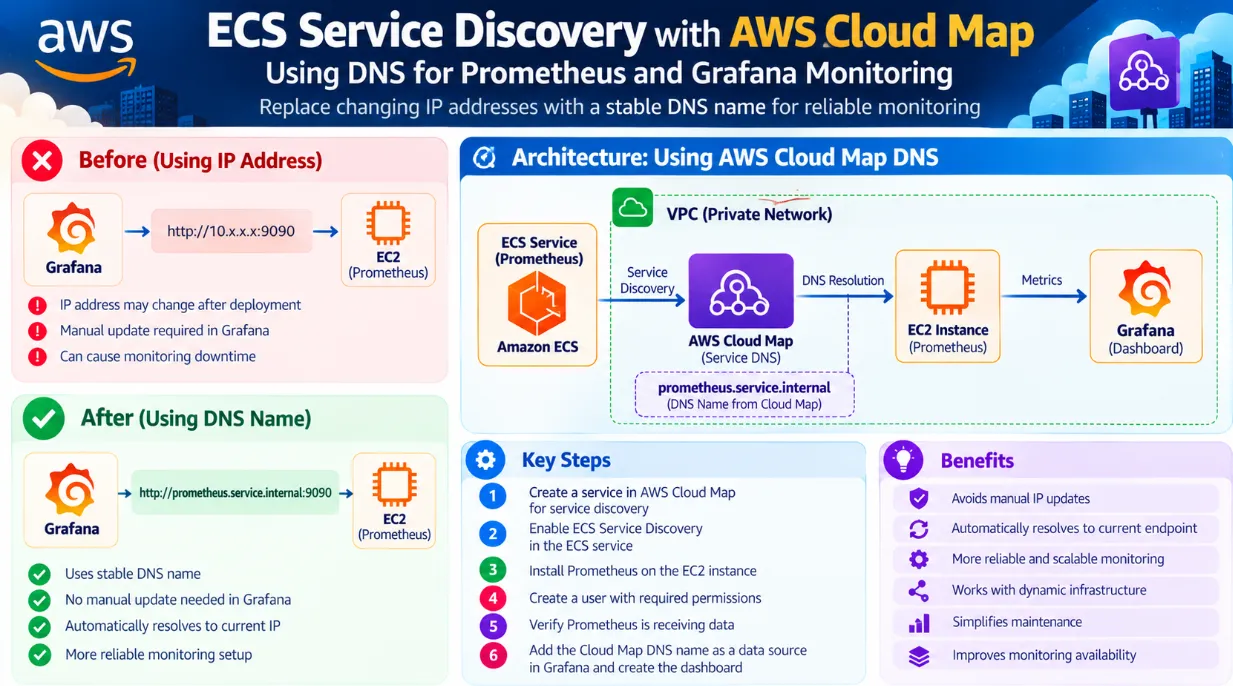
While setting up monitoring for my ECS services, I initially configured Grafana to connect to Prometheus using the private IP address of an EC2 instance.
It worked, but there was one problem.
Whenever the instance or deployment changes and the IP address changes, the Grafana data source would need to be updated manually.
I wanted to avoid that manual work.
So I decided to use AWS Cloud Map and ECS Service Discovery to provide a DNS-based endpoint instead of depending directly on an IP address.
The basic idea became:
ECS → Cloud Map → DNS → Prometheus → Grafana
The Problem with Using an IP Address
Initially, my Grafana data source looked something like:
1
http://<EC2-PRIVATE-IP>:9090
This works as long as the private IP remains the same.
But if the IP changes after a deployment, instance replacement, or infrastructure change, Grafana may no longer be able to reach Prometheus.
That means someone has to manually update the Grafana data source.
For a monitoring system, I wanted something more reliable.
Using AWS Cloud Map
To solve this, I created a service in AWS Cloud Map for service discovery.
Cloud Map allows services to be discovered using a service name instead of relying directly on changing IP addresses.
I then enabled ECS Service Discovery for the ECS service.
The architecture became:
1
2
3
4
5
6
7
8
9
10
11
12
13
ECS Service
     |
     ↓
AWS Cloud Map
     |
     ↓
Service DNS Name
     |
     ↓
Prometheus
     |
     ↓
Grafana
Now, instead of depending on a specific IP address, I can use the DNS name to locate the service.
Setting Up Prometheus
After configuring service discovery, I installed Prometheus on the EC2 instance.
I also created a user with the required permissions and verified that Prometheus was receiving the expected monitoring data.
Before moving forward, I checked that Prometheus was working correctly and that the metrics were available.
Connecting Grafana
Initially, I configured Grafana using the EC2 private IP address as the Prometheus data source.
For example:
1
http://10.x.x.x:9090
Grafana was able to connect successfully, and the dashboard displayed the Prometheus metrics.
However, using the IP address created a maintenance problem.
So, the next step was to replace the IP address with the Cloud Map DNS name.
For example:
1
http://prometheus.<service-name>.<namespace>:9090
The exact DNS name depends on the Cloud Map namespace and service configuration.
Why DNS Is Better Here
Using DNS provides an important advantage.
Instead of:
1
Grafana → EC2 Private IP
I can use:
1
Grafana → DNS Name → Current Service Endpoint
If the underlying IP changes, the service discovery mechanism can resolve the current endpoint.
This means I don't need to manually change the Grafana data source every time an IP address changes.
Monitoring Flow
The complete monitoring flow looks like this:
1
2
3
4
5
6
7
8
9
10
11
12
13
14
15
16
17
18
19
              AWS ECS
                 |
                 ↓
          ECS Service Discovery
                 |
                 ↓
            AWS Cloud Map
                 |
                 ↓
             DNS Name
                 |
                 ↓
            Prometheus
                 |
                 ↓
              Grafana
                 |
                 ↓
             Dashboard
This makes the monitoring setup more flexible and reduces manual configuration.
What I Learned
The biggest lesson from this setup was that monitoring should not depend unnecessarily on dynamic infrastructure details such as IP addresses.
Using service discovery and DNS provides a more flexible way to connect services.
Instead of thinking:
"Which IP address should Grafana connect to?"
I can think:
"Which service should Grafana connect to?"
That small change can make infrastructure easier to maintain as environments grow.
Final Thoughts
This was a useful hands-on experience for me because I got to work with multiple AWS concepts together:
- Amazon ECS
- AWS Cloud Map
- ECS Service Discovery
- DNS
- Prometheus
- Grafana
- EC2
The main goal was simple:
Avoid hardcoding an IP → Use service discovery → Connect through DNS → Reduce manual maintenance.
I'm continuing to explore how service discovery, monitoring, and automation can be combined to build more reliable AWS environments.
Enjoyed reading this content? Let the author know!
Your likes, comments, shares, and saves help creators reach more builders.

Loading recommendations
Loading article