
I Clicked “Launch Instance” — What Actually Happened?
My journey from simply knowing that EC2 is a cloud server to understanding what happens behind an EC2 instance—from AMIs and instance types to security groups, storage, and access.


When I started learning AWS, I kept coming across one word everywhere: EC2.
I knew it had something to do with servers. I knew it could run applications. But honestly, the idea of “launching a server” from the AWS console still felt a little abstract to me.
Then I actually launched my first EC2 instance.
And that changed the way I looked at cloud computing.
From a Physical Server to a Cloud Server
Before learning AWS, when I heard the word server, I imagined a physical machine sitting somewhere in a data center.
With Amazon EC2, I started looking at a server differently.
Instead of purchasing a physical machine, installing an operating system, connecting storage, configuring networking, and maintaining the hardware myself, I can create a virtual server in the cloud and configure it based on what my application needs.
That was my first “aha” moment with EC2.
I wasn't buying a server. I was creating the computing environment my application needed.
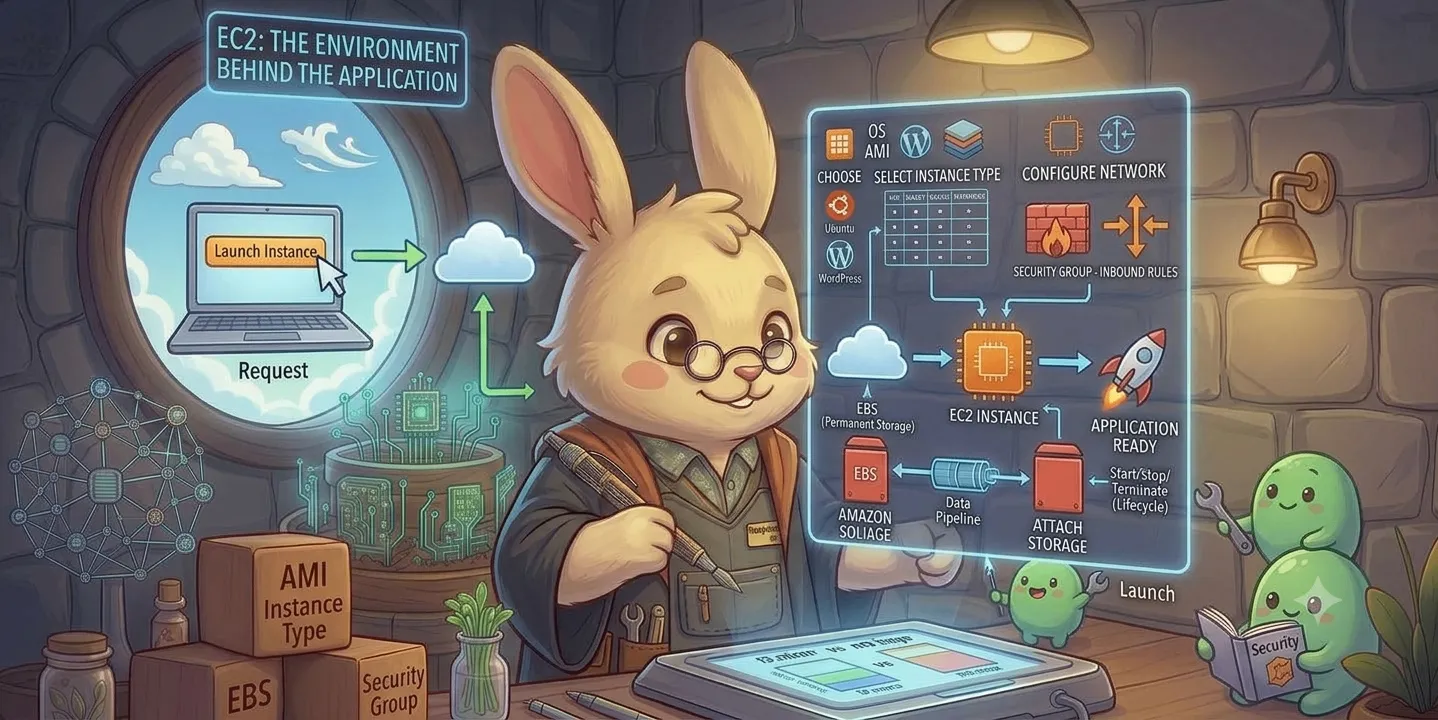
So, What Actually Happens When I Launch an EC2 Instance?
At first, the EC2 launch screen looked like a list of unrelated options.
AMI.
Instance type.
Key pair.
Security group.
Storage.
Instance type.
Key pair.
Security group.
Storage.
But once I connected the pieces, it started making sense.
The process looked something like this:
Choose an AMI → Select an instance type → Configure access → Configure networking → Configure storage → Launch
Each choice answers a different question.
1. AMI — What should my server start with?
An AMI, or Amazon Machine Image, provides the starting configuration for an EC2 instance.
For example, I can choose an image containing an operating system such as Linux or Windows.
So I started thinking of the AMI as:
“What do I want my new server to start with?”
This helped me understand that an EC2 instance doesn't start from nothing. I am choosing a predefined starting environment and then building from there.
2. Instance Type — How powerful should it be?
This was another concept that became much easier once I stopped thinking about the names and started thinking about the resources.
Different EC2 instance types provide different combinations of:
- CPU
- Memory
- Networking capacity
- Computing characteristics
So the question becomes:
“How much computing power does my application need?”
A small application doesn't necessarily need a powerful instance. A demanding workload might.
That made me realize that choosing an EC2 instance isn't just a technical decision. It's also a performance and cost decision.
3. Key Pair — Who Is Allowed to Connect?
This was one of the first things that made me think about security.
A key pair provides a way to securely connect to an EC2 instance, depending on the operating system and connection method.
It made me realize that creating a server is only one part of the problem.
The next question is:
Who should be allowed to access it?
4. Security Group — Who Can Reach My Server?
Security groups were another important part of my EC2 learning experience.
A security group acts as a virtual firewall for an EC2 instance.
For example, I might allow traffic for a specific application port while restricting other unnecessary access.
This made one thing very clear to me:
Making a server available and making a server securely available are two different things.
That is something I want to keep in mind whenever I build applications in the cloud.
5. Storage — Where Does My Data Go?
An EC2 instance also needs storage.
This is where Amazon EBS (Elastic Block Store) comes into the picture.
I started understanding the difference between the compute itself and the storage attached to it.
So now I could think of an EC2 instance as more than just a “computer.”
It is a combination of:
Compute + Operating System + Storage + Networking + Access Control
And that was probably the biggest shift in my understanding.
The Part That Made EC2 Feel Real
The most interesting moment was connecting to the running instance.
A few minutes earlier, I was looking at configuration options in the AWS console.
Then suddenly, I was connected to a machine running in the cloud.
I could install software.
I could run commands.
I could configure the environment.
I could host an application.
That was when the concept of cloud computing became much more real to me.
It wasn't just a diagram anymore.
It was a machine I could actually work with.
But What Happens When I Stop It?
This was another small but important learning moment.
I initially thought of an EC2 instance almost like turning off my personal computer.
But AWS introduced me to an important distinction:
Stop and Terminate are not the same thing.
Stopping an instance means the compute instance is shut down and can potentially be started again.
Terminating an instance means the instance is deleted, subject to the behavior of its associated resources and configuration.
That simple difference made me more careful about the actions I take in the AWS console.
What EC2 Taught Me Beyond EC2
Learning EC2 wasn't just about learning how to launch a virtual machine.
It changed how I started thinking about applications.
Whenever I see an application now, I naturally start asking:
- Where is it running?
- How much compute does it need?
- Where is its data stored?
- How does traffic reach it?
- Who is allowed to access it?
- How will it scale?
- What will it cost?
These questions are much bigger than EC2 itself.
But EC2 was where I started asking them.
My Takeaway
My first AWS certification helped me understand many cloud and AI concepts.
Learning EC2 gave me something different.
It helped me connect those concepts to an actual computing environment.
I started with a simple question:
“What is EC2?”
I ended up understanding something much more useful:
A cloud application is not just code. It's an entire environment of compute, storage, networking, security, and decisions working together.
EC2 was not just another AWS service I learned. It was one of the first services that helped me understand what happens behind the applications I use and build every day.
And now, I want to go one step further — from understanding individual AWS services to understanding how they work together to build complete cloud applications.
Enjoyed reading this content? Let the author know!
Your likes, comments, shares, and saves help creators reach more builders.

Loading recommendations
Loading article