
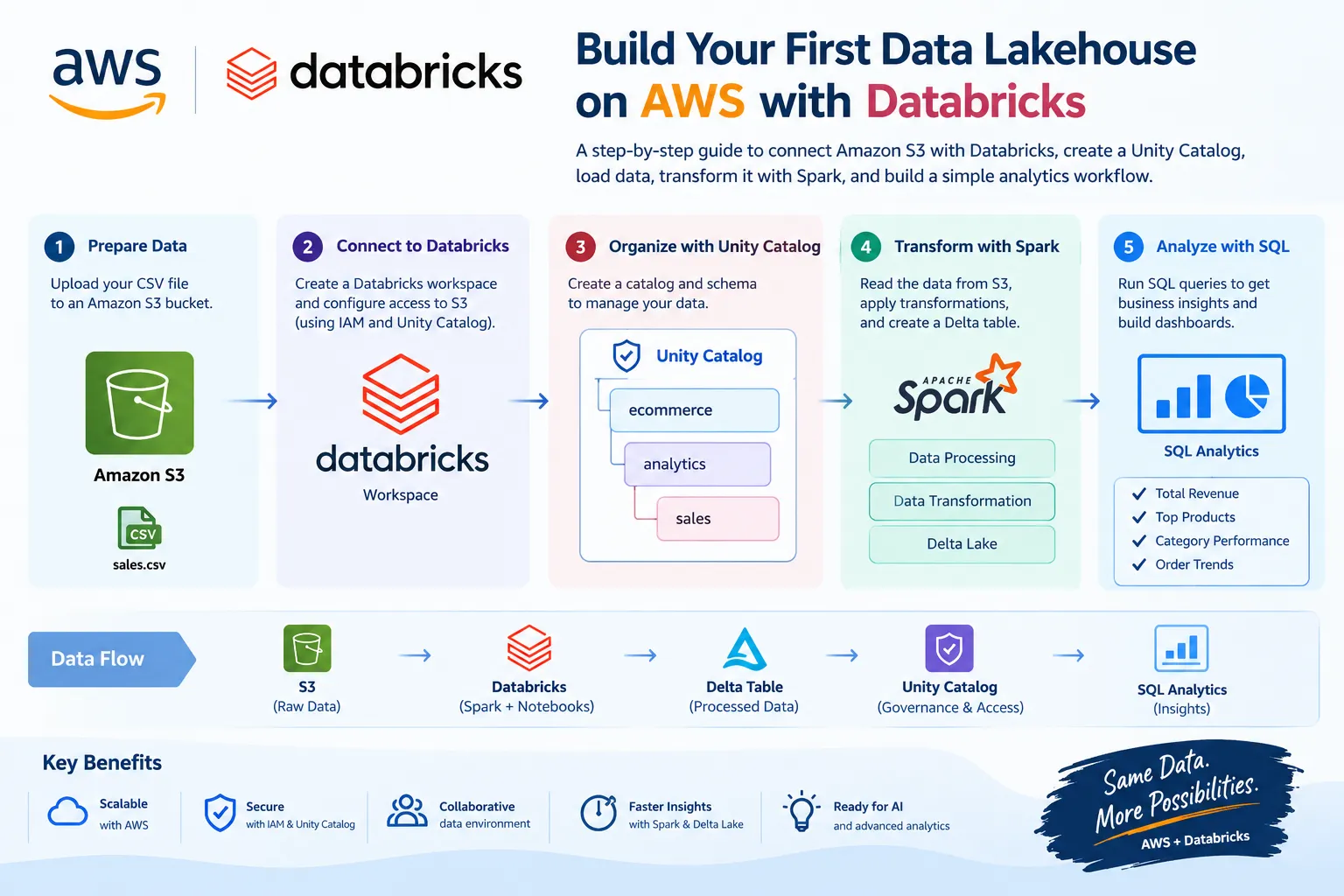
AWS + Databricks: Build Your First Mini Data Lakehouse - AWS
A beginner-friendly, hands-on guide to connecting Amazon S3 with Databricks, creating a Unity Catalog structure, loading data, transforming it with Spark SQL, and building a simple analytics workflow.

Today I wanted to explore something slightly different from my recent EC2 and networking work: how AWS and Databricks work together for modern data engineering and analytics.
AWS and Databricks have a strong integration around data, analytics, and AI. Databricks can use Amazon S3 as the storage layer, while Databricks provides the processing, analytics, governance, and collaborative development environment. AWS also lists Databricks as a SaaS product in AWS Marketplace, with a free-trial option currently available. (Amazon Web Services )
Instead of only reading about the integration, I wanted to understand it by building a small end-to-end project.
The project is intentionally simple:
CSV → Amazon S3 → Databricks → Spark → Delta table → SQL analytics
What We Will Build
Our mini project will look like this:
1
2
3
4
5
6
7
8
9
10
11
12
13
14
15
16
17
18
19
20
21
22
23
                  AWS
        +-----------------------+
        |     Amazon S3         |
        |                       |
        |  sales.csv            |
        +-----------+-----------+
                    |
                    | Read
                    v
        +-----------------------+
        |      Databricks       |
        |                       |
        |  Notebook + Spark     |
        |          |            |
        |          v            |
        |   Data Transformation |
        |          |            |
        |          v            |
        |     Delta Table       |
        +-----------+-----------+
                    |
                    v
             SQL Analytics
The objective isn't to build a huge enterprise platform. The objective is to understand where AWS ends and where Databricks adds value, and how the two platforms work together.
1. Why AWS + Databricks?
A modern data platform usually needs several capabilities:
- Cloud storage
- Data ingestion
- Data transformation
- Data engineering
- SQL analytics
- Data governance
- Machine learning and AI
- Collaboration
Amazon S3 is an excellent durable object-storage layer, while Databricks provides a unified environment for data engineering, analytics and AI workloads. AWS describes Databricks on AWS as a platform that can use S3 as its storage foundation and integrate with AWS services such as Amazon EC2 and Amazon Bedrock. (Amazon Web Services )
So our mental model is:
1
2
3
4
5
6
7
8
9
10
AWS
 └── S3
      └── Data Storage

Databricks
 ├── Spark
 ├── Notebooks
 ├── SQL
 ├── Delta
 └── Unity Catalog
2. Project Use Case
Let's imagine a small e-commerce company.
Every day, the company receives sales data:
1
2
3
4
5
6
order_id,customer,product,category,quantity,price
1001,Ali,Laptop,Electronics,1,850
1002,Sara,Mouse,Accessories,2,25
1003,Ahmed,Keyboard,Accessories,1,60
1004,John,Monitor,Electronics,2,220
1005,Ayesha,Laptop,Electronics,1,900
We want to answer questions such as:
- What is our total revenue?
- Which product generates the most revenue?
- Which category performs best?
- How many orders did we receive?
- What is the average order value?
This is a perfect small project for learning the basic AWS + Databricks workflow.
3. Step 1 — Create an S3 Bucket
First, create an S3 bucket in your AWS account.
For example:
1
my-databricks-learning-project
Important: S3 bucket names must be globally unique.
Create a folder structure such as:
1
2
3
4
5
6
7
8
my-databricks-learning-project/
│
├── raw/
│   └── sales.csv
│
├── processed/
│
└── output/
The
raw folder will contain our original data.The
processed area can contain transformed data.The
output area can contain analytics results.For a learning project, this simple structure is enough.
4. Step 2 — Upload the CSV
Create a file named:
1
sales.csv
Example:
1
2
3
4
5
6
7
8
order_id,customer,product,category,quantity,price
1001,Ali,Laptop,Electronics,1,850
1002,Sara,Mouse,Accessories,2,25
1003,Ahmed,Keyboard,Accessories,1,60
1004,John,Monitor,Electronics,2,220
1005,Ayesha,Laptop,Electronics,1,900
1006,Hassan,Headphones,Accessories,3,80
1007,Fatima,Monitor,Electronics,1,250
Upload it to:
1
s3://my-databricks-learning-project/raw/sales.csv
5. Step 3 — Create Your Databricks Workspace
There are several ways to deploy Databricks on AWS.
For a beginner, the easiest route is to use the Databricks Data Intelligence Platform through AWS Marketplace. Databricks currently provides a free-trial option through AWS Marketplace; the current listing advertises up to $400 in usage credits for a 14-day trial, subject to its terms. (Databricks Documentation )
Another option is creating a workspace from the Databricks account console with AWS configuration.
For manually configured classic workspaces, Databricks documents requirements including AWS IAM permissions, S3 storage, networking, and a VPC/NAT configuration. Databricks currently recommends automated configuration for most deployments because it can provision the required AWS resources through temporary IAM delegation. (Databricks Documentation )
For this learning project, I would use the simplest available workspace setup rather than manually building a complex production network.
6. Step 4 — Check Unity Catalog
Once the workspace is available, open Databricks and look for:
Catalog
Databricks uses Unity Catalog as its governance layer for data and AI assets. It provides centralized access control, lineage, auditing and data discovery. New Databricks workspaces have been automatically enabled for Unity Catalog as part of the rollout that began in 2023. (Databricks Documentation )
Our structure will eventually look like:
1
2
3
4
5
Catalog
   |
   +-- Schema
         |
         +-- sales table
The three-level namespace is:
1
catalog.schema.table
For example:
1
ecommerce.analytics.sales
7. Step 5 — Connect Databricks to S3
This is one of the most important parts of the exercise.
Databricks needs permission to access the S3 data.
With Unity Catalog, Databricks uses:
1
2
3
4
5
6
7
8
9
10
AWS IAM Role
       |
       v
Storage Credential
       |
       v
External Location
       |
       v
S3 Bucket
Databricks currently recommends the automated setup for most S3 external locations. It can create the required AWS IAM resources and Unity Catalog objects using temporary AWS IAM delegation rather than maintaining standing access to your AWS account. (Databricks Documentation )
From Databricks:
Catalog → Connect → External locations → Create external location
Choose:
Set up Automatically
Then provide the S3 bucket path:
1
s3://my-databricks-learning-project/
Databricks will guide you through the AWS authorization step.
8. Step 6 — Create a Catalog
Now let's create our catalog.
From Catalog Explorer:
Catalog → Create Catalog
For example:
1
2
Catalog:
ecommerce
Then create a schema:
1
2
Schema:
analytics
Our final structure becomes:
1
2
3
4
5
ecommerce
   |
   └── analytics
          |
          └── sales
Databricks supports creating catalogs through Catalog Explorer, SQL, REST APIs, CLI and Terraform. (Databricks Documentation )
9. Step 7 — Create a Databricks Notebook
Create a new notebook.
Choose:
1
2
Language:
Python
Attach the notebook to suitable Databricks compute.
For a small learning workload, keep the compute configuration small and shut down/delete resources when you're finished to avoid unnecessary charges.
10. Step 8 — Read the CSV from S3
Now we can read our data.
Using PySpark:
1
2
3
4
5
6
df = spark.read \
    .option("header", "true") \
    .option("inferSchema", "true") \
    .csv("s3://my-databricks-learning-project/raw/sales.csv")

display(df)
You should see:
1
2
3
4
5
order_id | customer | product | category | quantity | price
------------------------------------------------------------
1001     | Ali      | Laptop  | Electronics | 1     | 850
1002     | Sara     | Mouse   | Accessories | 2     | 25
...
At this point:
S3 → Databricks Spark
is working.
11. Step 9 — Inspect the Data
Let's look at the schema:
1
df.printSchema()
We should have something similar to:
1
2
3
4
5
6
7
root
 |-- order_id: integer
 |-- customer: string
 |-- product: string
 |-- category: string
 |-- quantity: integer
 |-- price: double
We can also check the number of rows:
1
df.count()
And display a few records:
1
display(df.limit(10))
12. Step 10 — Calculate Revenue
Now let's create a new column:
1
2
3
4
5
6
7
8
from pyspark.sql.functions import col

sales_df = df.withColumn(
    "revenue",
    col("quantity") * col("price")
)

display(sales_df)
Now the data becomes:
1
2
3
4
5
order_id | product | quantity | price | revenue
------------------------------------------------
1001     | Laptop  | 1        | 850   | 850
1002     | Mouse   | 2        | 25    | 50
1003     | Keyboard| 1        | 60    | 60
This is our first transformation.
13. Step 11 — Create a Delta Table
Instead of keeping the transformed DataFrame only in memory, let's save it as a Delta table.
For example:
1
2
3
4
sales_df.write \
    .format("delta") \
    .mode("overwrite") \
    .saveAsTable("ecommerce.analytics.sales")
Now we have:
1
2
3
4
5
ecommerce
   |
   └── analytics
          |
          └── sales
This gives us a persistent table that we can query using SQL.
14. Step 12 — Query the Data with SQL
Switch to SQL:
1
2
SELECT *
FROM ecommerce.analytics.sales;
Now let's calculate total revenue:
1
2
3
SELECT
    SUM(revenue) AS total_revenue
FROM ecommerce.analytics.sales;
We can calculate revenue by category:
1
2
3
4
5
6
SELECT
    category,
    SUM(revenue) AS total_revenue
FROM ecommerce.analytics.sales
GROUP BY category
ORDER BY total_revenue DESC;
And revenue by product:
1
2
3
4
5
6
SELECT
    product,
    SUM(revenue) AS total_revenue
FROM ecommerce.analytics.sales
GROUP BY product
ORDER BY total_revenue DESC;
Now our small project has become a simple analytics platform.
15. Step 13 — Create a Business Insight
Let's answer a real business question:
Which product generated the most revenue?
1
2
3
4
5
6
7
SELECT
    product,
    SUM(revenue) AS revenue
FROM ecommerce.analytics.sales
GROUP BY product
ORDER BY revenue DESC
LIMIT 5;
This is where the technology becomes useful.
We're no longer just moving files.
We're turning:
Raw Data → Processed Data → Business Information
16. The Complete Data Flow
Our finished learning architecture looks like this:
1
2
3
4
5
6
7
8
9
10
11
12
13
14
15
16
17
18
19
20
21
22
23
24
25
26
27
28
29
                AWS
       +-------------------+
       |    Amazon S3      |
       |                   |
       |  raw/sales.csv    |
       +---------+---------+
                 |
                 | IAM / Unity Catalog
                 |
                 v
       +-------------------+
       |    Databricks     |
       |                   |
       |    Notebook       |
       |        |          |
       |      Spark        |
       |        |          |
       |        v          |
       |   Transformation  |
       |        |          |
       |        v          |
       |   Delta Table     |
       +---------+---------+
                 |
                 v
          SQL Analytics
                 |
                 v
        Business Insights
17. What Did I Actually Learn?
This small project helped me connect several concepts that are often learned separately.
Amazon S3
Provides scalable object storage for our data.
Databricks
Provides the collaborative environment for data engineering, analytics and AI workloads.
Apache Spark
Processes and transforms the data.
Delta Lake
Provides the table/storage layer used by Databricks workloads.
Unity Catalog
Provides centralized governance, permissions, discovery and lineage.
AWS IAM
Controls access between AWS resources and Databricks.
The result is a simple but realistic cloud data workflow.
18. A More Production-Oriented Version
For a production architecture, I wouldn't stop at:
1
CSV → S3 → Databricks
I would evolve it into something like:
1
2
3
4
5
6
7
8
9
10
11
12
13
14
15
16
17
18
19
20
              Data Sources
                   |
                   v
             Amazon S3
                   |
                   v
             Databricks
                   |
          +--------+--------+
          |                 |
          v                 v
       Bronze             Silver
          |                 |
          +--------+--------+
                   |
                   v
                 Gold
                   |
                   v
          BI / Analytics / AI
And add:
- Unity Catalog governance
- IAM least privilege
- Encryption
- Data quality checks
- Monitoring
- CI/CD
- Terraform
- Private connectivity where required
- Automated ingestion
- Cost controls
For private connectivity, Databricks also supports AWS PrivateLink so users can reach Databricks services through private endpoints rather than the public internet. The current Databricks documentation was updated on October 1, 2026. (Databricks Documentation )
19. An Interesting Real-World Example
This integration isn't only useful for learning projects.
AWS recently published a September 2026 customer example showing how United Airlines uses Amazon Redshift and AWS Glue Data Catalog federation to query Databricks-managed data.
Their architecture spans Amazon Redshift and Databricks Unity Catalog, with data stored on Amazon S3. AWS Glue Data Catalog federation allows Redshift users to query the Databricks-managed data without duplicating the data into Redshift. (Amazon Web Services )
That's an important lesson:
Modern data architectures don't always require moving data from one platform to another. Federation can allow different analytics systems to work with governed data where it already exists.
20. Cost Considerations
This is a learning project, so cost awareness is important.
There can be costs associated with:
- Databricks compute
- AWS infrastructure
- S3 storage
- S3 requests/data transfer
- Other AWS resources used by the workspace
The current AWS Marketplace listing shows a Databricks free trial with up to $400 in usage credits for 14 days, but the trial has terms and additional AWS infrastructure costs may apply. (Amazon Web Services, Inc. )
For a learning project:
Start small → run the workload → verify the result → terminate/stop unnecessary resources.
Don't leave development compute running when you're finished.
21. What I Would Add Next
Once this basic project works, I would extend it with:
Level 1
1
S3 → Databricks → Delta
Level 2
Add multiple datasets:
1
2
3
Customers
Products
Orders
Level 3
Build a Bronze/Silver/Gold architecture.
Level 4
Add automated ingestion.
Level 5
Add data-quality checks.
Level 6
Add dashboards.
Level 7
Add machine-learning or AI workloads.
Level 8
Add infrastructure automation with Terraform and CI/CD.
This gives a very practical path from beginner project → portfolio project → production-style data platform.
Conclusion
Today's project was a small one, but it helped me understand a much bigger concept.
AWS provides the cloud infrastructure and services, while Databricks gives us a powerful collaborative platform for working with data, analytics and AI.
The basic workflow we built was:
1
2
3
4
5
6
7
8
9
10
11
12
13
14
15
Amazon S3
    ↓
Databricks
    ↓
Spark
    ↓
Transformation
    ↓
Delta Table
    ↓
Unity Catalog
    ↓
SQL Analytics
    ↓
Business Insights
What I liked most about this exercise is that it moved the learning from "What is Databricks?" to "How can I actually build something with Databricks on AWS?"
I'm continuing my cloud journey beyond compute and networking and exploring how AWS, data engineering, analytics and AI platforms fit together in real-world architectures.
That's the kind of hands-on learning I want to keep doing: learn → build → test → document → share. 🚀☁️
Official Resources
- AWS: Zero to Generative AI with Databricks and AWS
- Databricks on AWS — S3 External Locations
- Databricks — Unity Catalog Setup Guide
- AWS Marketplace — Databricks Data Intelligence Platform
- AWS: Redshift + Databricks Unity Catalog Federation Example
Suggested AWS Builder Center topics
AWS · Databricks · Amazon S3 · Data Engineering · Analytics
Enjoyed reading this content? Let the author know!
Your likes, comments, shares, and saves help creators reach more builders.

Loading recommendations
Loading article