
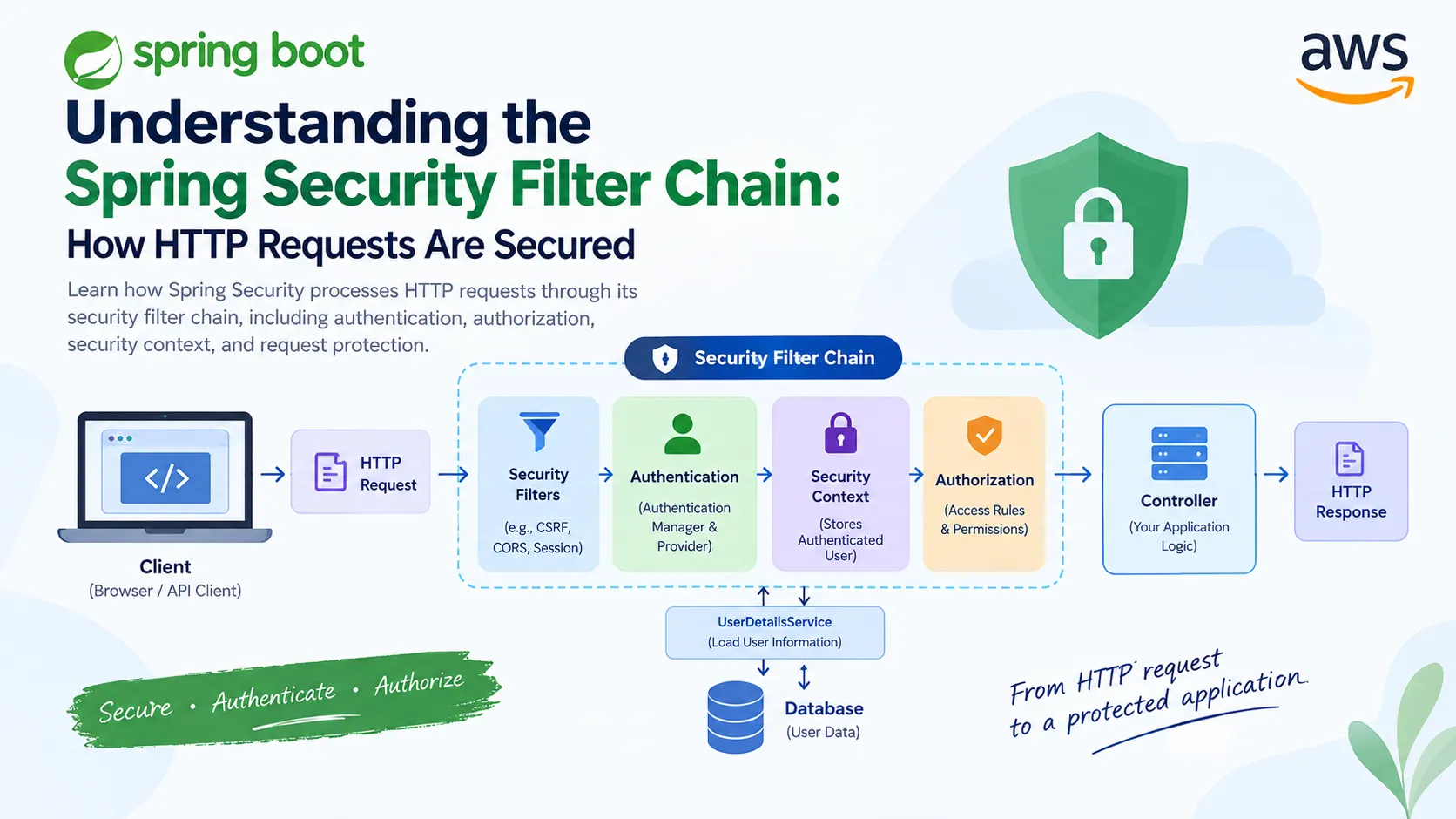
Understanding the Spring Security Filter Chain: How HTTP Requests Are Secured
Learn how Spring Security processes HTTP requests through its security filter chain, including authentication, authorization, security context, and request protection. This guide explains the request flow with practical Spring Boot examples.

Understanding the Spring Security Filter Chain: How HTTP Requests Are Secured
When building a Spring Boot application, protecting APIs and application resources is an important part of backend development. Spring Security provides a powerful framework for handling authentication and authorization, but for beginners, one concept can initially feel confusing: the Security Filter Chain.
The Security Filter Chain is one of the core concepts behind Spring Security. Instead of allowing every HTTP request to directly reach a controller, Spring Security processes requests through a sequence of security filters first. These filters can authenticate users, check permissions, protect against attacks, and establish the security context before the request reaches the application.
Understanding this request flow makes it much easier to understand concepts such as Basic Authentication, database authentication, sessions, CSRF protection, and JWT-based authentication.
What Is a Filter?
Before understanding the Security Filter Chain, we need to understand what a filter is.
In a web application, a filter can intercept an HTTP request before it reaches the application. It can inspect the request, perform some processing, and then allow the request to continue.
A simplified request flow looks like this:
1
2
3
4
5
6
7
8
9
10
11
12
13
Client
   |
   v
HTTP Request
   |
   v
Filter
   |
   v
Controller
   |
   v
HTTP Response
For example, a filter could check whether a request contains valid authentication information before allowing it to continue.
Spring Security uses multiple filters together to implement its security functionality.
What Is the Security Filter Chain?
The Security Filter Chain is a sequence of security filters through which an HTTP request passes.
A simplified view is:
1
2
3
4
5
6
7
8
9
10
11
12
13
14
15
16
17
18
19
Client
   |
   v
HTTP Request
   |
   v
Security Filter Chain
   |
   +--> Authentication
   |
   +--> Security Context
   |
   +--> Authorization
   |
   v
Controller
   |
   v
HTTP Response
The important point is that the controller is not the first place where Spring Security checks the request.
The request first passes through the security infrastructure.
The exact filters involved depend on the Spring Security configuration and the type of authentication being used. Therefore, it is better to think of the Security Filter Chain as a configurable pipeline rather than a fixed list of filters.
Configuring the Security Filter Chain
In a modern Spring Boot application, we can configure the Security Filter Chain using a
SecurityFilterChain bean.For example:
1
2
3
4
5
6
7
8
9
10
11
12
13
14
public SecurityFilterChain securityFilterChain(HttpSecurity http)
throws Exception {
http
.csrf(csrf -> csrf.disable())
.authorizeHttpRequests(auth -> auth
.requestMatchers("/public").permitAll()
.anyRequest().authenticated()
)
.httpBasic(Customizer.withDefaults());
return http.build();
}
Let's understand what this configuration means.
1
.csrf(csrf -> csrf.disable())
This disables CSRF protection. Whether CSRF should be disabled depends on the application architecture. For a browser-based application using cookies for authentication, CSRF protection is often important. For a stateless API using a token in the
Authorization header, the security design is different.Next:
1
2
3
4
.authorizeHttpRequests(auth -> auth
    .requestMatchers("/public").permitAll()
    .anyRequest().authenticated()
)
This defines authorization rules.
The
/public endpoint can be accessed without authentication, while every other request requires an authenticated user.Finally:
1
.httpBasic(Customizer.withDefaults());
This enables HTTP Basic Authentication.
Authentication and Authorization Are Different
One of the most important concepts in Spring Security is the difference between authentication and authorization.
Authentication answers:
Who are you?
Authorization answers:
What are you allowed to access?
For example, suppose a user sends credentials with a request.
Spring Security first needs to determine whether those credentials are valid. This is authentication.
After the user has been authenticated, Spring Security can determine whether that user has permission to access a particular endpoint. This is authorization.
The simplified flow is:
1
2
3
4
5
6
7
8
9
10
11
12
13
Request
   |
   v
Authentication
   |
   v
Authenticated User
   |
   v
Authorization
   |
   v
Controller
How Authentication Works
When using username and password authentication, Spring Security can delegate authentication to an
AuthenticationManager.A simplified flow is:
1
2
3
4
5
6
7
8
9
10
11
12
13
14
15
16
HTTP Request
     |
     v
Authentication Filter
     |
     v
AuthenticationManager
     |
     v
AuthenticationProvider
     |
     v
UserDetailsService
     |
     v
Database
The
AuthenticationProvider is responsible for performing authentication using the supplied credentials.When database-backed authentication is configured,
UserDetailsService can be used to load the user's information.For example:
1
2
3
4
5
6
7
8
9
10
11
12
13
public class MyUserDetailsService
implements UserDetailsService {
public UserDetails loadUserByUsername(String username)
throws UsernameNotFoundException {
// Find user from database
// Return UserDetails
}
}
The password should not be stored as plain text. A password encoder such as BCrypt can be used to securely store and verify passwords.
The Security Context
After successful authentication, Spring Security needs a place to store information about the authenticated user.
This is where the SecurityContext becomes important.
The authenticated user's information is associated with the security context, which allows other parts of the application to determine who is making the request.
Conceptually:
1
2
3
4
5
6
7
Authentication
      |
      v
SecurityContext
      |
      v
Authenticated User
For example, application code can access the current authentication information:
1
2
3
4
5
6
Authentication authentication =
        SecurityContextHolder
            .getContext()
            .getAuthentication();

System.out.println(authentication.getName());
This can be useful when an application needs to identify the currently authenticated user.
Authorization Happens After Authentication
After Spring Security knows who the user is, it can check whether the user is allowed to access the requested resource.
For example:
1
2
3
4
5
.authorizeHttpRequests(auth -> auth
    .requestMatchers("/admin/**").hasRole("ADMIN")
    .requestMatchers("/user/**").hasRole("USER")
    .anyRequest().authenticated()
)
Here, users with the
ADMIN role can access /admin/**, while users with the USER role can access /user/**.If a user is not authenticated, the application can reject the request because authentication is required.
If the user is authenticated but does not have sufficient permissions, the request can also be rejected because authorization has failed.
This distinction is important when designing secure APIs.
What Happens When a Request Is Rejected?
Suppose an endpoint requires authentication:
1
.anyRequest().authenticated()
and an unauthenticated client tries to access it.
The request is processed by Spring Security before it reaches the controller. Because authentication is required but unavailable, Spring Security prevents the request from reaching the protected resource.
This is one of the major benefits of the filter-based architecture: security checks can be applied consistently before application logic executes.
Stateless Authentication and JWT
Modern REST APIs commonly use stateless authentication.
For example:
1
2
3
4
5
.sessionManagement(session ->
    session.sessionCreationPolicy(
        SessionCreationPolicy.STATELESS
    )
)
With stateless authentication, the server does not maintain a traditional login session for each client request.
JWT is one common approach to implementing stateless authentication.
A simplified JWT request flow looks like:
1
2
3
4
5
6
7
8
9
10
11
12
13
14
15
16
17
Client
  |
  | Authorization: Bearer <token>
  v
Security Filter Chain
  |
  v
JWT Authentication
  |
  v
SecurityContext
  |
  v
Authorization
  |
  v
Controller
The important idea is that JWT authentication is not separate from the Security Filter Chain. JWT processing is integrated into the security request-processing pipeline.
Why Understanding the Filter Chain Matters
The Security Filter Chain is more than just a collection of filters. It provides the foundation for Spring Security's request-processing model.
Once you understand this concept, many other Spring Security topics become easier to understand:
- Basic Authentication
- Database Authentication
- Password Encoding
- Sessions
- CSRF Protection
- JWT Authentication
- Role-Based Authorization
- Method-Level Security
Instead of thinking of Spring Security as something that magically blocks requests, you can understand it as a pipeline that processes each request according to the application's security configuration.
Conclusion
The Spring Security Filter Chain is a fundamental concept for anyone working with Spring Boot security.
When a client sends an HTTP request, the request can pass through a series of security filters before reaching the controller. Depending on the configuration, these filters can handle authentication, establish the security context, apply authorization rules, and provide protection against common web security threats.
The overall idea can be summarized as:
1
2
3
4
5
6
7
8
9
10
11
12
13
14
15
16
17
18
19
Client
   |
   v
HTTP Request
   |
   v
Security Filter Chain
   |
   +--> Authentication
   |
   +--> Security Context
   |
   +--> Authorization
   |
   v
Controller
   |
   v
Response
Understanding this flow provides a strong foundation for learning more advanced Spring Security features such as database authentication, JWT, OAuth 2.0, and OpenID Connect.
Rather than memorizing individual filters, focus first on understanding where the Security Filter Chain sits in the request lifecycle and why security checks happen before the request reaches the protected application logic. Once that mental model is clear, the rest of Spring Security becomes significantly easier to reason about.
Enjoyed reading this content? Let the author know!
Your likes, comments, shares, and saves help creators reach more builders.

Loading recommendations
Loading article