
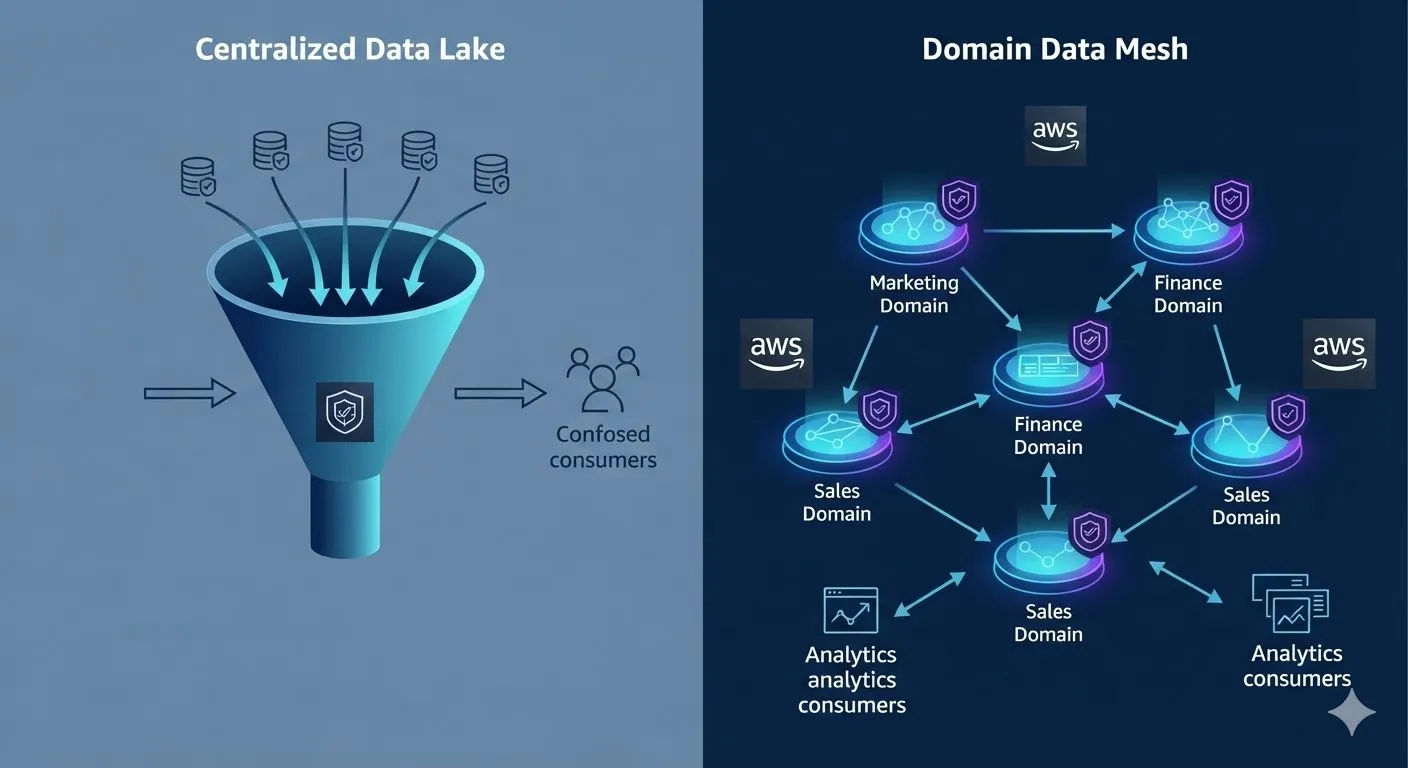
Modern Data Mesh Architecture: Decentralizing Analytics with AWS Lake Formation
As enterprise data volumes grow exponentially, traditional centralized data platforms—like monolithic data lakes or data warehouses—frequently turn into operational bottlenecks. Central data engineering teams become overwhelmed by specialized requests, leading to slow data delivery and stale insights.

To solve this scaling problem, organizations are shifting toward a Data Mesh architecture. A data mesh decentralizes data ownership by treating data as a product, managed directly by the business domains that create it. However, decentralization introduces a massive challenge: how do you maintain security, compliance, and governance across disparate teams?
This article explores how to build a modern Data Mesh on AWS by leveraging AWS Lake Formation to enforce unified, federated data governance across a decentralized organization.
The Architecture: Centralized Governance, Decentralized Ownership
A production-grade AWS Data Mesh separates your cloud footprint into two primary components: Domain Data Accounts and a central Governance Account.

- Producer Domain Accounts: Business units (e.g., Marketing, Finance) ingest, transform, and store their own data inside their own Amazon S3 buckets. They use AWS Glue to catalog these assets locally.
- The Central Governance Account: Rather than storing data, this account houses a centralized AWS Glue Data Catalog. Producers register their metadata tables here, and a centralized AWS Lake Formation deployment controls cross-account permissions.
- Consumer Domain Accounts: Data consumers use tools like Amazon Athena or Amazon Redshift Spectrum to query the data products. They never access the raw S3 buckets directly; instead, they query the central catalog, which securely proxies the request if permissions match.Step 1: Registering Data Products in the Central Catalog
In a Data Mesh, domain producers must publish their metadata to the central hub. To do this, producers use AWS Glue Crawlers or Glue jobs to populate a local data catalog schema, then expose that schema to the central Governance account using AWS Lake Formation cross-account grants.
aws lakeformation grant-permissions
--principal DataLakePrincipalIdentifier=111122223333
--resource '{"Database": {"Name": "marketing_data_product"}}'
--permissions "ALL" --permissions-with-grant-option "ALL"
--principal DataLakePrincipalIdentifier=111122223333
--resource '{"Database": {"Name": "marketing_data_product"}}'
--permissions "ALL" --permissions-with-grant-option "ALL"
Step 2: Implementing Fine-Grained Access Control
The defining feature of AWS Lake Formation in a Data Mesh is its ability to enforce column-level, row-level, and cell-level security without duplicating datasets or modifying underlying S3 objects.
If the Finance team needs access to the Marketing data product but must not see Personally Identifiable Information (PII) like email addresses, Lake Formation can filter that column out dynamically.
Example: Creating a Data Filter via AWS CLI
Run this command in the central Governance account to create a data filter that excludes the
email column for a specific table:aws lakeformation create-data-cells-filter
--table-data-cells-filter '{
"TableCatalogId": "111122223333",
"DatabaseName": "marketing_data_product",
"TableName": "customer_conversions",
"Name": "hide_pii_emails",
"ColumnNames": ["customer_id", "conversion_date", "revenue"],
"ColumnWildcard": {"ExcludedColumnNames": ["email"]}
}'
--table-data-cells-filter '{
"TableCatalogId": "111122223333",
"DatabaseName": "marketing_data_product",
"TableName": "customer_conversions",
"Name": "hide_pii_emails",
"ColumnNames": ["customer_id", "conversion_date", "revenue"],
"ColumnWildcard": {"ExcludedColumnNames": ["email"]}
}'
Once defined, you simply grant read access to this specific
DataCellsFilter to the Consumer Account's IAM role, ensuring they never see the restricted data during analytics queries.SELECT customer_id, SUM(revenue)
FROM "central_governance_mesh"."customer_conversions"
GROUP BY customer_id;
FROM "central_governance_mesh"."customer_conversions"
GROUP BY customer_id;
Behind the scenes, AWS Lake Formation evaluates the data cell filter policies, strips out any unapproved data columns or rows, handles the cross-account S3 credentials on the fly, and returns the computed results safely back to the analyst.
Key Operational Benefits
- No Data Silos, No Data Duplication: Domains query data in place. There is no need to copy massive datasets via ETL pipelines into a central warehouse just to grant access.
- Agile Domain Teams: Central IT is no longer a blocker. The Marketing team can change its underlying application architecture at will, as long as they maintain the schema contract published to the data mesh.
- Auditability and Compliance: Because all access requests go through AWS Lake Formation, security teams get a unified, immutable audit trail in AWS CloudTrail, proving exactly who accessed what data asset, and when.Summary Checklist for Launching Your Data Mesh
To move from a monolithic data architecture to a decentralized model using AWS, focus on these implementation phases:
- Define distinct AWS accounts for each organizational domain to enforce rigid blast boundaries.
- Disable
IAM allowed principalpermissions in Lake Formation to transition from legacy IAM policies to fine-grained Lake Formation tags. - Implement an automated data catalog ingestion framework utilizing AWS Glue schema registries.
- Authorize cross-account access securely via AWS RAM (Resource Access Manager) integrations built natively into Lake Formation.
Enjoyed reading this content? Let the author know!
Your likes, comments, shares, and saves help creators reach more builders.

Loading recommendations
Loading article