
Three Ways to Access AWS APIs
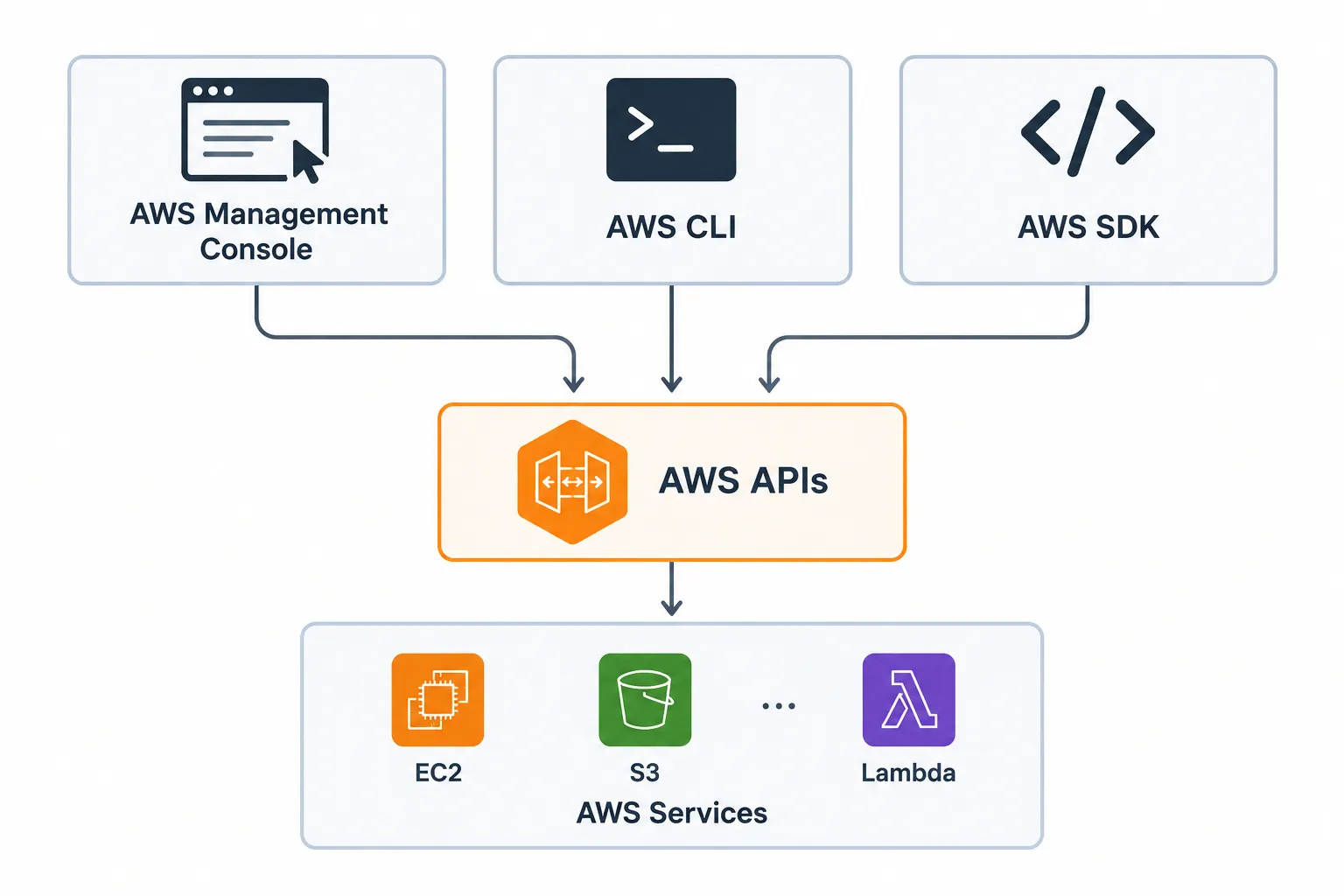
AWS provides three primary ways to interact with its services through APIs: AWS Management Console, AWS CLI, and AWS SDK. This article explains how each method works and when to use them, with simple examples using services like EC2, S3, and Lambda.

Three Ways to Access AWS APIs
When we work with AWS, we interact with different services such as EC2, S3, Lambda, and DynamoDB. But how do we actually communicate with these AWS services?
The answer is APIs (Application Programming Interfaces).
AWS services provide APIs that allow us to send requests and receive responses. We can access these APIs mainly through three methods:
- AWS Management Console
- AWS CLI
- AWS SDK
1. AWS Management Console
The AWS Management Console is a web-based graphical interface provided by AWS.
It allows us to interact with AWS services by clicking buttons and filling out forms.
For example, if we want to create an S3 bucket, we can:
Open S3 → Click "Create bucket" → Enter bucket name → Create
We don't have to manually write an API request. The Console handles the communication with AWS in the background.
So the flow is:
You → Console → AWS API → AWS Service
The Console is especially useful for beginners because we can visually see the available services and their options.
2. AWS CLI
The AWS CLI (Command Line Interface) allows us to interact with AWS using commands in a terminal.
Instead of clicking buttons, we give instructions through commands.
For example:
1
aws s3 mb s3://my-bucket
This command tells AWS to create an S3 bucket.
The flow is:
You → CLI Command → AWS API → AWS Service
AWS CLI is useful when we want to work quickly from the terminal or automate tasks.
3. AWS SDK
The AWS SDK (Software Development Kit) allows us to interact with AWS services using programming languages.
For example, if we are using Python, we can use Boto3, the AWS SDK for Python.
1
2
3
import boto3

s3 = boto3.client("s3")
Now our Python application can communicate with Amazon S3.
For example, we can use Python code to upload a file:
1
2
3
4
5
s3.upload_file(
    "file.txt",
    "my-bucket",
    "file.txt"
)
The flow is:
Python Application → AWS SDK → AWS API → AWS Service
SDKs are useful when we want to integrate AWS services into our applications.
A Simple Real-Life Example
Suppose we want to upload a file to an S3 bucket.
We can do the same task in three different ways.
Using Console
We open S3, select our bucket, click Upload, and select the file.
Using CLI
1
aws s3 cp file.txt s3://my-bucket/
Using SDK
1
2
3
4
5
6
7
8
9
import boto3

s3 = boto3.client("s3")

s3.upload_file(
    "file.txt",
    "my-bucket",
    "file.txt"
)
The method is different, but the goal is the same: communicating with the AWS S3 service through its APIs.
Why Are APIs Important?
APIs make it possible for different tools and applications to communicate with AWS services.
For example:
- The Console provides a graphical way to interact with AWS.
- The CLI provides a command-based way.
- The SDK provides a programming-based way.
This gives developers flexibility to choose the method that best fits their work.
Conclusion
AWS provides different ways to interact with its services, but APIs are the underlying communication mechanism.
The three primary methods are:
AWS Management Console → Click
AWS CLI → Command
AWS SDK → Code
AWS CLI → Command
AWS SDK → Code
Once I understood this, AWS became much easier to understand because I realised that the Console, CLI, and SDK are simply different ways of communicating with AWS services through APIs.
Enjoyed reading this content? Let the author know!
Your likes, comments, shares, and saves help creators reach more builders.

Loading recommendations
Loading article