
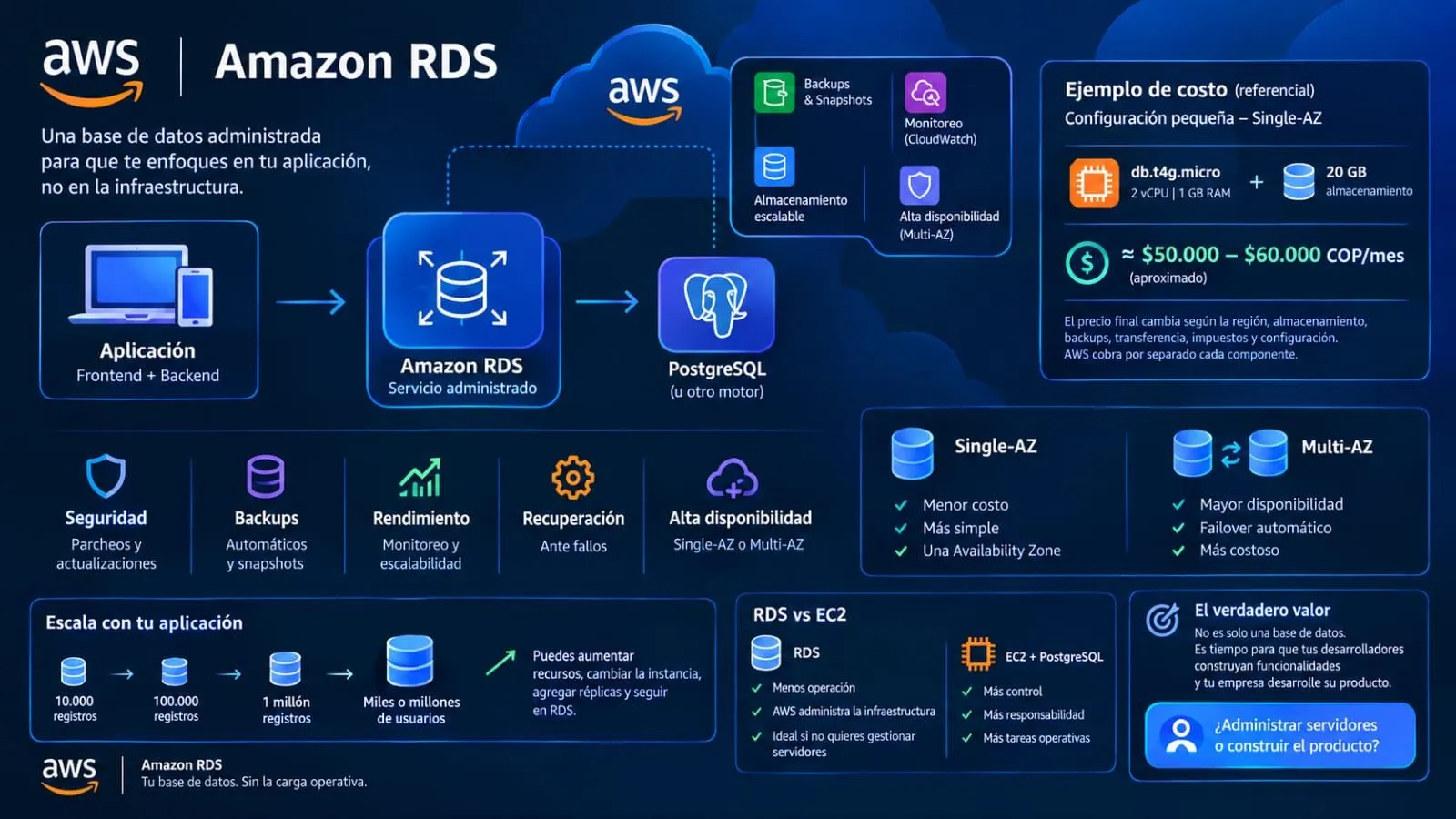
Amazon RDS: less infrastructure, more product
Amazon RDS is an AWS solution that allows you to manage relational databases without worrying about much of the underlying infrastructure. For a small project, a Single-AZ configuration could cost approximately $50,000–$60,000 COP per month. With features such as backups, scalability, security, and managed maintenance, RDS enables you to spend less time on servers and more on product development.

Imagine you have to launch an application tomorrow.
You have the frontend, the backend, 10,000 registered users, and all the business logic is working perfectly.
But there is one question that could cause everything to fall apart:
Where is the data stored?
Users, orders, products, payments, inventory... all the application's critical information ultimately depends on a database.
And here lies the problem: we could install PostgreSQL on a server ourselves, but then we also have to worry about the server, storage, backups, updates, disaster recovery, availability, and performance.
And let's be honest: if we are building an application, our goal probably isn't to become server administrators.
That’s where Amazon RDS comes in.
RDS, or Amazon Relational Database Service, is AWS's managed relational database service. It allows us to use well-known engines like PostgreSQL, MySQL, MariaDB, Oracle, or SQL Server, while AWS manages much of the infrastructure needed to keep that database running.
And this is important: RDS doesn't invent a new way of working with databases.
If we already know PostgreSQL, we keep using PostgreSQL.
We still have tables, relationships, primary keys, foreign keys, indexes, transactions, and SQL.
What changes is who handles a large part of the infrastructure.
For example, instead of having:
Server → operating system → PostgreSQL → backups → maintenance → recovery
we can have:
Application → RDS → PostgreSQL
And behind that RDS, AWS provides tools for backups, snapshots, storage, monitoring, and various availability options.
Now, let's do something more interesting.
Suppose we have a small university application with 10,000 records.
Will AWS charge us for having 10,000 records?
No.
RDS doesn't work based on a "10,000 records = X amount of money" model. The price depends primarily on the resources we provision: instance capacity, storage, backups, data transfer, and—depending on the configuration—other components.
For example, for a small project, we might use PostgreSQL on a db.t4g.micro instance—with 2 vCPUs and 1 GB of memory—in Single-AZ mode (meaning a single Availability Zone).
Currently, that configuration costs around $0.016 per hour in regions like US East, based on published pricing for that instance. That works out to approximately:
$0.016 × 730 hours ≈ $11.68 per month.
If we add, for instance, 20 GB of General Purpose storage, the cost comes to around $14 per month for a small baseline configuration—before taxes, data transfer fees, or other charges.
In Colombian pesos—using an exchange rate that fluctuates daily—we are looking at roughly $50,000–$60,000 COP per month as a ballpark figure for a small configuration of this type.
And here’s the interesting part:
For that price, we aren't just buying space to store 10,000 records.
We are getting a managed database that can scale along with our application.
Furthermore, AWS uses a pay-as-you-go model. If the instance is running, we pay for the usage time; storage is billed separately. AWS also allows you to stop an instance to avoid paying for compute hours, although you continue to pay for storage and certain backups while it is stopped.
So, what happens when our application grows?
We might start with:
10,000 records.
Then we have:
100,000.
Then:
1 million.
And eventually, our application becomes a service used by thousands or even millions of people.
We don't necessarily have to abandon RDS. We can scale up resources, change the instance type, increase storage, and even use read replicas when the workload demands it.
And if we are dealing with a truly critical application, another fundamental feature comes into play:
Multi-AZ.
With Single-AZ, our database resides in a single Availability Zone.
It is simpler and more cost-effective.
But imagine our system is a bank and the database stops working.
We can't simply say:
"Well, let's just wait for it to come back online."
We need availability.
With a Multi-AZ configuration, AWS can maintain a standby instance in a different Availability Zone and perform a failover if a failure occurs, depending on the architecture used.
In short:
Single-AZ = lower cost and simplicity.
Multi-AZ = higher availability and higher cost.
And this brings us to one of the major advantages of the cloud:
We don't have to pay from day one for infrastructure designed for Google, Netflix, or a bank.
Enjoyed reading this content? Let the author know!
Your likes, comments, shares, and saves help creators reach more builders.

Loading recommendations
Loading article