
Building first agent on Amazon EKS
Build a customer service agent on Amazon EKS from scratch: start with a Strands agent loop invoking models through an AI Gateway, offload tools to an MCP server, and trace the entire lifecycle in Langfuse.

The problem
A locally running agent only needs a few dozen lines of Python. But when you turn it into a real Kubernetes service, three questions appear: what should the agent loop look like and where should model credentials live; should tools live inside the agent process or be split out; and when the response is slow or wrong, where do you look to understand why.
Instead of answering all three at once, I built it incrementally — each step adds one capability on top of the previous one.
| Part | Capability | What the agent gains |
|---|---|---|
| 1. First agent | Core loop | Receives a query, reasons, calls a tool, and replies |
| 2. Tools with MCP | Networked tool access | Moves tools to an MCP server and discovers them at runtime |
| 3. Observability | Traces | Sees every LLM call and tool call through Langfuse |
Part 1 — Building your first agent
Deploy the first agent for AnyCompany Shop using the Strands Agents SDK, calling the model through the Amazon Bedrock via Envoy AI Gateway.
Architecture
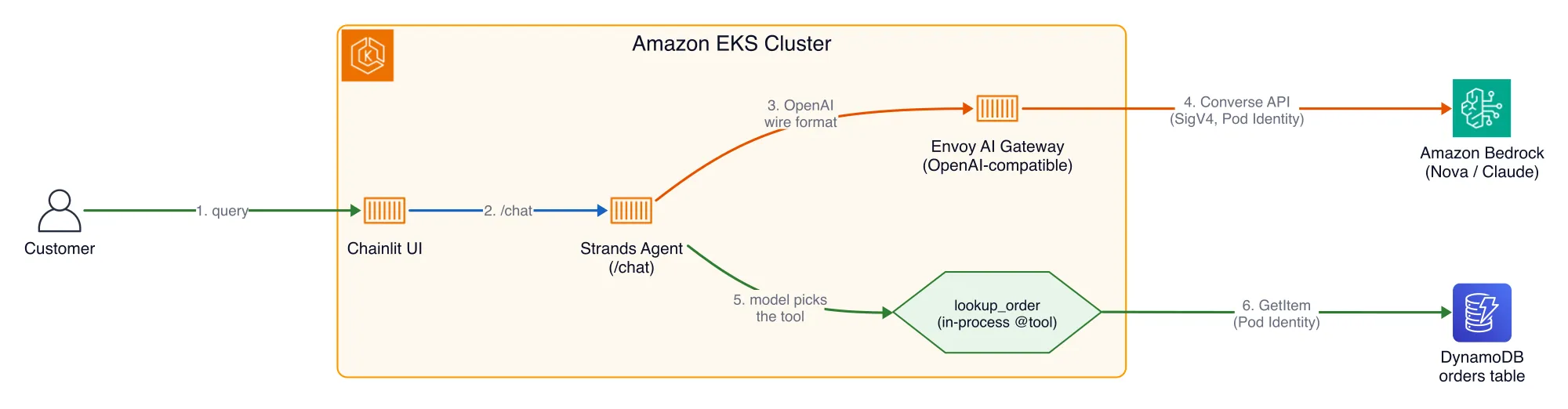
The agent is just a loop: it receives a question, asks the model, and if the model says “call a tool,” it calls it, feeds the result back to the model, and then responds to the customer. The key point from the start is that the agent does not call Bedrock directly and does not keep Bedrock credentials. It sends a normal chat-completions request to the gateway, and the gateway owns the AWS identity (SigV4 via EKS Pod Identity) before translating the request to the Bedrock Converse API. Switching models (Nova to Claude) is just a single change to
MODEL_ID.Strands SDK and code
Strands is an open-source Python SDK for building agents; the LLM decides which tool to call and in what order. Four concepts carry the whole SDK: Agent (the loop), Model (the endpoint that speaks chat-completions; here it is AI Gateway), Tools (functions decorated with
@tool), and System prompt (behavior shaping).All values are read from the environment using the 12-factor pattern, so the same image can run anywhere:
1
2
3
4
5
6
7
8
model = OpenAIModel(

    client_args={

        "base_url": os.environ["MODEL_BASE_URL"],   # points to Envoy AI Gateway

        "api_key": os.environ.get("MODEL_API_KEY", "not-needed"),  # gateway authenticates

    },

    model_id=os.environ.get("MODEL_ID", "nova-lite"),  # alias, gateway rewrites to Bedrock id

    params={"max_tokens": 1024, "temperature": 0.3},

)
Deploy and chat
k8s.yaml is a Deployment + ClusterIP Service (port 8080). Two important wiring details: serviceAccountName: agent grants DynamoDB access through Pod Identity (for lookup_order), and envFrom: agent-config injects MODEL_BASE_URL, MODEL_ID, and ORDERS_TABLE into the container.1
2
3
cd ~/environment/modules/200-strands-agents/customer-agent
envsubst < k8s.yaml | kubectl apply -f -
kubectl rollout status deployment/customer-agent --timeout=120sOpen the URL shown in the banner, log in as Support Associate, and test three prompts — a working order path, an order in a special status, and an error case:
1
2
3
Hi, my order ORD-1001 still hasn't arrived. Can you help?

Status of the mechanical keyboard from Order ORD-1005?

Can you check on order ORD-99999?
Result for Part 1: a Strands agent loop handles the conversation, the model call goes through AI Gateway, and the
lookup_order tool reads DynamoDB through Pod Identity.Part 2 — Agent tools with MCP
This is where tools stop living inside the agent process. In this step, I move the tool to an independent MCP server and let the agent discover it at runtime through agentgateway.
MCP and agentgateway
Model Context Protocol is an open standard for exposing tools to an agent over the network: the MCP server publishes a set of tools, the client (the Strands agent) connects, calls
list_tools to discover them, and then calls them by name. The agent does not import the tool code — it learns about tools at runtime. A tool changes from “a function inside the agent” to “a service running separately on the network.”Benefits: tool decoupling (change one place), discoverability (add a tool and the agent sees it), shareability (many agents can use the same tool), and a single control point — every call passes through agentgateway, an MCP gateway that understands the protocol and sees each
tools/list and tools/call. That is what makes per-tool authorization possible (the key theme in the next article, Securing).Architecture

The MCP server holds the required DynamoDB permissions for the order tool — the tool has moved, but not its data path. Because each user has a different token, the agent cannot use a shared global credential: each chat session creates an agent with that user’s token and forwards it on every MCP call.
A nice consequence: the agent now runs under the
customer-agent ServiceAccount without Pod Identity, so the pod does not hold any AWS permissions. The DynamoDB permissions move with the MCP server and the tool. This is least privilege following the code.Deploy and chat
1
2
3
4
5
6
7
8
# MCP server

cd ~/environment/modules/500-agent-tools-mcp/mcp-server

envsubst < k8s.yaml | kubectl apply -f - && kubectl rollout status deployment/mcp-server --timeout=120s

# Agent (MCP version)

cd ../customer-agent

envsubst < k8s.yaml | kubectl apply -f - && kubectl rollout status deployment/customer-agent --timeout=120s

# Seed Milvus for the local search_products tool (RAG vector search)

kubectl exec -i deploy/customer-agent -- python - < seed_products.py
1
2
3
Where is my order ORD-1001?
Do you have the Mechanical Keyboard in stock?
What do you have for cutting down background noise on calls?
The first three prompts hit
lookup_order, check_inventory, and initiate_return through the MCP server; the last one hits the local search_products tool — vector search returns noise-canceling headphones even though the term does not exactly match. You can confirm the agent discovered the tools:1
2
kubectl logs deploy/customer-agent | grep "Discovered"
# Discovered 3 MCP tools ...: ['lookup_order', 'check_inventory', 'initiate_return']
Result for Part 2: tools are moved out to an independent MCP server, routed through agentgateway (a network control point), and each session forwards the Cognito token on every call.
Part 3 — Observability with Langfuse
The agent is currently a black box: when it answers slowly or incorrectly, you cannot see which model call or tool call caused it. In this step, I instrument the agent with OpenTelemetry and read the traces in Langfuse.
A trace is a record of a request as it moves through the system and how long each stage takes. For an AI agent, it shows which model call invokes which tool, how many tokens it used, and which stage is slow. Langfuse and a shared OpenTelemetry Collector are already running in the cluster.
The nice part: there is almost no extra code to write. The app is launched with
opentelemetry-instrument (runtime auto-instrumentation patches httpx/FastAPI), a Langfuse client flushes spans after each request, and OTEL_EXPORTER_OTLP_ENDPOINT points to the collector. The key is the traceparent header: Envoy AI Gateway reads it, so the gateway span is nested under the agent trace instead of generating a separate one.Architecture

Deploy and read the trace
1
2
3
cd ~/environment/modules/300-observability-langfuse/customer-agent

envsubst < k8s.yaml | kubectl apply -f - && kubectl rollout status deployment/customer-agent --timeout=120s

kubectl logs deploy/customer-agent | grep Langfuse   # -> Langfuse connected successfully
Send a query that triggers a tool call, open Tracing > Traces in Langfuse, and switch to the Timeline view. A trace has four parts:
POST /chat (root FastAPI span), the agent’s chat generation (model, token usage, latency), the lookup_order tool call (input + DynamoDB result), and the ChatCompletion span (gateway reporting the same model call).
Send a query for an order that does not exist: the tool span shows a not-found result, and the model chooses to ask for an error instead of inventing data. In short: a trace tells you why this request was slow, while the dashboard tells you whether the slowdown is normal.

Result for Part 3: the agent now emits OpenTelemetry traces to Langfuse; each request produces one trace that spans the agent, tool calls, and AI Gateway through
traceparent.Final thoughts
Across these three parts, a customer service agent has grown from nothing into a service running on EKS: a Strands agent loop calls the model through AI Gateway without holding Bedrock credentials, tools are extracted into an MCP server and routed through agentgateway, and every request leaves behind a trace that is readable in Langfuse.
Enjoyed reading this content? Let the author know!
Your likes, comments, shares, and saves help creators reach more builders.

Loading recommendations
Loading article