
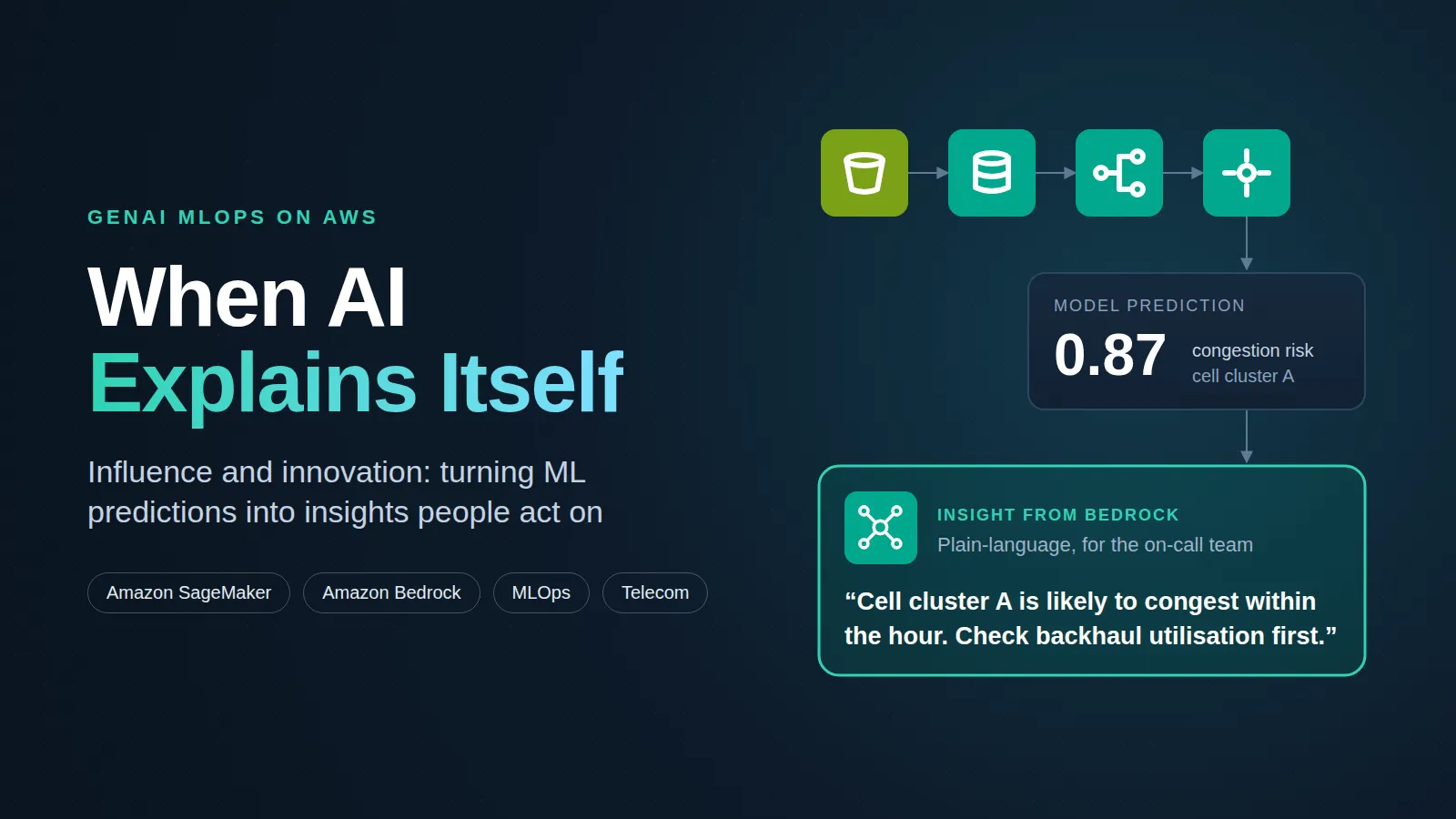
When AI Explains Itself: Influence and Innovation in GenAI MLOps
The next leap in enterprise AI is not a more accurate model. It is a model that people trust enough to act on. The sagemaker-bedrock-genai-mlops-demo project shows how to build one, by joining production MLOps on Amazon SageMaker with generative AI on Amazon Bedrock.

The innovation: predictions that speak human
Most ML systems stop at a number. A risk score or a forecast lands on a dashboard, and someone still has to work out what it means and what to do. That gap is where most of the value of machine learning is lost.
This project closes the gap. It applies the idea to a hard, high-stakes domain: telecom network performance. A SageMaker model predicts how the network will behave. Bedrock then turns each prediction into a short, plain-language insight that tells operations teams what is likely to happen and where to look first.
The innovation is the pairing. Predictive ML supplies accuracy, GenAI supplies understanding, and MLOps keeps both reliable in production. None of the three alone changes how a team works. Together they do.
The influence: who this changes work for
An AI system has influence when it changes decisions, not when it produces outputs. This design reaches three groups:
- Operations engineers get explanations they can act on during an incident, instead of scores they must interpret under pressure.
- Decision-makers can follow the reasoning behind a prediction, which builds the trust needed to fund and scale AI.
- ML engineers get a blueprint that takes a model from experiment to governed production, with every stage mapped to an AWS service.
The project is also built to be shared. Each folder documents one stage of the lifecycle, so the wider community can learn the pattern and reuse it in other industries.
Architecture: innovation built on proven services
The design is new; its parts are not. Every block is a managed AWS service, so the pattern is ready for production from day one. Data flows from S3 through a governed pipeline to a live endpoint, and every prediction passes through Bedrock before it reaches people.

Inside SageMaker, the top row builds and approves the model and the bottom row serves and monitors it. Bedrock takes each prediction from the endpoint, so operations teams receive explanations, not raw scores.
The AWS building blocks
| AWS service | Category | Role in this design |
|---|---|---|
| Amazon S3 | Storage | Holds the historical network performance data |
| SageMaker Feature Store | Machine learning | Serves the same features to training and inference |
| SageMaker Pipelines | Machine learning | Runs preparation, training, evaluation and approval |
| SageMaker training jobs | Machine learning | Train the model and tune its hyperparameters |
| SageMaker endpoint | Machine learning | Serves real-time predictions from the approved model |
| SageMaker Model Monitor | Machine learning | Detects data drift in live traffic |
| Amazon CloudWatch | Monitoring | Collects metrics and raises alerts |
| Amazon Bedrock | Generative AI | Turns each prediction into a plain-language explanation |
Inside the repository, folder by folder
The repository is organised by lifecycle stage, so its layout doubles as a checklist for a production ML system.
| Folder | Stage | What it covers |
|---|---|---|
| data/ | Data | Sample or anonymised datasets. In production, data comes from Amazon S3 and follows governance and compliance rules. |
| feature_store/ | Features | Feature definitions in SageMaker Feature Store, so training and inference use the same feature values. |
| training/ | Training | Training logic, algorithm selection and hyperparameter tuning on SageMaker. |
| pipelines/ | Orchestration | The SageMaker Pipeline: data preparation, training, evaluation and an approval step. |
| monitoring/ | Operations | Model Monitor and CloudWatch for drift detection (placeholder, not yet written). |
| bedrock_genai/ | Explanation | Bedrock prompts that turn predictions into readable explanations. |
| architecture/ | Design | The overall architecture (placeholder, not yet written). |
Two choices stand out. First, the Feature Store sits between data and training, which prevents training-serving skew: the model sees the same features in production that it saw when it learned. Second, the pipeline ends in an approval step, so no model reaches the endpoint without passing evaluation.
Five principles that turn ML into influence
Accuracy alone does not earn trust. These five principles, each tied to a stage of the repository, are what let a model shape real decisions.
- Automation over handoffs. SageMaker Pipelines runs preparation, training and evaluation as one repeatable workflow. Retraining becomes a pipeline run, not a manual project.
- Quality gates. Evaluation and an approval step stand between training and deployment, so a weaker model cannot replace a stronger one by accident.
- Consistency. Feature Store gives training and inference one source of truth for features.
- Continuous monitoring. Model Monitor and CloudWatch watch live traffic for data drift. When the network's behaviour changes, the team finds out before predictions lose accuracy.
The Bedrock layer adds a fifth practice that classic MLOps lacks: explainability for the people who act on the output. A prediction such as "high risk of congestion on cell cluster A" becomes a short note that says what is likely to happen and what operations engineers should check first.
Building it yourself
The repository currently holds the design and documentation for each stage, not runnable code. To build the system from it, follow the folders in order:
- Put a sample of historical network performance data in an S3 bucket.
- Define the features in a SageMaker Feature Store feature group.
- Write a training script and run a SageMaker training job, with hyperparameter tuning.
- Wrap preparation, training and evaluation in a SageMaker Pipeline, ending in a model approval step.
- Deploy the approved model to a SageMaker real-time endpoint.
- Turn on Model Monitor against the endpoint and send its metrics to CloudWatch.
- Pass each prediction and its key inputs to a Bedrock model with a prompt that asks for a short operational explanation.
Clone the repository with
git clone https://github.com/ayman-metwally2020/sagemaker-bedrock-genai-mlops-demo and use each folder's README as the brief for that step.Illustrative code, stage by stage
The snippets below sketch each stage with the SageMaker Python SDK and boto3. They are illustrative, not part of the repository: names such as
bucket, df, role and the cell values are placeholders to adapt.1. Features: SageMaker Feature Store
1
2
3
4
5
6
7
8
9
10
11
12
13
14
15
16
17
import sagemaker
from sagemaker.feature_store.feature_group import FeatureGroup

session = sagemaker.Session()
role = sagemaker.get_execution_role()

fg = FeatureGroup(name="network-kpis", sagemaker_session=session)
fg.load_feature_definitions(data_frame=df)  # df: pandas DataFrame of network KPIs
fg.create(
    s3_uri=f"s3://{bucket}/feature-store",
    record_identifier_name="cell_id",
    event_time_feature_name="event_time",
    role_arn=role,
    enable_online_store=True,
)
# wait until the feature group is Created, then:
fg.ingest(data_frame=df, max_workers=4, wait=True)
2. Training: a built-in XGBoost estimator
1
2
3
4
5
6
7
8
9
10
11
12
13
14
15
from sagemaker.estimator import Estimator
from sagemaker.workflow.pipeline_context import PipelineSession

pipeline_session = PipelineSession()
image = sagemaker.image_uris.retrieve("xgboost", session.boto_region_name, version="1.7-1")

xgb = Estimator(
    image_uri=image,
    role=role,
    instance_count=1,
    instance_type="ml.m5.xlarge",
    output_path=f"s3://{bucket}/models",
    sagemaker_session=pipeline_session,
)
xgb.set_hyperparameters(objective="reg:squarederror", num_round=200, max_depth=6, eta=0.1)
3. Orchestration: SageMaker Pipelines with an approval gate
1
2
3
4
5
6
7
8
9
10
11
12
13
14
15
16
17
18
19
20
21
22
23
24
25
26
27
28
29
30
31
32
33
from sagemaker.inputs import TrainingInput
from sagemaker.model import Model
from sagemaker.workflow.model_step import ModelStep
from sagemaker.workflow.pipeline import Pipeline
from sagemaker.workflow.steps import TrainingStep

train_step = TrainingStep(
    name="Train",
    step_args=xgb.fit({"train": TrainingInput(f"s3://{bucket}/train/", content_type="text/csv")}),
)

model = Model(
    image_uri=image,
    model_data=train_step.properties.ModelArtifacts.S3ModelArtifacts,
    role=role,
    sagemaker_session=pipeline_session,
)
register_step = ModelStep(
    name="Register",
    step_args=model.register(
        content_types=["text/csv"],
        response_types=["text/csv"],
        inference_instances=["ml.m5.large"],
        transform_instances=["ml.m5.large"],
        model_package_group_name="network-perf",
        approval_status="PendingManualApproval",  # the approval gate
    ),
)

pipeline = Pipeline(name="network-perf-pipeline", steps=[train_step, register_step],
                    sagemaker_session=pipeline_session)
pipeline.upsert(role_arn=role)
pipeline.start()
A production pipeline would add a processing step for evaluation and a condition step that registers the model only when its metrics pass.
4. Deployment: an endpoint with data capture
1
2
3
4
5
6
7
8
9
10
11
12
13
14
from sagemaker import ModelPackage
from sagemaker.model_monitor import DataCaptureConfig

approved = ModelPackage(role=role, model_package_arn=approved_package_arn, sagemaker_session=session)
approved.deploy(
    initial_instance_count=1,
    instance_type="ml.m5.large",
    endpoint_name="network-perf",
    data_capture_config=DataCaptureConfig(
        enable_capture=True,
        sampling_percentage=100,
        destination_s3_uri=f"s3://{bucket}/capture",
    ),
)
5. Monitoring: Model Monitor and CloudWatch
1
2
3
4
5
6
7
8
9
10
11
12
13
14
15
16
17
18
from sagemaker.model_monitor import CronExpressionGenerator, DefaultModelMonitor
from sagemaker.model_monitor.dataset_format import DatasetFormat

monitor = DefaultModelMonitor(role=role, instance_count=1, instance_type="ml.m5.xlarge")
monitor.suggest_baseline(
    baseline_dataset=f"s3://{bucket}/train/train.csv",
    dataset_format=DatasetFormat.csv(header=True),
    output_s3_uri=f"s3://{bucket}/baseline",
)
monitor.create_monitoring_schedule(
    monitor_schedule_name="network-perf-drift",
    endpoint_input="network-perf",
    output_s3_uri=f"s3://{bucket}/monitoring",
    statistics=monitor.baseline_statistics(),
    constraints=monitor.suggested_constraints(),
    schedule_cron_expression=CronExpressionGenerator.hourly(),
    enable_cloudwatch_metrics=True,  # drift metrics flow to CloudWatch
)
6. Explanation: from prediction to insight with Bedrock
1
2
3
4
5
6
7
8
9
10
11
12
13
14
15
16
17
18
19
import boto3

runtime = boto3.client("sagemaker-runtime")
bedrock = boto3.client("bedrock-runtime")

result = runtime.invoke_endpoint(EndpointName="network-perf", ContentType="text/csv", Body=csv_row)
prediction = float(result["Body"].read())

prompt = (
    f"You are a telecom operations assistant. The model predicts a score of {prediction:.2f} "
    f"for cell {cell_id} over the next hour. Key inputs: {features}. "
    "In three short sentences, explain what is likely happening and what the on-call engineer should check first."
)
response = bedrock.converse(
    modelId=MODEL_ID,  # any text model enabled in your Bedrock account
    messages=[{"role": "user", "content": [{"text": prompt}]}],
    inferenceConfig={"maxTokens": 300, "temperature": 0.2},
)
print(response["output"]["message"]["content"][0]["text"])
What this means for the future of AI in operations
The project's lessons point to a shift in how AI creates value:
- Data quality is the foundation. Strong data preparation is what makes every later stage reliable.
- Automation is what scales. MLOps turns one good experiment into a system that keeps improving.
- Monitoring protects trust. Drift detection keeps predictions honest as the network changes.
- Explanation drives adoption. GenAI makes ML results easy to understand, and what people understand, they use.
The last lesson is the innovation that matters most. The teams that win with AI will not be those with the most models. They will be those whose models are understood and acted on by the people closest to the work.
This pattern reaches well beyond telecom. Any field that runs on predictions, from energy grids to supply chains to healthcare operations, can pair MLOps with GenAI the same way.
Join the conversation
The blueprint is open on GitHub . Next on the roadmap are runnable pipeline code, a full architecture write-up and a monitoring setup. Fork it, adapt it to your industry, and share what you learn: ideas spread fastest when practitioners build on each other's work.
Enjoyed reading this content? Let the author know!
Your likes, comments, shares, and saves help creators reach more builders.

Loading recommendations
Loading article