
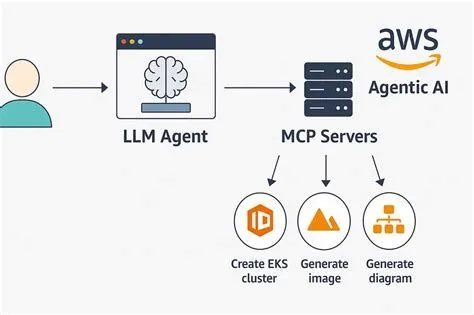
Giving Your Ai agent Access to aws Using AWS Through MCP: A Complete Guide to AWS's Model Context Protocol Resources
a guide to aws mcp server through which you can provide power to your ai agent to manage,read and control your aws resources 3 ways through which you can provide access to your aws

Table of Contents
- What Is MCP and Why AWS Cares
- The Three Layers of AWS's MCP Offering
- Layer 1 — Agent Toolkit for AWS & the Managed AWS MCP Server
- Layer 2 — AWS Knowledge MCP Server (Docs, No AWS Account Needed)
- Layer 3 — The awslabs/mcp Open-Source Server Suite
- The MCP Proxy for AWS
- Choosing the Right Server for Your Task
- Summary Reference Table
1. What Is MCP and Why AWS Cares
The Model Context Protocol (MCP) is an open protocol, originally developed by Anthropic, that standardizes how AI applications (chat clients, IDE assistants, coding agents) connect to external tools and data sources. Instead of every AI app writing bespoke integrations for every service, an MCP server exposes a set of "tools" (and sometimes resources/prompts) over a common interface, and any MCP client — Claude Desktop, Claude Code, Cursor, Kiro, Windsurf, VS Code, Cline, and others — can call them the same way.
For AWS specifically, MCP solves three recurring problems with AI-assisted cloud work:
- Stale knowledge. Foundation models are frozen at a training cutoff, but AWS ships new services, APIs, and pricing constantly. An MCP server can pull live AWS documentation, "What's New" posts, and pricing data into the model's context at request time.
- Hallucinated infrastructure. Asking a model to "just write me a CDK stack" from memory risks invented resource properties or deprecated APIs. MCP servers that wrap CDK/CloudFormation constructs, schema validators, and best-practice checkers reduce that risk.
- Fragmented workflows. Provisioning infrastructure, querying a database, checking cost, and filing a support ticket are normally different tools, consoles, and credentials. MCP lets one agent orchestrate all of them through a single conversational interface.
2. The Three Layers of AWS's MCP Offering
AWS's MCP surface area has evolved quickly and now sits in three layers, which is important to understand before picking a starting point:
| Layer | What it is | Best for |
|---|---|---|
| Agent Toolkit for AWS (GA May 2026) | AWS's official, managed successor to the open-source MCP servers — one remote AWS MCP Server plus curated "skills" | Production coding-agent workflows; teams that want IAM auditing and a single endpoint |
| AWS Knowledge MCP Server | A free, no-credential, fully-managed remote server for docs/best practices only | Anyone who just wants an agent that knows current AWS documentation |
| awslabs/mcp (open source) | ~50 specialized, self-hosted (stdio) servers, one per AWS service or workflow | Granular, per-service control; the widest range of examples and community servers |
AWS explicitly says the open-source
awslabs/mcp repository continues to work and accept contributions, but the most-used projects are gradually migrating into Agent Toolkit for AWS, so new production builds are steered there first. This guide covers all three layers because most real-world setups still combine them.3. Layer 1 — Agent Toolkit for AWS & the Managed AWS MCP Server
Agent Toolkit for AWS is AWS's current flagship offering for agent-assisted development. It bundles:
- The AWS MCP Server — a single, managed, remote MCP endpoint that gives an agent access to all ~300+ AWS services and 15,000+ API actions through one tool, without installing the AWS CLI locally.
- Curated "skills" — evaluated, multi-step playbooks for common but tricky tasks (configuring a data pipeline, building a production-ready VPC, wiring Lambda to API Gateway) that keep the agent from improvising insecure or non-Well-Architected designs.
- IAM condition keys that distinguish agent actions from human ones, so you can write policies like "this role may only be assumed by an agent" or audit agent activity separately from console/CLI use.
- CloudWatch metrics and CloudTrail logging for every call the agent makes.
Setup
1
2
# Requires AWS CLI 2.35+
aws configure agent-toolkit
This single command auto-detects installed coding agents (Kiro, Claude Code, Cursor, Codex, and others) on your machine, installs the relevant skills, and configures the MCP Server connection for you. There's no additional charge for the toolkit itself — you only pay for the AWS resources the agent actually provisions or queries.
Example prompt once connected
1
2
3
"Set up a production-ready VPC with public and private subnets across
2 AZs, then deploy a containerized FastAPI service into it behind an
ALB, following AWS Well-Architected security guidance."
The agent uses the AWS MCP Server to inspect your account, execute validated AWS CLI-equivalent calls, and follows the matching skill instead of guessing at CIDR ranges or security-group rules from training data.
Manual connection (if not using aws configure agent-toolkit)
The managed AWS MCP Server (preview/GA) can also be added directly to any MCP client via the
mcp-proxy-for-aws bridge (see Section 6 ):1
2
3
4
5
6
7
8
9
10
11
{
"mcpServers": {
"aws-mcp": {
"command": "uvx",
"args": [
"mcp-proxy-for-aws@latest",
"https://aws-mcp.us-east-1.api.aws/mcp"
]
}
}
}
Because this server is remote and IAM-backed, there's no local credential exposure beyond your existing AWS CLI/profile — every call is signed with SigV4 and shows up in CloudTrail.
4. Layer 2 — AWS Knowledge MCP Server (Docs, No AWS Account Needed)
If you don't need the agent to act on your AWS account — you just want it to know current AWS material — the AWS Knowledge MCP Server is the simplest starting point. It's a free, remote, fully-managed server with no authentication or AWS account required, covering:
- The latest AWS documentation and API references
- "What's New" posts
- Getting Started guides
- AWS Builder Center and blog content
- Architecture references and AWS Well-Architected guidance
Configuration (any MCP client)
1
2
3
4
5
6
7
8
{
  "mcp": {
    "aws-knowledge-mcp-server": {
      "type": "http",
      "url": "https://knowledge-mcp.global.api.aws"
    }
  }
}
Example use
1
2
"According to current AWS documentation, what are the quota limits
for Lambda concurrent executions, and how do I request an increase?"
Because the server is queried live, the answer reflects today's documented limits rather than a frozen training snapshot.
5. Layer 3 — The awslabs/mcp Open-Source Server Suite
The
awslabs/mcp GitHub monorepo is the original and still the widest catalog of AWS MCP servers — roughly 50 of them, each scoped to one AWS service or workflow, installed individually via uvx (Python) and run locally over stdio. They're grouped below by what they're used for.5.1 Infrastructure & Deployment
| Server | What it does |
|---|---|
| AWS IaC MCP Server | Consolidated Infrastructure-as-Code toolkit: CloudFormation docs, CDK best practices, construct examples, security validation, deployment troubleshooting |
| AWS Documentation MCP Server | Searches official AWS docs via the real search API and converts pages to Markdown for the model to read |
| Amazon EKS MCP Server | Kubernetes cluster management and application deployment on EKS |
| Amazon ECS MCP Server | Container orchestration and ECS application deployment |
| Finch MCP Server | Local container building with Amazon ECR push integration |
| AWS Serverless MCP Server | Full serverless application lifecycle backed by the SAM CLI (init, build, deploy, tail logs) |
| AWS Lambda Tool MCP Server | Exposes your existing Lambda functions as callable agent tools — useful for giving an agent access to private VPC resources without opening them up |
| AWS Transform MCP Server | Manages AWS Transform workspaces/jobs for mainframe, VMware, and .NET modernization projects |
| AWS Support MCP Server | Creates and manages AWS Support cases from the agent conversation |
Example — CDK best-practice check:
1
2
3
"I have this CDK stack that creates an S3 bucket and a Lambda
function. Use the AWS IaC MCP server to check it against current
security best practices before I deploy."
The server returns concrete recommendations (block public access, enable versioning, least-privilege execution role) sourced from current AWS guidance rather than the model's static training data
5.1 Cost, Support & Operations
| Server | What it does |
|---|---|
| AWS Pricing MCP Server | Real-time product availability and pricing — on-demand, reserved, and savings-plan rates |
| AWS Support MCP Server | Create/manage AWS Support cases (also listed above under Infrastructure) |
| AWS Cost & Usage tooling (exposed through the AWS MCP Server / Agent Toolkit rather than a standalone repo server) | Cost Explorer-style queries against your live billing data |
Example — cost estimate before deploying:
1
2
3
"Before I deploy this, use the AWS Pricing MCP server to estimate
the monthly cost of an r6g.xlarge Aurora PostgreSQL instance plus
a 500GB S3 bucket in us-east-1."
6. The MCP Proxy for AWS
Several AWS MCP servers — including the managed AWS MCP Server and AWS Knowledge MCP Server — are hosted remotely and secured with SigV4 (AWS's standard request-signing scheme), not a static API key. Most MCP clients don't natively speak SigV4, so AWS publishes a small client-side bridge,
mcp-proxy-for-aws, that:- Signs requests using your local AWS credentials (profile, environment variables, or IAM role)
- Performs dynamic tool discovery against the remote endpoint
- Supports a
--read-onlyflag to strip out any tool that could mutate resources - Handles retries, timeouts, and logging
1
2
3
4
5
# Run directly
uvx mcp-proxy-for-aws@latest https://your-service.us-east-1.amazonaws.com/mcp

# Read-only mode (safe for exploratory/agentic use)
uvx mcp-proxy-for-aws@latest --read-only https://aws-mcp.us-east-1.api.aws/mcp
If a server you want to use is described as "remote" and "SigV4-secured" rather than a
pip/uvx-installed local package, this proxy is almost always the piece that connects it to your MCP client.7. Choosing the Right Server for Your Task
| If you want to... | Start with |
|---|---|
| Just get accurate, current AWS answers, no account access | AWS Knowledge MCP Server |
| Let a coding agent build/deploy production infra safely | Agent Toolkit for AWS (AWS MCP Server + skills) |
| Fine-grained control over exactly one service (e.g., only DynamoDB) | The matching awslabs.* server from the open-source suite |
| Query your own Bedrock Knowledge Base / enterprise RAG | Bedrock Knowledge Bases Retrieval MCP Server |
| Check cost before deploying | AWS Pricing MCP Server |
| Connect any of the above without a compatible SigV4 client | mcp-proxy-for-aws |
8. Summary Reference Table
| Category | Representative Servers |
|---|---|
| Getting started / all-in-one | AWS MCP Server (Agent Toolkit), AWS Knowledge MCP Server |
| Documentation | AWS Documentation MCP Server |
| IaC & deployment | AWS IaC MCP Server, AWS Serverless MCP Server, AWS Lambda Tool MCP Server |
| Containers | EKS MCP Server, ECS MCP Server, Finch MCP Server |
| AI/ML & Bedrock | Bedrock KB Retrieval, Kendra, Q Business, Q Index, AgentCore, SageMaker AI, Translate |
| Databases | DynamoDB, Aurora (Postgres/MySQL/DSQL), DocumentDB, Neptune, Keyspaces, Redshift, Oracle, MSSQL |
| Caching / APIs | ElastiCache/Valkey, AppSync |
| Cost & support | AWS Pricing MCP Server, AWS Support MCP Server |
| Migration | AWS Transform MCP Server |
| Connectivity | mcp-proxy-for-aws |
Enjoyed reading this content? Let the author know!
Your likes, comments, shares, and saves help creators reach more builders.

Loading recommendations
Loading article