
Building a Simple Serverless Application with AWS Lambda, Amazon API Gateway, and Amazon DynamoDB: A Beginner-Friendly Guide to Creating Scalable Cloud Applications
Learn how to build a simple serverless application using AWS Lambda, Amazon API Gateway, and Amazon DynamoDB. This beginner-friendly guide explains how these services work together to create APIs without managing servers, while providing scalability, flexibility, and easy cloud deployment.

Building a Simple Serverless Application on AWS
Serverless computing makes it easier to build and deploy applications without managing physical or virtual servers. AWS provides several services that can work together to create a complete serverless application.
In this article, we will explore a simple architecture using Amazon API Gateway, AWS Lambda, and Amazon DynamoDB.
Serverless computing makes it easier to build and deploy applications without managing physical or virtual servers. AWS provides several services that can work together to create a complete serverless application.
In this article, we will explore a simple architecture using Amazon API Gateway, AWS Lambda, and Amazon DynamoDB.
- What is Serverless Computing?
Serverless computing allows developers to run application code without directly managing servers. AWS takes care of infrastructure, scaling, and much of the operational management.
Instead of continuously running a server, you can run code when an application receives a request. - Amazon API Gateway
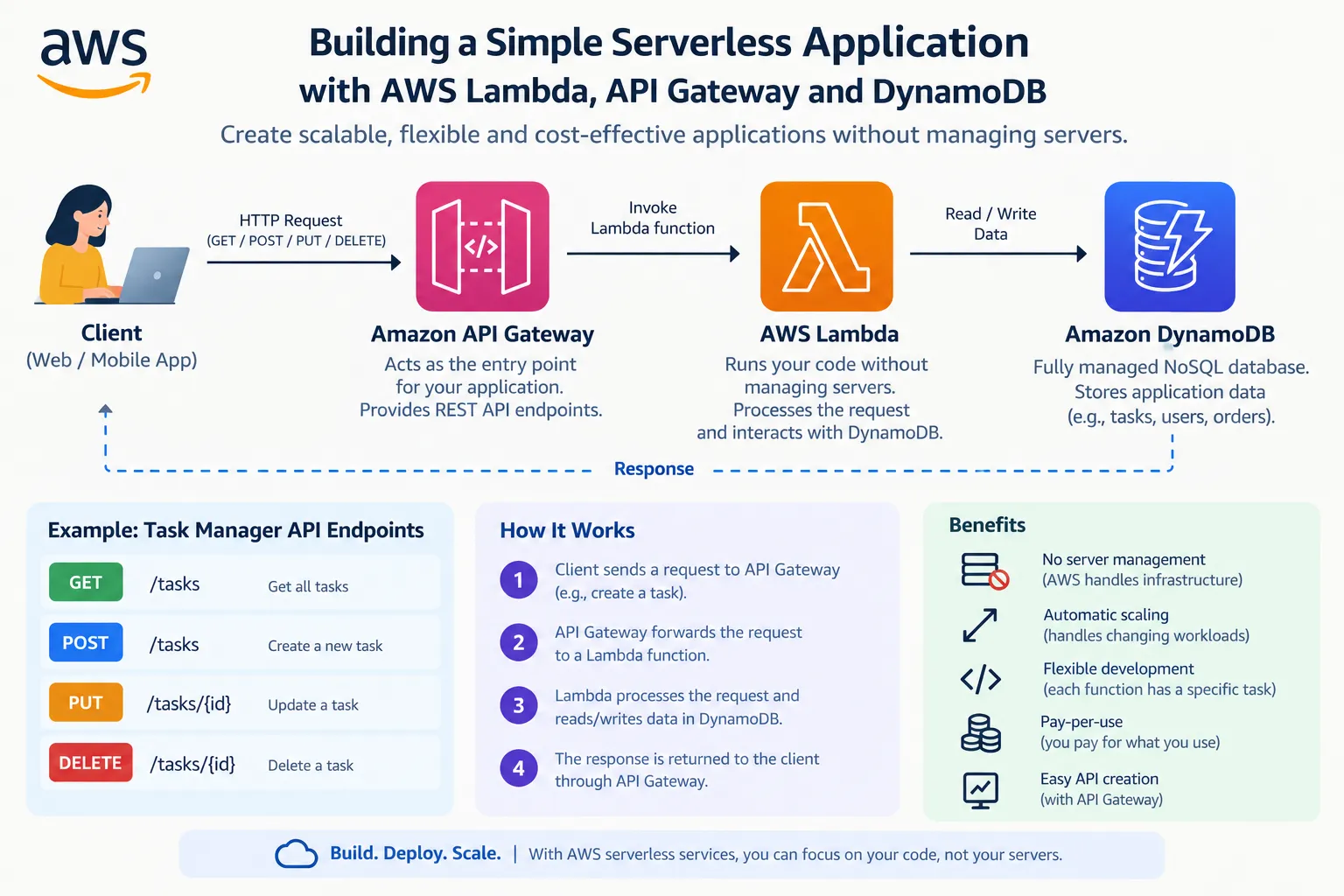
Amazon API Gateway acts as the entry point for the application.
It can provide API endpoints such as:
GET – Retrieve data
POST – Add new data
PUT – Update data
DELETE – Remove data
When a client sends a request, API Gateway can forward it to an AWS Lambda function. - AWS Lambda
AWS Lambda runs application code without requiring you to manage servers.
For example, a Lambda function can:
Receive a request from API Gateway.
Process the request.
Read or update information.
Return a response to the client.
Lambda can automatically scale based on incoming requests, making it useful for applications with changing workloads. - Amazon DynamoDB
Amazon DynamoDB is a fully managed NoSQL database service.
It can store application information such as:
User details
Product information
Tasks
Orders
Application settings
Lambda can communicate with DynamoDB to create, read, update, or delete records. - Simple Architecture
A basic serverless application can follow this flow:
Client → API Gateway → Lambda → DynamoDB
For example, consider a simple task management application.
A user creates a task in the application. The request goes to API Gateway, which invokes Lambda. Lambda processes the request and stores the task in DynamoDB.
When the user wants to view their tasks, another request follows the same path and retrieves the required information. - Benefits of This Architecture
This serverless architecture provides several benefits:
No server management: AWS manages the underlying infrastructure.
Automatic scaling: Lambda can handle changing workloads.
Flexible development: Each function can handle a specific task.
Pay-for-use model: You generally pay based on the resources and requests used.
Easy API creation: API Gateway makes it easier to expose application functionality through APIs. - Monitoring the Application
Monitoring is important for understanding how an application performs.
Amazon CloudWatch can be used with AWS services to monitor metrics, collect logs, and help identify problems.
For example, Lambda logs can help developers understand whether a function executed successfully or encountered an error.
Conclusion
AWS serverless services make it possible to build applications without spending time managing servers. By combining Amazon API Gateway, AWS Lambda, and Amazon DynamoDB, developers can create scalable and flexible applications using a simple architecture.
For beginners, a small task management API is a good project for understanding how serverless applications work. Once the basic architecture is understood, additional features such as authentication, monitoring, and automated deployment can be added.
Enjoyed reading this content? Let the author know!
Your likes, comments, shares, and saves help creators reach more builders.

Loading recommendations
Loading article