
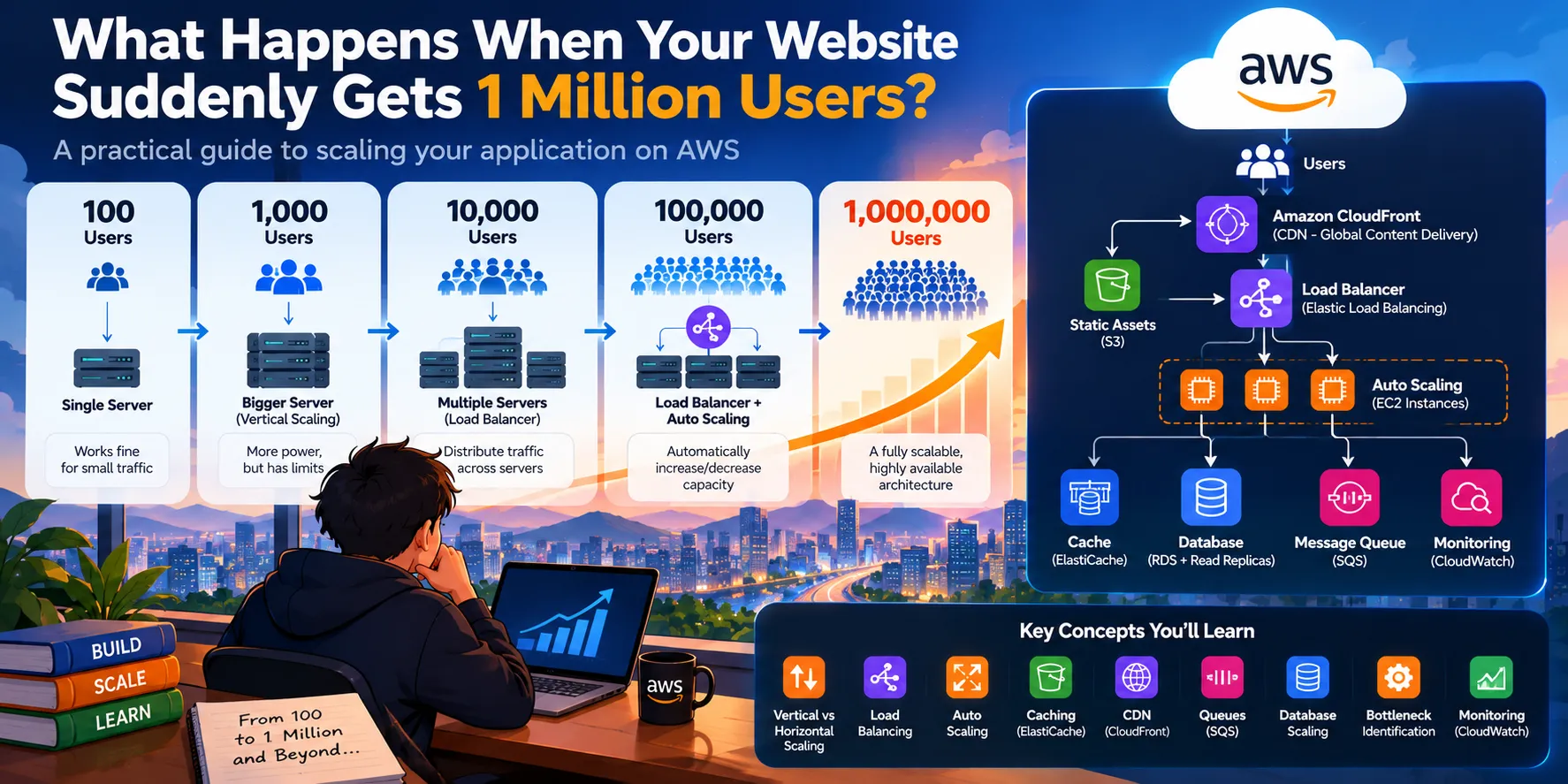
What Happens When Your Website Suddenly Gets 1 Million Users?
What happens when a website suddenly goes from 100 users to 1 million? Explore how applications handle massive traffic without crashing or slowing down. Learn how load balancing, Auto Scaling, caching, CDNs, queues, and database optimization work together to support growing workloads. By the end, you'll understand how to identify scalability bottlenecks and design an AWS architecture that can grow from a small application into a reliable, production-ready system.

What Happens When Your Website Suddenly Gets 1 Million Users?
Your application works perfectly with 100 users. Then a post goes viral, traffic explodes, and suddenly millions of people want to use it. What breaks first—and how can AWS help you scale without bringing your application down?
Introduction
Imagine you have built a simple e-commerce application.
It has:
- A React frontend
- A Node.js backend
- A database
- A few hundred products
- A single server running your application
You launch it.
At first, everything works perfectly.
You have 100 users.
Then 1,000.
Then 10,000.
One morning, your product gets featured by a popular creator.
Suddenly, 1 million users are trying to access your application.
Your code hasn't changed.
Your application logic hasn't changed.
But something is very different:
The amount of work your system has to handle has exploded.
This is where scalability becomes important.
Scaling an application isn't simply about buying a bigger server. As traffic increases, different parts of your architecture become bottlenecks.
Your server might run out of CPU.
Your database might become overloaded.
Your network might become saturated.
Your users might experience increasing latency.
A single component failing might bring down the entire application.
Cloud platforms such as AWS provide services and architectural patterns that allow developers to progressively address these problems.
Let's see how.
1. Start With 100 Users
Let's begin with the simplest possible architecture.
1
2
3
4
5
6
7
8
9
10
11
12
              Users
                |
                v
        +----------------+
        |   Web Server   |
        |   Node.js App  |
        +----------------+
                |
                v
        +----------------+
        |    Database    |
        +----------------+
For a small application, this might be completely sufficient.
You could run your Node.js application on a single Amazon EC2 instance and connect it to a database.
The architecture is simple.
And simplicity is good.
You don't need Kubernetes, microservices, multiple databases, and dozens of AWS services just because they are available.
The best architecture is often the simplest architecture that meets your current requirements.
But there is a problem.
What happens when traffic increases?
2. What Changes When You Reach 10,000 Users?
Suppose your application grows from 100 users to 10,000.
Your single server now receives significantly more requests.
Users might experience:
- Slower page loads
- Higher API response times
- Increased CPU usage
- Increased memory consumption
- Request failures
- Database delays
At this point, you have two fundamental approaches to scaling.
Vertical Scaling
Vertical scaling means making your existing server more powerful.
For example:
1
2
3
4
5
6
7
Small Server
    ↓
More CPU
More RAM
More Network Capacity
    ↓
Larger Server
Instead of running your application on a small EC2 instance, you move it to a larger instance.
This is easy to understand.
However, there is a limit.
You cannot keep making one machine bigger forever.
And there is another problem:
What happens if that server fails?
Your entire application could become unavailable.
This leads us to the second approach.
3. Horizontal Scaling: Add More Servers
Instead of making one server extremely powerful, we can run multiple application servers.
1
2
3
4
5
6
7
8
                 Users
                   |
                   v
             Application
               Servers
              /   |   \
             /    |    \
           EC2   EC2   EC2
This is called horizontal scaling or scaling out.
Instead of:
1
1 huge server
you use:
1
3 smaller servers
or:
1
10 servers
or:
1
100 servers
depending on the workload.
This has a major advantage.
If one application server fails, other servers can continue serving requests.
But now we have another problem.
Who decides which server receives each request?
That's where a load balancer comes in.
4. The Load Balancer: The Traffic Controller
Imagine thousands of users sending requests to your application.
You don't want every user to manually choose a server.
Instead, put a load balancer in front of your application servers.
1
2
3
4
5
6
7
8
9
10
11
                     Users
                       |
                       v
              +----------------+
              | Load Balancer  |
              +----------------+
                 /     |     \
                /      |      \
               v       v       v
             EC2     EC2     EC2
             App     App     App
AWS provides Elastic Load Balancing, which can distribute incoming traffic across healthy application targets.
Now instead of users connecting directly to one server:
1
Users → Server
we have:
1
Users → Load Balancer → Multiple Servers
The load balancer can distribute requests across available servers and use health checks to avoid sending traffic to unhealthy targets.
This gives us two important benefits:
Scalability + Availability
But we're still manually deciding how many servers we have.
What if traffic changes constantly?
5. What If Traffic Suddenly Doubles?
Imagine your application normally has:
1
10 EC2 instances
But suddenly traffic doubles.
You might need:
1
20 EC2 instances
Then traffic falls again at night.
Do you still need all 20?
Probably not.
Keeping unnecessary servers running wastes resources and money.
This is where Amazon EC2 Auto Scaling becomes useful.
Instead of manually adding and removing instances, you can configure an Auto Scaling group to adjust capacity based on demand and your scaling policies.
The architecture becomes:
1
2
3
4
5
6
7
8
9
10
11
12
13
                    Users
                      |
                      v
               Load Balancer
                      |
          +-----------+-----------+
          |           |           |
         EC2         EC2         EC2
          |           |           |
          +-----------+-----------+
                      ^
                      |
               Auto Scaling
When demand increases:
1
2
3
4
5
More traffic
     ↓
More capacity required
     ↓
Additional instances
When demand decreases:
1
2
3
4
5
Less traffic
     ↓
Less capacity required
     ↓
Instances can be removed
This is one of the fundamental ideas behind cloud elasticity.
You don't necessarily need to permanently provision for your highest possible traffic.
6. But There's a Hidden Problem: Your Application Has State
Now imagine your users log into your application.
A user sends a request.
The load balancer sends it to Server A.
Then the user's next request goes to Server B.
What happens if the login session exists only inside Server A's memory?
Server B might not know that the user is authenticated.
This is a classic problem when horizontally scaling applications.
The solution is to avoid keeping important shared state only inside an individual application server.
Instead, shared state can be moved to external systems such as a database or appropriate caching/session stores.
This allows application servers to become more stateless.
Then:
1
2
3
4
Request 1 → Server A
Request 2 → Server C
Request 3 → Server B
Request 4 → Server A
The application can continue working regardless of which healthy server handles the request.
This is an important architectural principle:
The easier it is to replace an application server, the easier it becomes to scale the application horizontally.
7. Now You're Getting 100,000 Users
At 100,000 users, your application servers may no longer be your biggest problem.
Something else may become the bottleneck:
Your database.
Imagine thousands of users repeatedly requesting:
- Product information
- User profiles
- Recommendations
- Order history
- Search results
- Categories
Your application servers might have plenty of CPU capacity.
But every request keeps asking the database for the same information.
For example:
1
2
3
4
5
6
7
8
9
10,000 users
      |
      v
Application Servers
      |
      v
Database
      ↑
Thousands of repeated queries
The database becomes a bottleneck.
So instead of asking the database for the same information repeatedly, we can introduce caching.
8. Caching: Don't Calculate the Same Thing Again
Suppose 50,000 users request the same product page.
Without caching:
1
2
3
4
5
6
7
User
 ↓
Application
 ↓
Database
 ↓
Product Data
That database query may happen thousands of times.
With caching:
1
2
3
4
5
6
7
User
 ↓
Application
 ↓
Cache
 ↓
Product Data
If the data is already cached, the application can return it without querying the database every time.
AWS provides Amazon ElastiCache, which can provide managed in-memory caching using engines such as Redis and Memcached.
Caching can dramatically reduce repeated database work and improve response times.
But caching introduces an important question:
What should we cache?
Common candidates include:
- Frequently accessed product information
- Session-related data
- Frequently requested API responses
- Configuration data
- Computed results
Caching isn't a magic solution.
If data changes frequently, you need to think carefully about cache invalidation and consistency.
9. What About Images, Videos, CSS, and JavaScript?
There's another problem.
Your application doesn't only serve API responses.
It may also serve:
- Images
- JavaScript files
- CSS
- Videos
- Fonts
- Product assets
Imagine millions of users downloading the same product image from your application servers.
That is inefficient.
Instead, static content can be distributed using a Content Delivery Network (CDN).
AWS provides Amazon CloudFront for content delivery.
A simplified architecture looks like:
1
2
3
4
5
6
7
8
9
10
                         Users
                           |
                           v
                    Amazon CloudFront
                       /         \
                      /           \
                Cached Content   Origin
                                  |
                                  v
                            Application
CloudFront uses edge locations to serve cached content closer to users.
For example, if a product image is cached at an edge location, future users who are geographically closer to that location can receive the cached object without every request traveling back to the origin.
This reduces latency and can also reduce the number of requests reaching your origin infrastructure.
10. Now You're Approaching 1 Million Users
Let's put the pieces together.
Our original architecture was:
1
2
3
4
5
6
7
Users
  |
  v
One Server
  |
  v
Database
Our scalable architecture now looks more like:
1
2
3
4
5
6
7
8
9
10
11
12
13
14
15
16
17
18
19
                         Users
                           |
                           v
                    Amazon CloudFront
                           |
                           v
                  Load Balancer
                           |
              +------------+------------+
              |            |            |
             EC2          EC2          EC2
              |            |            |
              +------------+------------+
                           |
                    +------+------+
                    |             |
                    v             v
                Cache          Database
              ElastiCache       Layer
And Auto Scaling manages the number of application instances based on your scaling configuration.
This is already a dramatically different system.
But at this scale, another question becomes important:
What happens when one part of the application becomes overloaded?
11. Don't Scale Everything Together
Imagine your application has three major functions:
1
2
3
User Authentication
Product Search
Order Processing
Suppose product search suddenly receives 10 times more traffic.
Do you really want to scale authentication and order processing by the same amount?
Probably not.
This is where decoupling becomes important.
Instead of building everything as one tightly coupled component, you can separate workloads so that different parts of the system can scale independently.
For example:
1
2
3
4
5
6
7
                 API
                  |
       +----------+----------+
       |          |          |
       v          v          v
    Users      Search      Orders
     Service    Service     Service
Each component can have different scaling requirements.
AWS architecture guidance commonly recommends progressively decoupling workloads and using managed services where appropriate as systems grow.
12. What If Order Processing Takes Time?
Suppose a user places an order.
Your backend needs to:
- Save the order.
- Process payment.
- Update inventory.
- Generate an invoice.
- Send an email.
- Notify another service.
Should the user have to wait for all six operations to complete?
Probably not.
Instead, the application can accept the request and place background work into a queue.
AWS provides Amazon Simple Queue Service (Amazon SQS) for message queuing.
A simplified architecture:
1
2
3
4
5
6
7
8
9
10
11
12
User
 |
 v
Order API
 |
 v
SQS Queue
 |
 +--------+---------+---------+
 |        |         |         |
 v        v         v         v
Worker   Worker    Worker    Worker
Now order-processing workers can consume tasks asynchronously.
This provides an important benefit:
The system becomes more resilient to traffic spikes.
If 100,000 orders suddenly arrive, the queue can temporarily hold work while consumers process it.
Instead of forcing every component to operate at exactly the same speed, the queue acts as a buffer between them.
13. The Database Is Usually the Hard Part
At very large scale, simply adding more application servers doesn't necessarily solve the problem.
Why?
Because the database often has different scaling characteristics.
You might have:
1
2
3
4
100 application servers
        |
        v
One database
If all 100 servers depend heavily on the same database, the database can become the bottleneck.
This is why large-scale architecture often requires thinking about:
- Query optimization
- Indexing
- Caching
- Read replicas
- Database partitioning
- Data modeling
- Connection management
- Purpose-built databases
For read-heavy workloads, read replicas can help distribute database reads.
For other workloads, a different database technology may be more appropriate.
The key lesson is:
Adding more application servers doesn't help if every server is waiting on the same bottleneck.
14. What Happens If One Server Fails?
At 1 million users, failure isn't something you can simply hope won't happen.
Servers fail.
Networks fail.
Software crashes.
Availability Zones can experience problems.
The goal of a resilient architecture isn't to assume failure won't happen.
It's to design the system so that individual failures don't automatically become total outages.
For example, application instances can be distributed across multiple Availability Zones.
A load balancer can route traffic toward healthy targets.
Auto Scaling can replace unhealthy capacity.
Managed services can provide additional availability mechanisms depending on the service and configuration.
This changes the mindset from:
"How do I prevent every failure?"
to:
"How do I design the system so that a failure doesn't take everything down?"
That's a much more powerful way to think about distributed systems.
15. Monitoring Becomes Critical
You cannot manage a million-user application by guessing.
You need visibility.
You need to know:
- How much traffic are we receiving?
- What is the average latency?
- What is the error rate?
- Which servers are overloaded?
- Is the database becoming a bottleneck?
- Are requests timing out?
- Is the cache working?
- How many messages are waiting in queues?
AWS provides Amazon CloudWatch for monitoring, metrics, logs, alarms, and observability capabilities across AWS resources and applications.
Monitoring allows your system to react to changing conditions instead of waiting for users to report that something is broken.
16. The Complete Picture
Let's put everything together.
A more scalable AWS architecture could look conceptually like this:
1
2
3
4
5
6
7
8
9
10
11
12
13
14
15
16
17
18
19
20
21
22
23
24
25
26
27
28
29
30
31
32
33
34
35
36
37
                         USERS
                           |
                           v
                    +-------------+
                    | CloudFront  |
                    +-------------+
                           |
                           v
                    +-------------+
                    |Load Balancer|
                    +-------------+
                           |
              +------------+------------+
              |            |            |
             EC2          EC2          EC2
              |            |            |
              +------------+------------+
                           |
              +------------+------------+
              |                         |
              v                         v
        +-------------+           +-------------+
        | ElastiCache |           |  Database   |
        +-------------+           +-------------+
                                      |
                                  Read Replicas

        Background Processing
                 |
                 v
            +---------+
            |   SQS   |
            +---------+
                 |
          +------+------+
          |             |
        Worker        Worker
And around the entire architecture, you would also consider:
- Security
- Identity and access management
- Monitoring
- Logging
- Backups
- Disaster recovery
- Cost optimization
This is very different from our original one-server application.
17. But Here's the Most Important Lesson
You might look at this architecture and think:
"Why don't I just build this architecture from the beginning?"
Because you probably shouldn't.
If your application has 100 users, deploying dozens of services and multiple layers of infrastructure may create unnecessary complexity.
Scaling should be incremental.
Start simple.
Measure.
Find the bottleneck.
Fix the bottleneck.
Measure again.
Then scale the component that actually needs scaling.
AWS describes this approach as scaling a web application step by step rather than immediately introducing every possible component.
A sensible evolution might look like:
1
2
3
4
5
6
7
8
9
10
11
12
13
14
15
16
17
18
19
100 users
    ↓
Single application server
    ↓
10,000 users
    ↓
Multiple servers + Load Balancer
    ↓
100,000 users
    ↓
Auto Scaling + Caching + CDN
    ↓
500,000 users
    ↓
Database optimization + asynchronous processing
    ↓
1,000,000+ users
    ↓
Decoupled architecture + independent scaling
The exact numbers are illustrative—not universal thresholds.
Your application's architecture depends on request rates, workload characteristics, database behavior, traffic patterns, latency requirements, and many other factors.
18. Scalability Is Not Just About More Servers
This is perhaps the biggest misconception about scalability.
Scalability isn't:
"Add more EC2 instances."
It's about identifying where the system is constrained and changing the architecture accordingly.
For example:
| Bottleneck | Possible Strategy |
|---|---|
| CPU | Horizontal scaling / Auto Scaling |
| Traffic distribution | Load Balancer |
| Static content | CloudFront / object storage |
| Repeated database reads | Caching |
| Slow background tasks | Queues / asynchronous processing |
| Database reads | Read replicas / optimization |
| Tightly coupled services | Decoupling |
| Infrastructure failures | Multi-AZ architecture |
| Unknown performance issues | Monitoring and observability |
The solution depends on the bottleneck.
19. A Real-World Perspective
Large-scale applications don't become reliable simply because they use the cloud.
They become reliable because their architecture is designed around the realities of distributed systems.
AWS has published examples of applications handling very large workloads using combinations of load balancing, Auto Scaling, caching, distributed architectures, and purpose-built services. For example, AWS has documented Dream11's architecture handling very high request volumes using Amazon Aurora and Amazon ElastiCache.
The important lesson isn't to copy Dream11's architecture.
It's to understand why each architectural decision exists.
20. The Mental Model You Should Remember
When your application grows, ask these questions in order:
Question 1: Is the application server overloaded?
If yes:
Scale compute horizontally.
Question 2: Can traffic be distributed safely?
If not:
Introduce load balancing and make application instances easier to replace.
Question 3: Is traffic changing over time?
If yes:
Use elasticity and Auto Scaling where appropriate.
Question 4: Is the database receiving too many repeated reads?
If yes:
Consider caching and database optimization.
Question 5: Are static assets consuming application capacity?
If yes:
Move them toward object storage and CDN-based delivery.
Question 6: Are long-running tasks slowing down user requests?
If yes:
Consider asynchronous processing and queues.
Question 7: Does one component need to scale independently?
If yes:
Decouple the workload.
Question 8: What happens when something fails?
If you don't know:
You have an availability problem to solve.
This is the mindset that separates simply deploying an application from designing a scalable system.
Conclusion
Going from 100 users to 1 million users isn't a single scaling operation.
It's an architectural journey.
At first, one server may be enough.
Then you may need multiple servers.
Then a load balancer.
Then automatic scaling.
Then caching.
Then a CDN.
Then asynchronous processing.
Then database optimization.
Then independent scaling of different components.
And eventually, your application may evolve into a distributed system composed of many independently scalable services.
The most important lesson is this:
Don't scale everything. Scale the bottleneck.
Cloud computing gives developers the infrastructure and services needed to make this evolution possible without purchasing and operating a physical data center.
But AWS doesn't magically make an application scalable.
Good architecture does.
AWS simply gives you powerful building blocks to implement that architecture.
And when your application suddenly goes viral?
You don't want to be asking:
"How do I keep one server alive?"
You want to be asking:
"Which part of my system is the bottleneck—and how can I scale that part independently?"
That's the real idea behind building applications for scale.
Key Takeaways
- Scaling isn't simply about adding bigger servers.
- Vertical scaling makes an existing machine more powerful.
- Horizontal scaling adds more instances to distribute workload.
- Load balancers distribute traffic across healthy application instances.
- Auto Scaling allows capacity to adapt to changing demand.
- Stateless application design makes horizontal scaling easier.
- Caching reduces repeated database work.
- CDNs such as Amazon CloudFront can serve frequently requested content closer to users.
- Queues such as Amazon SQS help decouple workloads and handle asynchronous processing.
- Databases can become the bottleneck even when application servers have plenty of capacity.
- Monitoring is essential for understanding system behavior at scale.
- Scalability should be incremental: measure → identify the bottleneck → fix it → measure again.
Enjoyed reading this content? Let the author know!
Your likes, comments, shares, and saves help creators reach more builders.

Loading recommendations
Loading article