
Building a Serverless REST API with AWS Lambda and Amazon API Gateway
Learn how to build and deploy a serverless REST API using AWS Lambda and Amazon API Gateway. This article explains how serverless architecture works, how API requests trigger Lambda functions, how DynamoDB can be used for persistent data, and how CloudWatch helps monitor the application. It also covers the benefits, limitations, security considerations, and practical architecture of building applications without managing traditional servers.

Building a Serverless REST API with AWS Lambda and Amazon API Gateway
When building a backend application, one of the first decisions is how to run the server.
Traditionally, developers deploy applications on virtual machines or dedicated servers. This gives them a lot of control, but it also means managing operating systems, servers, scaling, and infrastructure.
Serverless computing provides another approach.
With AWS Lambda, developers can run code without managing the underlying servers. Combined with Amazon API Gateway, Lambda can be used to build REST APIs that automatically respond to HTTP requests.
In this article, we will explore how a simple serverless API can be designed using AWS Lambda, API Gateway, DynamoDB, IAM, and CloudWatch.
1. What Is Serverless Computing?
Serverless does not mean that there are no servers.
Servers still exist, but AWS manages the underlying infrastructure for the developer.
Instead of thinking about:
1
2
3
4
5
Server
 ├── Operating System
 ├── Runtime
 ├── Application
 └── Scaling
we can focus mainly on:
1
2
3
4
Function
   |
   v
Business Logic
AWS handles much of the infrastructure required to execute the function.
This makes serverless particularly useful for applications where workloads can vary significantly.
2. Serverless API Architecture
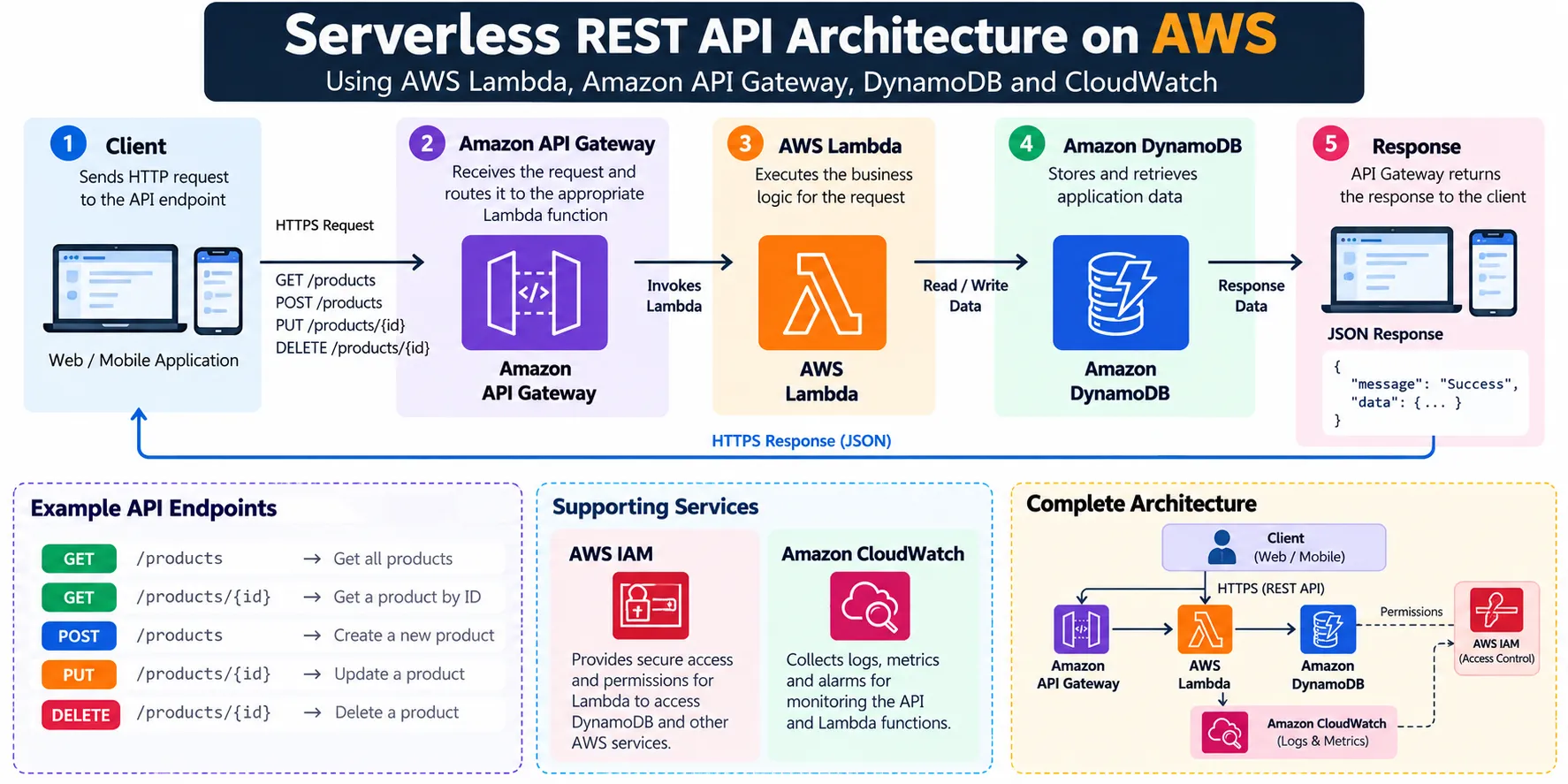
A basic serverless REST API can use the following architecture:
1
2
3
4
5
6
7
8
9
10
11
12
13
14
15
16
17
18
19
20
                    Client
                      |
                    HTTPS
                      |
                      v
              Amazon API Gateway
                      |
                      v
                 AWS Lambda
                      |
                      v
              Amazon DynamoDB
                      |
                      v
                   Response

             Amazon CloudWatch
                    ^
                    |
              Logs + Metrics
Each service has a specific responsibility.
- API Gateway receives HTTP requests.
- Lambda executes application logic.
- DynamoDB stores application data.
- IAM controls permissions.
- CloudWatch provides logs and monitoring.
3. Why Use AWS Lambda?
AWS Lambda allows code to run in response to events.
For an API, the event can be an HTTP request.
For example:
1
2
3
4
5
6
7
8
9
10
GET /users
       |
       v
API Gateway
       |
       v
Lambda
       |
       v
Return users
The developer does not need to maintain a continuously running backend server for this function.
Lambda can execute the function when needed and AWS manages the infrastructure required to run it.
4. Creating a Simple Lambda Function
A Lambda function can contain the business logic for an API endpoint.
For example, a simple function could return a JSON response:
1
2
3
4
5
6
7
8
export const handler = async (event) => {
    return {
        statusCode: 200,
        body: JSON.stringify({
            message: "Hello from AWS Lambda"
        })
    };
};
The function receives an event and returns a response.
The exact event structure depends on how the Lambda function is connected to other AWS services.
5. Connecting API Gateway
AWS Lambda by itself does not automatically create a public REST endpoint.
Amazon API Gateway can act as the HTTP entry point.
The request flow becomes:
1
2
3
4
5
6
7
8
9
10
11
12
13
14
15
16
Client
   |
   | GET /hello
   v
API Gateway
   |
   | Lambda Invocation
   v
AWS Lambda
   |
   | JSON Response
   v
API Gateway
   |
   v
Client
For example:
1
GET https://example-api/hello
API Gateway receives the request and invokes the appropriate Lambda function.
6. Designing REST Endpoints
A small application could expose endpoints such as:
1
2
3
4
5
GET    /products
GET    /products/{id}
POST   /products
PUT    /products/{id}
DELETE /products/{id}
The architecture could look like:
1
2
3
4
5
6
7
8
9
10
11
                  API Gateway
                       |
        ┌──────────────┼──────────────┐
        |              |              |
        v              v              v
    GET Lambda     POST Lambda    DELETE Lambda
        |              |              |
        └──────────────┼──────────────┘
                       |
                       v
                  DynamoDB
In a real application, multiple API operations can also share Lambda functions depending on the design.
7. Storing Data with Amazon DynamoDB
An API usually needs persistent storage.
Amazon DynamoDB is a fully managed NoSQL database that works well with serverless applications.
For example, a products table could contain:
1
2
3
4
5
6
7
Product
-------------------------
id
name
price
category
createdAt
The architecture becomes:
1
2
3
4
5
6
7
8
9
10
Client
  |
  v
API Gateway
  |
  v
Lambda
  |
  v
DynamoDB
Lambda can read, create, update, or delete records based on the incoming request.
8. Example CRUD Flow
Consider a request to create a product.
1
POST /products
The request could contain:
1
2
3
4
5
{
  "name": "Laptop",
  "price": 65000,
  "category": "Electronics"
}
The flow is:
1
2
3
4
5
6
7
8
9
10
11
12
13
14
15
Client
  |
  | POST /products
  v
API Gateway
  |
  v
Lambda
  |
  | PutItem
  v
DynamoDB
  |
  v
Success Response
The client receives a response such as:
1
2
3
{
  "message": "Product created successfully"
}
9. IAM and Least Privilege
Security is an important part of serverless architecture.
A Lambda function should not automatically receive permission to access every AWS service.
For example, if the function only needs to read and write to one DynamoDB table, its IAM permissions should be limited accordingly.
The principle is:
1
2
3
4
5
6
Lambda
   |
   v
IAM Role
   |
   +---- DynamoDB permissions
Instead of:
1
2
3
4
Lambda
   |
   v
Full AWS Access
Least-privilege permissions reduce the impact of accidental or malicious access.
10. Monitoring with Amazon CloudWatch
Once the API is deployed, we need to know whether it is working correctly.
AWS Lambda automatically integrates with Amazon CloudWatch for logs and monitoring.
The flow is:
1
2
3
4
5
6
Lambda
   |
   v
CloudWatch
  /    \
Logs   Metrics
Logs can help identify problems such as:
- Runtime errors
- Invalid input
- Database failures
- Unexpected application behavior
- Slow operations
For example, developers can log important information during development and troubleshooting.
11. Error Handling
A production API should not assume that every request will succeed.
For example:
1
2
3
4
5
6
7
8
9
10
11
12
13
14
15
Client
  |
  v
API Gateway
  |
  v
Lambda
  |
  +---- Valid request → Process
  |
  +---- Invalid request → 400
  |
  +---- Missing resource → 404
  |
  +---- Internal error → 500
Proper status codes make the API easier for frontend applications and other clients to consume.
A Lambda response might look like:
1
2
3
4
5
6
return {
    statusCode: 404,
    body: JSON.stringify({
        message: "Product not found"
    })
};
12. Environment Configuration
Applications often need configuration values such as:
1
2
3
4
TABLE_NAME
ENVIRONMENT
API_KEY
REGION
These values should not be hard-coded into the application.
Instead, configuration can be provided through environment variables or appropriate AWS secret-management services.
For example:
1
2
3
4
5
Lambda
  |
  +---- Environment Variables
  |
  +---- Secrets
This allows the same application logic to be used across different environments.
13. Authentication and Authorization
A production API may need to identify users and control what they are allowed to access.
The architecture can be extended with an authentication mechanism:
1
2
3
4
5
6
7
8
9
10
11
12
13
Client
  |
  v
API Gateway
  |
  v
Authentication
  |
  v
Lambda
  |
  v
DynamoDB
Depending on the application, services such as Amazon Cognito can be considered for user authentication.
For example:
1
2
3
4
5
6
7
8
9
10
11
12
13
User
 |
 v
Authentication
 |
 v
Access Token
 |
 v
API Gateway
 |
 v
Lambda
Authentication answers:
Who is the user?
Authorization answers:
What is this user allowed to do?
These are different security concerns and should both be considered when designing an API.
14. Serverless Scaling
One of the major advantages of serverless architecture is that the application does not have to rely on a single manually managed server.
Consider an API receiving requests:
1
2
3
4
5
6
7
          Requests
        /    |    \
       v     v     v
   Lambda Lambda Lambda
       \     |     /
        \    |    /
         DynamoDB
AWS can manage the infrastructure required for Lambda execution.
This is useful for applications where traffic changes throughout the day.
For example:
1
2
3
4
Morning       → Low traffic
Afternoon     → Medium traffic
Evening       → High traffic
Night         → Low traffic
The application can be designed to handle these changing workloads without manually starting and stopping servers.
15. Serverless Is Not Always the Best Choice
Serverless architecture has many advantages, but it is not suitable for every workload.
It can be a good choice for:
- REST APIs
- Event-driven applications
- Background processing
- Scheduled tasks
- Lightweight backend services
- Applications with variable traffic
Other workloads may benefit more from containers or traditional servers.
For example:
1
2
3
4
Simple Event
      |
      v
   Lambda
can be very effective.
But a large application requiring long-running processes or specialized server configuration may require a different architecture.
The right architecture depends on the workload.
16. Serverless Development Workflow
A practical development workflow could look like this:
1
2
3
4
5
6
7
8
9
10
11
12
13
14
15
16
17
18
19
20
21
22
Developer
    |
    v
Write Lambda Function
    |
    v
Test Locally
    |
    v
Deploy
    |
    v
API Gateway
    |
    v
Lambda
    |
    v
DynamoDB
    |
    v
CloudWatch
This workflow can later be automated using CI/CD.
For example:
1
2
3
4
5
6
7
8
9
10
11
12
13
GitHub
   |
   v
GitHub Actions
   |
   v
Build + Test
   |
   v
Deploy Lambda
   |
   v
AWS
This allows infrastructure and application changes to become repeatable and version controlled.
17. Benefits of Serverless Architecture
No Server Management
Developers do not need to maintain traditional application servers for Lambda functions.
Automatic Scaling
Lambda is designed to handle changing workloads without manually provisioning individual servers.
Event-Driven
Functions can be triggered by HTTP requests and many other AWS events.
Faster Development
Developers can focus on application logic rather than server administration.
Pay for Usage
The serverless model can be cost-effective for workloads that do not require continuously running infrastructure, although costs depend on usage and architecture.
18. Challenges to Consider
Serverless also introduces some challenges.
Cold Starts
Functions may experience additional startup latency depending on the runtime and configuration.
Debugging
Distributed applications can be more complex to troubleshoot.
Service Dependencies
The application may depend on several managed AWS services.
Architecture Complexity
Adding many functions and services without proper design can make an application difficult to maintain.
Good monitoring, logging, naming conventions, documentation, and infrastructure automation become increasingly important as the application grows.
19. Complete Architecture
A more complete serverless application could look like this:
1
2
3
4
5
6
7
8
9
10
11
12
13
14
15
16
17
18
19
20
21
22
23
24
25
26
27
                         Users
                           |
                           v
                  Amazon API Gateway
                           |
                    ┌──────┴──────┐
                    |             |
                    v             v
              Lambda Function  Lambda Function
                    |             |
                    └──────┬──────┘
                           |
                           v
                    Amazon DynamoDB
                           |
                           v
                    Application Data

              ┌──────────────────────┐
              │    AWS IAM           │
              │ Access Control       │
              └──────────────────────┘

              ┌──────────────────────┐
              │ Amazon CloudWatch    │
              │ Logs + Metrics       │
              └──────────────────────┘
Each component has a focused responsibility.
This separation makes the architecture easier to understand and evolve.
20. What I Learned
Building a serverless application changes the way we think about backend development.
Instead of starting with:
1
Which server should I deploy?
we can start with:
1
What event should trigger my application logic?
The infrastructure becomes a collection of managed services:
1
2
3
4
5
6
7
API Gateway
      ↓
Lambda
      ↓
DynamoDB
      ↓
CloudWatch
This allows developers to focus more on application behavior while AWS manages much of the underlying infrastructure.
Conclusion
AWS Lambda and Amazon API Gateway provide a powerful foundation for building serverless APIs.
By combining:
- Amazon API Gateway for HTTP requests
- AWS Lambda for application logic
- Amazon DynamoDB for data
- AWS IAM for permissions
- Amazon CloudWatch for monitoring
developers can build applications without managing traditional backend servers.
The most important lesson is that serverless is not simply about removing servers. It is about changing the way applications are designed—from continuously running infrastructure toward event-driven, managed, and scalable components.
A simple request can therefore travel through an entire cloud architecture:
1
2
3
4
5
6
7
8
9
10
11
12
13
Client
  ↓
API Gateway
  ↓
Lambda
  ↓
DynamoDB
  ↓
Lambda
  ↓
API Gateway
  ↓
Client
That is the core idea behind building modern serverless applications on AWS.
Enjoyed reading this content? Let the author know!
Your likes, comments, shares, and saves help creators reach more builders.

Loading recommendations
Loading article