
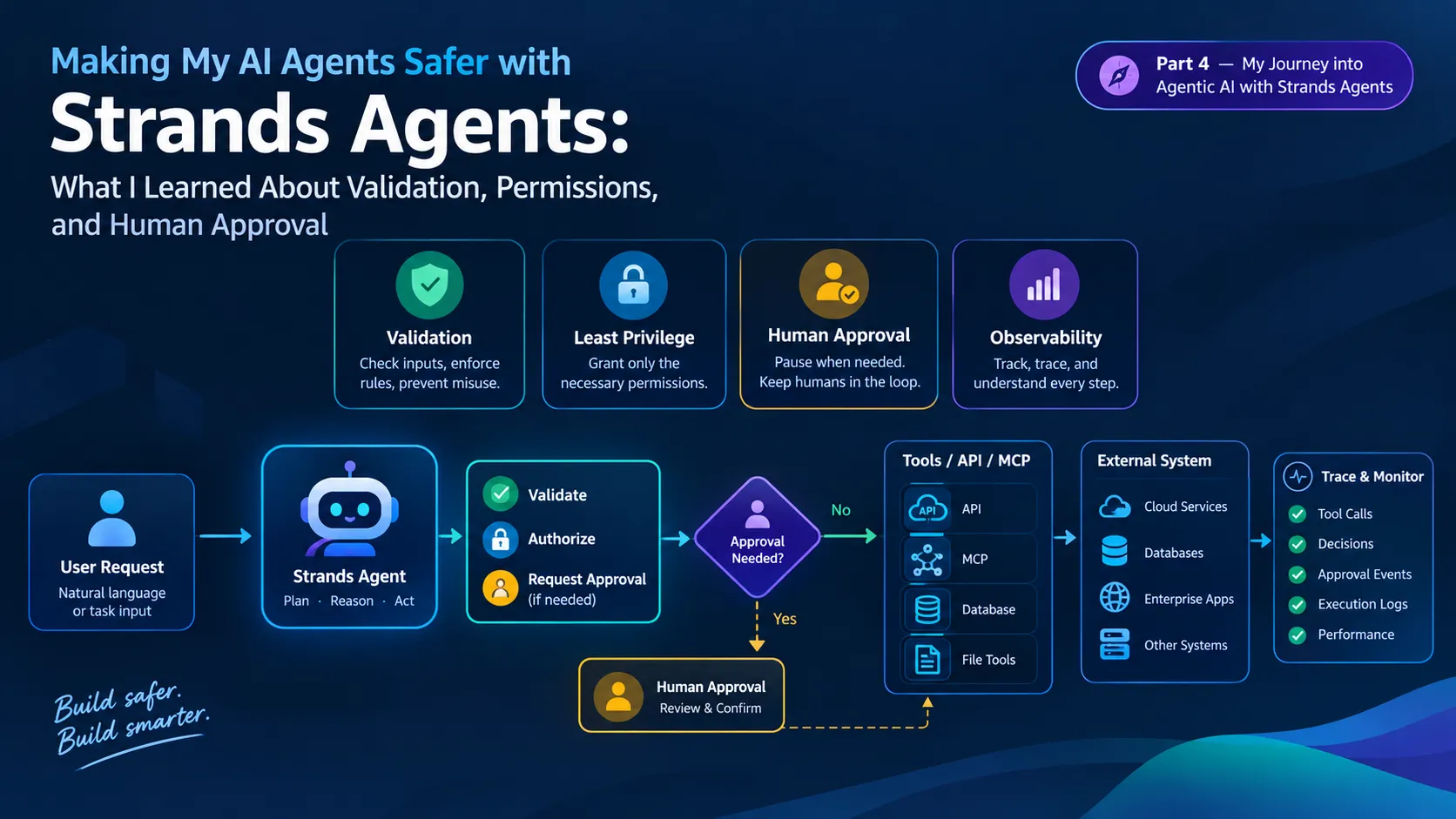
Making My AI Agents Safer with Strands Agents: What I Learned About Validation, Permissions, and Human Approval
While experimenting with Strands Agents, I reached a point where simply giving an agent more tools didn't feel like enough. Once an agent can call APIs, MCP tools, or make changes to real systems, I started asking a different question: what should the agent actually be allowed to do? In this article, I share what I learned while exploring validation, permissions, human approval, hooks, and observability, and how these ideas changed the way I think about building agentic applications.


Continuing My Agentic AI Journey
This is Part 4 of my journey into agentic AI with Strands Agents.
In the previous articles, I focused on understanding how agents work, how they use tools, and how they can connect to external systems.
The progression has been:
- Part 1: Understanding agents and the agent loop
- Part 2: Building an agent that selects and executes tools
- Part 3: Connecting agents to APIs, MCP, and external capabilities
- Part 4: Making those interactions safer and more controlled
Part 3 raised an important question for me:
If an agent can access real systems, how do we make sure it only does what it is actually allowed to do?
That question changes the way I think about agentic applications.
Giving an agent more tools makes it more capable.
But capability without boundaries can also make an agent harder to control.
So in this article, I want to explore four important layers:
- Input validation
- Permissions and least privilege
- Human approval for sensitive actions
- Observability and auditability
The goal isn't to make an agent unable to act.
The goal is to make its actions controlled, explainable, and reviewable.
The Problem With Giving an Agent More Tools
In Part 3, I explored a simple progression:
1
2
3
4
5
6
7
User
  ↓
Agent
  ↓
Tool
  ↓
API / MCP / External System
This architecture is powerful because the agent can translate natural-language intent into actions.
But consider what happens when the toolset grows.
An agent might have tools such as:
1
2
3
4
5
get_project_status()
update_project_status()
create_project()
delete_project()
send_notification()
From the agent's perspective, these are all capabilities it can potentially use.
From an application's perspective, they have very different risk levels.
Reading a project status is one thing.
Deleting a project is something completely different.
This leads to an important design principle:
Not every tool should have the same level of access or autonomy.
Strands documentation makes this distinction explicit: tools execute with the permissions of the host process, so developers need to audit their behavior and ensure the permissions are appropriate for the deployment environment.
1. Start With Least Privilege
The first control is simple:
Give a tool only the permissions it needs.
Imagine a project-status tool.
It should be able to read project information.
It should not automatically receive permission to:
- Delete projects
- Modify unrelated files
- Access arbitrary directories
- Execute shell commands
- Change infrastructure
A simple architecture could look like this:
1
2
3
4
5
6
7
8
9
10
11
                 ┌──────────────────┐
                 │   Strands Agent  │
                 └────────┬─────────┘
                          │
             ┌────────────┴────────────┐
             │                         │
             ▼                         ▼
      Read-only tools            Action tools
             │                         │
             ▼                         ▼
       Project data          Controlled operations
The important idea is that the agent's capabilities should be intentionally designed.
More tools do not automatically mean a better agent.
They mean a larger security boundary.
Strands' responsible-AI guidance recommends least privilege, input validation, clear tool documentation, error handling, and audit logging when designing tools.
2. Validate Tool Inputs
The next question is:
What happens if the agent chooses the correct tool but sends the wrong input?
This is an easy problem to overlook.
Suppose we create a tool that updates a project's status:
1
2
3
4
5
6
7
8
9
10
11
12
13
14
15
16
17
18
from strands import tool
def update_project_status(project: str, status: str) -> str:
"""Update the status of a project."""
allowed_statuses = {
"planning",
"development",
"testing",
"completed"
}
if status not in allowed_statuses:
return "Error: invalid project status."
# Perform the update here
return f"{project} status updated to {status}."
The model may understand the user's request correctly.
But the tool still validates the value.
This distinction matters.
The model is responsible for interpreting intent.
The application is responsible for enforcing valid inputs.
1
2
3
4
5
6
7
8
9
User Intent
     ↓
Agent interprets request
     ↓
Tool selected
     ↓
Input validation
     ↓
Action
I don't want the model itself to be the final authority on whether an input is valid.
The tool should enforce its own contract.
3. Prompts Are Not Permission Systems
This was one of the biggest lessons for me.
It is tempting to write a system prompt such as:
1
Never delete a project without permission.
That instruction may be useful.
But it should not be the only protection.
A prompt tells the model what it should do.
A permission system determines what the application actually allows.
Those are different responsibilities.
For example:
1
2
3
Prompt
  ↓
"Do not delete projects without approval."
is different from:
1
2
3
4
5
6
7
Policy / Control
  ↓
delete_project()
  ↓
Approval required
  ↓
Execute or deny
This becomes especially important when agents interact with APIs, databases, MCP servers, files, or other external systems.
Strands' current security guidance describes production agents as systems that accept untrusted input, call tools with real permissions, and return model output to real users. It recommends controls at those boundaries rather than relying only on model behavior.
4. Separate Read Actions From Write Actions
A useful pattern is to classify tools based on their effect.
For example:
| Tool | Type | Example |
|---|---|---|
| get_project_status() | Read | Safe information retrieval |
| search_projects() | Read | Search existing data |
| update_project_status() | Write | Changes application state |
| create_project() | Write | Creates new data |
| delete_project() | Destructive | Removes data |
This gives us a natural policy boundary.
1
2
3
4
5
6
7
8
9
10
11
Read
 ↓
Can often execute automatically

Write
 ↓
Validate + authorize

Destructive
 ↓
Validate + authorize + potentially require human approval
The exact policy depends on the application.
The important part is that the policy is explicit.
5. Adding a Human Approval Step
What if the agent wants to perform a sensitive action?
Instead of allowing the tool to execute immediately, we can pause the workflow.
For example:
1
2
3
4
5
6
7
8
9
10
11
12
13
14
15
16
17
18
19
20
21
22
23
24
25
User:
"Delete the old website project."

        ↓

Agent understands request

        ↓

Agent selects delete_project()

        ↓

Approval checkpoint

        ↓
   ┌───────────────┐
   │ Approve?      │
   │               │
   │ Yes / No      │
   └───────┬───────┘
           │
      ┌────┴────┐
      ↓         ↓
   Execute     Reject
This creates a human-in-the-loop workflow.
Current Strands documentation provides intervention mechanisms that can gate tool calls behind human approval or policy checks. The SDK also provides a
HumanInTheLoop intervention for pausing before a tool call and allowing a person to approve, edit, or reject it.6. Using Hooks as a Control Layer
One of the Strands concepts I found particularly interesting is hooks.
Hooks allow developers to attach logic to points in the agent lifecycle.
That means we can introduce controls without putting all of the logic inside the tool itself.
Conceptually:
1
2
3
4
5
6
7
8
9
10
11
12
13
14
                 Agent Loop
                     │
                     ▼
              Tool Call Requested
                     │
                     ▼
                Security Hook
                     │
          ┌──────────┼──────────┐
          ▼          ▼          ▼
        Allow      Reject     Approve
          │          │          │
          ▼          ▼          ▼
       Execute      Stop     Ask Human
Strands documentation describes hooks as a way to add logging, validation, guardrails, error handling, and custom logic throughout the agent lifecycle.
A simplified example looks like this:
1
2
3
4
5
6
7
8
9
10
11
12
13
14
15
16
17
18
19
20
21
22
from strands import Agent, tool
from strands.hooks import (
    BeforeToolCallEvent,
    HookProvider,
    HookRegistry,
)

class ToolSecurityHook(HookProvider):

    def register_hooks(self, registry: HookRegistry) -> None:
        registry.add_callback(
            BeforeToolCallEvent,
            self.check_tool
        )

    def check_tool(self, event: BeforeToolCallEvent) -> None:
        tool_name = event.tool_use["name"]

        if tool_name == "delete_project":
            event.cancel_tool = (
                "Deletion requires explicit approval."
            )
The important part isn't the exact policy in this small example.
It is the architecture.
The tool still exists.
The agent can still reason about using it.
But another layer can inspect the action before execution.
7. Human Approval for Destructive Operations
We can make the example more realistic.
Suppose our agent supports:
1
2
3
get_project_status
update_project_status
delete_project
We might define:
1
2
3
4
5
6
7
8
9
10
11
12
13
14
15
get_project_status
        ↓
Automatic

update_project_status
        ↓
Validate + authorize

delete_project
        ↓
Validate + authorize
        ↓
Human approval
        ↓
Execute
This creates a risk-based workflow.
Not every action needs to interrupt the user.
Only actions that require additional oversight need approval.
Strands also supports intervention policies that can gate every tool call or only riskier calls, and its documentation describes policy-based and human-approval approaches for tool execution.
8. What If the Tool Input Is Dangerous?
Another important boundary exists between the model and the tool.
Consider a file-reading tool:
1
2
3
def read_file(path: str) -> str:
...
Without restrictions, a model-generated path could potentially point somewhere the application did not intend to expose.
A safer design establishes an allowed boundary.
Conceptually:
1
2
3
4
5
6
7
8
9
Requested path
      ↓
Normalize path
      ↓
Check allowed directory
      ↓
      ├── Allowed → Read
      │
      └── Denied → Stop
The same principle applies to:
- Database queries
- API parameters
- File paths
- Shell commands
- URLs
- Resource identifiers
- MCP tool inputs
The model can propose the value.
The application should validate it.
This is one reason I increasingly think of tools as security boundaries, not just functions.
9. External Tools Need the Same Protection
Part 3 introduced APIs and MCP.
That creates another important question:
Does connecting to an external tool change the security responsibility?
No.
If anything, it makes the boundary more important.
Consider:
1
2
3
4
5
6
7
Agent
  │
  ├── Python Tool
  │
  ├── REST API
  │
  └── MCP Server
Each connection introduces a capability.
Each capability should have:
- Defined permissions
- Validated inputs
- Clear ownership
- Error handling
- Appropriate authentication
- Logging
- A clear trust boundary
Strands specifically warns that MCP can connect an agent to tools controlled by another party, so developers should carefully consider what they connect to.
10. Authentication and Authorization Are Different
This distinction became much clearer to me while exploring agent security.
Authentication answers:
Who are you?
Authorization answers:
What are you allowed to do?
For example:
1
2
3
4
5
6
7
8
9
10
11
User
 ↓
Authentication
 ↓
Identity established
 ↓
Authorization
 ↓
Allowed capabilities determined
 ↓
Agent
An authenticated user should not automatically receive access to every tool.
A support employee might be allowed to:
1
2
read_ticket()
update_ticket()
but not:
1
delete_customer()
Similarly, an agent should not receive broad credentials simply because it needs one API.
The permissions should be scoped to the actual operation.
11. Handling Tool Failures
Safety is not only about malicious inputs.
Tools can simply fail.
For example:
1
2
3
4
5
Agent
 ↓
API Tool
 ↓
API unavailable
The agent should not treat the failed operation as successful.
A tool should return a meaningful failure state:
1
2
3
4
5
6
7
8
9
try:
    response = requests.get(
        "https://example.com/api/projects",
        timeout=5
    )
    response.raise_for_status()

except requests.RequestException as error:
    return f"Project service unavailable: {error}"
The agent can then explain the failure instead of inventing a result.
This is particularly important for external APIs because network failures, authentication errors, rate limits, and invalid responses are normal application conditions.
Good error handling gives the agent something real to reason about.
12. Rate Limiting Agent Actions
There is another failure mode that is easy to overlook:
The agent may repeatedly call a tool.
Imagine:
1
2
3
4
5
6
Tool call 1
Tool call 2
Tool call 3
Tool call 4
Tool call 5
...
A loop like this can increase:
- Cost
- Latency
- API usage
- Resource consumption
A control layer can place a limit on tool calls.
For example:
1
Maximum API calls per request = 5
If the limit is reached:
1
2
3
4
5
6
7
Agent
 ↓
Tool call #6
 ↓
Rate limit
 ↓
Blocked
Strands' hooks documentation includes rate-limiting examples that restrict how many times a tool can be called during an invocation.
This is another example of why safety rules should not depend entirely on the model remembering an instruction.
13. Observability: Knowing What the Agent Actually Did
After adding permissions and approval, another question appears:
How do we know what the agent actually did?
This is where observability becomes important.
A useful agent trace might look like:
1
2
3
4
5
6
7
8
9
10
11
12
13
14
15
User Request
     ↓
Model Call
     ↓
Tool Selection
     ↓
Validation
     ↓
Authorization
     ↓
Tool Execution
     ↓
Tool Result
     ↓
Model Response
Without this information, debugging becomes difficult.
If a user says:
"The agent gave me the wrong answer."
we want to know:
- Which model call happened?
- Which tool was selected?
- What arguments were passed?
- Did validation succeed?
- Was an external API called?
- What did the tool return?
- How many agent-loop cycles occurred?
- How long did each step take?
Strands provides traces, metrics, and logs through OpenTelemetry-based observability. Its documentation describes tracing model interactions, tool calls, token usage, latency, and execution flow.
14. A Simple Observability Example
For local experimentation, Strands can export traces to the console.
1
2
3
4
5
6
7
8
from strands import Agent
from strands.telemetry import StrandsTelemetry

StrandsTelemetry().setup_console_exporter()

agent = Agent()

agent("What is agent observability?")
This provides visibility into the agent execution rather than treating the final response as the only thing that matters.
As applications grow, telemetry can be sent to OpenTelemetry-compatible backends.
That creates a much more useful picture:
1
2
3
4
5
6
7
8
9
10
11
12
                    Agent Run
                       │
       ┌───────────────┼───────────────┐
       ▼               ▼               ▼
    Model Calls     Tool Calls       Metrics
       │               │               │
       └───────────────┼───────────────┘
                       ▼
                    Traces
                       │
                       ▼
               Observability System
AWS has also documented Strands' use of OpenTelemetry for tracing agent trajectories and monitoring metrics such as tool calls, latency, and token usage.
15. What Should Be Controlled by the Model?
This is the distinction I find most useful.
An agent is good at:
1
2
3
4
5
6
7
8
9
Understanding intent
       ↓
Planning
       ↓
Selecting a capability
       ↓
Interpreting results
       ↓
Generating a response
But deterministic application controls should handle things such as:
1
2
3
4
5
6
7
8
Authentication
Authorization
Input validation
Permission checks
Rate limits
Approval requirements
Audit logging
Execution boundaries
So the architecture becomes:
1
2
3
4
5
6
7
8
9
10
11
12
13
14
15
16
17
18
19
20
21
22
23
24
25
26
27
28
29
                 User
                   │
                   ▼
            ┌─────────────┐
            │    Agent    │
            │             │
            │ Understand  │
            │ Plan        │
            │ Select Tool │
            └──────┬──────┘
                   │
                   ▼
          ┌─────────────────┐
          │ Control Layer   │
          │                 │
          │ Validation      │
          │ Authorization   │
          │ Approval        │
          │ Rate Limits     │
          └────────┬────────┘
                   │
                   ▼
             Tool / API / MCP
                   │
                   ▼
             External System
                   │
                   ▼
              Result + Trace
This separation makes the system easier to reason about.
16. The Security Boundary Is Bigger Than the Model
One of the biggest lessons from Part 3 was that the agent is not the entire application.
Part 4 reinforced that idea.
The model is only one component.
A real agentic application might contain:
1
2
3
4
5
6
7
8
9
10
11
12
13
14
15
Frontend
   ↓
Backend
   ↓
Authentication
   ↓
Strands Agent
   ↓
Policy / Validation
   ↓
Tools
   ↓
APIs / MCP
   ↓
Databases / External Systems
Every boundary matters.
A model can produce a malicious or incorrect parameter.
An API can return unexpected data.
An MCP server can expose capabilities you did not intend to grant broadly.
A tool can have excessive permissions.
A human approval workflow can be poorly designed.
Observability can accidentally capture sensitive information.
Security therefore has to be treated as a system-level concern.
17. A Practical Safety Checklist
Before allowing an agent to interact with real systems, I would ask:
Tools
- Does every tool have a clearly defined purpose?
- Does each tool have the minimum permissions it needs?
- Are dangerous operations separated from read-only operations?
Inputs
- Are tool arguments validated?
- Are paths, URLs, identifiers, and other parameters constrained?
- Are external responses treated carefully?
Permissions
- Who is allowed to use this capability?
- What identity is being used?
- Can the agent access more than the user should?
Sensitive Actions
- Which operations require approval?
- Can destructive actions be blocked automatically?
- Can the user reject or modify the proposed action?
Reliability
- What happens when an API fails?
- What happens when a tool times out?
- What happens when the agent repeatedly calls the same tool?
Observability
- Can I see which tools were called?
- Can I trace a request from start to finish?
- Can I measure latency, errors, and token usage?
- Are sensitive values protected in logs?
This checklist is simple, but it changes the way I think about agent design.
18. From Autonomous Agent to Controlled Agent
There is a subtle difference between these two architectures.
Autonomous without controls
1
2
3
4
5
6
7
User
 ↓
Agent
 ↓
Tool
 ↓
System
Controlled autonomy
1
2
3
4
5
6
7
8
9
10
11
12
13
14
15
User
 ↓
Agent
 ↓
Validation
 ↓
Authorization
 ↓
Approval if required
 ↓
Tool
 ↓
System
 ↓
Audit / Observability
The second architecture does not eliminate autonomy.
It puts boundaries around it.
That is the direction I find much more interesting for real applications.
19. What I Learned From This Part
My biggest takeaway is that building an agent is not only about making it more capable.
It is also about deciding where the agent's authority stops.
A few principles stood out to me:
1. Capability should be intentional
Every tool expands what the agent can do.
2. Tools should enforce their own contracts
The model can select a tool, but the tool should validate its inputs.
3. Least privilege matters
An agent should not receive permissions simply because they might be useful someday.
4. Sensitive actions deserve additional controls
Human approval can be appropriate when an action is destructive, irreversible, or high impact.
5. Prompts are not authorization systems
Instructions can guide the model, but deterministic controls should enforce critical boundaries.
6. Observability is part of reliability
If I cannot see what an agent did, debugging and improving it becomes much harder.
7. External tools increase responsibility
APIs and MCP make agents more useful, but they also expand the security boundary.
Where I Am Going Next
At this point in my journey, the architecture has evolved considerably.
I started with:
1
Agent
Then:
1
Agent → Tools
Then:
1
Agent → Tools → APIs / MCP
Now:
1
2
3
4
5
6
7
8
9
10
11
12
13
Agent
  ↓
Tools
  ↓
APIs / MCP
  ↓
Validation
  ↓
Permissions
  ↓
Human Approval
  ↓
Observability
The next question naturally becomes:
What happens when one agent is no longer enough?
What if one agent handles planning while another specializes in research?
What if different agents have different tools and permissions?
What if a supervisor agent coordinates them?
That leads into the next stage of my learning journey:
multi-agent systems and agent orchestration.
Continue the Series
This article is Part 4 of my series:
My Journey into Agentic AI with Strands Agents
Part 1 — Building My First Agentic AI Application with Strands Agents: A Developer's Journey
I started by understanding the agent loop, built-in tools, custom tools, security considerations, and observability.
Part 2 — Building a Real-World AI Agent with Strands Agents: From User Request to Tool Execution
I moved from concepts into a practical workflow where an agent interpreted a request, selected tools, executed them, and processed the results.
Part 3 — Connecting AI Agents to Real Applications: APIs, MCP, and External Tools
I explored how agents can move beyond local Python functions and interact with APIs, MCP servers, and external systems.
Part 4 — Making My AI Agents Safer with Strands Agents: What I Learned About Validation, Permissions, and Human Approval
In this article, I focused on the controls that should surround those capabilities.
Next — Multi-Agent Systems
The next question I want to explore is how multiple specialized agents can work together without turning the architecture into an uncontrolled collection of autonomous components.
Conclusion
My view of agentic AI has changed as I have built more of these systems.
At first, I thought the interesting part was making an agent capable of using tools.
Then I realized that connecting tools to real systems was where things became much more useful.
Now I think the harder engineering problem is controlling that capability.
A useful agent needs freedom to reason.
A reliable application needs boundaries around what that reasoning can actually execute.
That is why I see validation, permissions, human approval, and observability not as extra features added at the end, but as part of the architecture itself.
The goal isn't to remove autonomy from an AI agent.
The goal is to make that autonomy controlled, observable, and trustworthy.
References
- Strands Agents — Add tools to your agent
- Strands Agents — Responsible AI and tool design
- Strands Agents — Hooks
- Strands Agents — Human-in-the-loop
- Strands Agents — Observability and tracing
- AWS Security Blog — Extending Amazon Bedrock Guardrails to tool interactions using the Strands Agents SDK
- AWS Machine Learning Blog — Strands Agents SDK technical deep dive into agent architectures and observability
About the Author
I'm Sai Madhav Challa, a developer exploring AI agents, full-stack development, and practical applications of generative AI.
This series documents my hands-on learning journey with Strands Agents, from understanding the fundamentals to experimenting with tools, APIs, MCP, security, and eventually multi-agent architectures.
I'm learning by building, testing, breaking things, and documenting what I discover along the way.
Enjoyed reading this content? Let the author know!
Your likes, comments, shares, and saves help creators reach more builders.

Loading recommendations
Loading article