
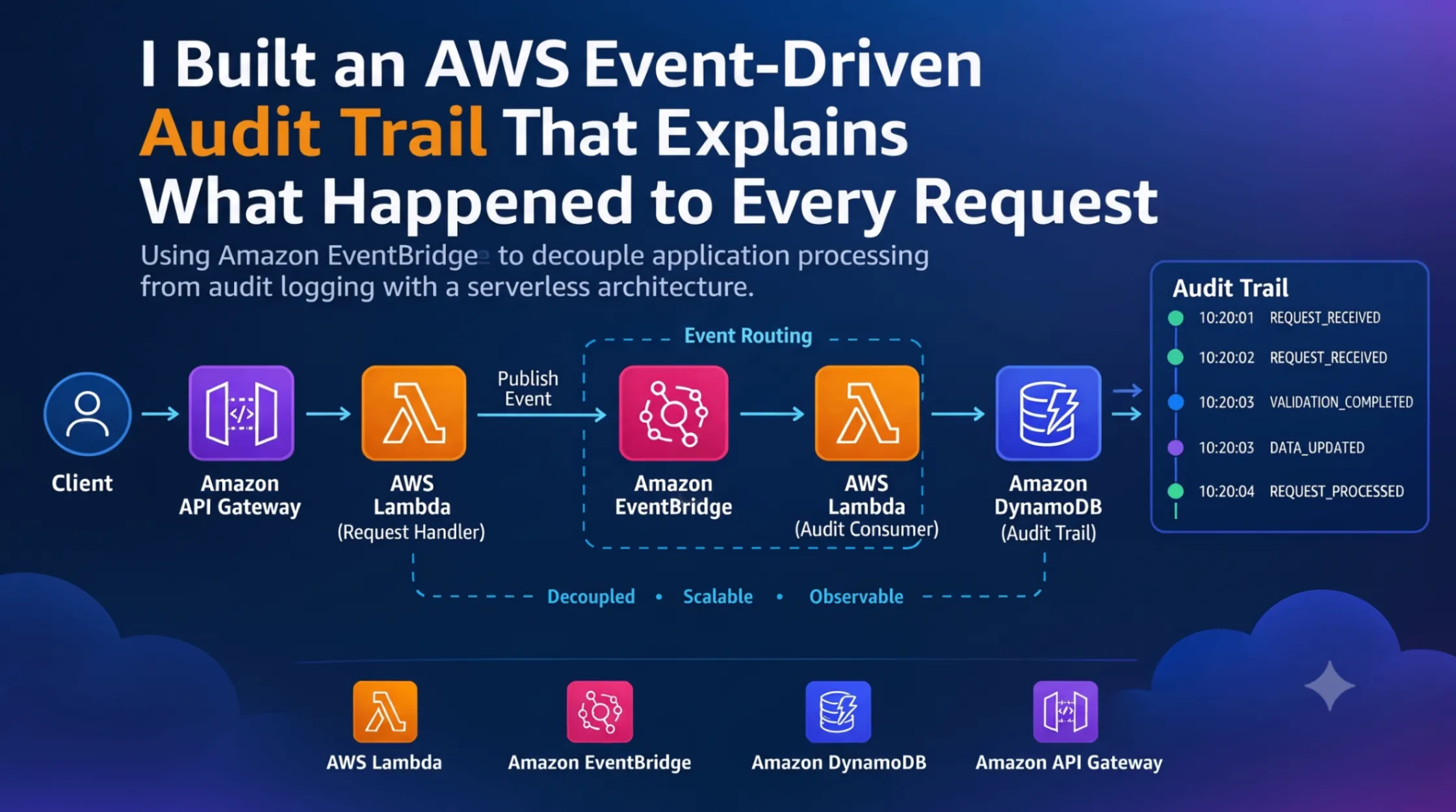
I Built an AWS Event-Driven Audit Trail That Explains What Happened to Every Request
I explored how Amazon EventBridge can be used to build an event-driven audit trail using API Gateway, AWS Lambda, and DynamoDB. Instead of tightly coupling audit logic with application processing, application events are published to EventBridge and routed to an independent audit service.

I Built an AWS Event-Driven Audit Trail That Explains What Happened to Every Request
When I started learning AWS, I often thought of logging as something that happens inside an application. A Lambda function receives a request, performs some work, and writes messages to CloudWatch.
That works well for simple applications.
But as an application grows, a single request can pass through several different components. At that point, simply having logs in different places does not always give a clear picture of what happened.
This made me think about a different question:
What if important application actions were treated as events, and a separate component built the audit trail from those events?
To explore this idea, I designed an event-driven audit architecture using Amazon API Gateway, AWS Lambda, Amazon EventBridge, and Amazon DynamoDB.
The main idea is simple:
1
2
3
4
5
6
7
8
9
Application
     ↓
Application Event
     ↓
Amazon EventBridge
     ↓
Audit Consumer
     ↓
Amazon DynamoDB
Instead of tightly connecting the application to the audit system, the application publishes an event and lets EventBridge handle the routing.
Why I Wanted to Try This
Imagine an application processing an invoice.
A single request might go through several stages:
1
2
3
4
5
6
7
REQUEST_RECEIVED
       ↓
VALIDATION_COMPLETED
       ↓
DATA_UPDATED
       ↓
REQUEST_PROCESSED
If something goes wrong, we might also have:
1
2
3
REQUEST_RECEIVED
       ↓
VALIDATION_FAILED
If all of these actions are logged independently, finding the complete history of one request can become difficult.
I wanted an audit system where I could ask:
What happened to request REQ-2026-001?
and get a sequence of meaningful events.
This is where Amazon EventBridge becomes interesting.
EventBridge allows applications and AWS services to produce events and lets rules route matching events to targets. This creates a useful separation between the component producing an event and the components consuming it.
The Architecture
The architecture I designed looks like this:
1
2
3
4
5
6
7
8
9
10
11
12
13
14
15
16
17
18
19
20
21
22
23
24
25
26
27
28
29
30
31
32
                         ┌──────────────────┐
                         │      Client     |
                         └────────┬─────────┘
                                  │
                                  ▼
                         ┌──────────────────┐
                         │   API Gateway  |
                         └────────┬─────────┘
                                  │
                                  ▼
                         ┌──────────────────┐
                         │  Request Lambda│
                         └────────┬─────────┘
                                  │
                    ┌─────────────┴─────────────┐
                    │                           │
                    ▼                           ▼
             ┌──────────────┐          ┌────────────────┐
             │  DynamoDB    │          │  EventBridge   │
             │ Main Table   │          │  Event Bus     │
             └──────────────┘          └───────┬────────┘
                                               │
                                               ▼
                                      ┌────────────────┐
                                      │  Audit Lambda  │
                                      └───────┬────────┘
                                              │
                                              ▼
                                      ┌────────────────┐
                                      │ DynamoDB Audit │
                                      │     Table      │
                                      └────────────────┘
There are four main responsibilities:
- API Gateway receives the request.
- The request Lambda performs the application operation.
- EventBridge routes application events.
- The audit Lambda stores the events in DynamoDB.
The important design decision is that the request Lambda does not need to know how the audit system works internally.
It only needs to publish a meaningful event.
Designing the Application Event
I wanted the events to contain useful information instead of generic messages.
For example:
1
2
3
4
5
6
7
8
9
10
11
{
  "Source": "invoice.application",
  "DetailType": "RequestProcessed",
  "Detail": {
    "requestId": "REQ-2026-001",
    "action": "CREATE_INVOICE",
    "status": "SUCCESS",
    "user": "demo-user",
    "timestamp": "2026-10-03T12:00:00Z"
  }
}
The important fields are:
requestIdidentifies the request.actiondescribes the operation.statusdescribes the result.useridentifies the actor.timestamprecords when the event occurred.
This makes the event useful to other components as well.
For example, the same event could potentially be used for auditing, monitoring, notifications, or analytics.
Using Amazon EventBridge as the Event Router
I would use a custom EventBridge event bus for application-specific events.
For example:
1
ApplicationAuditBus
The request Lambda publishes an event to this bus.
The EventBridge rule can then look for a specific event pattern.
For example:
1
2
3
4
5
6
7
8
{
  "source": [
    "invoice.application"
  ],
  "detail-type": [
    "RequestProcessed"
  ]
}
This means that the rule is interested only in events generated by the invoice application with the
RequestProcessed detail type.This is more flexible than sending every event to the same destination.
For example, an application could produce:
1
2
3
4
RequestReceived
RequestValidated
RequestProcessed
RequestFailed
Different EventBridge rules could then react to different types of events.
The Request Lambda
The main Lambda function is responsible for application processing.
A simplified example of publishing an event would look like this:
1
2
3
4
5
6
7
8
9
10
11
12
13
14
15
16
17
18
19
20
21
22
23
24
25
26
27
28
29
30
31
32
import json
import boto3
from datetime import datetime, timezone

events = boto3.client("events")

def lambda_handler(event, context):

    request_id = event.get("requestId", "UNKNOWN")

    audit_event = {
        "Source": "invoice.application",
        "DetailType": "RequestProcessed",
        "Detail": json.dumps({
            "requestId": request_id,
            "action": "CREATE_INVOICE",
            "status": "SUCCESS",
            "timestamp": datetime.now(timezone.utc).isoformat()
        })
    }

    events.put_events(
        Entries=[audit_event]
    )

    return {
        "statusCode": 200,
        "body": json.dumps({
            "message": "Request processed",
            "requestId": request_id
        })
    }
The important operation here is:
1
events.put_events(...)
The Lambda publishes an event instead of directly calling the audit Lambda.
That creates a cleaner separation between the application and the audit system.
The Audit Lambda
The EventBridge rule can use another Lambda as its target.
I called this function:
1
AuditWriterLambda
Its responsibility is simple:
Receive an application event and store an audit record.
A simplified implementation is:
1
2
3
4
5
6
7
8
9
10
11
12
13
14
15
16
17
18
19
20
21
22
23
24
25
26
27
28
import json
import boto3

dynamodb = boto3.resource("dynamodb")
table = dynamodb.Table("AuditTrail")

def lambda_handler(event, context):

    detail = event.get("detail", {})

    request_id = detail.get("requestId")
    timestamp = detail.get("timestamp")

    table.put_item(
        Item={
            "requestId": request_id,
            "timestamp": timestamp,
            "action": detail.get("action"),
            "status": detail.get("status")
        }
    )

    return {
        "statusCode": 200,
        "body": json.dumps({
            "message": "Audit record stored"
        })
    }
The important part is that this Lambda does not need to know anything about the original API request.
It receives an event and processes that event.
Designing the DynamoDB Audit Table
I would use a DynamoDB table named:
1
AuditTrail
with:
1
2
Partition Key: requestId
Sort Key: timestamp
This allows multiple events to be associated with the same request.
For example:
1
2
3
4
5
6
REQ-2026-001
    |
    ├── 10:20:01  REQUEST_RECEIVED
    ├── 10:20:02  VALIDATION_COMPLETED
    ├── 10:20:03  DATA_UPDATED
    └── 10:20:04  REQUEST_PROCESSED
Now the audit table represents the lifecycle of a request.
Instead of searching through unrelated log messages, the application can organize events around a request ID.
Thinking in Events Instead of Function Calls
This was the most interesting part of the architecture for me.
A tightly coupled design might look like this:
1
2
3
4
5
Request Lambda
      ↓
Audit Lambda
      ↓
DynamoDB
The first Lambda knows that the second Lambda exists.
The event-driven design looks like this:
1
2
3
4
5
Request Lambda
      ↓
EventBridge
      ↓
Audit Lambda
The request Lambda only produces an event.
This means the audit component can evolve independently.
For example, later I could add another consumer:
1
2
3
4
5
6
7
                         ┌── Audit Lambda
                         │
Application Event ───→ EventBridge
                         │
                         ├── Notification Lambda
                         │
                         └── Analytics Processor
The original application code would not need to directly call all of these components.
This is one of the reasons I find event-driven architecture interesting.
Handling Different Outcomes
The same architecture can support both successful and unsuccessful operations.
For example:
1
2
3
4
5
6
7
8
9
10
{
  "Source": "invoice.application",
  "DetailType": "RequestFailed",
  "Detail": {
    "requestId": "REQ-2026-002",
    "action": "CREATE_INVOICE",
    "status": "FAILED",
    "reason": "VALIDATION_ERROR"
  }
}
An EventBridge rule could identify failed requests.
The event could then be routed to an additional notification or monitoring component.
The architecture could become:
1
2
3
4
5
6
7
8
9
                     EventBridge
                         │
             ┌───────────┴───────────┐
             │                       │
             ▼                       ▼
       Audit Lambda           Notification Lambda
             │                       │
             ▼                       ▼
        DynamoDB                    SNS
The application still publishes one event.
Different consumers can react to it independently.
Why Structured Events Matter
A lesson I took from this design is that the quality of an event matters.
Compare these two examples.
Generic event
1
2
3
{
  "message": "Invoice completed"
}
It is difficult for another system to understand exactly what happened.
Structured event
1
2
3
4
5
6
{
  "requestId": "REQ-2026-001",
  "action": "CREATE_INVOICE",
  "status": "SUCCESS",
  "timestamp": "2026-10-03T12:00:00Z"
}
The second event contains information that another system can process without understanding the internal implementation of the original application.
This makes the event more useful as a communication contract between components.
IAM Permissions
Another important part of the architecture is permissions.
The request Lambda needs permission to publish events to EventBridge.
The EventBridge rule needs permission to invoke the target Lambda.
The audit Lambda needs permission to write to DynamoDB.
Conceptually:
1
2
3
4
5
6
7
8
9
10
11
12
13
Request Lambda
      |
      | events:PutEvents
      ↓
EventBridge
      |
      | Lambda invocation
      ↓
Audit Lambda
      |
      | dynamodb:PutItem
      ↓
DynamoDB
I would keep these permissions as specific as possible instead of giving every component broad access.
This follows the principle of least privilege and also makes the architecture easier to understand and maintain.
What About Duplicate Events?
An audit system should also consider duplicate processing.
In distributed and event-driven systems, consumers should be designed carefully so that processing the same event more than once does not create an incorrect final state.
One way to handle this is to include a unique event ID.
For example:
1
2
3
4
5
6
{
  "eventId": "EVT-7F82A91",
  "requestId": "REQ-2026-001",
  "action": "CREATE_INVOICE",
  "status": "SUCCESS"
}
The audit system can then use the event ID as part of its idempotency strategy.
This is a small detail, but it becomes important when designing systems that are expected to operate reliably.
Adding More Consumers
Once the application is publishing structured events, additional use cases become possible.
For example:
1
2
3
4
5
6
7
8
9
                       EventBridge
                            │
       ┌────────────────────┼────────────────────┐
       │                    │                    │
       ▼                    ▼                    ▼
 Audit Service       Notification Service   Analytics
       │                    │                    │
       ▼                    ▼                    ▼
   DynamoDB                 SNS             Data Store
The original application does not have to know about all these consumers.
This is the part of EventBridge that I find particularly useful.
The event becomes the connection between different parts of the system.
A Possible Extension With DynamoDB Streams
Another AWS pattern that fits naturally with this architecture is DynamoDB Streams.
Instead of having the application explicitly publish every database-related event, changes in DynamoDB can be captured using DynamoDB Streams.
The architecture could then evolve into:
1
2
3
4
5
6
7
8
9
10
11
DynamoDB
    ↓
DynamoDB Streams
    ↓
EventBridge Pipes
    ↓
EventBridge
    ↓
EventBridge Rules
    ↓
Multiple Targets
This would be useful for applications where database changes themselves are important events.
It also demonstrates that event-driven architecture does not have to be limited to API requests.
Database changes, application actions, and AWS service events can all become part of a broader event-driven system.
Monitoring the Architecture
An event-driven system should also be observable.
CloudWatch can be used to monitor the Lambda functions and investigate failures.
Useful things to monitor include:
- Lambda invocation errors
- Lambda duration
- Event processing failures
- Audit Lambda failures
- Unexpected increases in event volume
- DynamoDB errors
The goal is not simply to create an audit system.
The audit system itself should also be observable.
Otherwise, it becomes difficult to know when the audit pipeline is not functioning correctly.
Security Considerations
Audit events can contain sensitive information, so they should be designed carefully.
I would avoid placing information such as:
- Passwords
- Authentication tokens
- Secret keys
- Payment credentials
- Unnecessary personal information
inside events.
Instead, events should contain only the information required for the intended consumers.
IAM permissions should also follow least privilege.
For example:
1
2
3
4
5
6
7
8
Request Lambda
→ PutEvents only

Audit Lambda
→ PutItem only on required DynamoDB table

EventBridge
→ Invoke only the required target Lambda
This keeps the permissions boundary clear.
Cost Considerations
One reason I like this architecture for learning is that it is based on managed AWS services.
There is no server to maintain.
The main components are:
- API Gateway
- Lambda
- EventBridge
- DynamoDB
- CloudWatch
For a small learning experiment, the workload can be kept very low.
However, AWS pricing depends on usage, region, service configuration, and current pricing rules, so I would always check the official AWS pricing pages before deploying a workload at scale.
For a learning project, I would also remove unused resources after completing the experiment.
What This Architecture Taught Me
The biggest lesson from this design was not simply learning another AWS service.
It was changing the way I think about communication between application components.
A tightly coupled architecture thinks like this:
1
2
3
4
5
Component A
    ↓
Call Component B
    ↓
Call Component C
An event-driven architecture can instead think like this:
1
2
3
4
5
6
7
Component A
    ↓
Publish Event
    ↓
EventBridge
    ↓
Interested Components
That small change can make it easier to add new consumers without modifying the original producer every time.
Final Architecture
The complete design can be summarized as:
1
2
3
4
5
6
7
8
9
10
11
12
13
14
15
16
17
18
19
20
21
22
23
24
25
26
27
28
29
30
31
32
33
34
                         ┌──────────────────┐
                         │      Client     │
                         └────────┬─────────┘
                                  │
                                  ▼
                         ┌──────────────────┐
                         │   API Gateway  |
                         └────────┬─────────┘
                                  │
                                  ▼
                         ┌──────────────────┐
                         │  Request Lambda│
                         └────────┬─────────┘
                                  │
                           Publish Event
                                  │
                                  ▼
                         ┌──────────────────┐
                         │  EventBridge    │
                         │    Event Bus    │
                         └────────┬─────────┘
                                  │
                           Event Pattern
                                  │
                                  ▼
                         ┌──────────────────┐
                         │  Audit Lambda  │
                         └────────┬─────────┘
                                  │
                                  ▼
                         ┌──────────────────┐
                         │ DynamoDB Audit │
                         │      Table      │
                         └──────────────────┘
The responsibilities are clearly separated:
1
2
3
4
5
6
7
8
9
10
11
12
13
14
API Gateway
    → receives requests

Lambda
    → performs application processing

EventBridge
    → routes events

Audit Lambda
    → processes audit events

DynamoDB
    → stores audit history
Conclusion
I started this exploration with a simple question:
Can an application maintain a useful audit trail without tightly coupling its business logic to the audit system?
The event-driven approach provides an interesting answer.
Instead of making the main application responsible for every downstream operation, it can publish meaningful events and allow other components to consume those events independently.
Amazon EventBridge acts as the routing layer between the producer and consumers, while Lambda provides lightweight processing and DynamoDB provides a persistent audit history.
The most important concept I took away is:
Don't make every component know about every other component. Publish meaningful events and let interested components react to them.
For me, this is one of the most useful ideas behind event-driven architecture, and it gives me a better foundation for exploring more advanced AWS patterns such as EventBridge Pipes, DynamoDB Streams, serverless workflows, notifications, and distributed application observability.
AWS is not just a collection of individual services. The interesting part is learning how those services can be combined to create systems where each component has a clear responsibility.
Enjoyed reading this content? Let the author know!
Your likes, comments, shares, and saves help creators reach more builders.

Loading recommendations
Loading article