
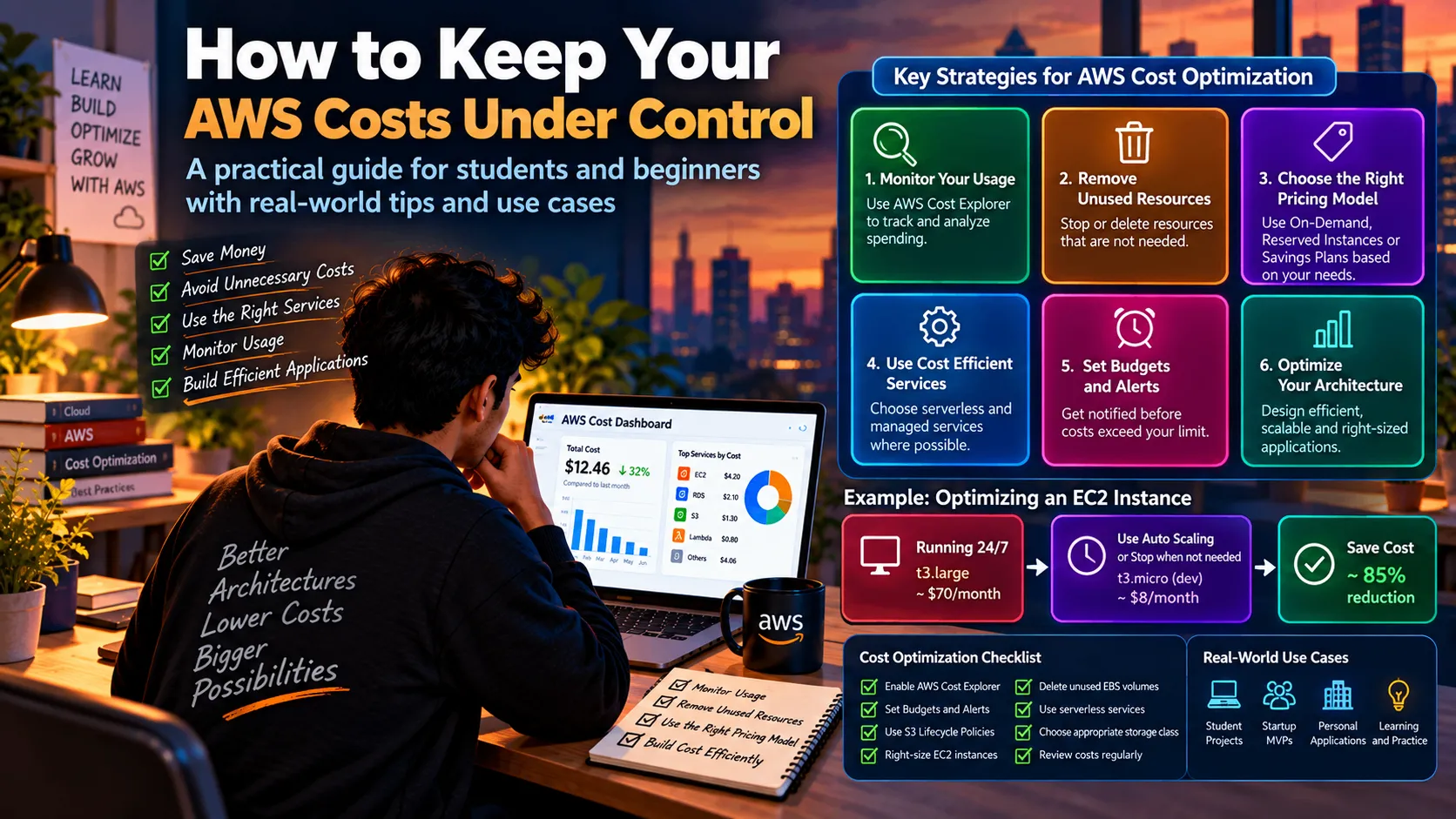
How to Keep Your AWS Costs Under Control
A practical guide for students and beginners building projects on AWS One of the first things many developers discover after moving a project to the cloud is: Cloud resources cost money—even when you're just experimenting. The good news is that cost optimization doesn't mean avoiding AWS. It means understanding what you're using, why you're using it, and whether you still need it. Let's look at some practical ways students and beginners can keep AWS project costs under control.

🔎 1. Know Where Your Money Is Going
Before optimizing anything, you need to understand your usage.
AWS provides tools that help you inspect and analyze your spending.
A useful mindset is:
1
2
3
4
5
6
7
Create Resource
      ↓
Understand Its Cost
      ↓
Monitor Usage
      ↓
Optimize
Don't wait until the end of the month to discover that a resource has been running unnecessarily.
🗑️ 2. Delete What You Don't Need
This sounds obvious, but it's one of the easiest mistakes to make while learning cloud computing.
You create something for a tutorial:
1
2
3
4
5
6
7
EC2 Instance
     ↓
Test Project
     ↓
Tutorial Finished
     ↓
❌ Instance Still Running
The project is finished, but the resource hasn't been cleaned up.
Before finishing a project, check whether you still need:
- EC2 instances
- Load balancers
- Databases
- Unused storage
- Snapshots
- Elastic IP-related resources
- Development environments
A simple cleanup routine can prevent unnecessary usage.
⚙️ 3. Choose the Right Architecture
Sometimes cost optimization starts before you deploy anything.
For example, imagine a small application that receives requests occasionally.
Running a continuously active server may not always be necessary.
Depending on the workload, serverless services could be an alternative.
1
2
3
4
5
6
7
Traditional Approach

Request
   ↓
Always-running Server
   ↓
Response
versus:
1
2
3
4
5
6
7
Serverless Approach

Request
   ↓
Function
   ↓
Response
The correct choice depends on the workload, but architecture decisions can have a major effect on operational costs.
📊 4. Monitor Your Usage
Don't treat monitoring as something only large companies need.
Even a student project benefits from knowing what is happening.
You can monitor:
- Resource usage
- Spending trends
- Unexpected increases
- Service-level costs
- Resource utilization
For example:
1
2
3
4
5
6
7
Monthly Cost
     │
     ├── EC2
     ├── S3
     ├── RDS
     ├── Lambda
     └── Other Services
If one service suddenly becomes much more expensive, you can investigate before the situation gets worse.
🚨 5. Set Budgets and Alerts
One of the most useful habits for beginners is setting up cost notifications.
The basic idea is:
1
2
3
4
5
6
7
8
9
Budget
   ↓
Usage increases
   ↓
Threshold reached
   ↓
Notification
   ↓
Developer investigates
This gives you an early warning instead of discovering unexpected spending later.
For personal projects, even a small budget threshold can be useful as an awareness mechanism.
💾 6. Don't Ignore Storage
Storage can be easy to forget.
Imagine your application continuously uploads:
1
2
3
4
5
Images
Documents
Logs
Backups
Temporary Files
Over time, unnecessary data can accumulate.
A better approach is to periodically ask:
Do I really need to keep this data?
You can also consider appropriate S3 storage classes and lifecycle policies when they match your application's access patterns.
For example:
1
2
3
4
5
6
7
8
9
Frequently Used Data
        ↓
Standard Storage

Older Data
        ↓
Lifecycle Policy
        ↓
More Cost-Appropriate Storage
🖥️ 7. Right-Size Your Resources
Bigger doesn't automatically mean better.
Suppose you're developing a small application and choose a compute resource that is far more powerful than your workload requires.
You might end up paying for capacity you're barely using.
Instead:
1
2
3
4
5
6
7
Actual Workload
      ↓
Measure Usage
      ↓
Choose Appropriate Size
      ↓
Monitor Again
This is called right-sizing.
The goal isn't to use the smallest resource possible.
The goal is to use a resource that is appropriate for the workload.
🧪 8. Be Careful With Development Environments
This is particularly important for students.
You might create:
1
2
3
4
Development Environment
Testing Environment
Demo Environment
Production Environment
But if you're working alone on a college project, you may not need all of them running continuously.
A useful habit is:
Start → Work → Test → Stop/Clean Up
rather than:
Start → Forget → Leave Running
🧠 9. Cost Optimization Is Also an Architecture Skill
Here's something interesting.
Cost optimization isn't simply:
"How can I pay less?"
It's also:
"How can I design this system more efficiently?"
For example:
1
2
3
4
5
Poorly Planned Architecture
          ↓
Unnecessary Resources
          ↓
Higher Cost
while:
1
2
3
4
5
6
7
Efficient Architecture
          ↓
Appropriate Resources
          ↓
Better Utilization
          ↓
More Controlled Cost
This is why cloud engineers need to understand both architecture and economics.
🛠️ 10. A Simple AWS Cost Checklist
Before finishing your AWS project, ask yourself:
☑️ Resources
- Do I still need every resource?
- Are any resources running unnecessarily?
☑️ Compute
- Is the compute capacity appropriate?
- Can the workload use a different architecture?
☑️ Storage
- Am I storing unnecessary data?
- Can lifecycle policies help?
☑️ Database
- Does the database need to run continuously?
- Is the selected configuration appropriate?
☑️ Monitoring
- Am I tracking my spending?
- Have I configured useful alerts?
☑️ Cleanup
- Did I remove temporary resources?
- Did I check associated resources as well?
🚀 A Practical Student Workflow
If you're building an AWS project for your portfolio, try this workflow:
1
2
3
4
5
6
7
8
9
10
11
12
13
14
15
        💡 Idea
          ↓
      Build Locally
          ↓
      Deploy to AWS
          ↓
     Monitor Usage
          ↓
   Optimize Resources
          ↓
      Test Again
          ↓
    Document Project
          ↓
      🎯 Portfolio
This gives you something more valuable than simply saying:
"I deployed my project on AWS."
You can explain why you selected particular services and how you managed the resources efficiently.
🎯 Final Takeaway
AWS cost optimization isn't about avoiding cloud services.
It's about using them intentionally.
Monitor your resources.
Remove what you don't need.
Choose architectures that match your workload.
Set budgets and alerts.
Review your infrastructure regularly.
Most importantly, make cost awareness part of your development process rather than something you think about only after receiving a bill.
Build efficiently. Monitor continuously. Optimize intelligently. ☁️💰
Enjoyed reading this content? Let the author know!
Your likes, comments, shares, and saves help creators reach more builders.

Loading recommendations
Loading article