
Building and Deploying an AWS EC2 Health Dashboard with Kiro IDE
Learn how I built and deployed an AWS EC2 Health Dashboard using React, TypeScript, Node.js, Express, AWS APIs, Kiro IDE, and Antideploy, with a focus on cloud monitoring, full-stack development, and deployment troubleshooting.

Building and Deploying an AWS EC2 Health Dashboard with Kiro IDE
Introduction
As part of my journey in cloud engineering, I built an AWS EC2 Health Dashboard to gain hands-on experience in integrating AWS services with a full-stack web application.
The project focuses on retrieving EC2-related information through a backend API and presenting it through a web-based dashboard. During development, I also used Kiro IDE for AI-assisted development and Antideploy for application deployment.
Project Overview
The application follows a frontend-backend architecture where the React frontend communicates with a Node.js and Express backend through REST APIs.
The backend handles communication with AWS APIs and provides the required information to the frontend.
Key capabilities include:
Dashboard-based EC2 monitoring
EC2 instance information retrieval
Backend health endpoint
REST API integration
Application authentication
AWS IAM-based authorization
Environment-based configuration
Production deployment
Architecture
User
↓
React + TypeScript Frontend
↓
Node.js + Express Backend
↓
AWS APIs
↓
Amazon EC2
↓
React + TypeScript Frontend
↓
Node.js + Express Backend
↓
AWS APIs
↓
Amazon EC2
This architecture keeps AWS-related operations on the backend instead of exposing cloud credentials or sensitive configuration to the client-side application.
AWS Integration
A major part of the project was integrating the application with AWS.
I worked with:
Amazon EC2 for compute resources
AWS IAM for permissions and access control
AWS APIs for retrieving EC2 information
Environment variables for configuration management
The project also reinforced an important security practice: AWS credentials should never be hard-coded in application source code or committed to a public repository.
API Layer
The backend exposes REST endpoints that the frontend can consume.
GET /api/health
GET /api/ec2/instances
GET /api/ec2/instances
The /api/health endpoint is used to verify backend availability, while /api/ec2/instances retrieves EC2-related information for the dashboard.
This separation between frontend, backend, and AWS services makes the application easier to maintain and extend.
Development with Kiro IDE
I used Kiro IDE throughout the development process as an AI-assisted development environment.
It helped me with:
Understanding project requirements
Implementing application features
Debugging development issues
Reviewing configuration problems
Iterating on the application
Troubleshooting frontend and backend integration
One of my key takeaways was that AI-assisted development works best when combined with a strong understanding of the underlying architecture. Generated solutions still need to be reviewed, tested, and validated before being used in a production environment.
Deployment with Antideploy
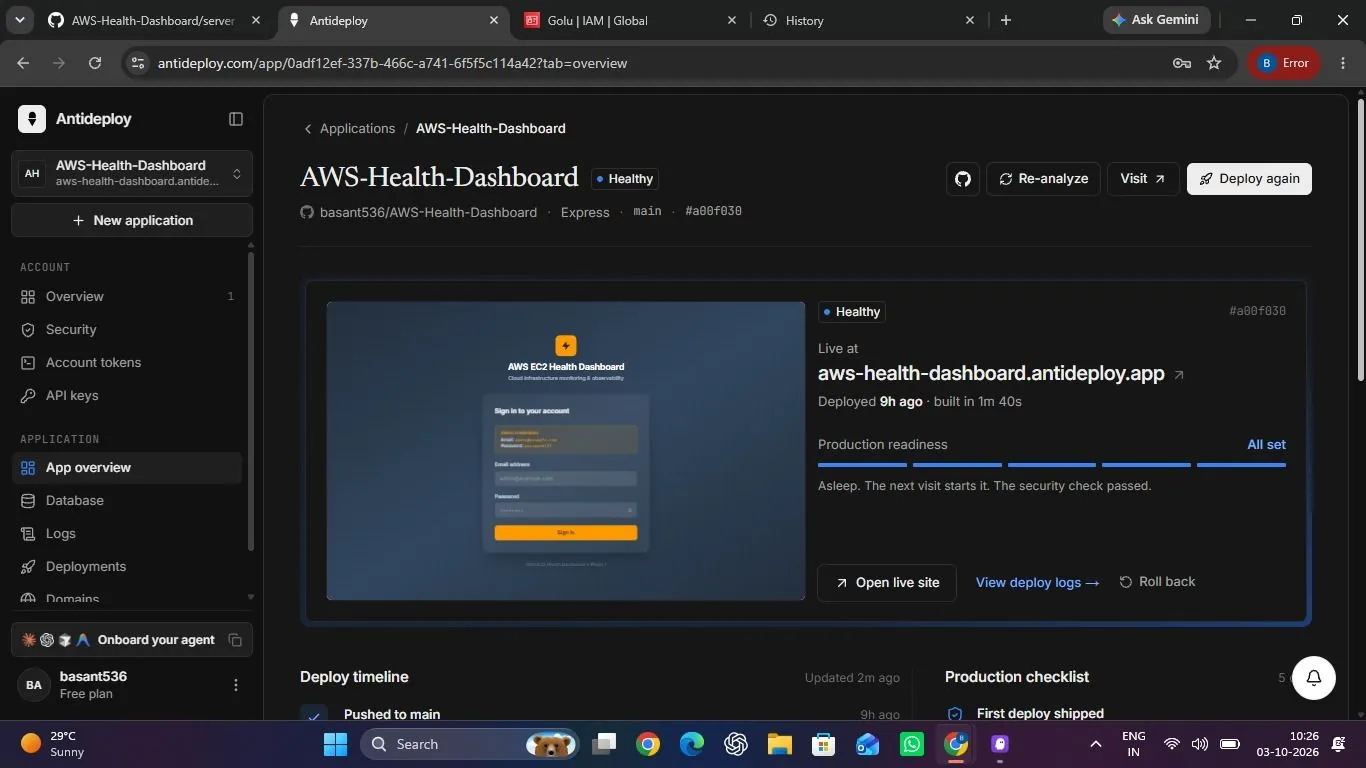
After completing the application, I deployed it using Antideploy.
The deployment process involved configuring the application build, backend startup process, environment variables, GitHub integration, and production port configuration.
I also encountered and resolved deployment-related issues involving build configuration, frontend/backend integration, and production environment settings.
This part of the project was particularly valuable because it demonstrated the difference between an application that works locally and one that is correctly configured for a production environment.
Technology Stack
Frontend:
React, TypeScript, Vite
React, TypeScript, Vite
Backend:
Node.js, Express.js, REST APIs
Node.js, Express.js, REST APIs
AWS:
Amazon EC2, AWS IAM, AWS APIs
Amazon EC2, AWS IAM, AWS APIs
Development & Deployment:
Kiro IDE, Git, GitHub, Antideploy
Kiro IDE, Git, GitHub, Antideploy
Project Links
GitHub Repository:
https://github.com/basant536/AWS-Health-Dashboard
https://github.com/basant536/AWS-Health-Dashboard
Live Demo:
https://aws-health-dashboard.antideploy.app
https://aws-health-dashboard.antideploy.app
Key Learnings
Building this project helped me strengthen my practical understanding of:
AWS EC2 and IAM
AWS API integration
REST API architecture
Frontend-backend communication
Environment configuration
Cloud application deployment
Production troubleshooting
AI-assisted software development
More importantly, it gave me practical experience in taking an application from development to deployment while troubleshooting issues along the way.
Future Improvements
For future versions, I plan to explore features such as:
CloudWatch metrics integration
Real-time EC2 monitoring
CPU, memory, and disk metrics
Historical monitoring data
SNS-based notifications
Multi-region monitoring
Role-based access control
AWS cost insights
Conclusion
This project was a practical exercise in bringing together AWS, full-stack development, AI-assisted development, and cloud deployment.
The development journey can be summarized as:
Plan → Build → Integrate → Deploy → Troubleshoot → Improve
It has strengthened my interest in building practical solutions around AWS and continuing my journey toward cloud engineering.
#AWS #AmazonEC2 #AWSIAM #CloudComputing #CloudEngineering #DevOps #Kiro #React #NodeJS #TypeScript #Antideploy #AWSBuilders
Enjoyed reading this content? Let the author know!
Your likes, comments, shares, and saves help creators reach more builders.

Loading recommendations
Loading article