
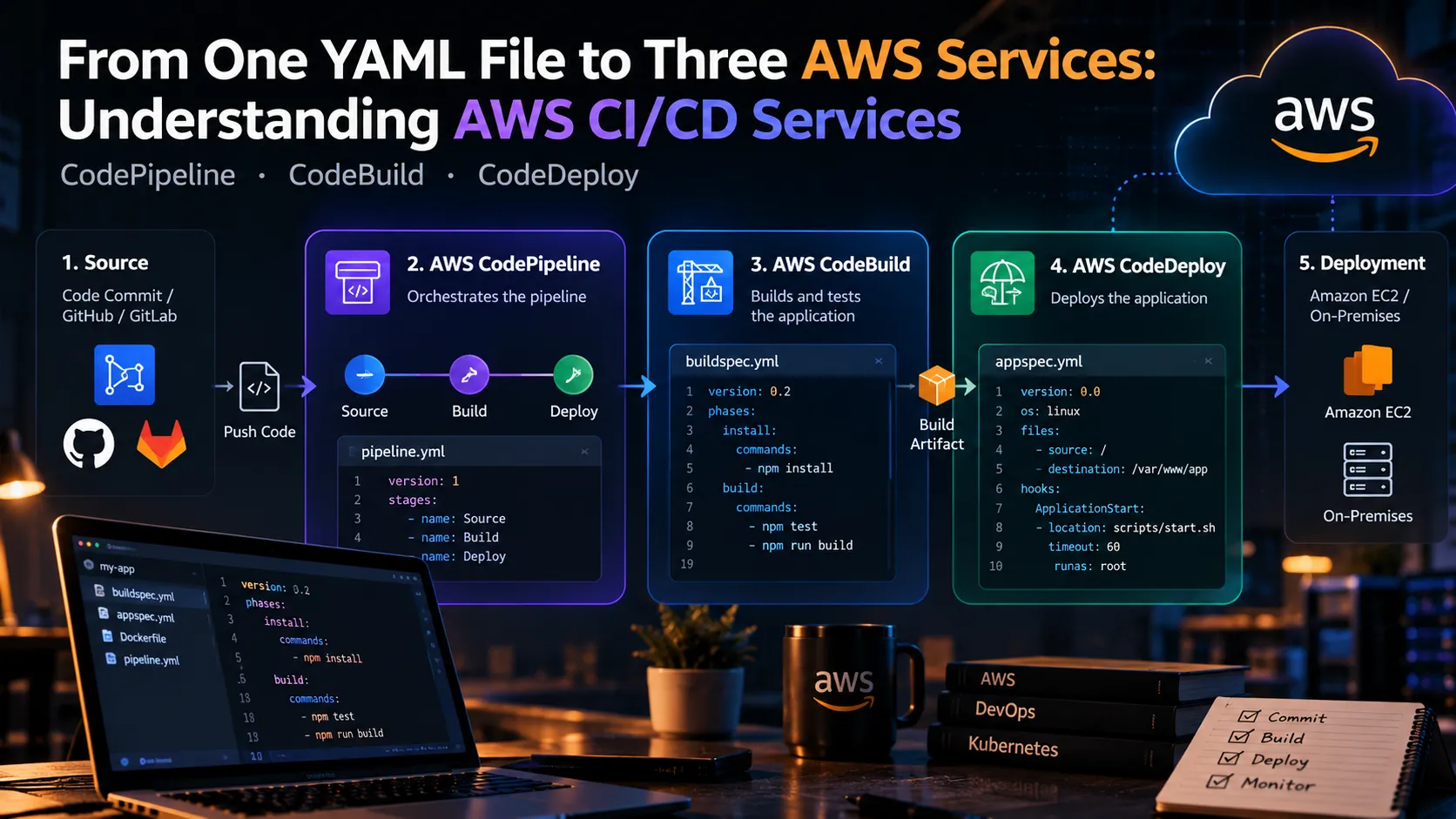
From One YAML File to Three AWS Services: Understanding AWS CI/CD Services
Discover the architecture behind AWS-native CI/CD. This guide explains how CodePipeline, CodeBuild, and CodeDeploy work together, using practical YAML configurations, deployment flow, and common mistakes to avoid.

Introduction
Deploying an application manually can quickly become repetitive.
Build the code. Run tests. Create an artifact. Upload it. Deploy it. Check whether everything worked.
Then do it again for the next release.
This is where CI/CD becomes useful. AWS provides several services that can work together to automate this entire process:
- AWS CodePipeline for orchestration
- AWS CodeBuild for building and testing
- AWS CodeDeploy for deployment
The interesting part is that these services don't work in isolation. They form a pipeline where the output of one stage becomes the input for the next.
1
2
3
4
5
6
7
8
9
10
11
Source
  ↓
CodePipeline
  ↓
CodeBuild
  ↓
Build Artifact
  ↓
CodeDeploy
  ↓
Application
1. CodePipeline: The Orchestrator
Think of CodePipeline as the coordinator.
It defines the different stages of the delivery process and determines when each stage should run.
A simplified pipeline might look like:
1
2
3
4
5
6
7
8
9
Git Repository
      ↓
   Source
      ↓
    Build
      ↓
   Deploy
      ↓
 Production
Instead of manually running every command, CodePipeline connects these steps into one automated workflow.
For example, a new commit can trigger the pipeline, which then sends the source code to CodeBuild.
2. CodeBuild: Build and Test
Once the source reaches CodeBuild, the application needs to be compiled, tested, or packaged.
This is where
buildspec.yml becomes important.A simple example:
1
2
3
4
5
6
7
8
9
10
11
12
13
14
15
16
version: 0.2

phases:
  install:
    commands:
      - echo Installing dependencies

  build:
    commands:
      - echo Building application
      - npm install
      - npm test

artifacts:
  files:
    - '**/*'
The YAML file describes what CodeBuild should do during the build process.
This is one of the nice things about CI/CD configuration: the build process becomes part of the project instead of being dependent on someone's local machine.
3. Passing the Artifact Forward
After CodeBuild finishes, the application needs to be packaged and passed to the deployment stage.
The artifact could contain:
1
2
3
4
Application files
Configuration
Deployment instructions
Dependencies
CodePipeline handles the movement of artifacts between stages.
Conceptually:
1
2
3
4
5
6
7
Source Code
    ↓
CodeBuild
    ↓
Artifact
    ↓
CodeDeploy
This separation also makes troubleshooting easier.
If the build succeeds but deployment fails, you can investigate the deployment stage instead of wondering whether the application even compiled correctly.
4. CodeDeploy: Delivering the Application
The final stage can use CodeDeploy to deploy the application to supported compute environments such as Amazon EC2.
CodeDeploy can use an
appspec.yml file to describe deployment behavior.For example:
1
2
3
4
5
6
7
8
9
10
11
12
13
version: 0.0

os: linux

files:
  - source: /
    destination: /var/www/myapp

hooks:
  ApplicationStart:
    - location: scripts/start.sh
      timeout: 60
      runas: root
This tells CodeDeploy where application files should go and which scripts should run during deployment.
The exact configuration depends on the application and deployment target.
How the Three Services Connect
The complete workflow now looks like this:
1
2
3
4
5
6
7
8
9
10
11
12
13
Developer
   ↓
Source Repository
   ↓
CodePipeline
   ↓
CodeBuild
   ↓
Build Artifact
   ↓
CodeDeploy
   ↓
EC2 / Application Environment
Each service has a focused responsibility.
| Service | Main Responsibility |
|---|---|
| CodePipeline | Orchestrates the workflow |
| CodeBuild | Builds and tests the application |
| CodeDeploy | Deploys the application |
This separation is what makes the architecture easier to understand and maintain.
Common Deployment Gotchas
A CI/CD pipeline can fail for surprisingly small reasons.
Incorrect YAML
Indentation matters. A small formatting mistake can stop a build or deployment.
Missing Permissions
The IAM roles used by CodePipeline, CodeBuild, and CodeDeploy need appropriate permissions to access the resources they use.
Wrong Artifact Paths
The build may succeed while the deployment fails because the expected files aren't present in the artifact.
Deployment Scripts
Scripts referenced by
appspec.yml need to exist in the artifact and have the appropriate permissions.Environment Differences
A build that works locally may fail in CodeBuild because environment variables, runtime versions, dependencies, or system packages differ.
Why AWS-Native CI/CD?
Using AWS-native services can simplify the pipeline when your application already runs primarily on AWS.
Instead of maintaining a separate CI/CD server, you can combine managed services:
1
2
3
4
5
CodePipeline
     +
CodeBuild
     +
CodeDeploy
The result is a workflow where code can move from commit to production with minimal manual intervention.
Final Thoughts
The real value of AWS CI/CD isn't simply automating deployment.
It's making the delivery process repeatable.
CodePipeline coordinates the process, CodeBuild creates and tests the application, and CodeDeploy handles deployment.
And YAML sits at the center of much of this configuration, turning deployment steps into something that can be stored, reviewed, versioned, and reproduced.
Once this architecture clicks, CI/CD stops looking like three unrelated AWS services and starts looking like what it really is:
one automated path from source code to running software.
Enjoyed reading this content? Let the author know!
Your likes, comments, shares, and saves help creators reach more builders.

Loading recommendations
Loading article