
Securing AI Agents on Amazon EKS
A customer messages a support agent. Three security questions follow - who is this user, what are they allowed to do, and what if the agent has to run code? We answer each with one layer: identity (Cognito), authorization (agentgateway), and isolation (a Firecracker sandbox) - without ever touching the agent's code.

The story: one message, three questions
A customer messages the agent: “I want to return the wireless mouse from order ORD-1002.”
Simple enough, until you realize the agent is about to touch real orders and real money. Three questions have to be answered before it acts, and each is a different kind of security:
- Who is actually sending this? A customer? A support rep? (Identity)
- Is this person allowed to process a return? (Authorization)
- And later, if someone asks the agent to crunch numbers and the model writes code to do it, how do we run that code without trusting it? (Isolation)
Meet the two staff members we’ll follow:
- Sarah, a Support Associate, can look up orders and process returns.
- David, a Sales Analyst, can look up orders, but not return them.
Here’s the key idea: none of these three answers live inside the agent. The agent just carries a token and calls tools. Everyone’s identity, permissions, and the dangerous code all get handled at the edges around it. Let’s walk the three questions in order.
Question 1: Who is this? (Identity)
When Sarah logs in, she doesn’t tell the agent “I’m Sarah, a support rep.” Instead, Amazon Cognito (the login system) checks her password and hands her a signed badge, a JWT token. Stamped inside that badge is her role:
cognito:groups: ["support-associate"].Think of it like a building pass. Cognito is security at the front desk; it prints the pass and signs it so it can’t be forged. From then on, Sarah’s badge travels with every request she makes. The agent simply clips it on and forwards it, never reading or deciding anything itself.
1
2
3
4
5
Sarah logs in
  -> Cognito checks her and issues a signed JWT:
      { "cognito:groups": ["support-associate"], ... }
  -> the agent attaches that badge to every tool call:
      Authorization: Bearer <jwt>
Question 2: Are you allowed? (Authorization)
Sarah’s badge says she’s a Support Associate. But who checks the badge, and who decides what that role can do? Not the agent, but a gatekeeper sitting in front of every tool call: agentgateway.

The gatekeeper does two things, in order:
- Verify the badge is real. It checks Cognito’s signature. A missing or forged badge is rejected on the spot (401). This is why Question 1 must come before Question 2: you can’t trust the role until you’ve proven the badge is genuine.
- Check the rule for the tool being called, e.g. “only a Support Associate may process a return.”
And the gatekeeper is deny-by-default: unless a rule explicitly says yes, the answer is no. You open doors by adding rules, never by removing locks. The rules read the role straight off the badge:
1
2
3
4
# "Anyone may look up an order; only a Support Associate may process a return."
matchExpressions:
  - 'mcp.tool.name == "lookup_order"'
  - 'mcp.tool.name == "initiate_return" && "support-associate" in jwt["cognito:groups"]'
So when the return request comes in:
- Sarah (Support Associate): the gatekeeper allows
initiate_return. The return goes through, approved, with a return authorization number:

- David (Sales Analyst): sends the exact same message, but the gatekeeper blocks
initiate_return. The agent can look up the order for him, yet replies that it doesn’t have access to process returns:

The neat part: because the gatekeeper speaks the agent’s tool protocol (MCP), it doesn’t just block the call, it hides the tool entirely. Sarah and David ask the agent what it can do and get different answers:
1
2
Sarah  -> tools available: lookup_order, initiate_return
David  -> tools available: lookup_order
Question 3: What if the agent has to run code? (Isolation)
Now David asks something open-ended: “Chart last month’s sales by region.” There’s no fixed tool for that. The model has to write a little program, run it over the order data, and show the chart.
Here’s the danger: that program was written by an AI. You can’t fully trust it. What if it tries to copy customer data somewhere, or poke at other systems?
💡 The mental shift: you don’t make AI-written code safe by reviewing it harder. You run it in a room with no doors (no network, no credentials) and you burn the room down after one use.
That room is a Firecracker microVM, a tiny, throwaway virtual machine. When David asks for the chart:
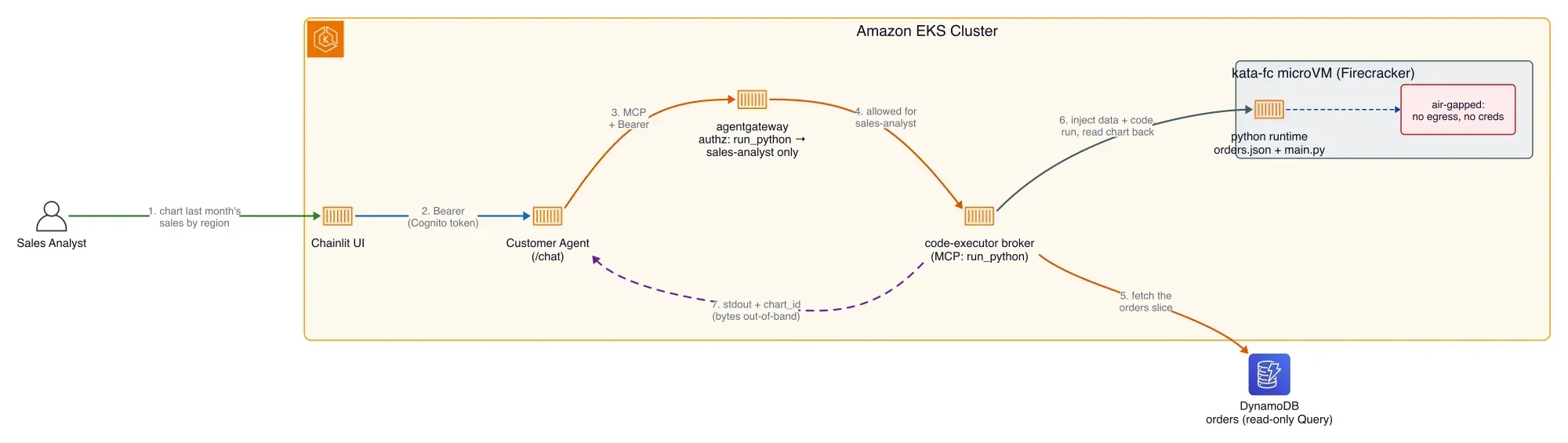
- The gatekeeper confirms David is a Sales Analyst (same deny-by-default rule, only his role may run code).
- A broker fetches just the slice of orders needed (read-only) and drops it, plus the AI’s code, into a fresh microVM as plain files.
- The code runs, produces a chart, and the broker grabs the image.
- The microVM is destroyed.
Two things keep it airtight:
- No way out. The microVM has its network cut off completely and carries no credentials, so even malicious code has nothing to steal and nowhere to send it.
- Data goes around the model, not through it. The order rows go in as a file; the chart comes back as a short ID the agent fetches separately. The AI model never sees the raw customer data or the image bytes.
1
2
3
# running code is just another tool: only David's role may call it
matchExpressions:
  - 'mcp.tool.name == "run_python" && "sales-analyst" in jwt["cognito:groups"]'
David gets his chart inline in the chat. Sarah, with a different role, doesn’t even see the option.
And the seal is real: the microVM’s network policy lists
Egress as controlled but defines no egress rule at all, so every outbound packet is denied by default. Ask for a chart and you can watch a sandbox VM get claimed, run for a few seconds, then vanish and get replaced by a fresh one.1
2
kubectl get networkpolicy kata-fc-python-airgap -n agent-sandbox -o jsonpath='{.spec}'
# policyTypes: ["Ingress", "Egress"] (Egress is governed, but no egress rule exists, so all outbound is blocked)`
Enjoyed reading this content? Let the author know!
Your likes, comments, shares, and saves help creators reach more builders.

Loading recommendations
Loading article