
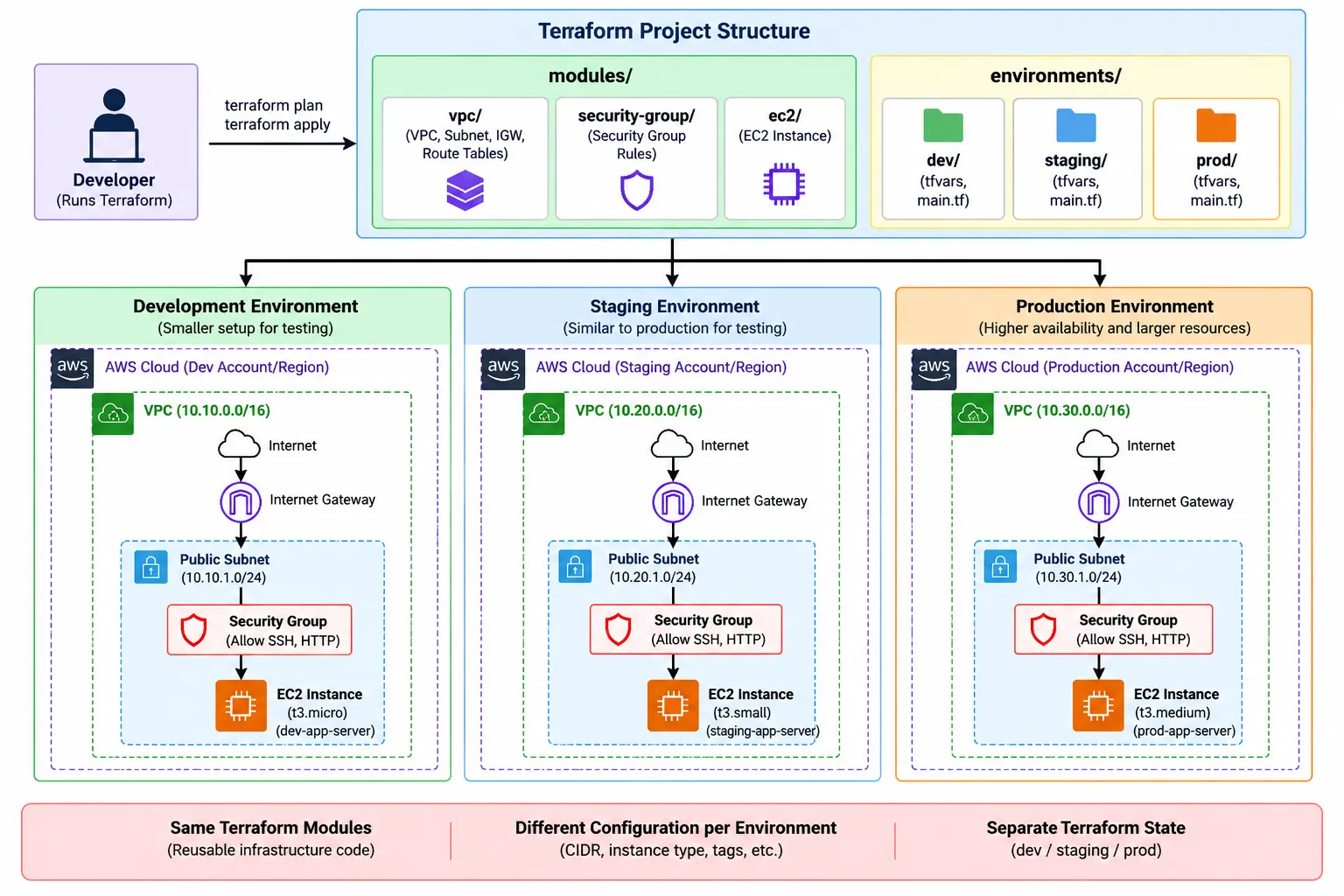
How to Build Multi-Environment AWS Infrastructure Using Terraform Modules
Learn how to build and manage Development, Staging, and Production environments on AWS using reusable Terraform modules.

When we start learning Terraform, we usually create a few resources in a single
.tf file. That works well for practice.But real projects are different.
A company may have multiple environments such as:
- Development
- Staging
- Production
Each environment may use similar AWS infrastructure, but with different configurations.
For example:
Development
- Smaller EC2 instance
- Fewer resources
- Lower cost
Production
- Larger EC2 instance
- More resources
- Higher availability
- Stronger security
Copying the same Terraform code three times is possible, but it quickly becomes difficult to maintain.
A better approach is to use Terraform Modules.
In this article, we'll understand how we can build a simple multi-environment AWS infrastructure using reusable Terraform modules.
1. What Does Multi-Environment Mean?
Suppose we are building an application.
Before releasing it to real users, we normally don't deploy every new change directly to production.
We may have:
1
Development → Staging → Production
Development
Used by developers to build and test new features.
Staging
Used to test the application in an environment similar to production.
Production
The actual environment used by customers.
The infrastructure might be similar across all three environments.
For example:
1
2
3
4
5
6
7
8
9
10
11
12
13
14
15
16
17
Development
   ├── VPC
   ├── Subnet
   ├── Security Group
   └── EC2

Staging
   ├── VPC
   ├── Subnet
   ├── Security Group
   └── EC2

Production
   ├── VPC
   ├── Subnet
   ├── Security Group
   └── EC2
Writing all of this separately creates duplicate code.
Terraform modules help solve this problem.
2. What is a Terraform Module?
A Terraform module is simply a reusable collection of Terraform files.
Think of a module like a reusable template.
For example, instead of writing the code to create an EC2 instance again and again, we can create an EC2 module once.
1
2
3
4
5
EC2 Module
     ↓
Development
Staging
Production
All three environments can use the same module but provide different values.
For example:
1
2
3
Dev  → t3.micro
Stage → t3.small
Prod → t3.medium
The logic remains the same.
Only the configuration changes.
This is one of the biggest advantages of Terraform modules.
3. Why Use Modules?
Without modules, our project might look like:
1
2
3
4
5
6
7
8
9
10
11
dev_ec2.tf
dev_vpc.tf
dev_security_group.tf

stage_ec2.tf
stage_vpc.tf
stage_security_group.tf

prod_ec2.tf
prod_vpc.tf
prod_security_group.tf
There would be a lot of repeated code.
With modules, we can organize it like:
1
2
3
4
5
6
7
8
9
modules/
    vpc/
    ec2/
    security-group/

environments/
    dev/
    staging/
    prod/
Now the infrastructure logic exists inside
modules/, while each environment contains its own configuration.This makes our infrastructure:
- Reusable
- Easier to understand
- Easier to maintain
- More consistent
- Easier to scale
4. Project Architecture
For this example, imagine that we want to deploy:
1
2
3
4
5
6
7
8
9
10
11
Internet
   |
Internet Gateway
   |
   VPC
   |
Public Subnet
   |
Security Group
   |
EC2 Instance
We will create reusable modules for the infrastructure and use them across our environments.
5. Recommended Project Structure
Our Terraform project could look like this:
1
2
3
4
5
6
7
8
9
10
11
12
13
14
15
16
17
18
19
20
21
22
23
24
25
26
27
terraform-aws-multi-env/
│
├── modules/
│   │
│   ├── vpc/
│   │   ├── main.tf
│   │   ├── variables.tf
│   │   └── outputs.tf
│   │
│   └── ec2/
│       ├── main.tf
│       ├── variables.tf
│       └── outputs.tf
│
└── environments/
    │
    ├── dev/
    │   ├── main.tf
    │   ├── variables.tf
    │   ├── terraform.tfvars
    │   └── provider.tf
    │
    ├── staging/
    │   └── ...
    │
    └── prod/
        └── ...
There are two important sections.
modules/
Contains reusable infrastructure code.
environments/
Contains configuration for each environment.
So you can think of it as:
1
2
3
Modules = HOW infrastructure is created

Environment = WHAT configuration should be used
This simple idea makes Terraform projects much easier to understand.
6. Creating the VPC Module
Let's start with a simple VPC module.
Inside:
1
modules/vpc/main.tf
we can write:
1
2
3
4
5
6
7
8
9
10
11
12
13
14
15
16
17
18
19
resource "aws_vpc" "main" {
  cidr_block = var.vpc_cidr

  tags = {
    Name        = "${var.environment}-vpc"
    Environment = var.environment
  }
}

resource "aws_subnet" "public" {
  vpc_id                  = aws_vpc.main.id
  cidr_block              = var.public_subnet_cidr
  map_public_ip_on_launch = true

  tags = {
    Name        = "${var.environment}-public-subnet"
    Environment = var.environment
  }
}
Notice that we haven't hardcoded values such as:
1
10.0.0.0/16
Instead, we use variables.
7. Define Module Variables
Inside:
1
modules/vpc/variables.tf
we define:
1
2
3
4
5
6
7
8
9
10
11
12
13
14
variable "vpc_cidr" {
  description = "CIDR block for the VPC"
  type        = string
}

variable "public_subnet_cidr" {
  description = "CIDR block for the public subnet"
  type        = string
}

variable "environment" {
  description = "Environment name"
  type        = string
}
Now every environment can send different values to this module.
8. Create Outputs
Sometimes another module needs information about resources created by our VPC module.
For example, our EC2 module may need the subnet ID.
We can expose it using outputs.
Inside:
1
modules/vpc/outputs.tf
write:
1
2
3
4
5
6
7
output "vpc_id" {
  value = aws_vpc.main.id
}

output "public_subnet_id" {
  value = aws_subnet.public.id
}
Now other parts of our Terraform configuration can use these values.
9. Create the EC2 Module
Next, let's create an EC2 module.
Inside:
1
modules/ec2/main.tf
we can write:
1
2
3
4
5
6
7
8
9
10
resource "aws_instance" "app" {
  ami           = var.ami_id
  instance_type = var.instance_type
  subnet_id     = var.subnet_id

  tags = {
    Name        = "${var.environment}-app-server"
    Environment = var.environment
  }
}
Then define the variables.
Inside:
1
modules/ec2/variables.tf
1
2
3
4
5
6
7
8
9
10
11
12
13
14
15
variable "ami_id" {
type = string
}
variable "instance_type" {
type = string
}
variable "subnet_id" {
type = string
}
variable "environment" {
type = string
}Again, the EC2 module doesn't care whether it is being used for development, staging, or production.
It simply receives values and creates the resource.
10. Configure the Development Environment
Now let's use our modules.
Inside:
1
environments/dev/main.tf
we can write:
1
2
3
4
5
6
7
8
9
10
11
12
13
14
15
16
module "vpc" {
  source = "../../modules/vpc"

  vpc_cidr           = var.vpc_cidr
  public_subnet_cidr = var.public_subnet_cidr
  environment        = "dev"
}

module "ec2" {
  source = "../../modules/ec2"

  ami_id        = var.ami_id
  instance_type = var.instance_type
  subnet_id     = module.vpc.public_subnet_id
  environment   = "dev"
}
Notice this line:
1
subnet_id = module.vpc.public_subnet_id
The VPC module creates the subnet.
It returns the subnet ID through an output.
The EC2 module then uses that subnet ID.
So the flow becomes:
1
2
3
4
5
6
7
8
9
10
VPC Module
    |
Creates Subnet
    |
Returns Subnet ID
    |
    ↓
EC2 Module
    |
Creates EC2 inside that subnet
This is how different Terraform modules can work together.
11. Use terraform.tfvars for Environment Values
Now we need to provide actual values.
For development:
1
environments/dev/terraform.tfvars
could contain:
1
2
3
4
5
6
vpc_cidr           = "10.10.0.0/16"
public_subnet_cidr = "10.10.1.0/24"

instance_type = "t3.micro"

ami_id = "your-ami-id"
For staging:
1
2
3
4
5
6
vpc_cidr           = "10.20.0.0/16"
public_subnet_cidr = "10.20.1.0/24"

instance_type = "t3.small"

ami_id = "your-ami-id"
And production:
1
2
3
4
5
6
vpc_cidr           = "10.30.0.0/16"
public_subnet_cidr = "10.30.1.0/24"

instance_type = "t3.medium"

ami_id = "your-ami-id"
Now all environments use the same modules.
But their configurations are different.
That's the main idea behind our multi-environment architecture.
12. Configure the AWS Provider
Inside each environment, we can configure the AWS provider.
For example:
1
2
3
4
5
6
7
8
9
10
11
terraform {
  required_providers {
    aws = {
      source  = "hashicorp/aws"
    }
  }
}

provider "aws" {
  region = "ap-south-1"
}
We should avoid putting AWS access keys directly inside Terraform files.
Instead, use secure authentication methods supported by AWS and Terraform, such as configured AWS credentials, temporary credentials, or IAM roles depending on where Terraform is running.
13. Deploy the Development Environment
Now enter the development directory:
1
cd environments/dev
Initialize Terraform:
1
terraform init
Terraform will download the required provider and initialize the modules.
Next, check the configuration:
1
terraform validate
Then see what Terraform is planning to create:
1
terraform plan
Finally:
1
terraform apply
Terraform will create the development infrastructure.
14. Deploy Staging and Production
The same process can be followed for staging.
1
2
3
4
5
cd environments/staging

terraform init
terraform plan
terraform apply
And production:
1
2
3
4
5
cd environments/prod

terraform init
terraform plan
terraform apply
The important point is that we didn't rewrite the VPC and EC2 logic.
We reused our modules.
15. Understanding the Complete Flow
Our architecture now looks something like this:
1
2
3
4
5
6
7
8
9
10
11
12
13
                     Terraform Modules
                           |
             -----------------------------
             |                           |
          VPC Module                 EC2 Module
             |                           |
     -----------------                   |
     |       |       |                   |
    Dev    Stage    Prod                 |
     |       |       |                   |
     -----------------                   |
             |                           |
             └──── Module Outputs ───────┘
Or in simpler terms:
1
2
3
4
5
6
7
                  Reusable Modules
                        |
          --------------------------------
          |              |               |
         DEV          STAGING           PROD
          |              |               |
       AWS Infra       AWS Infra       AWS Infra
Same infrastructure logic.
Different configurations.
16. But What About Terraform State?
This is where multi-environment projects become especially important.
Terraform uses a state file to keep track of the infrastructure it manages.
By default, Terraform creates:
1
terraform.tfstate
For a personal learning project, local state may be enough.
But for a real team project, keeping important Terraform state only on one person's laptop is risky.
A better architecture is to use remote state.
Historically, a common AWS setup has been:
1
2
3
4
5
6
Terraform
    |
    ↓
Amazon S3
    |
Stores Terraform State
The important part is that each environment should have its own state.
For example:
1
2
3
4
5
dev       → dev/terraform.tfstate

staging   → staging/terraform.tfstate

production → prod/terraform.tfstate
This isolation is important.
A change in the development environment should not accidentally modify production resources.
Remote state also makes it easier for teams and automation systems to work with Terraform.
17. Why Environment Isolation Matters
Imagine development and production using the same state.
A developer makes a change:
1
terraform destroy
If everything is mixed together, this could become dangerous.
Instead, we want:
1
2
3
4
5
6
7
8
9
10
11
12
13
14
15
16
17
DEV
 |
State
 |
Development Resources

STAGING
 |
State
 |
Staging Resources

PRODUCTION
 |
State
 |
Production Resources
Each environment should be independently manageable.
18. Don't Put Secrets in Terraform Code
Another important rule is:
Never hardcode secrets inside your Terraform files.
Avoid things like:
1
2
access_key = "..."
secret_key = "..."
Also avoid committing sensitive
.tfvars files or state files to public Git repositories.Remember that Terraform state can contain sensitive information depending on the resources you manage.
Your
.gitignore should normally exclude files that should not be committed, such as:1
2
3
4
.terraform/
*.tfstate
*.tfstate.*
*.tfvarsBe careful, however: whether all
.tfvars files should be ignored depends on how your project stores configuration. Non-secret example variable files can safely be version controlled.19. Development vs Production Configuration
One of the biggest advantages of this architecture is that environments don't have to be identical.
For example:
| Configuration | Development | Production |
|---|---|---|
| EC2 size | Smaller | Larger |
| Number of instances | Fewer | Multiple |
| Monitoring | Basic | Detailed |
| High availability | Optional | Important |
| Backup | Basic | Strong backup strategy |
| Cost focus | Very high | Balanced with reliability |
| Security | Strong | Strong + stricter controls |
The modules can remain reusable while environment-specific values control how infrastructure is created.
20. Common Mistakes to Avoid
When building multi-environment Terraform infrastructure, beginners commonly make a few mistakes.
Hardcoding Everything
Avoid:
1
instance_type = "t3.micro"
inside reusable modules when different environments may require different values.
Use variables instead.
Copy-Pasting Infrastructure
Don't maintain separate copies of almost identical infrastructure unless there is a genuine architectural reason.
Use reusable modules.
Mixing State
Keep state isolated between environments.
Production and development should not accidentally share the same Terraform state.
Committing Secrets
Never push AWS credentials or sensitive Terraform data to GitHub.
Giving Terraform Excessive AWS Permissions
Terraform needs permissions to create infrastructure, but that doesn't automatically mean it should receive unrestricted administrator access forever.
Follow the principle of least privilege wherever practical.
Applying Without Reviewing the Plan
Always check:
1
terraform plan
before applying important infrastructure changes.
For production environments, reviewing the plan becomes even more important.
21. How This Architecture Can Grow
Our example is intentionally simple.
A real project could have modules such as:
1
2
3
4
5
6
7
8
9
10
modules/
│
├── vpc/
├── ec2/
├── alb/
├── security-group/
├── rds/
├── s3/
├── iam/
└── monitoring/
Then environments could use them like:
1
2
3
4
5
6
7
8
9
10
11
12
13
14
                    Terraform
                        |
                 Reusable Modules
                        |
        --------------------------------
        |              |               |
       DEV          STAGING           PROD
        |              |               |
        ↓              ↓               ↓
      VPC            VPC             VPC
      EC2            EC2             EC2
      ALB            ALB             ALB
      RDS            RDS             RDS
      IAM            IAM             IAM
As the infrastructure grows, modules help keep the project organized.
22. A Real-World Deployment Flow
Once we understand the basics, this architecture can also be connected with CI/CD.
For example:
1
2
3
4
5
6
7
8
9
10
11
12
13
14
15
16
17
18
19
Developer
    |
    ↓
Git Repository
    |
    ↓
CI/CD Pipeline
    |
    ↓
Terraform Plan
    |
    ↓
Review / Approval
    |
    ↓
Terraform Apply
    |
    ↓
AWS Infrastructure
This means infrastructure changes can follow a controlled process similar to application code.
This idea is known as Infrastructure as Code (IaC).
Instead of manually creating everything from the AWS Console, infrastructure is defined and managed through code.
23. Key Lessons
If you remember only a few things from this article, remember these:
1. Don't repeat infrastructure code unnecessarily.
Create reusable Terraform modules.
Create reusable Terraform modules.
2. Keep environments separate.
Development, staging, and production should have independent configurations and state.
Development, staging, and production should have independent configurations and state.
3. Use variables.
Let each environment provide its own values.
Let each environment provide its own values.
4. Use outputs.
Outputs allow modules to share required information.
Outputs allow modules to share required information.
5. Protect Terraform state.
For serious projects, use an appropriate remote state setup and proper access controls.
For serious projects, use an appropriate remote state setup and proper access controls.
6. Never hardcode AWS credentials.
7. Always review
terraform plan before applying important changes.8. Follow least privilege when giving Terraform access to AWS.
Conclusion
Building multiple AWS environments doesn't mean we need to write the same Terraform code again and again.
Terraform modules allow us to create reusable infrastructure components and use them across development, staging, and production.
The basic idea is simple:
1
2
3
4
5
6
7
8
9
Write Infrastructure Once
          ↓
Create Reusable Modules
          ↓
Provide Different Configuration
          ↓
--------------------------------
|              |               |
DEV         STAGING           PROD
This approach makes infrastructure cleaner, more consistent, easier to maintain, and easier to scale.
If you're learning Terraform, don't stop after creating a single EC2 instance.
Try building the same infrastructure for multiple environments.
Start with:
1
2
3
4
5
6
7
VPC
 ↓
Subnet
 ↓
Security Group
 ↓
EC2
Then separate it into modules and create development, staging, and production environments.
Once you understand that pattern, you have moved from simply learning Terraform commands to understanding how Terraform can be structured for real infrastructure projects.
Enjoyed reading this content? Let the author know!
Your likes, comments, shares, and saves help creators reach more builders.

Loading recommendations
Loading article