
AWS Secures the Garage, You Lock the Car: The Shared Responsibility Model
Assuming a managed cloud service is automatically secure is a dangerous miscalculation. Learn exactly where AWS’s protection ends, what your team must configure, and the automated tools you need to lock down your infrastructure.

The Most Expensive Assumption in Cloud Architecture (And How to Fix It)
You hand your car keys to a valet. You expect them to park the car safely. You do not expect them to buckle your kids in the back seat.
AWS is the valet.
When you start building in the cloud, it is easy to assume the provider handles everything. You deploy your first managed EKS cluster or set up a Fargate task, and a false sense of security sets in. You think AWS has your back.
Spoiler: They only have half of it.
The biggest mistake cloud operators make isn't writing bad code. It is fundamentally misunderstanding the AWS Shared Responsibility Model. If you get this wrong, your flawless infrastructure becomes a liability.
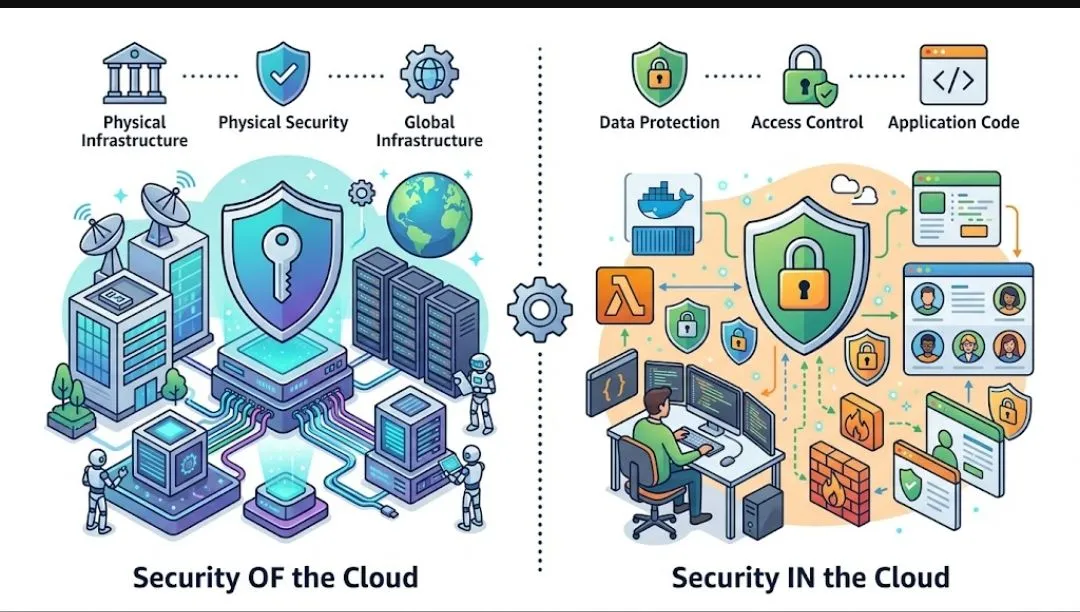
AWS Secures the Cloud. You Secure What is IN the Cloud.
Think of AWS as the landlord of a high tech office building. They guarantee the foundation is solid. They hire security guards for the lobby. They make sure the power stays on.
But if you leave your office door unlocked and someone walks out with your laptop? That is on you.
Security OF the Cloud (The Landlord)
AWS protects the infrastructure that runs all the services offered in the AWS Cloud.
AWS protects the infrastructure that runs all the services offered in the AWS Cloud.
- Compute hardware
- Physical data centers
- Global network infrastructure
- The hypervisor layer
Security IN the Cloud (The Tenant)
You are responsible for the workloads you build on top of that foundation.
You are responsible for the workloads you build on top of that foundation.
- Customer data encryption
- IAM policies and access management
- Operating system patching (using tools like Systems Manager)
- Network traffic routing and firewall configurations
The Cloud Native Twist: The Line Shifts
The Shared Responsibility Model is not a static line. It moves depending on the services you choose to architect.
When you spin up a bare metal EC2 instance, you own almost everything. You are the one patching the OS, configuring the network rules, and securing the data.
But when you adopt cloud native managed services, AWS takes on more of the heavy lifting. If you use Fargate or SQS, AWS manages the underlying infrastructure, the operating system, and the platform. You simply manage the data, the endpoints, and who has access to the queues.
This shifting line is exactly what I emphasize when helping junior engineers prepare for their architecture certifications. Passing an exam proves you know the services exist. Understanding the shared responsibility model proves you know how to keep them out of the headlines.
Clarity on this model dictates your entire security posture. It tells you exactly where to focus your engineering effort. Stop worrying about the physical data center, and start auditing your IAM roles.

You pay for a spot in a high-security parking garage. You expect the perimeter to be guarded and the cameras to be rolling. You do not expect the attendant to roll up your windows, lock your doors, and hide your laptop in the trunk.
AWS secures the garage. You must lock the car.
When you start building in the cloud, it is easy to assume the provider handles everything. You deploy a standard EC2 instance or spin up an EKS cluster, and a false sense of security sets in. You think AWS has your back.
Spoiler: They only have half of it.
The biggest mistake cloud operators make isn't writing bad code. It is fundamentally misunderstanding the AWS Shared Responsibility Model. If you get this wrong, your flawless infrastructure becomes a liability.
The Cost of Getting It Wrong
The title of this post promises the "most expensive" assumption. Let's look at the receipts.
In 2019, Capital One suffered a breach exposing 100 million customer records. It wasn't because AWS data centers were compromised. A hacker exploited a Server-Side Request Forgery (SSRF) vulnerability, which was exacerbated by an over-permissive IAM role attached to an EC2 instance WAF. That role allowed the attacker to read sensitive S3 buckets.
AWS did its job perfectly. The customer's configuration failed.
This isn't an isolated incident. Publicly exposed S3 buckets and AWS access keys hardcoded into public GitHub repositories have caused billions of dollars in reputational and regulatory damage across the industry. Gartner predicts that through 2025, 99% of cloud security failures will be the customer's fault.
You cannot outsource your accountability.
The 3 Tiers of Control
To stop playing guessing games with security, you need to understand how AWS categorizes operational controls. There are three layers:
- Inherited Controls: These are controls AWS fully owns. You inherit their physical and environmental security. You don't need to worry about the locks on the data center doors or the cooling systems.
- Shared Controls: This is where the confusion lives. Both you and AWS have a role here. Think of patch management. AWS patches the underlying infrastructure; you must patch your guest OS and applications. Think of training. AWS trains its employees; you are responsible for training your developers.
- Customer-Specific Controls: This is entirely on you. Application security, routing rules, and Identity and Access Management (IAM) are your domain alone.
The Line Shifts: Infrastructure vs. Abstracted Services
The Shared Responsibility Model is not a static line. It moves depending on the services you architect.
Infrastructure Services (EC2, VPC)
When you spin up a standard EC2 instance, you own almost everything above the hypervisor. You patch the OS, configure the network rules, and secure the data. (And if you run an EC2
.metal instance, there isn't even an AWS hypervisor in play, shifting the line even further).Container & Managed Services (EKS, RDS)
EKS is the perfect example of shared responsibility in action. AWS manages the Kubernetes control plane (the API server and etcd). But unless you are using Fargate, you own the worker nodes. You are responsible for OS patching, pod security standards, RBAC, network policies, and managing your secrets.
Abstracted Services (S3, DynamoDB, SQS)
Here, AWS manages the infrastructure, the operating system, and the platform. You simply manage the data, the resource policies, and the IAM access.
Who Owns What: A Quick Reference
| Service Type | AWS Responsibility | Your Responsibility |
|---|---|---|
| Standard EC2 | Physical security, network backbone, hypervisor | Guest OS, app software, firewall (Security Groups), IAM, data |
| Managed EKS | Control plane (API server, etcd), infra scaling | Worker node OS, Pod security, RBAC, container images |
| AWS Lambda | Underlying infrastructure, OS, runtime environment | Application code, execution roles (IAM), dependencies |
| Amazon S3 | Storage infrastructure, durability, basic availability | Bucket policies, public access blocks, data encryption |
The Compliance Reality Check
Let's address the audit room. If you are pursuing SOC 2, HIPAA, or PCI DSS, you might think hosting on AWS gives you an automatic pass. It does not.
Tools like AWS Artifact are phenomenal for downloading AWS's compliance reports. You can hand the auditor proof that the AWS data center is SOC 2 compliant. But the auditor will immediately turn to you and ask for proof that your application is SOC 2 compliant. AWS's attestations do not transfer to your poorly secured workloads.
How to Fix It: Architectures That Defend Themselves
I was auditing a mid-sized SaaS company’s environment recently. They had a beautiful, highly available microservices architecture. But their default security groups were wide open, and their developers had wildcard
"*" permissions on production S3 buckets. They built a fortress with paper doors.We didn't just write new policies. We implemented automated tools to enforce the Shared Responsibility Model for them. Here is the toolkit you need to stop guessing and start governing:
- AWS Organizations Service Control Policies (SCPs): Set immutable guardrails. Prevent anyone from disabling CloudTrail or making S3 buckets public, regardless of their local IAM permissions.
- Amazon S3 Block Public Access (BPA): Turn this on at the account level. It is the easiest win in cloud security.
- AWS KMS: Implement default encryption at rest across all datastores.
- IAM Access Analyzer: Use math to prove your policies adhere to least privilege and identify unused roles.
- Amazon GuardDuty: Turn on intelligent threat detection to monitor CloudTrail, VPC Flow Logs, and DNS logs for malicious activity.
- Amazon Inspector: Automate vulnerability management and vulnerability scanning for your EC2 and ECR container images.
- AWS Security Hub & AWS Config: Continuously monitor your posture against benchmarks like the CIS AWS Foundations Benchmark.
5 Things to Do This Monday
Don't wait for an audit or an incident. When you log in next week, execute this checklist:
- Enable S3 Block Public Access at the account level.
- Turn on Amazon GuardDuty (it takes one click and 30 seconds).
- Review your AWS Config dashboard to identify unencrypted EBS volumes.
- Run IAM Access Analyzer to find roles that haven't been used in 90 days, and delete them.
- Verify that AWS CloudTrail is enabled in all regions, not just the ones you actively deploy to.
Clarity beats cleverness in cloud operations. Stop assuming the platform handles it all. Start auditing your IAM, encrypting your data, locking down your network boundaries, and actively monitoring your logs.
Own your half of the model.
For the definitive, technical breakdown, read the Official AWS Shared Responsibility Model Documentation .
Enjoyed reading this content? Let the author know!
Your likes, comments, shares, and saves help creators reach more builders.

Loading recommendations
Loading article