
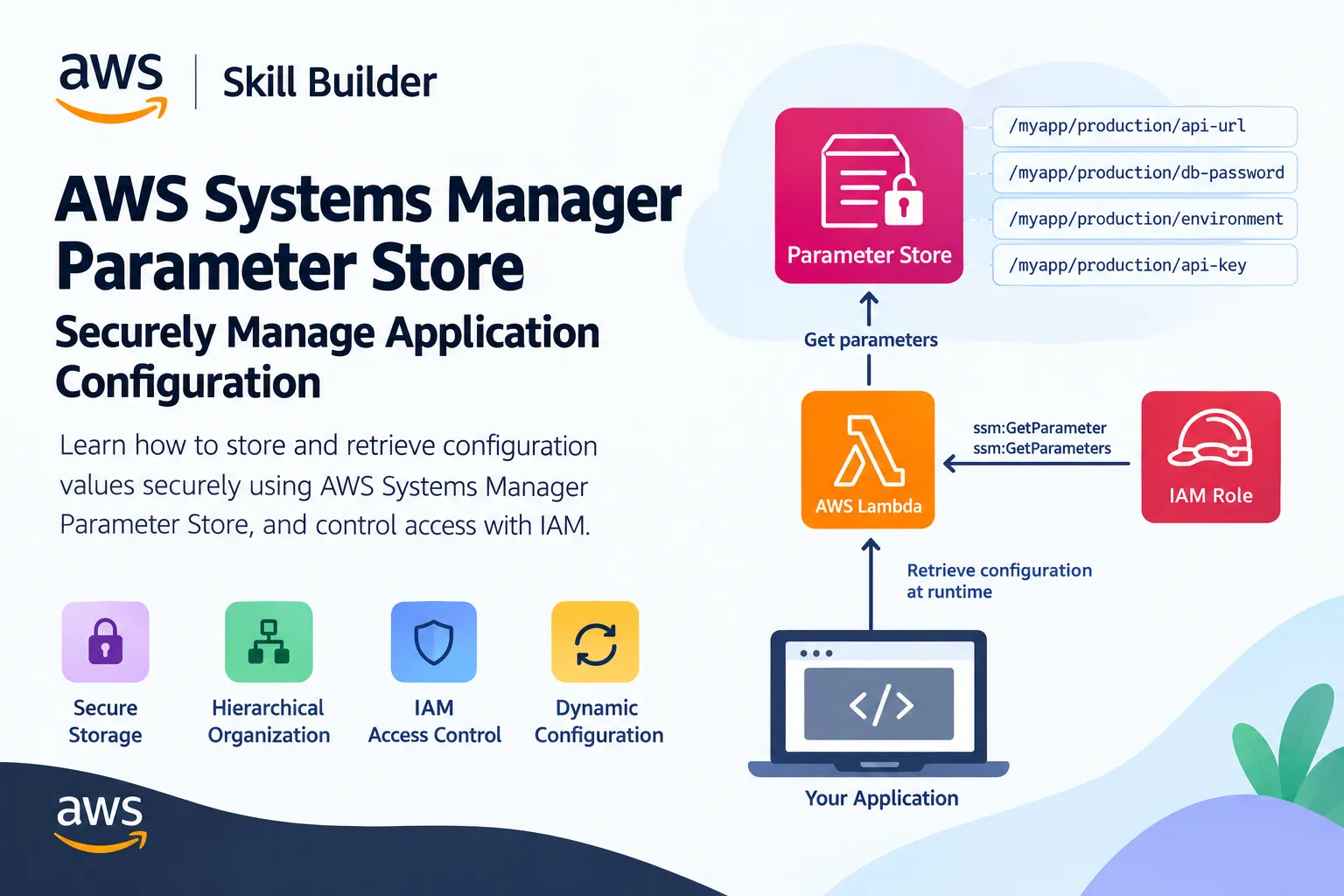
AWS Systems Manager Parameter Store: Securely Manage Application Configuration
Learn how to use AWS Systems Manager Parameter Store to securely store, organize, and retrieve application configuration. This hands-on guide covers String and SecureString parameters, parameter hierarchies, IAM permissions, AWS CLI commands, Lambda integration, parameter versioning, security best practices, and common mistakes.


Managing configuration is a common challenge when building applications in the cloud.
Database endpoints, API URLs, feature flags, environment names, and other configuration values should not be hard-coded directly into application code. Sensitive values such as passwords and API keys also need to be protected carefully.
AWS provides AWS Systems Manager Parameter Store to help applications store and retrieve configuration data securely.
In this hands-on tutorial, we'll build a simple configuration-management workflow using:
- AWS Systems Manager Parameter Store — stores application configuration.
- AWS IAM — controls who or what can read parameters.
- AWS CLI — creates and retrieves parameters.
- AWS Lambda — demonstrates how an application can retrieve configuration at runtime.
The resulting architecture looks like this:
1
2
3
4
5
6
7
8
9
10
11
12
13
14
15
16
17
18
19
20
21
22
23
24
25
26
27
28
                    ┌─────────────────────────┐
                    │   AWS Systems Manager   │
                    │    Parameter Store      │
                    │                         │
                    │  /myapp/environment     │
                    │  /myapp/api-url         │
                    │  /myapp/database-name   │
                    │  /myapp/api-key         │
                    └────────────┬────────────┘
                                 │
                           Read parameter
                                 │
                                 ▼
                    ┌─────────────────────────┐
                    │       AWS Lambda        │
                    │                         │
                    │  Application Logic      │
                    └────────────┬────────────┘
                                 │
                         IAM permissions
                                 │
                                 ▼
                    ┌─────────────────────────┐
                    │       AWS IAM Role      │
                    │                         │
                    │  ssm:GetParameter       │
                    │  ssm:GetParameters      │
                    └─────────────────────────┘
What Is Parameter Store?
AWS Systems Manager Parameter Store provides a centralized place to store configuration values and secrets.
Instead of putting configuration directly inside your application:
1
2
API_URL = "https://api.example.com"
ENVIRONMENT = "production"
you can store these values as parameters:
1
2
/myapp/production/api-url
/myapp/production/environment
Your application retrieves them when it needs them.
This provides several advantages:
- Configuration is separated from application code.
- Values can be changed without modifying the application.
- IAM can control access.
- Parameters can be organized hierarchically.
- Sensitive parameters can be encrypted.
- Applications can retrieve configuration at runtime.
1. Create Parameters
Let's create a few parameters for a sample application.
We'll use the AWS CLI.
First, create a normal string parameter:
1
2
3
4
aws ssm put-parameter \
  --name "/myapp/production/environment" \
  --type "String" \
  --value "production"
Now create an API URL:
1
2
3
4
aws ssm put-parameter \
  --name "/myapp/production/api-url" \
  --type "String" \
  --value "https://api.example.com"
You can verify the parameter:
1
2
aws ssm get-parameter \
  --name "/myapp/production/environment"
The response will look similar to:
1
2
3
4
5
6
7
{
    "Parameter": {
        "Name": "/myapp/production/environment",
        "Type": "String",
        "Value": "production"
    }
}
2. Organize Parameters with Hierarchies
One useful feature of Parameter Store is hierarchical naming.
For example:
1
2
3
4
5
6
7
8
/myapp/development/api-url
/myapp/development/environment

/myapp/staging/api-url
/myapp/staging/environment

/myapp/production/api-url
/myapp/production/environment
This makes it easier to separate configuration between environments.
A larger application might use:
1
/company/product/service/environment/parameter
For example:
1
2
3
/mycompany/orders/api/production/database-host
/mycompany/orders/api/production/database-port
/mycompany/orders/api/production/log-level
This structure makes parameters easier to manage as an application grows.
3. Store Sensitive Values Securely
Not every configuration value is public.
For example:
1
2
3
database-password
api-key
authentication-token
should not be stored as ordinary
String parameters.Parameter Store supports:
1
2
3
String
StringList
SecureString
For sensitive configuration, use
SecureString.For example:
1
2
3
4
aws ssm put-parameter \
  --name "/myapp/production/api-key" \
  --type "SecureString" \
  --value "my-secret-api-key"
The value is encrypted rather than stored as an ordinary plaintext parameter.
You can retrieve it with:
1
2
3
aws ssm get-parameter \
  --name "/myapp/production/api-key" \
  --with-decryption
The important distinction is:
1
2
3
4
5
6
7
String
   ↓
Normal configuration

SecureString
   ↓
Sensitive configuration
4. Give Applications Permission to Read Parameters
Creating a parameter does not automatically allow every AWS service or user to read it.
This is where AWS IAM becomes important.
Suppose a Lambda function needs to read:
1
/myapp/production/api-url
Its execution role needs permission to call:
1
ssm:GetParameter
A minimal IAM policy could look like:
1
2
3
4
5
6
7
8
9
10
11
12
{
  "Version": "2012-10-17",
  "Statement": [
    {
      "Effect": "Allow",
      "Action": [
        "ssm:GetParameter"
      ],
      "Resource": "arn:aws:ssm:REGION:ACCOUNT_ID:parameter/myapp/production/api-url"
    }
  ]
}
Replace:
1
2
REGION
ACCOUNT_ID
with the appropriate values for your AWS account.
This follows an important security principle:
Give an application only the permissions it actually needs.
Avoid giving an application unrestricted access such as:
1
ssm:*
when it only needs to read one parameter.
5. Retrieve Parameters from Lambda
Now let's see how an application can use Parameter Store.
Create a Lambda function using Python.
1
2
3
4
5
6
7
8
9
10
11
12
13
14
15
16
import boto3

ssm = boto3.client("ssm")

def lambda_handler(event, context):

    response = ssm.get_parameter(
        Name="/myapp/production/environment"
    )

    environment = response["Parameter"]["Value"]

    return {
        "statusCode": 200,
        "body": f"Running in {environment}"
    }
The Lambda function calls:
1
2
3
4
5
6
7
SSM Parameter Store
       ↓
get_parameter()
       ↓
Parameter value
       ↓
Application logic
The application code doesn't need to contain the configuration value itself.
6. Retrieve an Encrypted Parameter
For a
SecureString, request decryption:1
2
3
4
5
6
7
8
9
10
11
12
13
14
15
16
17
import boto3
ssm = boto3.client("ssm")
def lambda_handler(event, context):
response = ssm.get_parameter(
Name="/myapp/production/api-key",
WithDecryption=True
)
api_key = response["Parameter"]["Value"]
return {
"statusCode": 200,
"body": "Configuration loaded successfully"
}Notice that we don't return the API key in the response.
That's important.
Avoid code such as:
1
2
3
return {
    "api_key": api_key
}
because sensitive values can accidentally appear in application responses, logs, or debugging output.
7. Retrieve Multiple Parameters
Applications often need several configuration values.
Instead of making multiple individual calls, you can retrieve several parameters together.
For example:
1
2
3
4
5
6
7
8
9
response = ssm.get_parameters(
    Names=[
        "/myapp/production/environment",
        "/myapp/production/api-url"
    ]
)

for parameter in response["Parameters"]:
    print(parameter["Name"])
For encrypted parameters:
1
2
3
4
5
6
response = ssm.get_parameters(
    Names=[
        "/myapp/production/api-key"
    ],
    WithDecryption=True
)
This can simplify configuration loading when an application requires multiple values.
8. Retrieve Parameters by Path
When parameters follow a hierarchy, you can retrieve parameters recursively.
For example:
1
2
3
/myapp/production/environment
/myapp/production/api-url
/myapp/production/log-level
You can retrieve parameters under the path:
1
2
3
4
5
6
7
response = ssm.get_parameters_by_path(
    Path="/myapp/production/",
    Recursive=True
)

for parameter in response["Parameters"]:
    print(parameter["Name"])
This is useful for applications with many configuration values.
9. Use the AWS Console
You can also manage parameters without the CLI.
Open the AWS Management Console and navigate to:
1
2
3
Systems Manager
      ↓
Parameter Store
Choose:
1
Create parameter
Then provide:
1
2
3
4
5
6
7
8
Name:
 /myapp/production/environment

Type:
 String

Value:
 production
For sensitive data, select:
1
SecureString
You can then view, update, or delete parameters from the console.
10. Updating Configuration
One of the biggest advantages of externalized configuration is that your application code doesn't need to contain the configuration value.
Suppose the API URL changes:
1
2
3
4
5
Old:
https://api.example.com

New:
https://api-new.example.com
You can update the parameter:
1
2
3
4
5
aws ssm put-parameter \
  --name "/myapp/production/api-url" \
  --type "String" \
  --value "https://api-new.example.com" \
  --overwrite
The parameter now contains the new value.
Your application can retrieve the updated configuration without changing the source code.
However, applications that cache configuration values may need to be restarted or have their cache refreshed before they see the new value.
11. Add Versioning
Parameter Store maintains versions when parameters are updated.
For example:
1
2
3
4
5
6
7
Parameter
   │
   ├── Version 1
   │
   ├── Version 2
   │
   └── Version 3
You can inspect parameter history using the AWS CLI:
1
2
aws ssm get-parameter-history \
  --name "/myapp/production/api-url"
This can be useful when investigating configuration changes.
12. Parameter Store vs Environment Variables
A common approach is to place configuration directly into Lambda environment variables.
For example:
1
API_URL=https://api.example.com
This can work well for simple applications.
However, Parameter Store provides centralized configuration management.
A simplified comparison:
| Feature | Environment Variables | Parameter Store |
|---|---|---|
| Centralized configuration | Limited | Yes |
| IAM-controlled access | Limited | Yes |
| SecureString | No | Yes |
| Hierarchical organization | No | Yes |
| Parameter history | No | Yes |
| Shared across applications | Limited | Yes |
| Runtime retrieval | Yes | Yes |
The right approach depends on the application's requirements.
13. Security Best Practices
When using Parameter Store, keep security in mind.
Use least-privilege IAM policies
Don't give applications unrestricted Systems Manager permissions.
Prefer:
1
ssm:GetParameter
for a specific parameter or parameter path.
Use SecureString for sensitive values
For example:
1
2
3
4
API keys
Database passwords
Tokens
Private configuration
should generally not be stored as ordinary strings.
Don't print secrets
Avoid:
1
print(api_key)
or:
1
logger.info(api_key)
Secrets can accidentally end up in CloudWatch Logs or other systems.
Separate environments
Use different paths:
1
2
3
/myapp/dev/
/myapp/staging/
/myapp/production/
This reduces the chance of an application accidentally using production configuration during development.
Don't hard-code credentials
Avoid:
1
password = "MyPassword123"
Instead, retrieve sensitive configuration securely.
14. Common Mistakes
Mistake 1: Using String for secrets
Don't store sensitive credentials as ordinary strings.
Use:
1
SecureString
when appropriate.
Mistake 2: Giving Lambda ssm:*
A broad policy such as:
1
2
3
4
5
{
  "Effect": "Allow",
  "Action": "ssm:*",
  "Resource": "*"
}
gives the function far more access than it may require.
Use a narrowly scoped policy instead.
Mistake 3: Forgetting WithDecryption
For a
SecureString, this:1
2
3
ssm.get_parameter(
Name="/myapp/production/api-key"
)may not return the decrypted value.
Use:
1
2
3
4
ssm.get_parameter(
    Name="/myapp/production/api-key",
    WithDecryption=True
)
when the application needs the plaintext value.
Mistake 4: Logging sensitive configuration
Even if Parameter Store protects the value at rest, logging the decrypted value can expose it elsewhere.
Treat retrieved secrets as sensitive throughout the application.
15. A Practical Use Case
Imagine an e-commerce application with three environments:
1
2
3
Development
Staging
Production
Each environment needs:
1
2
3
4
5
API endpoint
Database host
Log level
Payment service URL
Authentication configuration
Instead of creating separate hard-coded configurations in the application, we can organize them like this:
1
2
3
4
5
6
7
8
9
10
11
/myshop/development/api-url
/myshop/development/database-host
/myshop/development/log-level

/myshop/staging/api-url
/myshop/staging/database-host
/myshop/staging/log-level

/myshop/production/api-url
/myshop/production/database-host
/myshop/production/log-level
Sensitive values can use:
1
SecureString
while non-sensitive configuration can use:
1
String
The application can then determine which environment it is running in and retrieve the appropriate parameters.
This creates a clean separation:
1
2
3
4
5
6
7
8
9
Application Code
       │
       │ configuration request
       ▼
Parameter Store
       │
       │ parameter value
       ▼
ApplicationEnjoyed reading this content? Let the author know!
Your likes, comments, shares, and saves help creators reach more builders.

Loading recommendations
Loading article