
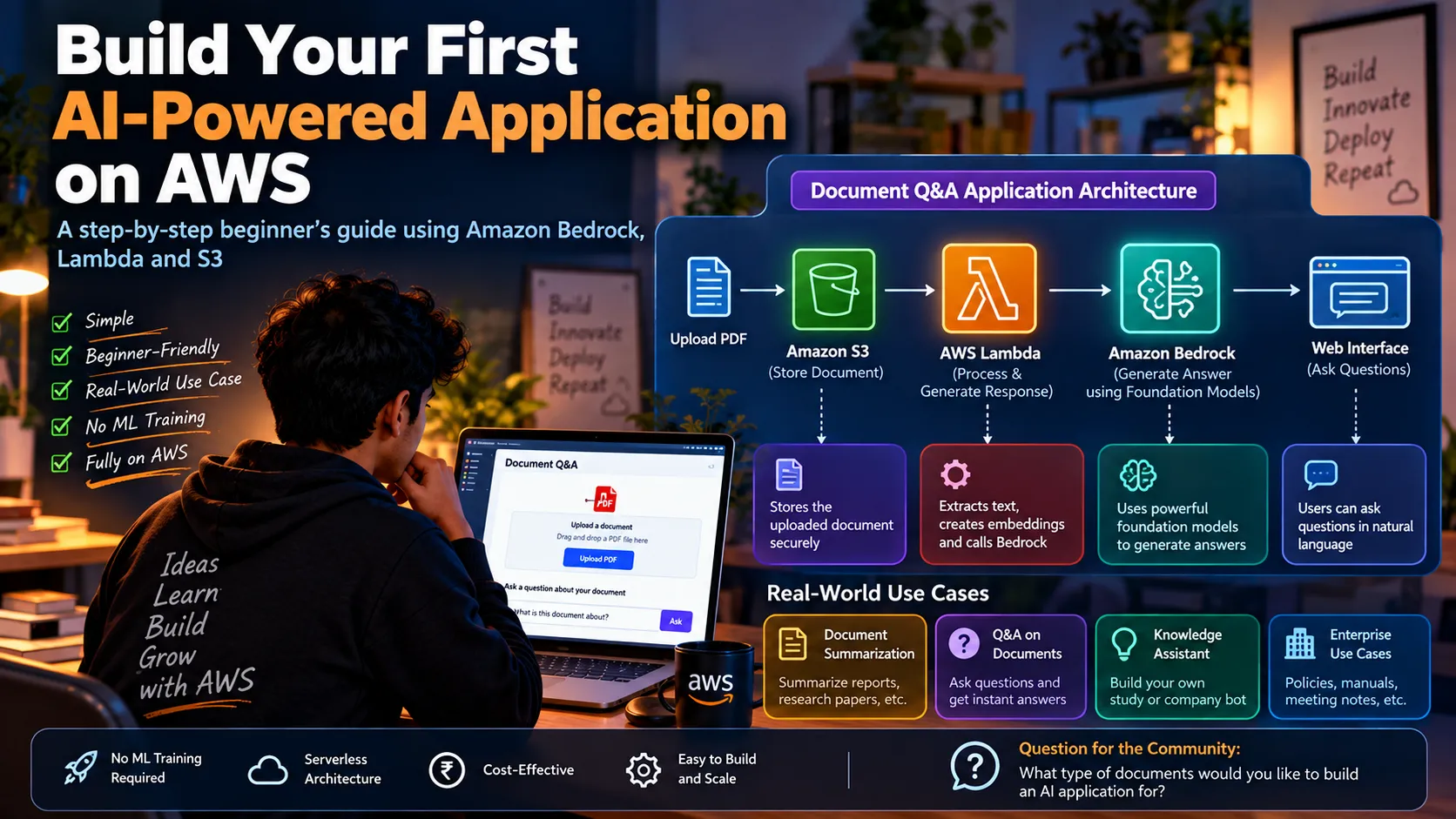
Build Your First AI-Powered Application on AWS
A beginner-friendly guide using Amazon Bedrock, Lambda, and S3 AI applications can sound complicated. You might think you need to train a machine-learning model, build a huge infrastructure, or understand advanced mathematics before you can create one. But that's not necessarily the case. With AWS, you can combine managed services to build an AI-powered application without training your own model. Let's imagine a simple project: Upload a document → Ask questions about it → Get an AI-generated answer.

🏗️ The Architecture
1
2
3
4
5
6
7
8
9
10
11
12
13
14
15
16
17
       Upload Document
              │
              ▼
        Amazon S3
              │
              ▼
        AWS Lambda
              │
              ▼
       Amazon Bedrock
              │
              ▼
        AI-generated
           Answer
              │
              ▼
       Web Interface
Each AWS service has a specific responsibility.
📁 1. Store the Document With Amazon S3
The first step is uploading a document.
For example:
- Research paper
- Company document
- Product manual
- Study material
Amazon S3 provides highly scalable object storage for these files.
Our application might have a flow like:
1
2
3
4
5
6
7
User
 ↓
Upload PDF
 ↓
Amazon S3
 ↓
Document stored
Now the document is available for the next stage of processing.
⚡ 2. Process the Request With Lambda
Next, we need some application logic.
This is where AWS Lambda can help.
Lambda allows us to run application code without managing servers.
Our function could:
- Receive the request
- Identify the document
- Process the input
- Prepare a prompt
- Send the request to an AI model
- Return the generated response
Conceptually:
1
2
3
4
5
6
7
8
9
Request
   ↓
Lambda
   ↓
Process Input
   ↓
Call AI Model
   ↓
Return Response
This keeps the application architecture relatively simple.
🧠 3. Add Intelligence With Amazon Bedrock
Now comes the interesting part.
Instead of building and training our own foundation model, we can use Amazon Bedrock to access foundation models through APIs.
Our application can send a prompt such as:
1
2
"Summarize the main points
from this document."
or:
1
2
"What are the key conclusions
mentioned in this report?"
The model generates a response that our application can return to the user.
💬 4. Turn It Into a Question-Answering Application
Now imagine giving the user a simple interface:
1
2
3
4
5
6
7
8
9
10
11
12
13
14
15
16
┌─────────────────────────────────────┐
│        📄 Document Q&A              │
│                                     │
│  Upload your document               │
│  [ Choose PDF ]                     │
│                                     │
│  Ask a question:                    │
│  ┌───────────────────────────────┐  │
│  │ What is this document about?  │  │
│  └───────────────────────────────┘  │
│                                     │
│              [ Ask ]                │
│                                     │
│  Answer:                            │
│  This document discusses...         │
└─────────────────────────────────────┘
Now we've moved from simply storing documents to building an AI-powered application.
🔄 What Happens Behind the Scenes?
Suppose a user asks:
"What are the three main recommendations in this report?"
The workflow could look like:
1
2
3
4
5
6
7
8
9
10
11
12
13
14
15
User Question
      ↓
Web Application
      ↓
AWS Lambda
      ↓
Prepare Prompt
      ↓
Amazon Bedrock
      ↓
Generate Response
      ↓
Return Answer
      ↓
User
The user sees a simple question-and-answer interface.
Behind the scenes, several cloud services are working together.
🚀 Where Can We Use This?
The same architecture idea can be adapted to many real-world applications.
📚 Education
Upload lecture notes and ask:
"Explain chapter 3 in simple terms."
🏢 Business
Upload company documents and ask:
"What are the main points of this policy?"
🔬 Research
Upload research papers and ask:
"What methodology was used in this study?"
💻 Software Development
Upload technical documentation and ask:
"What does this API endpoint do?"
📄 Document Processing
Upload reports and ask:
"Give me a short summary of this document."
The application idea can remain similar while the data and prompts change.
☁️ Why Use Multiple AWS Services?
The interesting part isn't simply using AI.
It's understanding how different cloud services can work together.
1
2
3
4
5
6
7
8
9
10
11
12
13
Amazon S3
   │
   │ Storage
   ▼
AWS Lambda
   │
   │ Application Logic
   ▼
Amazon Bedrock
   │
   │ AI Generation
   ▼
Web Application
Each service handles a specific responsibility.
This separation can make applications easier to develop, maintain, and scale.
🤯 Do You Need Machine Learning to Build It?
Not necessarily.
This is one of the most interesting things about modern AI development.
You don't always need to:
❌ Train a model from scratch
❌ Build your own GPU infrastructure
❌ Collect millions of training examples
❌ Implement a neural network yourself
❌ Build your own GPU infrastructure
❌ Collect millions of training examples
❌ Implement a neural network yourself
Instead, you can use managed AI services and focus on building the application around them.
That means developers can spend more time thinking about:
What problem am I solving?
rather than:
How do I train a foundation model?
🎯 The Bigger Lesson
Building an AI application isn't only about AI.
It's also about architecture.
You need to think about:
- Where will the data be stored?
- How will users interact with the application?
- How will requests be processed?
- How will the AI model be called?
- How will the application scale?
- How will access be controlled?
- How will costs be managed?
That's where cloud engineering and AI development start coming together.
🚀 Final Takeaway
A simple combination of Amazon S3 + AWS Lambda + Amazon Bedrock can form the foundation of an interesting AI application.
You can start with something small:
Upload → Process → Ask → Generate → Respond
Then gradually add more capabilities such as authentication, databases, monitoring, document retrieval, and richer user interfaces.
You don't have to start with a massive AI system.
Start small. Build something useful. Then make it smarter. ☁️🤖
Enjoyed reading this content? Let the author know!
Your likes, comments, shares, and saves help creators reach more builders.

Loading recommendations
Loading article