
Securing Multi-Tenant Kubernetes on AWS with Pomerium
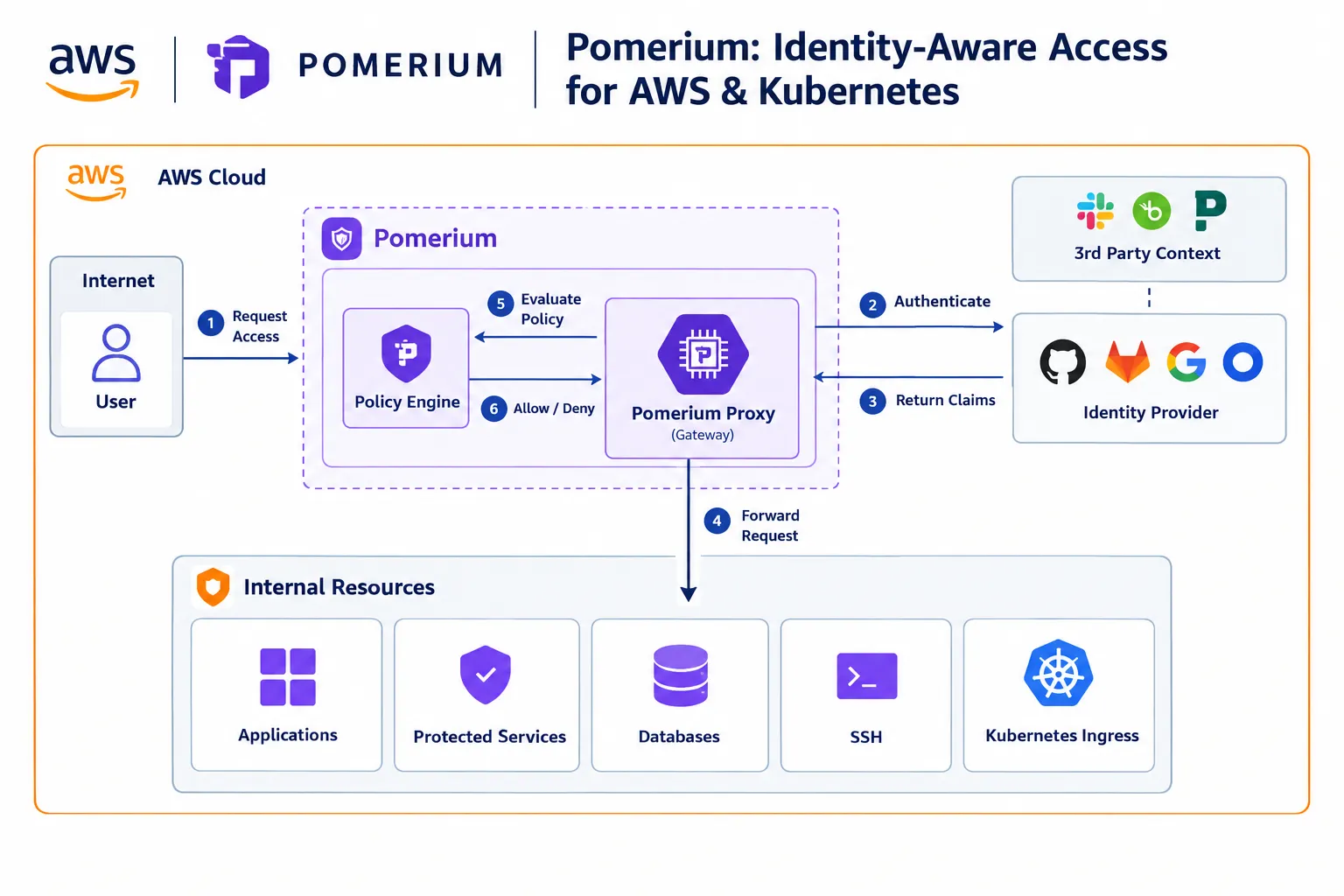
Pomerium is an identity-aware proxy designed to authenticate users and enforce authorization policies before requests reach protected applications.

Pomerium integrates with existing identity providers through OpenID Connect (OIDC), rather than acting as the identity provider itself. After authentication, it can apply policies based on information such as the user's identity, groups, domain, and other request context.
This creates a useful security model:
User → Identity Provider → Pomerium → Application
Instead of exposing every application directly to the internet and implementing authentication independently in every application, Pomerium can provide a common access-control layer.
Pomerium on AWS EKS
Amazon EKS provides managed Kubernetes control-plane operations while allowing organizations to run Kubernetes workloads using AWS infrastructure. AWS also provides the AWS Load Balancer Controller, which can provision AWS Application Load Balancers and Network Load Balancers from Kubernetes resources.
Pomerium can run directly inside an EKS cluster and operate as a Kubernetes ingress controller.
A simplified architecture looks like this:
1
2
3
4
5
6
7
8
9
10
11
12
13
14
15
16
                    Internet
                       |
                       v
              AWS Load Balancer
                       |
                       v
                +-------------+
                |  Pomerium   |
                | Auth + AuthZ |
                +-------------+
                       |
          +------------+-------------+
          |            |             |
          v            v             v
       App A        App B          App C
      Tenant A     Tenant A      Tenant B
Pomerium documents an AWS EKS reference architecture and notes that it can be used to provide fine-grained access to applications hosted on EKS.
Combining Pomerium with vCluster
For a multi-tenant platform, we can take this architecture one step further.
Instead of creating a separate physical or managed Kubernetes cluster for every team, a shared EKS cluster can host multiple vClusters.
For example:
1
2
3
4
5
6
7
8
9
10
11
12
13
                    AWS
                     |
                  Amazon EKS
                     |
            Shared Host Cluster
                     |
       +-------------+-------------+
       |                           |
       v                           v
   Tenant A                     Tenant B
   vCluster                     vCluster
       |                           |
   Applications                Applications
Pomerium then becomes the access layer in front of those workloads.
1
2
3
4
5
6
7
8
9
10
11
12
13
14
                       Users
                         |
                         v
                  Identity Provider
                         |
                         v
                    Pomerium
                         |
              +----------+----------+
              |                     |
              v                     v
        Tenant A vCluster      Tenant B vCluster
              |                     |
          Services              Services
This separation is important because Kubernetes isolation and application access control solve different problems.
vCluster provides a tenant Kubernetes environment, while Pomerium can control which authenticated identities are allowed to reach applications and APIs.
Authentication and Authorization Are Different
One of the useful characteristics of Pomerium is that authentication and authorization can be treated as separate stages.
Authentication
First, Pomerium verifies who the user is through an OIDC-compatible identity provider.
For example:
1
2
3
4
5
6
7
8
9
10
Developer
    |
    v
Pomerium
    |
    v
Corporate IdP
    |
    v
Authenticated identity
Pomerium supports OIDC identity providers and uses the resulting identity information to establish a session.
Authorization
After authentication, Pomerium evaluates the policy for the requested application.
For example:
1
2
3
4
5
policy:
  - allow:
      and:
        - domain:
            is: example.com
Pomerium Policy Language (PPL) provides YAML-based authorization rules with conditions and logical operators.
A platform team could therefore establish policies such as:
1
2
3
4
5
6
7
8
9
10
11
12
13
Engineering
   |
   +----> Development applications

Platform Team
   |
   +----> Development
   +----> Staging
   +----> Production

External Users
   |
   +----> Public applications only
The actual policy should be based on the organization's security requirements and identity model.
Protecting Kubernetes Applications
Pomerium's Kubernetes Ingress Controller watches Kubernetes Ingress resources and can dynamically configure routes from those resources. HTTPS is required for the Pomerium Ingress Controller.
A simplified example could look like:
1
2
3
4
5
6
7
8
9
10
11
12
13
14
15
16
17
18
19
20
21
22
23
24
apiVersion: networking.k8s.io/v1
kind: Ingress
metadata:
  name: backstage
  namespace: platform
  annotations:
    ingress.pomerium.io/policy: |
      allow:
        and:
          - domain:
              is: example.com
spec:
  ingressClassName: pomerium
  rules:
    - host: backstage.example.com
      http:
        paths:
          - path: /
            pathType: Prefix
            backend:
              service:
                name: backstage
                port:
                  number: 80
The important concept is that the application does not need to independently implement the entire authentication flow.
The request passes through Pomerium first:
1
2
3
4
5
6
7
8
9
10
11
https://backstage.example.com
              |
              v
         Pomerium
              |
       Authenticate
              |
        Check Policy
              |
              v
          Backstage
Pomerium and the Kubernetes API
Pomerium can also be used to control access to the Kubernetes API itself.
This is particularly interesting in a multi-tenant platform.
Instead of giving every developer direct network access to every Kubernetes API endpoint, Pomerium can act as a proxy and apply identity-aware policies.
Pomerium documents two approaches for Kubernetes API authentication: user impersonation and Pomerium JWT authentication for Kubernetes 1.30+.
This can create a model such as:
1
2
3
4
5
6
7
8
9
10
11
12
13
14
15
Developer
    |
    v
 Pomerium
    |
    +---- Identity
    +---- Group
    +---- Policy
    |
    v
Kubernetes API
    |
    +---- Tenant A
    |
    +---- Tenant B
Kubernetes RBAC can then remain responsible for the actual permissions inside the cluster.
That gives the platform two complementary layers:
Pomerium
→ Who is allowed to reach the Kubernetes API?
Kubernetes RBAC
→ Once there, what can that identity actually do?
AWS Cognito as an Identity Provider
Organizations using AWS Cognito can also integrate Cognito with Pomerium.
Pomerium documents AWS Cognito as an identity-provider integration and uses Cognito user pools as part of the authentication flow.
The resulting architecture can be:
1
2
3
4
5
6
7
8
9
10
11
12
             AWS
              |
      +-------+--------+
      |                |
   Cognito            EKS
      |                |
      v                v
   Identity          Pomerium
                       |
              +--------+--------+
              |        |        |
             App A   App B    App C
This is useful when the application platform already uses AWS-native identity infrastructure.
Pomerium is not limited to Cognito, however; its authentication model supports OIDC-compatible identity providers.
Machine-to-Machine Access
Not every request originates from a human.
Modern platforms also have:
- GitHub Actions
- CI/CD pipelines
- Kubernetes workloads
- automation
- service-to-service APIs
- operators
Pomerium supports JWT-based bearer authentication for machine identities. Its documentation specifically describes use cases involving Kubernetes service-account tokens and GitHub Actions OIDC tokens.
This creates an interesting GitOps architecture:
1
2
3
4
5
6
7
8
9
10
11
12
GitHub
   |
   v
GitHub Actions
   |
   | OIDC / JWT
   v
Pomerium
   |
   | Policy
   v
Internal API
Instead of distributing long-lived static credentials to every workflow, a platform can use short-lived identity tokens and policy-based authorization where supported by the deployment.
A Practical AWS Platform Architecture
Putting the components together, a platform could look like this:
1
2
3
4
5
6
7
8
9
10
11
12
13
14
15
16
17
18
                         AWS
                          |
                    Amazon EKS
                          |
             +------------+------------+
             |                         |
             v                         v
       AWS Load Balancer          Shared Services
             |                         |
             v                    +----+----+
         Pomerium                 |         |
             |                  Kafka    Backstage
       +-----+-----+
       |           |
       v           v
   vCluster A   vCluster B
       |           |
      Apps        Apps
The responsibilities can be separated:
| Layer | Responsibility |
|---|---|
| AWS | Infrastructure and networking |
| EKS | Kubernetes control plane |
| vCluster | Tenant Kubernetes environments |
| Pomerium | Identity-aware access and authorization |
| IdP | User authentication |
| Kubernetes RBAC | Kubernetes permissions |
| GitHub Actions | Deployment automation |
| Applications | Business functionality |
This separation is valuable because each component has a relatively clear responsibility.
Why This Architecture Matters
A multi-tenant platform isn't only about fitting more workloads onto fewer nodes.
The larger challenge is creating a consistent developer experience while maintaining appropriate isolation and access control.
A developer might see:
1
https://tenant-a.example.com
while the platform internally handles:
1
2
3
4
5
6
7
8
9
10
AWS
 └── EKS
      └── Shared Host Cluster
           ├── vCluster A
           │    ├── App A
           │    └── App B
           │
           └── vCluster B
                ├── App C
                └── App D
Pomerium can sit at the access boundary and continuously apply authentication and authorization policies before traffic reaches those workloads.
Pomerium describes its authorization model as dynamic and context-aware, with policies applicable across routes and, depending on the deployment, namespaces and clusters.
Security Considerations
Pomerium should not be viewed as a replacement for Kubernetes security controls.
A production architecture should still consider:
- Kubernetes RBAC
- network policies
- AWS IAM
- security groups
- private/public subnet design
- TLS certificate management
- secrets management
- audit logging
- container security
- tenant isolation
- least-privilege service accounts
Pomerium adds an identity-aware access-control layer; it does not eliminate the need for the underlying AWS and Kubernetes security mechanisms.
For example:
1
2
3
4
5
6
7
8
9
10
11
12
13
14
15
16
             Internet
                |
         AWS Network Controls
                |
         Load Balancer
                |
             Pomerium
       Authentication/AuthZ
                |
        Kubernetes Network
                |
          vCluster
                |
          Kubernetes RBAC
                |
            Workload
Defense in depth remains important.
Enjoyed reading this content? Let the author know!
Your likes, comments, shares, and saves help creators reach more builders.

Loading recommendations
Loading article