
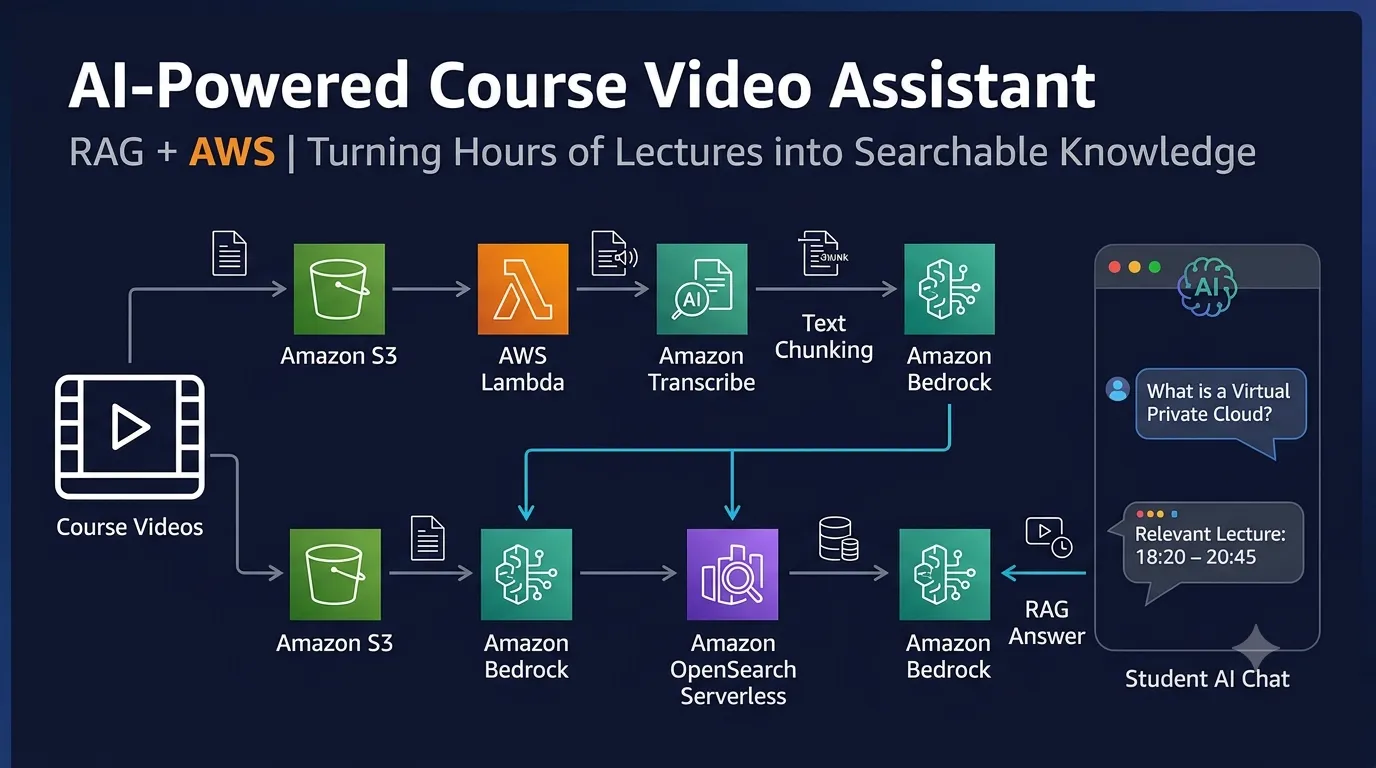
Building a RAG-Based AI Assistant for Large Course Video Libraries Using AWS
What if students could ask questions directly from hours of recorded lectures instead of searching through entire videos? In this article, we explore a simple Retrieval-Augmented Generation (RAG) system that processes course video transcripts, retrieves relevant information, and generates AI-powered answers with timestamps.

Introduction
Online learning platforms contain thousands of hours of recorded lectures, technical tutorials, and educational content.
Imagine a student studying a 3-hour cloud computing lecture who wants to understand only one topic, such as Amazon VPC or EC2 security groups.
Normally, the student must search through the video timeline, watch different sections, and manually identify the relevant explanation.
What if the student could simply ask:
"What is the difference between a public subnet and a private subnet?"
And receive an answer based only on the course material, along with the timestamp of the relevant explanation?
This is where Retrieval-Augmented Generation (RAG) becomes useful.
In this article, we will explore a simple architecture for building an AI-powered learning assistant specifically designed for large course video libraries using AWS services.
What Are We Building?
We will build a system that converts educational videos into searchable knowledge.
The system will:
- Accept recorded course videos.
- Extract audio from the videos.
- Convert speech into text using transcription.
- Divide long transcripts into smaller chunks.
- Generate vector embeddings.
- Store the embeddings in a vector database.
- Retrieve relevant content when a student asks a question.
- Generate an answer using an LLM.
- Provide timestamps so students can revisit the original lecture.
The main objective is to make large educational video libraries searchable through natural language.
AWS Architecture
For this demonstration, we will use the following AWS services:
- Amazon S3: Stores original course videos and processed transcripts.
- AWS Lambda: Triggers processing when a new video is uploaded.
- Amazon Transcribe: Converts lecture audio into text.
- Amazon Bedrock: Provides embedding and language model capabilities.
- Amazon OpenSearch Serverless: Stores and retrieves vector embeddings.
- Amazon API Gateway: Exposes the question-answering API.
- AWS Lambda: Handles retrieval and answer generation.
Architecture Diagram
1
2
3
4
5
6
7
8
9
10
11
12
13
14
15
16
17
18
19
20
21
22
23
24
25
26
27
28
29
30
31
32
33
34
35
36
37
38
39
40
41
42
43
44
45
46
47
48
49
50
             Course Video Upload
                     |
                     v
                Amazon S3
                     |
                     v
                AWS Lambda
                     |
                     v
             Amazon Transcribe
                     |
                     v
             Lecture Transcript
                     |
                     v
             Text Chunking
                     |
                     v
             Amazon Bedrock
           (Generate Embeddings)
                     |
                     v
          Amazon OpenSearch Serverless
              (Vector Database)

Student Question
       |
       v
  API Gateway
       |
       v
  Query Lambda
       |
       v
 Generate Query Embedding
       |
       v
 Vector Similarity Search
       |
       v
 Retrieve Relevant Transcript Chunks
       |
       v
 Amazon Bedrock LLM
       |
       v
 Answer + Video Timestamps
       |
       v
      Student
Step 1: Upload Course Videos to Amazon S3
First, create an S3 bucket to store the course videos.
Example structure:
1
2
3
4
5
6
7
8
9
10
11
12
13
14
course-video-library/
│
├── cloud-computing/
│   ├── lecture-01.mp4
│   ├── lecture-02.mp4
│   └── lecture-03.mp4
│
├── machine-learning/
│   ├── lecture-01.mp4
│   └── lecture-02.mp4
│
└── data-structures/
    ├── lecture-01.mp4
    └── lecture-02.mp4
Each video represents a source of knowledge for the RAG system.
When a new video is uploaded, an S3 event notification can trigger a Lambda function to start the processing workflow.
Step 2: Convert Video Speech into Text
A language model cannot directly search through a large collection of raw video files using ordinary text-based RAG.
Therefore, we first need to extract the spoken content.
Amazon Transcribe converts the lecture audio into text.
For example, a lecture might contain:
1
2
3
4
5
6
7
8
00:02:15 - A VPC is a logically isolated network
in AWS where you can launch resources.

00:03:40 - Public subnets have a route to an
Internet Gateway.

00:05:10 - Private subnets do not have a direct
route to an Internet Gateway.
The timestamps are important because they allow students to navigate back to the original lecture.
For large video libraries, transcription jobs can be processed asynchronously rather than keeping a single Lambda execution active for the entire video.
Step 3: Divide Large Transcripts into Smaller Chunks
A 3-hour lecture may contain thousands of words.
Sending the complete transcript to an LLM for every question would be inefficient and may exceed the model's context limits.
Instead, we divide the transcript into smaller chunks.
For example:
1
2
3
4
5
6
7
8
9
10
11
12
13
Lecture 01

Chunk 1:
Topic: Introduction to Cloud Computing
Timestamp: 00:00 - 02:30

Chunk 2:
Topic: Virtual Private Cloud
Timestamp: 02:30 - 05:00

Chunk 3:
Topic: Public and Private Subnets
Timestamp: 05:00 - 08:00
Each chunk should contain:
- Course ID
- Lecture ID
- Transcript text
- Start timestamp
- End timestamp
- Topic metadata
This makes retrieval more organized and allows us to identify the exact lecture section from which an answer was obtained.
Step 4: Generate Vector Embeddings
Now we need to make the transcript searchable based on meaning rather than only exact keywords.
Amazon Bedrock can generate vector embeddings for each transcript chunk.
For example, these two questions have similar meanings:
- What is a private subnet?
- Explain a subnet that does not have direct internet access.
Even though the wording differs, vector search can identify semantically related content.
The generated embeddings are stored in Amazon OpenSearch Serverless, configured for vector search.
Each vector is associated with its original transcript and metadata.
Step 5: Student Asks a Question
Now imagine a student asks:
"Explain how a NAT Gateway helps instances in a private subnet access the internet."
The application sends the question to an API Gateway endpoint.
A Lambda function then:
- Receives the question.
- Generates its embedding using Amazon Bedrock.
- Searches the vector database.
- Retrieves the most relevant transcript chunks.
- Passes the retrieved content to the language model.
Instead of searching every video again, the application searches the previously processed knowledge base.
Step 6: Generate an Answer Using RAG
The retrieved transcript chunks are supplied to the LLM as context.
A simplified prompt could look like this:
1
2
3
4
5
6
7
8
9
10
11
12
13
14
15
16
You are an AI course assistant.

Answer the student's question using only
the provided lecture context.

If the answer is not available in the
context, clearly state that.

Include the lecture name and timestamps
of the relevant explanation.

Context:
{retrieved_transcript_chunks}

Student Question:
{student_question}
The model generates an answer based on the retrieved course material.
Example Output
Student Question:
"What is the purpose of a NAT Gateway?"
AI Answer:
A NAT Gateway allows resources in a private subnet to initiate outbound connections to the internet while preventing unsolicited inbound connections from the internet.
Source: AWS Cloud Computing – Lecture 04
Relevant Timestamp: 18:20 – 20:45
The student can now jump directly to the relevant section of the lecture.
Step 7: Handle Large Course Libraries
When the number of videos increases, the system should organize knowledge by course and lecture.
For example:
1
2
3
4
5
6
7
8
9
10
11
12
Course: AWS Fundamentals
    |
    ├── Lecture 01
    ├── Lecture 02
    ├── Lecture 03
    └── Lecture 04

Course: Machine Learning
    |
    ├── Lecture 01
    ├── Lecture 02
    └── Lecture 03
Metadata filtering can ensure that a student searching within AWS Fundamentals receives results from the relevant course rather than unrelated material.
For large libraries, we can also process videos in background jobs, track transcription status, and update the vector index when new content is added.
Understanding the RAG Workflow
| Component | Responsibility |
|---|---|
| Amazon S3 | Stores video files |
| Amazon Transcribe | Converts speech into text |
| Text Chunking | Splits transcripts into smaller sections |
| Amazon Bedrock | Generates embeddings and answers |
| OpenSearch Serverless | Stores and retrieves vectors |
| API Gateway | Receives student questions |
| Lambda | Coordinates retrieval and generation |
The key concept is that the LLM does not need to process the entire video library for every question.
It receives only the most relevant retrieved information.
Benefits of This System
Faster Learning
Students can find explanations without manually searching through hours of lectures.
Context-Based Answers
The system uses the course transcripts as its knowledge source rather than relying only on general model knowledge.
Timestamp-Based Navigation
Students can return to the original lecture section to listen to the explanation again.
Scalable Video Knowledge Base
New lectures can be processed and added to the searchable knowledge base without rebuilding the entire application.
Reduced Repeated Processing
Once transcripts and embeddings are generated, they can be reused for multiple student questions.
Possible Future Improvements
The basic system can be extended with:
- A React-based chat interface.
- Course-specific access control.
- Multilingual transcription.
- Semantic search combined with keyword search.
- Automatic lecture summaries.
- Chapter-wise notes.
- Quiz generation based on lecture content.
- Feedback to identify incorrect or incomplete answers.
For production use, access permissions should be enforced at retrieval time so students can only query content they are authorized to access.
Conclusion
In this article, we explored how to build a RAG-based AI learning assistant for large educational video libraries using AWS.
By combining video transcription, text chunking, embeddings, vector search, and an LLM, we can transform hours of recorded lectures into a searchable learning resource.
Instead of watching an entire lecture to find one explanation, students can ask a question, receive a context-based answer, and navigate directly to the relevant timestamp.
The broader idea is simple: turn recorded educational content into an interactive knowledge base that students can explore through natural language.
Thank you for reading!
References
# distributed-architecture# amazon-transcribe# amazon-bedrock# aws-serverless-application-repository# amazon-s3
Any opinions in this article are those of the individual author and may not reflect the opinions of AWS.Enjoyed reading this content? Let the author know!
Your likes, comments, shares, and saves help creators reach more builders.

Loading recommendations
Loading article