
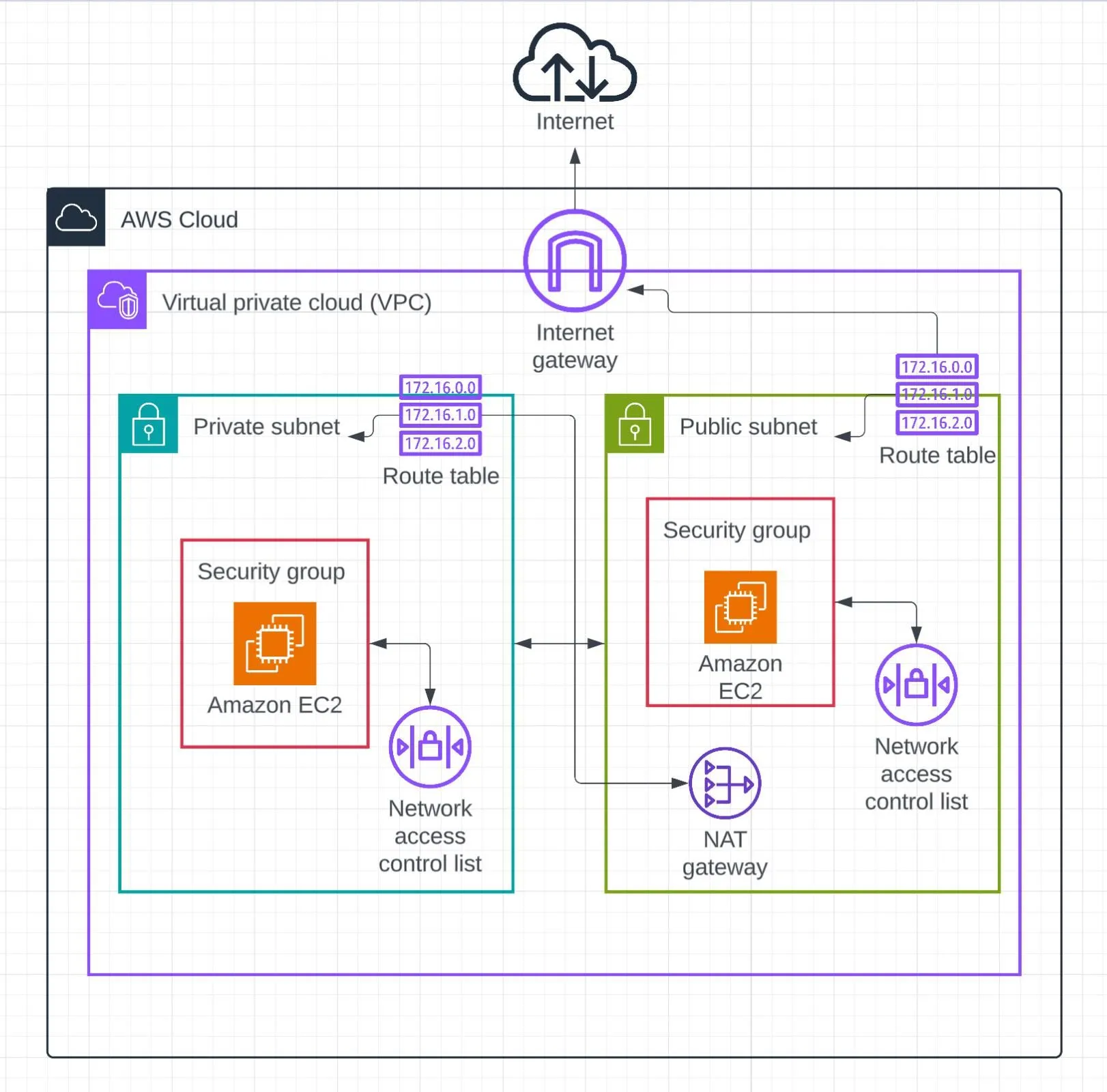
AWS VPC: Building Secure Cloud Networks
Learn how Amazon VPC helps you create a secure and isolated cloud network for your AWS resources. This article explains VPC basics, subnets, route tables, security groups, and best practices for building a secure network.

Introduction
As cloud applications grow, security and network management become very important. Amazon Virtual Private Cloud (Amazon VPC) allows you to create your own private network inside AWS.
With a VPC, you can control how your AWS resources communicate with each other and with the internet. You can also define security rules, IP addresses, subnets, and routing.
What is Amazon VPC?
Amazon VPC is a virtual network dedicated to your AWS account. It provides a secure environment where you can launch resources such as Amazon EC2 instances, databases, and other AWS services.
A VPC gives you control over:
- IP address ranges
- Subnets
- Route tables
- Internet connectivity
- Network security
- Access between resources
Main Components of a VPC
1. VPC
The VPC is the main network environment. You select an IPv4 CIDR block, such as
10.0.0.0/16, to define the available private IP address range.2. Subnets
A subnet is a smaller section of a VPC.
Subnets can be created in different Availability Zones. They are commonly divided into:
- Public subnet – Can have a route to an Internet Gateway.
- Private subnet – Does not have a direct route to the internet.
For example, web servers can be placed in public subnets while databases can be placed in private subnets.
3. Route Tables
Route tables control where network traffic is directed.
A public subnet can use a route such as:
0.0.0.0/0 → Internet GatewayPrivate subnets can use controlled routes for accessing required AWS services or external resources.
4. Internet Gateway
An Internet Gateway allows resources in a VPC to communicate with the internet when the appropriate routing and public addressing are configured.
5. Security Groups
Security groups act as virtual firewalls for resources such as EC2 instances.
They control allowed inbound and outbound traffic using rules based on protocols, ports, and IP addresses.
For example, an application server might allow HTTPS traffic on port 443 while restricting other unnecessary inbound connections.
6. Network ACLs
Network Access Control Lists (network ACLs) provide another layer of traffic control at the subnet level.
They can allow or deny traffic based on rules such as IP addresses, protocols, and ports.
Example Secure VPC Architecture
A simple secure architecture can contain:
1
2
3
4
5
6
7
8
9
10
11
                    Internet
                       |
                Internet Gateway
                       |
                 Public Subnet
                  /           \
             Web Server     Load Balancer
                       |
                 Private Subnet
                  /           \
             App Server     Database
The public layer handles internet-facing traffic, while sensitive application and database resources can be placed in private subnets.
Best Practices for VPC Security
- Use private subnets for sensitive resources such as databases.
- Allow only the required ports and protocols.
- Avoid opening security group rules to the entire internet unless necessary.
- Use multiple Availability Zones for better availability.
- Separate application layers using different subnets.
- Regularly review security group and network ACL rules.
- Use logging and monitoring to understand network activity.
- Follow the principle of least privilege when designing network access.
Enjoyed reading this content? Let the author know!
Your likes, comments, shares, and saves help creators reach more builders.

Loading recommendations
Loading article