
Title: Building a Serverless Task Manager API with AWS Lambda, API Gateway, and DynamoDB
Summary: A simple serverless backend that lets users create, view, update, and delete tasks without managing any servers. It uses AWS Lambda for logic, Amazon API Gateway for the API, and Amazon DynamoDB for storage.

Introduction
Traditionally, building a backend meant setting up a server, installing software, applying updates, and paying for it even when nobody used it. Serverless computing removes that work. You write the code, and AWS runs it only when needed. In this project, I built a small task manager API to learn how the main serverless services work together.
Architecture
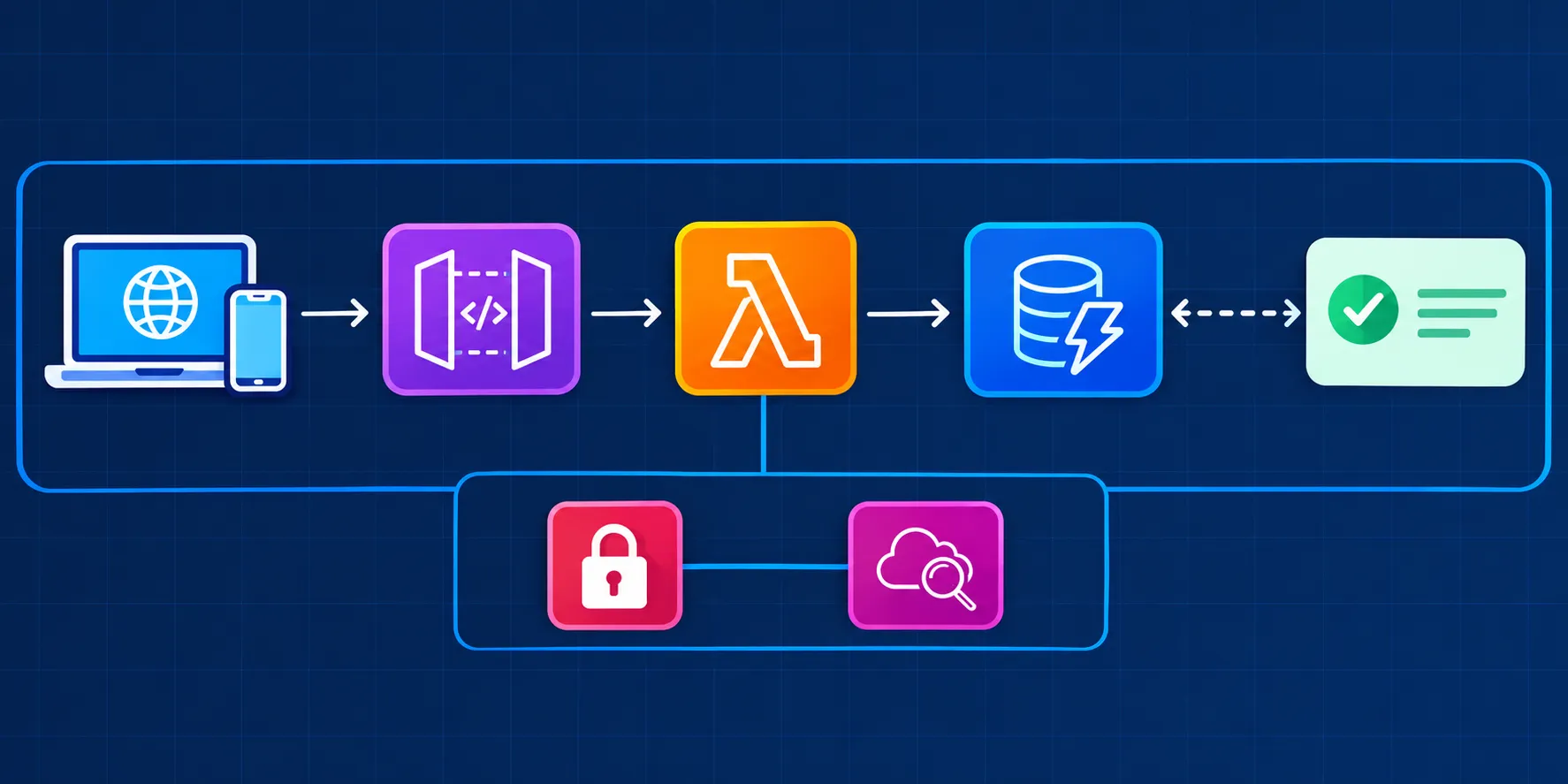
Client (browser or app) → API Gateway → Lambda → DynamoDB
The client sends a request, such as "add a task".
API Gateway receives it and routes it to the right Lambda function.
Lambda runs the code and reads or writes data in DynamoDB.
The response travels back to the client.
Services Used
AWS Lambda: Runs your code (Python or Node.js) in response to events. You pay only for execution time, and it scales automatically.
Amazon API Gateway: Creates the REST endpoints (GET, POST, PUT, DELETE) and handles routing, throttling, and authorization.
Amazon DynamoDB: A fast NoSQL database that stores items as key-value records, with no database server to manage.
AWS IAM: Gives Lambda only the permissions it needs, such as reading and writing one specific table.
Amazon CloudWatch: Stores logs and metrics so you can debug errors.
Implementation Steps
Create the DynamoDB table. Name it Tasks with taskId (String) as the partition key. Choose on-demand capacity so you pay per request.
Create a Lambda function. Choose the Python runtime, and write code that handles each action (create, list, update, delete) using the boto3 library.
Set up the IAM role. Attach a policy allowing only dynamodb:PutItem, GetItem, Scan, UpdateItem, and DeleteItem on the Tasks table. This follows the principle of least privilege.
Create the API in API Gateway. Add routes like POST /tasks, GET /tasks, PUT /tasks/{id}, and DELETE /tasks/{id}, and connect each to the Lambda function.
Deploy and test. Deploy to a stage (for example dev), then test the endpoint with Postman or curl.
Monitor. Check CloudWatch Logs to see each request and fix any errors.
Security Considerations
Use least-privilege IAM roles.
Add authentication with Amazon Cognito or API keys so only authorized users can call the API.
Enable throttling in API Gateway to prevent abuse.
Never hardcode credentials in the Lambda code.
Cost
The free tier covers 1 million Lambda requests, 1 million API Gateway calls (for the first 12 months), and 25 GB of DynamoDB storage each month, so a learning project like this costs almost nothing.
What I Learned
How event-driven, serverless architecture works
How AWS services connect through IAM permissions
The difference between SQL and NoSQL databases
How to build and test a REST API
Why scaling and cost are easier with serverless
Future Improvements
Add user login with Amazon Cognito
Build a frontend hosted on S3 and CloudFront
Send email reminders using Amazon SES or SNS
Deploy automatically using AWS SAM or CloudFormation
Add a CI/CD pipeline with CodePipeline
Traditionally, building a backend meant setting up a server, installing software, applying updates, and paying for it even when nobody used it. Serverless computing removes that work. You write the code, and AWS runs it only when needed. In this project, I built a small task manager API to learn how the main serverless services work together.
Architecture
Client (browser or app) → API Gateway → Lambda → DynamoDB
The client sends a request, such as "add a task".
API Gateway receives it and routes it to the right Lambda function.
Lambda runs the code and reads or writes data in DynamoDB.
The response travels back to the client.
Services Used
AWS Lambda: Runs your code (Python or Node.js) in response to events. You pay only for execution time, and it scales automatically.
Amazon API Gateway: Creates the REST endpoints (GET, POST, PUT, DELETE) and handles routing, throttling, and authorization.
Amazon DynamoDB: A fast NoSQL database that stores items as key-value records, with no database server to manage.
AWS IAM: Gives Lambda only the permissions it needs, such as reading and writing one specific table.
Amazon CloudWatch: Stores logs and metrics so you can debug errors.
Implementation Steps
Create the DynamoDB table. Name it Tasks with taskId (String) as the partition key. Choose on-demand capacity so you pay per request.
Create a Lambda function. Choose the Python runtime, and write code that handles each action (create, list, update, delete) using the boto3 library.
Set up the IAM role. Attach a policy allowing only dynamodb:PutItem, GetItem, Scan, UpdateItem, and DeleteItem on the Tasks table. This follows the principle of least privilege.
Create the API in API Gateway. Add routes like POST /tasks, GET /tasks, PUT /tasks/{id}, and DELETE /tasks/{id}, and connect each to the Lambda function.
Deploy and test. Deploy to a stage (for example dev), then test the endpoint with Postman or curl.
Monitor. Check CloudWatch Logs to see each request and fix any errors.
Security Considerations
Use least-privilege IAM roles.
Add authentication with Amazon Cognito or API keys so only authorized users can call the API.
Enable throttling in API Gateway to prevent abuse.
Never hardcode credentials in the Lambda code.
Cost
The free tier covers 1 million Lambda requests, 1 million API Gateway calls (for the first 12 months), and 25 GB of DynamoDB storage each month, so a learning project like this costs almost nothing.
What I Learned
How event-driven, serverless architecture works
How AWS services connect through IAM permissions
The difference between SQL and NoSQL databases
How to build and test a REST API
Why scaling and cost are easier with serverless
Future Improvements
Add user login with Amazon Cognito
Build a frontend hosted on S3 and CloudFront
Send email reminders using Amazon SES or SNS
Deploy automatically using AWS SAM or CloudFormation
Add a CI/CD pipeline with CodePipeline
Enjoyed reading this content? Let the author know!
Your likes, comments, shares, and saves help creators reach more builders.

Loading recommendations
Loading article