
Building a Private Network on AWS with Amazon VPC
A beginner project that creates a custom virtual network in AWS, with a public subnet for a web server and a private subnet for a database. It uses Amazon VPC, subnets, an Internet Gateway, route tables, and security groups.

Introduction
When you launch resources in AWS, they live inside a network. Amazon VPC (Virtual Private Cloud) lets you design that network yourself, deciding what is reachable from the internet and what stays private. In this project, I built a simple VPC to understand how cloud networking and isolation work.
Architecture
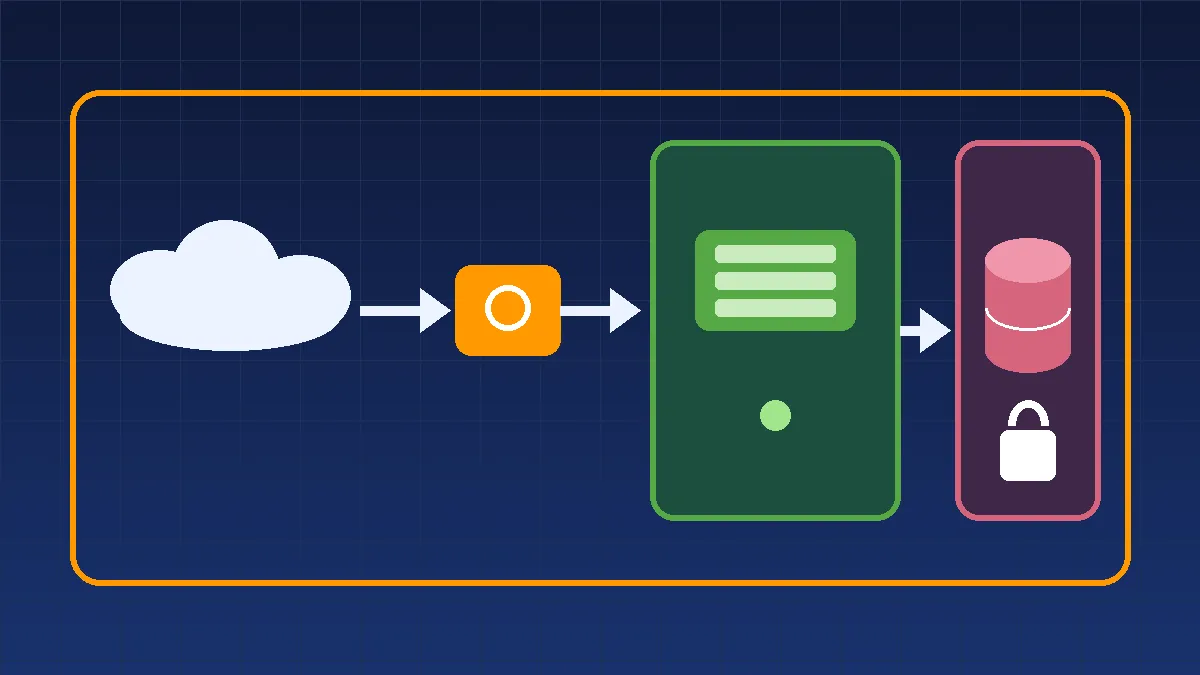
Internet → Internet Gateway → Public Subnet (web server) → Private Subnet (database)
Private resources reach the internet outbound only, through a NAT Gateway placed in the public subnet.
Key Concepts
VPC: Your own isolated network inside AWS, defined by an IP range such as 10.0.0.0/16.
Subnet: A smaller section of the VPC. Public subnets have a route to the internet, and private subnets do not.
Internet Gateway (IGW): Connects the VPC to the internet.
Route Table: Rules that decide where network traffic goes.
NAT Gateway: Lets private resources download updates without being reachable from outside.
Security Group: A firewall attached to an instance, which allows only the traffic you choose.
Network ACL: An optional firewall at the subnet level.
Implementation Steps
Create the VPC. Name it student-vpc and use the CIDR block 10.0.0.0/16.
Create two subnets. Make public-subnet (10.0.1.0/24) and private-subnet (10.0.2.0/24) in the same Availability Zone.
Create and attach an Internet Gateway. Attach it to student-vpc.
Configure the public route table. Add a route sending 0.0.0.0/0 to the Internet Gateway, then associate it with the public subnet.
Keep the private route table local. It has no route to the internet, so the private subnet stays isolated.
Launch a web server. Put an EC2 instance in the public subnet with a public IP. Allow HTTP (80) from anywhere and SSH (22) from your IP only.
Launch a database server. Put an EC2 instance (or an RDS database) in the private subnet. Its security group should allow traffic only from the web server's security group.
Test the setup. Open the web server's public IP in a browser. Confirm the database cannot be reached directly from the internet.
Clean up. Delete the NAT Gateway, instances, and VPC when finished.
Security Considerations
Keep databases and sensitive systems in private subnets.
Reference security groups instead of open IP ranges where possible.
Never open all ports to 0.0.0.0/0.
Enable VPC Flow Logs to record network traffic for troubleshooting and auditing.
Use a bastion host or AWS Systems Manager Session Manager to reach private servers.
When you launch resources in AWS, they live inside a network. Amazon VPC (Virtual Private Cloud) lets you design that network yourself, deciding what is reachable from the internet and what stays private. In this project, I built a simple VPC to understand how cloud networking and isolation work.
Architecture
Internet → Internet Gateway → Public Subnet (web server) → Private Subnet (database)
Private resources reach the internet outbound only, through a NAT Gateway placed in the public subnet.
Key Concepts
VPC: Your own isolated network inside AWS, defined by an IP range such as 10.0.0.0/16.
Subnet: A smaller section of the VPC. Public subnets have a route to the internet, and private subnets do not.
Internet Gateway (IGW): Connects the VPC to the internet.
Route Table: Rules that decide where network traffic goes.
NAT Gateway: Lets private resources download updates without being reachable from outside.
Security Group: A firewall attached to an instance, which allows only the traffic you choose.
Network ACL: An optional firewall at the subnet level.
Implementation Steps
Create the VPC. Name it student-vpc and use the CIDR block 10.0.0.0/16.
Create two subnets. Make public-subnet (10.0.1.0/24) and private-subnet (10.0.2.0/24) in the same Availability Zone.
Create and attach an Internet Gateway. Attach it to student-vpc.
Configure the public route table. Add a route sending 0.0.0.0/0 to the Internet Gateway, then associate it with the public subnet.
Keep the private route table local. It has no route to the internet, so the private subnet stays isolated.
Launch a web server. Put an EC2 instance in the public subnet with a public IP. Allow HTTP (80) from anywhere and SSH (22) from your IP only.
Launch a database server. Put an EC2 instance (or an RDS database) in the private subnet. Its security group should allow traffic only from the web server's security group.
Test the setup. Open the web server's public IP in a browser. Confirm the database cannot be reached directly from the internet.
Clean up. Delete the NAT Gateway, instances, and VPC when finished.
Security Considerations
Keep databases and sensitive systems in private subnets.
Reference security groups instead of open IP ranges where possible.
Never open all ports to 0.0.0.0/0.
Enable VPC Flow Logs to record network traffic for troubleshooting and auditing.
Use a bastion host or AWS Systems Manager Session Manager to reach private servers.
What I Learned
How IP ranges and CIDR blocks divide a network
The difference between public and private subnets
How route tables and gateways control traffic
How security groups protect individual resources
Why layered network design improves security
How IP ranges and CIDR blocks divide a network
The difference between public and private subnets
How route tables and gateways control traffic
How security groups protect individual resources
Why layered network design improves security
Future Improvements
Spread subnets across multiple Availability Zones for high availability
Add an Application Load Balancer in front of the web servers
Connect two VPCs with VPC Peering
Use VPC Endpoints to reach S3 privately
Build the whole network with CloudFormation or Terraform
Spread subnets across multiple Availability Zones for high availability
Add an Application Load Balancer in front of the web servers
Connect two VPCs with VPC Peering
Use VPC Endpoints to reach S3 privately
Build the whole network with CloudFormation or Terraform
Enjoyed reading this content? Let the author know!
Your likes, comments, shares, and saves help creators reach more builders.

Loading recommendations
Loading article