
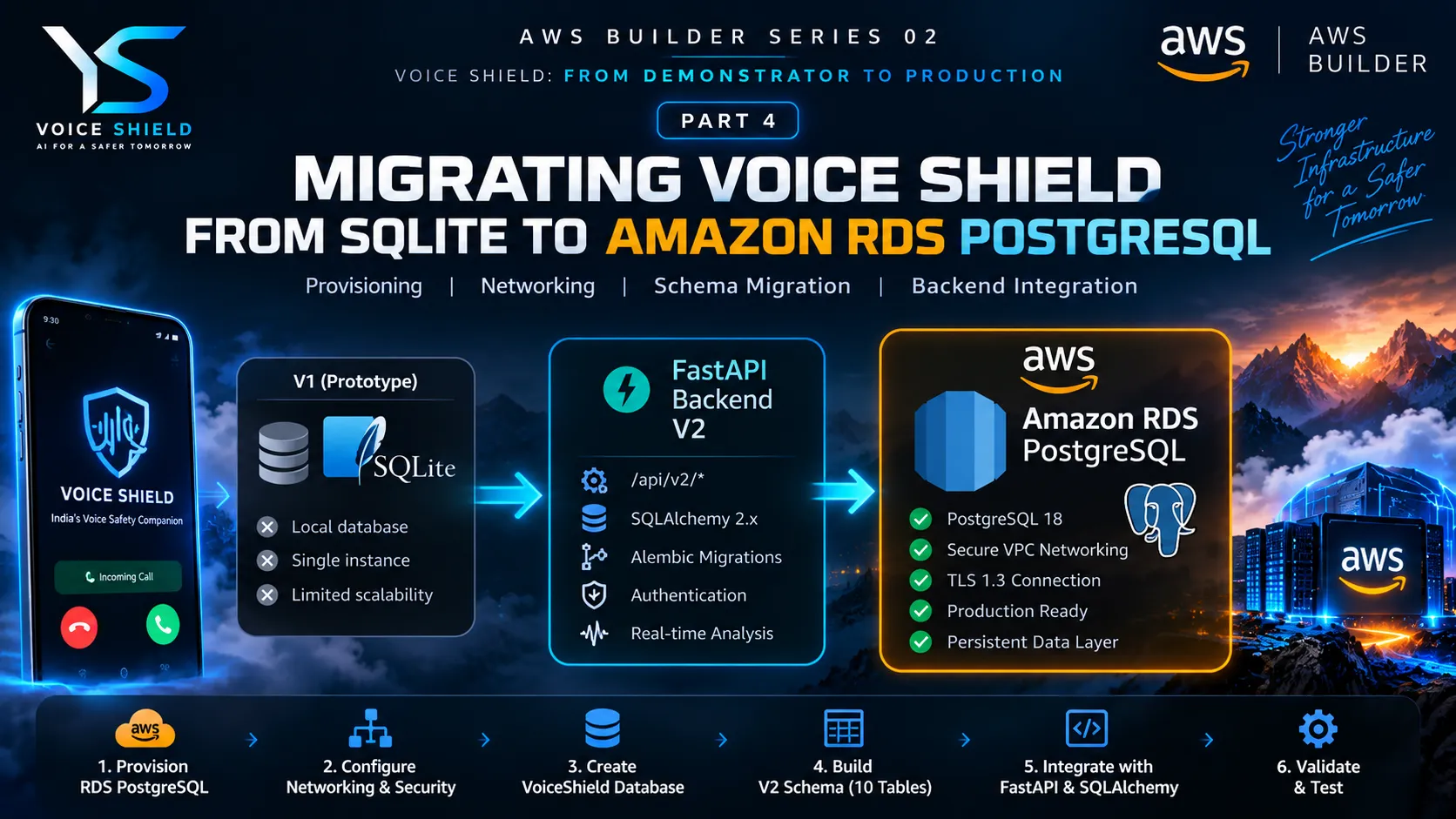
Migrating VOICE SHIELD from SQLite to Amazon RDS PostgreSQL
After preparing the AWS foundation and PostgreSQL target architecture in Part 3, the next step in VOICE SHIELD's productionization journey was executing the database migration. In this part, we move from planning the PostgreSQL/RDS architecture to actually provisioning and validating the production database layer, connecting the V2 backend through SQLAlchemy, introducing Alembic migrations, and establishing the foundation for persistent V2 services.
Series: VOICE SHIELD: From Demonstrator to Production (5 articles)
- …
- 4Migrating VOICE SHIELD from SQLite to Amazon RDS PostgreSQL This article

From PostgreSQL Planning to a Working Production Database
In Part 3, we established the direction:
1
2
3
4
5
6
7
8
9
10
11
12
13
VOICE SHIELD V1
      │
      │ SQLite
      ▼
Existing Application
      │
      │ Migration
      ▼
VOICE SHIELD V2
      │
      │ PostgreSQL
      ▼
Amazon RDS
Part 4 is where that architecture became an actual working infrastructure layer.
The objective was not simply to create an RDS instance.
The objective was to make the database usable by the VOICE SHIELD V2 backend while keeping the application architecture controlled and migration-safe.
1. Provisioning Amazon RDS PostgreSQL
The first major step was creating the PostgreSQL database on Amazon RDS.
The VoiceShield environment uses:
1
2
3
4
5
6
7
Engine: PostgreSQL
Version: PostgreSQL 18
Instance: db.t3.micro
Storage: gp3
Initial Storage: 20 GiB
Database: voiceshield
Port: 5432
The RDS instance was placed inside the VoiceShield VPC created during the previous stage.
The resulting foundation became:
1
2
3
4
5
6
7
8
9
AWS VPC
   │
   ├── Subnet A
   │
   ├── Subnet B
   │
   └── RDS PostgreSQL
          │
          └── voiceshield
2. Networking the Database
A database is only useful to the application if the application can reach it.
The RDS networking layer therefore required:
- VPC configuration
- Subnet configuration
- Route tables
- Internet Gateway connectivity for the current architecture
- RDS security group
- PostgreSQL port
5432
The database security group was configured to allow PostgreSQL traffic only from approved network ranges.
The important principle was:
1
2
3
4
5
6
7
8
9
Internet
   │
   │  NOT unrestricted
   ▼
Security Group
   │
   │ TCP 5432
   ▼
PostgreSQL RDS
We deliberately avoided:
1
0.0.0.0/0 → 5432
The database should never become an unrestricted public PostgreSQL endpoint.
3. Validating RDS Independently
Before connecting the application, the database itself was tested independently.
The PostgreSQL client was used to establish a direct connection to RDS.
The connection was successfully established using TLS:
1
2
3
SSL: Enabled
Protocol: TLS 1.3
Cipher: TLS_AES_256_GCM_SHA384
The connection was then verified with PostgreSQL:
1
SELECT current_database(), current_user, version();
This confirmed that:
- DNS resolution worked
- Network routing worked
- Security-group access worked
- PostgreSQL was reachable
- Credentials worked
- TLS worked
- PostgreSQL was responding correctly
This independent validation was important.
Instead of debugging the application and infrastructure simultaneously, we established:
1
2
3
4
5
6
7
8
9
Laptop
   ↓
Network
   ↓
RDS
   ↓
PostgreSQL
   ↓
TLS
first.
4. Creating the VoiceShield Database
After validating the RDS instance, the application database was created:
1
voiceshield
The database became the target persistence layer for V2.
The architecture was now:
1
2
3
4
5
6
7
8
9
10
11
12
13
FastAPI V2
    │
    ▼
SQLAlchemy
    │
    ▼
PostgreSQL Driver
    │
    ▼
AWS RDS
    │
    ▼
voiceshield
5. Building the V2 Schema
The next step was creating the database structure required by VoiceShield V2.
The database currently contains 10 tables.
User and device layer
1
2
3
users
user_devices
user_auth_events
Voice analysis layer
1
analysis_records
Real-time call layer
1
2
call_sessions
call_chunks
Device compatibility layer
1
device_recording_compatibilities
Cybercrime intelligence layer
1
2
3
cybercrime_categories
cybercrime_templates
cybercrime_template_versions
The resulting structure looks like:
1
2
3
4
5
6
7
8
9
10
11
12
13
14
15
16
17
18
19
20
21
22
                    users
                      │
              ┌───────┴────────┐
              ▼                ▼
        user_devices     user_auth_events

             call_sessions
                   │
                   ▼
              call_chunks

        cybercrime_categories
                   │
                   ▼
          cybercrime_templates
                   │
                   ▼
      cybercrime_template_versions

         analysis_records

 device_recording_compatibilities
This represents a significant architectural transition from the original prototype database.
6. PostgreSQL-Native Schema Design
The migration was not treated as a simple SQLite-to-PostgreSQL copy.
The V2 schema uses PostgreSQL capabilities where appropriate.
For example:
1
2
3
SQLite / generic JSON
        ↓
PostgreSQL JSONB
and:
1
2
3
Generic FLOAT
        ↓
DOUBLE PRECISION
and:
1
2
3
Application identifiers
        ↓
UUID where appropriate
Foreign-key constraints and uniqueness constraints were also preserved as part of the relational design.
The goal was to make PostgreSQL the actual V2 database architecture, rather than simply using RDS as a remote SQLite replacement.
7. Connecting the V2 Backend
Once the database was ready, the FastAPI V2 backend was connected to RDS.
The application uses:
1
2
3
4
5
6
7
8
9
10
FastAPI
   │
   ▼
SQLAlchemy 2.x
   │
   ▼
psycopg
   │
   ▼
PostgreSQL
The database connection is controlled through:
1
DATABASE_URL=postgresql+psycopg://...
This keeps the infrastructure configuration outside the application source code.
8. Introducing Alembic
The V2 backend also introduced Alembic as the database migration mechanism.
The intended architecture is:
1
2
3
4
5
6
7
SQLAlchemy Models
        │
        ▼
      Alembic
        │
        ▼
PostgreSQL Schema
This gives the project a controlled way to evolve the database as V2 develops.
Future schema changes can therefore be represented as migrations instead of relying on uncontrolled startup-time database modifications.
9. V2 API Transition
The database migration happened alongside another important backend change:
VoiceShield's API namespace moved to V2.
The canonical backend namespace is now:
1
/api/v2/
For example:
1
2
3
4
5
6
7
8
GET  /api/v2/health
GET  /api/v2/ready

POST /api/v2/auth/sync

GET  /api/v2/cybercrime/categories

GET  /api/v2/cybercrime/templates
The health endpoint identifies the backend version:
1
2
3
4
5
{
  "status": "ok",
  "version": "v2",
  "service": "voiceshield-api"
}
The readiness endpoint also validates the database connection.
This makes the database part of the actual backend readiness lifecycle rather than merely an external resource.
10. V2 Backend Validation
After connecting the backend to PostgreSQL, the V2 backend was tested as a complete application rather than validating individual components in isolation.
The resulting test status was:
1
2
3
129 passed
3 skipped
0 failed
The skipped tests were related to external provider integration testing.
This gave us a much stronger checkpoint:
1
2
3
4
5
6
7
8
9
10
11
12
13
14
15
16
RDS
 │
 ▼
PostgreSQL
 │
 ▼
SQLAlchemy
 │
 ▼
FastAPI V2
 │
 ▼
Automated Tests
 │
 ▼
129 PASS
11. What Changed From V1?
The architectural transition can now be summarized as:
V1
1
2
3
4
5
6
7
Android
   │
   ▼
FastAPI
   │
   ▼
SQLite
V2
1
2
3
4
5
6
7
8
9
10
11
12
13
14
Android
   │
   │ HTTPS
   ▼
FastAPI V2
   │
   ▼
SQLAlchemy
   │
   ▼
PostgreSQL
   │
   ▼
Amazon RDS
And around the database we now have:
1
2
3
4
5
6
7
8
9
Users
Devices
Authentication Events
Call Sessions
Call Chunks
Analysis Records
Device Compatibility
Cybercrime Templates
Template Versions
This is the foundation required for the next generation of VoiceShield services.
12. The Important Lesson
The biggest lesson from this migration was that database migration is an architecture problem, not simply a database problem.
We had to solve several layers together:
1
2
3
4
5
6
7
8
9
10
11
12
13
14
15
                DATABASE MIGRATION
                       │
        ┌──────────────┼──────────────┐
        ▼              ▼              ▼
     Network        Security       Schema
        │              │              │
        ▼              ▼              ▼
       RDS          SG/TLS        PostgreSQL
        │                             │
        └──────────────┬──────────────┘
                       ▼
                  V2 Backend
                       │
                       ▼
                    Android
Every layer needed to work before the migration could be considered complete.
13. Current Architecture
At this point, VoiceShield has moved substantially beyond the original demonstrator architecture:
1
2
3
4
5
6
7
8
9
10
11
12
13
14
15
16
17
18
19
20
21
22
23
                         ANDROID
                            │
                            │ HTTPS
                            ▼
                    ┌───────────────┐
                    │ FastAPI V2    │
                    │ /api/v2/*     │
                    └───────┬───────┘
                            │
                ┌───────────┼───────────┐
                │           │           │
                ▼           ▼           ▼
          Authentication  Realtime   Intelligence
                │           │           │
                └───────────┼───────────┘
                            ▼
                    SQLAlchemy 2.x
                            │
                            ▼
                  PostgreSQL 18
                            │
                            ▼
                       AWS RDS
The cloud foundation from the previous parts is now connected to the actual V2 application.
What's Next?
The next phase moves beyond infrastructure provisioning.
The focus becomes:
1
2
3
4
5
6
7
8
9
AWS Foundation
       ↓
PostgreSQL RDS
       ↓
V2 Backend
       ↓
Android V2
       ↓
Real-Time VoiceShield
With the database and API foundation established, the next challenge is to make the V2 application layer operate end-to-end against the new infrastructure.
That means validating the complete path:
1
2
3
4
5
6
7
8
9
10
11
12
13
Android
   ↓
V2 API
   ↓
Authentication
   ↓
Realtime Call Session
   ↓
Call Chunks
   ↓
Detection Pipeline
   ↓
PostgreSQL
Part 4 is therefore the point where VoiceShield's AWS foundation becomes a working application data layer.
Series Progress
1
2
3
4
Part 1 → From Demonstrator to Production
Part 2 → Designing the Production Architecture
Part 3 → AWS Foundation: Organizations, PostgreSQL & RDS Preparation
Part 4 → Migrating VoiceShield from SQLite to Amazon RDS PostgreSQL
Next: Part 5 — connecting the V2 application and real-time pipeline to the production cloud foundation.
Series: VOICE SHIELD: From Demonstrator to Production (5 articles)
- …
- 4Migrating VOICE SHIELD from SQLite to Amazon RDS PostgreSQL This article
Enjoyed reading this content? Let the author know!
Your likes, comments, shares, and saves help creators reach more builders.

Loading recommendations
Loading article