
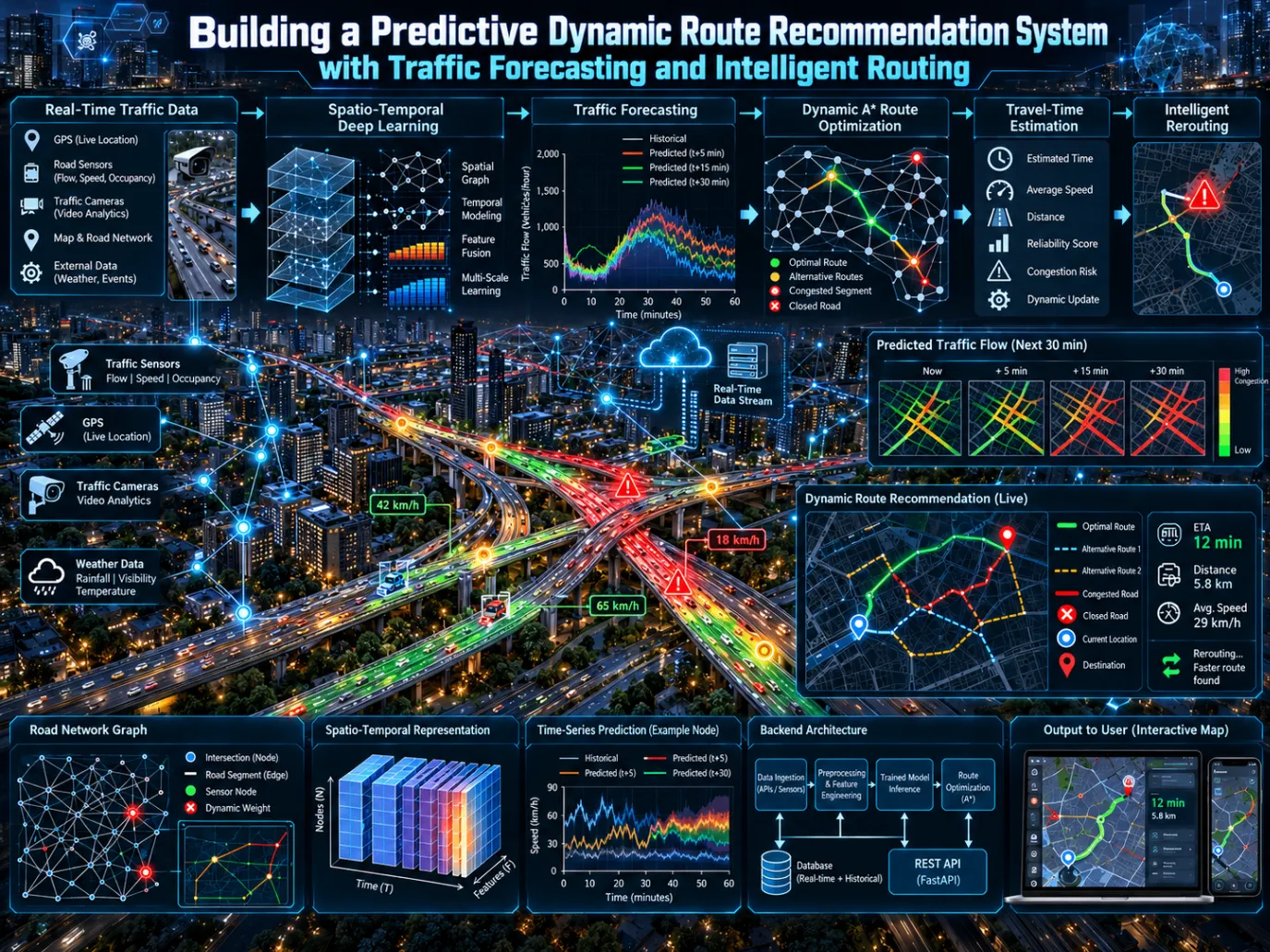
Building a Predictive Dynamic Route Recommendation System with Traffic Forecasting and Intelligent Routing
Learn how to build a predictive dynamic route recommendation system that combines traffic forecasting, intelligent routing, and explainable decisions. This article explores integrating the traffic forecasting model with FastAPI, React, dynamic road-network costs, A* candidate route generation, travel-time prediction, reliability analysis, and REROUTE/STAY decisions. Follow the complete architecture and validation workflow for a practical, end-to-end full-stack prototype.

Building a Predictive Traffic-Aware Route Recommendation System with Machine Learning and Dynamic Routing
Introduction
Modern navigation systems can calculate routes extremely quickly, but finding a route is only part of the problem. Traffic conditions change continuously, and a route that is efficient at one moment may become significantly slower several minutes later.
A more intelligent transportation system therefore needs to answer a different question:
Should the traveler remain on the current route, or should the system recommend another route based on predicted traffic conditions?
This article presents an end-to-end approach for building such a system. The solution combines traffic forecasting, travel-time estimation, dynamic road-network optimization, route comparison, reliability analysis, and an explicit rerouting decision engine inside a full-stack web application.
The key idea is to move beyond static route calculation:
1
2
3
4
5
6
7
8
9
10
11
12
13
14
15
16
17
Historical Traffic
        ↓
Traffic Forecast
        ↓
Predicted Speed
        ↓
Travel-Time Estimation
        ↓
Dynamic Road Costs
        ↓
Candidate Routes
        ↓
Route Comparison
        ↓
Benefit + Reliability
        ↓
REROUTE / STAY
Instead of treating machine learning, routing, and the user interface as separate components, the system connects them into one executable pipeline.
The resulting application allows a user to select a source and destination, visualize routes on a map, inspect predicted traffic information, compare candidate routes, and receive an explainable recommendation.
1. Why Predictive Routing Matters
Traditional route planning generally relies on the current state of a road network. If a road is currently moving slowly, its cost can be increased. If another road is faster, it may receive a lower cost.
The problem is that traffic is dynamic.
Consider a traveler beginning a 30-minute journey. At the beginning of the trip, Route A may appear to be the fastest option:
1
2
Route A: 30 minutes
Route B: 34 minutes
A conventional routing system may therefore select Route A.
However, suppose traffic forecasting predicts that congestion on Route A will increase substantially during the next 20 minutes:
1
2
Route A predicted time: 42 minutes
Route B predicted time: 35 minutes
The important information is no longer simply the current traffic condition. The system must consider what the traffic conditions are expected to become.
This creates a predictive routing problem:
Use traffic forecasts to estimate future route costs, generate alternative routes, compare their expected performance, evaluate prediction reliability, and determine whether changing routes provides enough measurable benefit.
That requires cooperation between several technical layers.
2. Overall System Architecture
The system follows a layered architecture in which each component has a clearly defined responsibility.
1
2
3
4
5
6
7
8
9
10
11
12
13
14
15
16
17
18
19
20
                    React Frontend
                         │
                     REST / JSON
                         │
                         ▼
                      FastAPI
                         │
          ┌──────────────┼──────────────┐
          ▼              ▼              ▼
   Forecast Service  Routing Service  Decision Service
          │              │              │
          ▼              ▼              ▼
 Traffic Model       Road Graph/A*   Benefit + Reliability
          │              │              │
          └──────────────┼──────────────┘
                         ▼
                  Route Recommendation
                         │
                         ▼
                    REROUTE / STAY
The architecture intentionally keeps responsibilities separated.
The frontend is responsible for presentation and interaction. It does not perform machine-learning inference or routing calculations.
The backend owns the application logic and coordinates forecasting, routing, travel-time estimation, reliability analysis, and decision-making.
The forecasting service owns model inference.
The routing service owns graph operations and A* search.
The decision service determines whether the predicted benefit is sufficient to recommend a route change.
This separation makes the system easier to test, debug, and extend. The supplied architecture specifically establishes that the frontend must not implement machine-learning or routing logic, while the backend must not contain UI logic.
3. Traffic Forecasting as the Intelligence Layer
At the center of the system is a traffic forecasting model trained to predict future traffic conditions from historical traffic observations.
The supplied project context uses the METR-LA traffic dataset, which contains 207 traffic sensors sampled every five minutes.
The forecasting configuration uses:
- 207 traffic sensors
- 5-minute sampling
- 12 historical input steps
- 12 forecast steps
- 60-minute historical input horizon
- 60-minute prediction horizon
- Three input channels: speed, sine of time, and cosine of time
- 32 hidden channels
- Dropout of 0.10
- A normalized 207 × 207 graph
- Chronological 70/10/20 training, validation, and test splits
The forecasting pipeline can therefore be represented as:
1
2
3
4
5
6
7
8
9
10
11
Historical Sensor Measurements
            ↓
        Preprocessing
            ↓
       Model Inference
            ↓
      Future Speed Values
            ↓
      Inverse Transformation
            ↓
     Traffic Predictions
The important architectural principle is that the existing validated forecasting implementation remains the actual machine-learning core.
A full-stack application should not replace a validated research model with a random predictor simply because integrating the real model is inconvenient. The supplied implementation requirements explicitly prohibit replacing the model with random predictions, hardcoded traffic values, toy networks, generic LSTMs, or fabricated metrics.
This distinction is particularly important when demonstrating a machine-learning system. A dashboard can look convincing while producing meaningless numbers. The purpose of the architecture is to ensure that the displayed predictions originate from the actual forecasting pipeline.
4. From Predicted Speed to Travel Time
Traffic forecasting produces predicted speeds, but travelers do not experience a route as a collection of speed measurements.
They experience travel time.
Therefore, predicted traffic must be translated into a quantity that the routing engine can use.
For a road segment:
1
Travel Time = Segment Length / Predicted Speed
The implementation must also perform the necessary unit conversions.
For example, if a segment is represented in kilometers and predicted speed is represented in kilometers per hour:
1
2
3
time_hours = distance_km / speed_kmh

time_minutes = time_hours × 60
This conversion is simple mathematically, but it becomes important operationally because invalid predictions can break the routing process.
The implementation therefore needs explicit handling for:
- Zero speed
- Negative speed
- Missing predictions
- Unrealistic speeds
- Invalid numerical values
The supplied implementation requirements specifically call for explicit rules around these conditions rather than allowing invalid values to propagate through the routing engine.
This layer forms the bridge between machine learning and graph optimization.
1
2
3
4
5
Predicted Speed
      ↓
Segment Travel Time
      ↓
Dynamic Edge Cost
Without this conversion, a traffic forecasting model and a routing algorithm remain two disconnected pieces of software.
5. Building a Dynamic Road Network
The next component is a routable road graph.
A road network can be represented as a graph:
1
2
Nodes = road intersections or points
Edges = road segments
Each edge can contain information such as:
- Segment length
- Current speed
- Predicted speed
- Travel time
- Geographic geometry
- Reliability information
- Additional optional cost factors
The important difference between ordinary shortest-path routing and predictive routing is that edge costs are not necessarily static.
Instead:
1
2
edge_cost =
    predicted_segment_travel_time
This allows the routing engine to search for paths based on expected future traffic rather than only the current traffic state.
The prototype can use a local road graph extracted from OpenStreetMap, a bundled graph representing a real geographic area, or a configured external routing provider. However, the application should remain runnable without requiring a paid external API for basic demonstration.
This is particularly useful for educational and development environments because the core routing pipeline can be demonstrated without introducing unnecessary external dependencies.
6. Why A* Is Useful
The system uses A* for route generation.
A* is a graph-search algorithm that combines the known cost of reaching a node with an estimate of the remaining cost to the destination.
Conceptually:
1
f(n) = g(n) + h(n)
where:
g(n)is the cost already accumulatedh(n)is the estimated cost from the current node to the destination
For a geographic road network, a distance-based heuristic can help guide the search toward the destination.
The routing service is responsible for:
- Finding the nearest graph node to the source.
- Finding the nearest graph node to the destination.
- Constructing dynamic edge costs.
- Running A*.
- Generating a baseline route.
- Generating alternative routes.
- Removing duplicate or nearly identical routes.
- Calculating route distances.
- Calculating current travel times.
- Calculating predicted travel times.
- Returning route geometries.
The goal is therefore not simply to run A* once.
The routing system needs a set of candidate routes that can be compared.
7. Candidate Route Generation
A single shortest path is not sufficient for a rerouting decision.
Suppose the system calculates:
1
Route A = 30 minutes
That number alone tells us nothing about whether another route might be better.
The routing layer therefore generates candidate alternatives:
1
2
3
4
5
Current Route
Alternative Route 1
Alternative Route 2
Alternative Route 3
...
Each candidate can contain:
1
2
3
4
5
6
Route ID
Route Type
Distance
Current Travel Time
Predicted Travel Time
Geometry
A simplified representation is:
1
2
3
4
5
6
7
8
9
10
11
12
{
  "routes": [
    {
      "id": "route_1",
      "type": "current",
      "distance_km": 12.4,
      "travel_time_minutes": 31.2,
      "predicted_travel_time_minutes": 32.8,
      "geometry": []
    }
  ]
}
The routing service should remove routes that are duplicates or so similar that presenting them provides no useful information.
This creates a meaningful candidate set for the decision engine.
8. The Decision Engine
The most important difference between this system and a simple shortest-path application is the decision layer.
The system should not automatically recommend the route with the smallest predicted travel time.
Instead, it should determine whether changing routes provides enough benefit and whether the prediction is sufficiently reliable.
The conceptual pipeline is:
1
2
3
4
5
6
7
8
9
10
11
12
13
14
15
Current Route
      ↓
Expected Travel Time
      ↓
Alternative Route
      ↓
Expected Travel Time
      ↓
Benefit
      ↓
Reliability
      ↓
Decision Threshold
      ↓
REROUTE / STAY
This avoids a common problem in intelligent systems: optimizing a numerical metric without considering whether the difference is actually meaningful.
For example, suppose:
1
2
Current route:     30.0 minutes
Alternative route: 29.8 minutes
The alternative route saves only 12 seconds.
If changing routes has any practical cost, that difference may not justify a recommendation.
The decision engine therefore uses an explicit benefit calculation.
A conceptual formula is:
1
2
3
4
benefit =
(current_time - alternative_time)
/
current_time
The result can be represented as a percentage.
For example:
1
2
3
4
5
6
7
8
9
Current route = 30 minutes
Alternative = 25.8 minutes

Savings = 4.2 minutes

Benefit =
(30 - 25.8) / 30
= 0.14
= 14%
The system can then compare this result with a configurable minimum benefit threshold.
9. Prediction Reliability
Benefit alone is not enough.
The system could predict that an alternative route will save 20%, but if the underlying forecast is highly uncertain, recommending an immediate reroute could be misleading.
Reliability therefore becomes another input to the decision.
The reliability component should be based on measurable information rather than an arbitrary number.
Potential sources include:
- Historical forecasting error
- Forecast horizon
- Horizon-specific validation error
- Sensor coverage
- Missing data
- An uncertainty proxy where available
A simple conceptual transformation can be:
1
2
reliability =
1 - normalized_expected_error
with documented bounds.
A stronger implementation can use historical forecasting error measured at different prediction horizons.
For example, the system may have different historical errors for predictions five, ten, fifteen, and sixty minutes into the future.
This allows reliability to reflect the actual behavior of the forecasting system.
The implementation requirements explicitly state that the reliability mechanism should explain what data produced the value, how it was normalized, which threshold was used, and why the decision changed.
The goal is transparency.
A number such as:
1
Reliability: 0.84
is not useful by itself.
A better explanation is:
1
2
3
4
5
6
Reliability: 0.84

Based on historical forecast error for the
relevant prediction horizon.

Decision threshold: 0.70
That makes the output interpretable.
10. REROUTE Versus STAY
The decision engine combines benefit and reliability.
A simplified decision policy might be:
1
2
3
4
5
6
7
8
9
10
IF
    benefit >= minimum benefit
AND
    reliability >= minimum reliability

THEN
    REROUTE

ELSE
    STAY
For example:
1
2
3
4
5
6
7
Minimum benefit: 10%
Minimum reliability: 0.70

Observed benefit: 17.8%
Reliability: 0.84

Decision: REROUTE
If the benefit is only 5%:
1
2
3
Decision: STAY
Reason:
Alternative route does not provide sufficient predicted benefit.
Or if the benefit is large but reliability is poor:
1
2
3
4
Decision: STAY
Reason:
Predicted benefit is significant, but forecast reliability
does not meet the required threshold.
This produces an explainable decision instead of an opaque recommendation.
A decision response can include:
1
2
3
4
5
6
7
8
9
{
  "decision": "REROUTE",
  "reason": "Alternative route has sufficient predicted travel-time benefit and acceptable prediction reliability.",
  "current_route_time_minutes": 31.4,
  "recommended_route_time_minutes": 25.8,
  "time_saving_minutes": 5.6,
  "benefit_percent": 17.8,
  "reliability_score": 0.84
}
The exact thresholds should be configurable and supported by the implementation rather than blindly copied as universal values.
11. FastAPI as the Application Backend
FastAPI provides the connection between the web interface and the intelligence pipeline.
The backend exposes REST APIs such as:
1
2
3
4
5
6
7
8
9
GET  /api/v1/health
GET  /api/v1/system/status

POST /api/v1/forecast
POST /api/v1/routes/recommend
POST /api/v1/routes/compare

GET  /api/v1/metrics/forecast
GET  /api/v1/metrics/system
FastAPI also provides automatic API documentation through:
1
2
/docs
/openapi.json
The API layer should use explicit Pydantic schemas rather than returning arbitrary dictionaries everywhere.
Important data contracts include:
1
2
3
4
5
6
7
8
9
Coordinate
RouteRequest
ForecastRequest
ForecastResponse
Route
RouteComparison
DecisionResult
SystemStatus
MetricsResponse
This creates a stable boundary between the frontend and backend.
12. Health and System Status
A machine-learning application should not pretend everything is working merely because the web server started.
The health endpoint should accurately report the state of the system.
For example:
1
2
3
4
5
6
{
  "status": "ok",
  "model_loaded": true,
  "routing_ready": true,
  "mode": "real"
}
In demonstration mode:
1
2
3
4
5
6
{
  "status": "ok",
  "model_loaded": false,
  "routing_ready": true,
  "mode": "demo"
}
The distinction matters.
If the model is unavailable, the application must not display:
1
Model: Online
simply because somebody forgot to update a boolean.
The system status interface should expose the status of components such as:
1
2
3
4
5
6
7
8
Backend
API
Model
Checkpoint
Dataset
Routing Graph
Storage
Operating Mode
The supplied validation checklist specifically requires verification of backend health, API documentation, model loading, scaler loading, graph loading, sensor ordering, prediction shape, and model reuse.
13. React and TypeScript Frontend
The frontend provides the user-facing layer.
A recommended technology stack is:
- React
- TypeScript
- Vite
- Leaflet
- React Leaflet
- Recharts or another lightweight chart library
- A clean CSS system or Tailwind CSS
The frontend should not contain machine-learning or routing logic.
Its job is to:
- Collect route input.
- Send API requests.
- Display loading states.
- Display errors.
- Render maps.
- Render candidate routes.
- Display route comparisons.
- Display the decision.
- Display forecasts and metrics.
- Display system status.
This keeps the application architecture clean.
14. The Main Dashboard
The dashboard is the primary interaction point.
A useful layout can contain the following sections.
Header
Display:
1
2
3
4
Application Name
System Status
Model Status
REAL / DEMO
Route Input
Provide:
1
2
3
Source
Destination
Analyze Route
Source and destination can be supplied through coordinate selection, map clicks, geocoding where available, or direct coordinate entry.
The backend should validate geographic ranges before processing requests.
Map
The map should display:
- Source marker
- Destination marker
- Current route
- Alternative routes
- Recommended route
- Route legend
- Route highlighting
- Fit-to-route behavior
Decision Card
The decision should be highly visible:
1
REROUTE
or:
1
STAY
The decision card should also show:
1
2
3
4
5
6
Current ETA
Recommended ETA
Time Saved
Benefit
Reliability
Reason
Forecast Panel
Display information such as:
1
2
3
4
5
Predicted Speed
Prediction Horizon
Sensor or Segment
Current Traffic
Predicted Traffic
Route Comparison
A comparison table can contain:
1
2
3
4
5
6
7
Route
Distance
Current Time
Predicted Time
Savings
Reliability
Status
This gives the user both the recommendation and the evidence behind it.
15. Forecast Analytics
The application should provide a separate analytics view or dashboard section.
The model information can include:
1
2
3
4
5
Dataset: METR-LA
Sensors: 207
History: 12 steps
Forecast: 12 steps
Sampling: 5 minutes
Measured project metrics should include:
1
2
3
MAE
RMSE
MAPE
Only actual measured values should be displayed.
The application should never manufacture attractive-looking performance numbers just because the dashboard looks empty without them. The supplied requirements explicitly prohibit invented metrics.
Useful visualizations include:
- Actual versus predicted traffic
- Error versus forecast horizon
- Sensor-level error distribution
These charts should obtain their data from backend APIs rather than embedding static values into the frontend.
16. Demo Mode
A practical prototype needs a reliable demonstration mode.
Real machine-learning workloads can require:
- Large datasets
- Model checkpoints
- GPU resources
- Routing data
- External services
A presentation should not collapse because one dependency is unavailable.
Therefore, the application includes a deterministic demonstration mode.
For example:
1
APP_MODE=demo
Demo mode can use:
- A bundled small road graph
- Bundled synthetic or replay traffic data
- Deterministic forecasts
- Deterministic route decisions
The critical requirement is transparency.
The user interface must clearly indicate:
1
DEMO MODE
or:
1
DEMO DATA
Demo mode must never be presented as real model output.
The supplied run guide specifies that the first successful local run should use demonstration mode and that it should work without the full dataset, GPU, or external routing API.
This creates a useful development strategy:
1
2
3
4
5
First:
Get the entire application working in demo mode.

Then:
Integrate and validate real model execution.
17. Real Mode
Once the complete application works in demonstration mode, the system can be switched to real operation.
For example:
1
APP_MODE=real
Real mode should load:
- The actual forecasting checkpoint
- The actual scaler
- The actual graph
- The appropriate dataset preprocessing
- The real routing data
The API interface should remain the same.
This is important because the frontend should not need a completely different implementation when moving from demonstration data to real model data.
The architecture therefore becomes:
1
2
3
4
5
6
7
8
9
10
11
12
13
                 Same API
                    │
          ┌─────────┴─────────┐
          │                   │
       DEMO MODE          REAL MODE
          │                   │
   Deterministic data    Actual model/data
          │                   │
          └─────────┬─────────┘
                    ▼
             Same services
                    ▼
              Same frontend
The difference is the underlying data and model source, not the entire application.
18. Performance Considerations
Machine-learning models should not be reloaded for every API request.
A naïve implementation could do:
1
2
3
4
5
6
7
8
9
Request
 ↓
Load model
 ↓
Run inference
 ↓
Return response
 ↓
Destroy model
for every route analysis.
That is inefficient and can make the application painfully slow.
Instead, the model should be loaded once during application startup and reused.
Inference should use appropriate inference-mode execution, such as:
1
torch.inference_mode()
The supplied implementation requirements explicitly call for model caching, inference mode, appropriate device selection, and avoiding repeated model initialization.
The forecasting service should hide these implementation details from the rest of the application.
For example:
1
2
3
class ForecastService:
    def predict(...):
        ...
The routing service should not need to know how PyTorch loads a checkpoint.
Similarly:
1
2
3
4
5
6
class RoutingService:
    def generate_candidates(...):
        ...

    def compare_routes(...):
        ...
And:
1
2
3
class DecisionService:
    def evaluate(...):
        ...
This service-oriented design keeps the system understandable.
19. Error Handling
Real systems fail.
The application therefore needs explicit handling for common failure conditions.
Backend errors include:
- Invalid coordinates
- Invalid requests
- Missing dataset
- Missing checkpoint
- Model loading failure
- Routing failure
- Missing predictions
- External-service failure
Frontend errors include:
- API failure
- Request timeout
- Empty route result
- Model unavailable
- Demonstration mode
- Backend unavailable
The UI should provide useful error messages rather than displaying a generic:
1
Something went wrong.
That sentence has probably wasted more developer hours than most programming languages.
A useful error might instead say:
1
2
Unable to generate routes because the routing graph
is unavailable. Check GRAPH_PATH or switch to demo mode.
This gives the user a path toward resolving the problem.
20. Testing the Complete Pipeline
Testing must cover more than whether the FastAPI process starts.
The backend should include tests for:
1
2
3
4
5
6
Health
Forecast
Routing
Travel Time
Decision
API Contracts
The tests should verify:
- Valid requests
- Invalid requests
- Model loading
- Route generation
- Travel-time calculations
- Reroute decisions
- Stay decisions
- Demonstration mode
- Real mode where dependencies are available
Frontend tests should cover:
- Dashboard rendering
- API loading state
- Route result rendering
- Decision card
- Error state
The supplied validation checklist also requires verification of the road graph, nearest-node lookup, A*, candidate generation, duplicate removal, geometry generation, travel-time units, invalid speeds, benefit calculation, reliability calculation, configurable thresholds, and both REROUTE and STAY behavior.
21. End-to-End Validation
Unit tests alone cannot prove that the entire application works.
The system should be tested as a complete chain:
1
2
3
4
5
6
7
8
9
10
11
12
13
14
15
16
17
18
19
Frontend
   ↓
POST /routes/recommend
   ↓
FastAPI
   ↓
Forecast Service
   ↓
Routing Service
   ↓
Travel-Time Calculation
   ↓
Decision Engine
   ↓
JSON Response
   ↓
Frontend
   ↓
Map + Decision + Analytics
A successful manual test should demonstrate:
- Backend starts.
- Frontend starts.
- Dashboard loads.
- Backend status becomes online.
- Model and routing status are accurately displayed.
- Source can be selected.
- Destination can be selected.
- Analyze Route can be triggered.
- Loading state appears.
- Backend receives the request.
- Forecasting executes.
- Candidate routes are generated.
- Predicted travel times are calculated.
- Benefit and reliability are evaluated.
- A decision is returned.
- The frontend receives the response.
- Routes appear on the map.
- Current and recommended routes are distinguishable.
- REROUTE or STAY is displayed.
- Travel-time comparison is displayed.
- Reliability is displayed.
- The explanation is displayed.
- Forecast information is displayed.
- There are no browser console errors.
- There are no backend tracebacks.
This acceptance flow is explicitly defined in the supplied implementation requirements.
22. Validation Commands
The project should provide straightforward validation commands.
For the backend:
1
2
cd backend
pytest -q
For Python-wide compilation:
1
python -m compileall .
For the frontend:
1
2
3
cd frontend
npm install
npm run build
For development:
1
2
3
4
5
cd backend
python -m venv .venv
.venv\Scripts\activate
pip install -r requirements.txt
uvicorn app.main:app --reload --port 8000
Then, in another terminal:
1
2
3
cd frontend
npm install
npm run dev
The frontend can then be opened at:
1
http://localhost:5173
The FastAPI documentation is available at:
1
http://localhost:8000/docs
These local-development steps are defined in the supplied run guide.
23. Configuration
A
.env.example file should make configuration explicit.A typical configuration can contain:
1
2
3
4
5
6
7
8
9
10
11
12
13
APP_ENV=development
APP_MODE=demo

BACKEND_HOST=127.0.0.1
BACKEND_PORT=8000
FRONTEND_PORT=5173

MODEL_CHECKPOINT=
DATASET_PATH=
GRAPH_PATH=

DECISION_MIN_BENEFIT_PERCENT=10
DECISION_MIN_RELIABILITY=0.70
The actual values must correspond to the implementation and available project evidence.
Configuration should control behavior without requiring developers to modify application source code.
This is particularly important when switching between demonstration and real operation.
24. Security Basics
Even a local prototype should follow basic security practices.
The application should:
- Validate all API input.
- Avoid exposing unnecessary filesystem paths.
- Keep secrets out of source code.
- Configure CORS deliberately.
- Avoid arbitrary file execution.
- Avoid shell execution based on user input.
- Sanitize logs.
- Keep
.envfiles out of version control.
These practices do not require turning a capstone prototype into a twelve-service cloud platform.
The architecture deliberately favors a simple local system over unnecessary infrastructure complexity.
25. Observability
Every route analysis should have an identifier.
For example:
1
analysis_id
Structured logs can record:
1
2
3
4
5
6
7
8
timestamp
analysis_id
source
destination
mode
model
decision
latency
This makes it possible to understand what happened during a route analysis.
For example:
1
2
3
4
5
6
analysis_id: A10291
mode: real
forecast: completed
routes: 4
decision: REROUTE
latency: 1.82s
Secrets and sensitive information should not be written to logs.
Observability is particularly valuable when debugging the interaction between forecasting, routing, and decision-making.
26. Documentation
A technically complete project should also be understandable to another developer.
Recommended documentation includes:
1
2
3
4
5
6
7
8
9
docs/
├── INTEGRATION_AUDIT.md
├── ARCHITECTURE.md
├── API.md
├── DECISION_LOGIC.md
├── ROUTING.md
├── MODEL_INTEGRATION.md
├── DEMO_MODE.md
└── VALIDATION_REPORT.md
The validation report should contain actual commands and actual results.
Documentation should not claim that something was tested if it was not.
The supplied project requirements explicitly emphasize evidence-based completion and require actual validation results rather than unsupported claims.
27. Why the Architecture Is Modular
The system is deliberately divided into independent responsibilities.
The forecasting service answers:
What is traffic expected to look like?
The travel-time service answers:
What does that predicted speed mean for a road segment?
The routing service answers:
Which routes are available when those predicted costs are applied?
The reliability service answers:
How trustworthy is the prediction being used?
The decision service answers:
Is the predicted benefit large enough and reliable enough to justify changing routes?
The frontend answers:
How can the result be communicated clearly to the traveler?
This separation provides an important engineering advantage.
A change to the forecasting implementation should not require rewriting the map.
A change to the route-generation strategy should not require rewriting the decision engine.
A change to the user interface should not modify machine-learning inference.
That is the difference between an integrated architecture and a pile of scripts wearing a frontend as a disguise.
28. The Complete Data Flow
The entire system can now be viewed as one continuous process.
Step 1: User Input
The user selects:
1
2
Source
Destination
Step 2: Request Validation
FastAPI validates the coordinates and request schema.
Step 3: Traffic Forecast
The forecasting service obtains the required historical traffic input and generates future speed predictions.
Step 4: Prediction Validation
Predictions are checked for:
- Correct shape
- Finite values
- Correct sensor ordering
- Valid ranges
- Correct inverse transformation
Step 5: Travel-Time Estimation
Predicted speed is converted into segment travel time.
Step 6: Dynamic Routing
Predicted travel times become dynamic edge costs.
Step 7: Candidate Generation
A* generates the baseline and alternative routes.
Step 8: Route Comparison
Each candidate receives:
1
2
3
4
Distance
Current Travel Time
Predicted Travel Time
Savings
Step 9: Reliability Evaluation
Forecast reliability is estimated using measurable historical information.
Step 10: Decision
The system evaluates benefit and reliability against configured thresholds.
Step 11: Explanation
The backend produces a structured explanation.
Step 12: Visualization
The frontend renders:
1
2
3
4
5
6
7
Map
Routes
Forecast
Travel Times
Reliability
Decision
Explanation
The complete conceptual pipeline is:
1
2
3
4
5
6
7
8
9
10
11
12
13
14
15
16
17
18
19
20
21
22
23
SOURCE + DESTINATION
          ↓
   TRAFFIC FORECAST
          ↓
   PREDICTED SPEED
          ↓
   TRAVEL-TIME MODEL
          ↓
  DYNAMIC EDGE COST
          ↓
       A* ROUTING
          ↓
   CANDIDATE ROUTES
          ↓
    ROUTE COMPARISON
          ↓
 BENEFIT + RELIABILITY
          ↓
      DECISION ENGINE
          ↓
     REROUTE / STAY
          ↓
     WEB DASHBOARD
29. A Practical Development Strategy
A project of this type should be implemented incrementally.
The recommended execution order is:
1
2
3
4
5
6
7
8
9
10
11
12
13
14
15
16
17
18
19
Phase 1   Repository Audit
Phase 2   Architecture Design
Phase 3   Backend Foundation
Phase 4   Model Integration
Phase 5   Road Graph + A*
Phase 6   Travel-Time Estimation
Phase 7   Reliability Model
Phase 8   Decision Engine
Phase 9   REST API
Phase 10  React Frontend
Phase 11  Map + Route Visualization
Phase 12  Forecast Analytics
Phase 13  Demo Mode
Phase 14  Real Mode
Phase 15  Testing
Phase 16  Local/Docker Startup
Phase 17  End-to-End Validation
Phase 18  Documentation
Phase 19  Final Cleanup
This ordering prevents a common development mistake: building an attractive frontend before proving that the underlying intelligence actually works.
The supplied master implementation plan explicitly requires repository inspection before major changes and places model integration, routing, decision logic, frontend work, testing, and validation into a defined execution sequence.
30. What Makes the Prototype a Real Intelligent Transportation Application?
The important characteristic is not the map.
It is not the React interface.
It is not the existence of an API.
The meaningful part is the connected intelligence pipeline:
1
2
3
4
5
6
7
8
9
10
11
12
13
14
15
16
17
PREDICT
   ↓
TRAFFIC FORECAST
   ↓
CONVERT SPEED TO TRAVEL TIME
   ↓
OPTIMIZE ROUTES
   ↓
COMPARE
   ↓
CHECK BENEFIT
   ↓
CHECK RELIABILITY
   ↓
DECIDE
   ↓
REROUTE / STAY
The interface is simply the presentation layer for this process.
A working implementation therefore needs to prove that the backend actually executes these stages rather than returning hardcoded JSON.
The supplied project requirements make this distinction explicit: if the route-analysis button simply returns hardcoded data, the system has not demonstrated the intended prototype.
31. Lessons for Building Machine-Learning Applications
This project illustrates several broader software-engineering principles.
31.1 A model is not an application
A trained model by itself does not provide a complete user-facing solution.
It needs:
1
2
3
4
5
6
7
8
9
Data
Preprocessing
Inference
Postprocessing
APIs
Business Logic
Visualization
Testing
Deployment
31.2 Predictions must connect to decisions
A prediction becomes useful when it changes an operational decision.
Here:
1
2
3
4
5
6
7
8
9
Predicted Speed
      ↓
Travel Time
      ↓
Route Cost
      ↓
Route Choice
      ↓
Rerouting Decision
31.3 Reliability matters
A prediction should not automatically trigger an action.
The system should consider how reliable the prediction is.
31.4 Explainability belongs in the application
Users should not receive only:
1
REROUTE
They should receive:
1
2
3
4
5
REROUTE

Alternative route is predicted to save 5.6 minutes.
Estimated benefit: 17.8%.
Reliability: 0.84.
This makes the recommendation understandable.
31.5 Demo mode can improve engineering quality
A deterministic demo mode is not merely a presentation trick.
It provides a controlled environment in which the complete API, routing, decision, and frontend pipeline can be tested without requiring every real-world dependency.
31.6 Validation must happen at multiple levels
A robust system requires:
1
2
3
4
5
6
7
8
9
Unit Tests
     +
API Tests
     +
Integration Tests
     +
Frontend Tests
     +
Manual End-to-End Validation
A green unit-test suite does not automatically mean the browser application works.
32. Final Perspective
Predictive route recommendation sits at the intersection of machine learning, graph algorithms, geospatial computing, backend engineering, frontend development, and decision systems.
The forecasting model provides a view of future traffic.
The travel-time layer converts predictions into route-level costs.
The road graph and A* algorithm transform those costs into candidate routes.
The reliability component determines how much trust should be placed in the forecast.
The decision engine converts the comparison into an explicit:
1
REROUTE
or:
1
STAY
recommendation.
FastAPI exposes the intelligence through structured APIs, while React provides the interactive interface through which users can inspect the results.
The result is not simply a traffic prediction dashboard and not simply a route planner. It is an integrated predictive decision system:
1
2
3
4
5
6
7
8
9
10
11
12
13
14
15
16
17
18
19
20
21
Historical Traffic
        ↓
Machine-Learning Forecast
        ↓
Future Traffic Conditions
        ↓
Predicted Segment Travel Time
        ↓
Dynamic Road-Network Costs
        ↓
A* Candidate Routes
        ↓
Route Comparison
        ↓
Benefit Analysis
        ↓
Reliability Analysis
        ↓
Explainable Decision
        ↓
REROUTE / STAY
The most important engineering principle is simple:
Every layer must be connected to the next one.
A forecasting model that never influences routing is disconnected.
A routing algorithm that ignores predicted traffic is not predictive.
A decision engine that ignores reliability is incomplete.
A frontend that displays hardcoded results is only a simulation.
A prototype becomes meaningful when the entire pipeline executes from user input to final recommendation and the system can demonstrate evidence that each stage actually worked.
That is the foundation of a practical predictive transportation application: use machine learning to anticipate changing conditions, translate those predictions into measurable route costs, compare realistic alternatives, evaluate whether the predicted improvement is sufficiently reliable, and communicate the resulting decision clearly to the user.
Enjoyed reading this content? Let the author know!
Your likes, comments, shares, and saves help creators reach more builders.

Loading recommendations
Loading article