
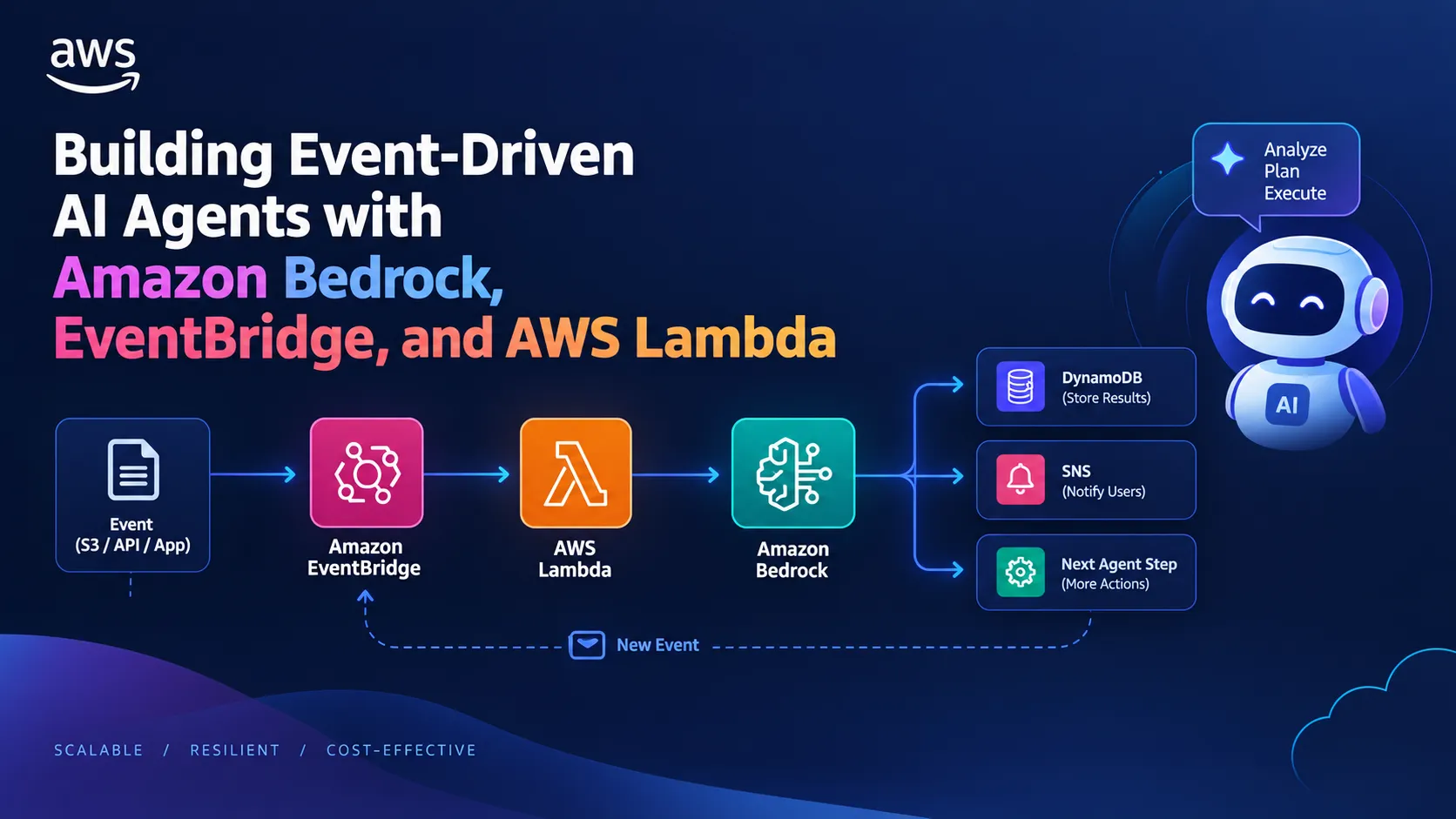
Building Event-Driven AI Agents with Amazon Bedrock, EventBridge, and AWS Lambda
Learn how to replace monolithic AI calls with an event-driven serverless architecture. This guide walks through combining Amazon Bedrock, EventBridge, and AWS Lambda to build scalable, resilient, and cost-effective AI agent workflows.

Generative AI has quickly shifted from simple text completions to autonomous AI Agents—systems capable of reasoning, executing multi-step workflows, calling APIs, and reacting to real-time events.
However, many developers still trigger AI processes via monolithic API endpoints or synchronous compute loops. This often leads to high execution costs, timeout risks, and tightly coupled architectures.
In this article, we will explore how to combine Serverless Event-Driven Architecture (EDA) with Amazon Bedrock to build resilient, scalable AI agent workflows that respond dynamically to system events without burning your compute budget.
The Concept: Synchronous vs. Event-Driven AI Workflows
The Traditional Approach (Synchronous)
- A user uploads a document to Amazon S3 or submits a query.
- Amazon API Gateway invokes a long-running AWS Lambda function or Amazon ECS task.
- The compute resource waits synchronously for the LLM response, invoking downstream API calls sequentially.
- Drawback: Lambda timeouts (15 minutes), higher compute costs for idle wait time, and brittle failure recovery.
The Event-Driven Approach (Asynchronous & Decoupled)
- An upstream action publishes a custom event to Amazon EventBridge.
- EventBridge routes the event to specialized, lightweight AWS Lambda micro-workers.
- Lambda interacts with Amazon Bedrock (using Bedrock Agents or direct Model Invocation).
- Results are published as new events back to EventBridge, triggering downstream actions (updating Amazon DynamoDB, sending an Amazon SNS notification, or triggering another agent step).
Step-by-Step Implementation
Step 1: Defining the Event Schema
Define a standardized JSON payload structure on your custom EventBridge event bus:
1
2
3
4
5
6
7
8
9
{

  "Source": "com.mycompany.ai",

  "DetailType": "TaskRequested",

  "Detail": {

    "taskId": "task-98765",

    "prompt": "Analyze this log output and route critical errors.",

    "userRole": "DevOpsAdmin"

  }

}
Step 2: Creating the Bedrock Action Router Lambda
This Python-based AWS Lambda function handles the incoming event and communicates with Amazon Bedrock using the AWS SDK (
boto3):1
2
3
4
5
6
7
8
9
10
11
12
13
14
15
16
17
18
19
20
21
22
23
24
25
26
27
28
29
30
31
32
33
34
35
36
37
38
39
40
41
42
43
44
45
46
47
48
49
50
51
52
53
import json
import os
import boto3
bedrock_runtime = boto3.client('bedrock-runtime', region_name='us-east-1')
def lambda_handler(event, context):
# Extract details from the EventBridge event
detail = event.get('detail', {})
user_prompt = detail.get('prompt', '')
# Define payload for Amazon Bedrock
body = json.dumps({
"anthropic_version": "bedrock-2023-05-31",
"max_tokens": 500,
"messages": [
{
"role": "user",
"content": user_prompt
}
]
})
try:
response = bedrock_runtime.invoke_model(
modelId='anthropic.claude-3-haiku-20240307-v1:0',
body=body
)
response_body = json.loads(response['body'].read())
ai_output = response_body['content'][0]['text']
# Publish completion event back to EventBridge
publish_completion_event(detail.get('taskId'), ai_output)
return {"statusCode": 200, "body": "Success"}
except Exception as e:
print(f"Error invoking Bedrock: {str(e)}")
raise e
def publish_completion_event(task_id, result):
events_client = boto3.client('events')
events_client.put_events(
Entries=[
{
'Source': 'com.mycompany.ai',
'DetailType': 'TaskCompleted',
'Detail': json.dumps({'taskId': task_id, 'result': result}),
'EventBusName': 'default'
}
]
)
Key Benefits of Event-Driven AI
- Cost Optimization: Pay only for exact model invocation time and milliseconds of compute execution during state transitions, rather than paying for idle connection waiting.
- Resilience & Retries: Native EventBridge Dead Letter Queues (DLQ) and SQS retries prevent system crashes when LLM endpoints experience rate limits (HTTP 429).
- Plug-and-Play Extensibility: Need to add a second LLM for validation or moderation? Simply add another EventBridge rule pointing to your new endpoint—no existing core code needs to change.
Key Takeaways for Builders
- Use Amazon Bedrock Agents when your AI needs to automatically orchestrate multiple native tools and databases via Action Groups.
- Use Amazon EventBridge + Lambda when you need fine-grained control over workflow execution, event filtering, and multi-service routing.
- Decouple input collection, AI processing, and output delivery to keep your cloud architectures scalable and budget-friendly.
Enjoyed reading this content? Let the author know!
Your likes, comments, shares, and saves help creators reach more builders.

Loading recommendations
Loading article