
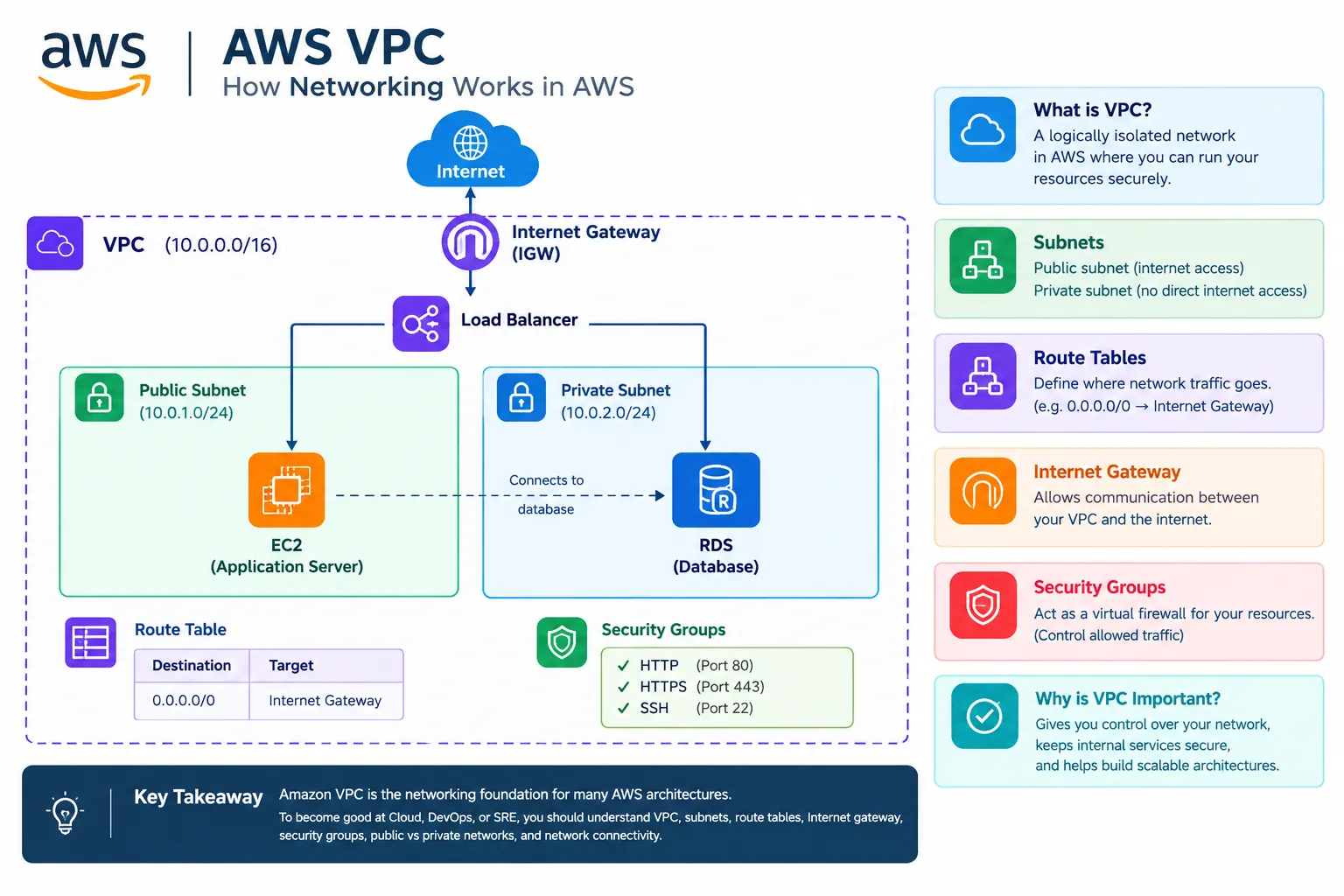
AWS VPC: How Networking Works in AWS ☁️🌐
Amazon VPC (Virtual Private Cloud) allows you to create a logically isolated network in AWS where you can securely run resources such as EC2 instances, databases, and applications.

When you launch an application on AWS, your servers need a network to communicate with each other and, when required, with the internet.
This is where Amazon VPC (Virtual Private Cloud) comes in.
A VPC is like your own private network inside AWS.
What is AWS VPC?
Amazon VPC allows you to create a virtual network with control over:
- IP addresses
- Subnets
- Routing
- Internet connectivity
- Network security
A simple architecture looks like this:
- AWS VPC
↓
Public Subnet → EC2 Server
↓
Private Subnet → RDS Database
What is a Subnet ?
A subnet is a smaller network inside your VPC.
There are two common types:
Public Subnet:
A subnet where resources can be configured for internet connectivity.
A subnet where resources can be configured for internet connectivity.
Private Subnet:
A subnet generally used for resources that should not have direct public internet access.
A subnet generally used for resources that should not have direct public internet access.
For example:
- Internet
↓
Load Balancer
↓
Public Subnet
↓
Application Server
↓
Private Subnet
↓
RDS Database
Route Tables
A route table contains rules that determine where network traffic should go.
For example:
Destination:
Target: Internet Gateway
0.0.0.0/0Target: Internet Gateway
This route can allow traffic to reach the internet when the rest of the network configuration is correctly set up.
Internet Gateway
An Internet Gateway (IGW) allows communication between resources in a VPC and the internet when the appropriate routing and public addressing configuration is in place.
A simplified flow is:
- User
↓
Internet
↓
Internet Gateway
↓
VPC
↓
EC2
Security Groups
A Security Group acts like a virtual firewall for AWS resources such as EC2 instances.
You can control which traffic is allowed.
For example:
- HTTP → Port 80
- HTTPS → Port 443
- SSH → Port 22
Only traffic allowed by the security-group rules can reach the resource.
Why is VPC Important?
VPC is important because it gives you control over your application's network architecture.
For example :
- Public Layer
↓
Web Server
↓
Private Layer
↓
Database
This type of architecture can help keep databases and internal services away from direct public internet exposure.
Real-World Example
Imagine you're building an e-commerce website.
A possible architecture could look like this:
- Internet
↓
Load Balancer
↓
Public Subnet
↓
EC2 / Application Server
↓
Private Subnet
↓
RDS Database
Users interact with the application, while the database can be placed in a private subnet.
Key Takeaway
Amazon VPC is the networking foundation for many AWS architectures.
To become good at Cloud, DevOps, or SRE, you should understand:
- VPC
- Subnets
- Route Tables
- Internet Gateway
- Security Groups
- Public vs Private Networks
- Network Connectivity
Once you understand these concepts, AWS networking becomes much easier to visualize. 🚀
Enjoyed reading this content? Let the author know!
Your likes, comments, shares, and saves help creators reach more builders.

Loading recommendations
Loading article