
I Gave an AI Agent Access to My AWS Account. Here's How I Made Sure It Can Only Read
How I built a read-only MCP server on my AWS compliance engine, enforced by an AST test in CI and a least-privilege IAM policy. No write path to inject into.

Builder TL;DR: I added an MCP server to my AWS compliance engine so I can ask Claude what happened in my account in plain English. The server can only read. I enforce that two ways: a test that parses the code and fails the build if any tool calls a mutating AWS API, and an IAM policy that grants nothing but reads. Either one can fail and the other still holds.
The problem
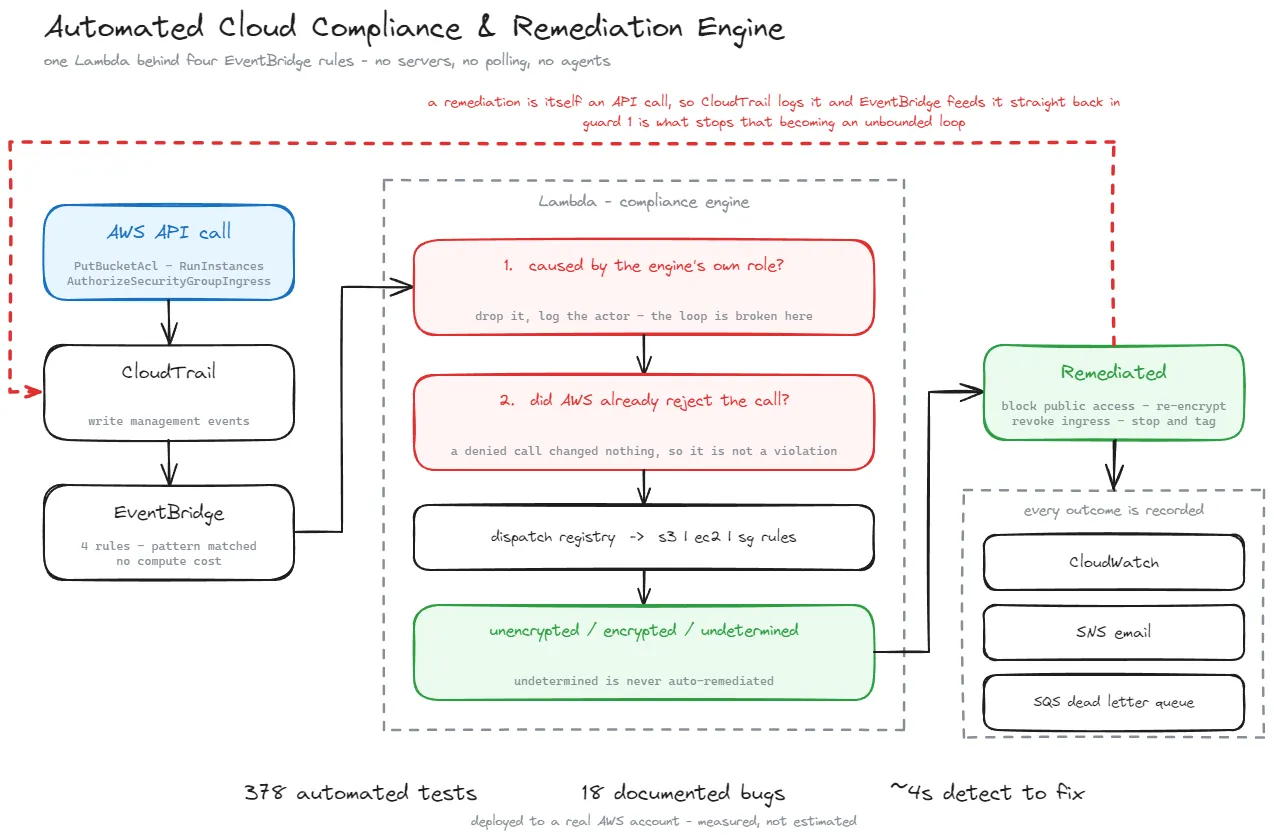
I run an automated compliance engine on AWS. CloudTrail captures API calls, EventBridge routes the risky ones (public S3 ACLs, removed bucket encryption, unencrypted EC2 volumes, SSH open to the internet) to a Lambda function, and the Lambda fixes them within seconds. It publishes CloudWatch metrics and structured logs for everything it does.
That part works. Answering questions about it was slow. "Who opened port 22 last Tuesday?" or "Which buckets are exempt from checks right now?" meant writing Logs Insights queries and clicking through the console.
So I built an MCP server. MCP (Model Context Protocol) lets an AI client like Claude Code or Claude Desktop call tools you write. I ask a question, the model decides which tools to call and in what order, and answers from real data.
The obvious worry: an agent that can call AWS APIs is one bad prompt away from changing something. Writing "please don't modify anything" in the instructions is not a control. Prompt injection is real, and the data this agent reads includes things an attacker controls, like resource names and the actor field in logs.
My rule was simple. The agent explains. The engine acts. They never swap jobs.
Why read-only at all
I already have code that remediates. It's deterministic, it's tested, and it responds in seconds. An LLM deciding whether to revoke a security group rule would be slower, less predictable and harder to audit than the code that already does it.
So the LLM gets the slow, fuzzy, human-facing part: explaining what happened and why. The fast, security-critical decision stays in plain Python. The engine and the MCP server share a data layer (metrics, logs, resource state) and nothing else. The server can't make the engine do anything, and the engine doesn't know the server exists.
The 6 tools
| Tool | What it reads |
|---|---|
| describe_engine_rules | What the engine enforces and which metrics it publishes. No AWS calls |
| get_compliance_posture | CloudWatch metrics: violations, remediations, exemptions over a time window |
| search_compliance_logs | Logs Insights query over the engine's structured logs |
| get_resource_history | Everything the engine ever logged about one instance, security group or bucket |
| get_resource_state | Current compliance state of one resource, read directly from AWS |
| list_exemptions | Resources currently tagged to bypass checks |
Every AWS call goes through one function, and every operation the server may perform is listed in one allowlist:
1
2
3
4
5
6
7
8
READ_ONLY_METHODS = frozenset({
    'get_metric_data',
    'start_query', 'get_query_results',
    'describe_instances', 'describe_volumes', 'describe_security_groups',
    'get_bucket_acl', 'get_bucket_encryption', 'get_bucket_tagging',
    'get_public_access_block',
    'get_resources',
})
Adding to that list is a deliberate act, and adding a mutating call fails the test suite. Which brings me to layer 1.
Layer 1: a test that reads the code
Code review can miss a
delete_ call slipped into a helper. A test that parses the source can't. It uses Python's ast module to walk every module in the package and collect every method call:1
2
3
4
5
6
7
8
9
10
11
12
13
14
15
16
17
MUTATING_PREFIXES = (
'put_', 'delete_', 'create_', 'modify_', 'terminate_', 'stop_', 'start_',
'revoke_', 'authorize_', 'update_', 'attach_', 'detach_', 'remove_',
'set_', 'reboot_', 'run_',
)
# logs:StartQuery only begins a read, so it is exempted by name rather than
# dropping start_ and letting StartInstances through with it.
READ_CALLS_THAT_LOOK_MUTATING = {'start_query'}
def _called_method_names(path):
tree = ast.parse(path.read_text(encoding='utf-8'))
return {
node.func.attr
for node in ast.walk(tree)
if isinstance(node, ast.Call) and isinstance(node.func, ast.Attribute)
}
Any name starting with a mutating prefix fails the build with the message: "This server is read-only by construction: there is no write path to prompt-inject into."
Two details I had to get right:
start_ is a trap. logs:StartQuery is a read: it starts a Logs Insights query. ec2:StartInstances restarts a stopped instance. If I'd removed start_ from the list to let my query through, start_instances would have come with it. So the exemption is one exact name, not the prefix, and there's a test proving start_instances is still caught.A guard that checks nothing passes. If the file glob ever came back empty, every assertion would pass on zero files. So the suite also checks that there are modules to scan, and feeds the guard a known-bad sample (
client.delete_bucket(...)) to prove it fires. A security test you've never seen fail is a test you only believe in.A third check runs the other way: every AWS-looking call the tools make has to appear in the allowlist. So a new call can't sneak in undeclared either.
Layer 2: an IAM policy that can't write
The test proves the code has no write path today. It doesn't stop someone calling
getattr(client, 'delete_bucket')(), which the AST check wouldn't see. That's why there's a second layer that knows nothing about the code.Terraform creates an optional least-privilege policy for a dedicated identity to run the server:
1
2
3
4
5
6
7
8
9
10
11
12
13
14
15
16
17
18
19
20
{
  Sid    = "QueryEngineLogs"
  Effect = "Allow"
  Action = ["logs:StartQuery", "logs:GetQueryResults", "logs:DescribeLogGroups"]
  Resource = [
    aws_cloudwatch_log_group.lambda.arn,
    "${aws_cloudwatch_log_group.lambda.arn}:*",
  ]
},
{
  Sid    = "ReadBucketConfiguration"
  Effect = "Allow"
  Action = [
    "s3:GetBucketAcl",
    "s3:GetEncryptionConfiguration",
    "s3:GetBucketTagging",
    "s3:GetBucketPublicAccessBlock",
  ]
  Resource = "arn:aws:s3:::*"
}
The log permissions are scoped to the engine's own log group.
cloudwatch:GetMetricData, the ec2:Describe* calls and tag:GetResources use Resource = "*" because they don't support resource-level permissions.One gotcha worth knowing: IAM action names don't always match the API operation names. The boto3 call
get_bucket_encryption needs s3:GetEncryptionConfiguration, and get_public_access_block needs s3:GetBucketPublicAccessBlock. Write the policy from the API names and you get AccessDenied on calls you thought you allowed.There's also a Terraform test for this policy, so the IAM side is checked in CI the same way the Python side is.
Why two layers
Each layer is weak alone. The AST test is a name-prefix heuristic. The IAM policy only helps if the server actually runs under that identity. Right now I run it locally under my own credentials, so in day-to-day use the code layer is the one holding the line. The policy is there for when it moves to a dedicated role.
The point is that they fail for different reasons. A bug that gets past the AST check (a dynamic call) is stopped by IAM. A misconfigured identity is covered by the code having no write calls to make. You need both to break at once.
The lesson that mattered most: "nothing found" is not "clean"
The design choice that paid off in practice wasn't about writes at all.
For an AI agent, an empty result is dangerous. If a query for a resource's history comes back with zero records, the model will happily tell you the resource has a clean record. But "zero records" can also mean the engine isn't deployed in this region, or never saw the resource, or the log group doesn't exist.
So every tool returns a warning when an empty result is ambiguous, and the server instructions tell the model: "Absence of evidence is not evidence of compliance." A compliant value of
null means undetermined, and the model is told not to round it to true or false.This caught a real bug on the first live run. Two of the six tools were pointed at a log group named
...-prod while my deployment was ...-test. Instead of an empty success, the tool returned:1
2
3
4
5
6
"status": "LogGroupNotFound",
"records": [],
"warning": "Log group /aws/lambda/compliance-engine-prod does not exist in
us-east-1. The engine is most likely not deployed to this region,
or not deployed at all. This is not evidence that the account is
compliant."
Without that warning, the agent would have reported a clean account and I'd have believed it. I fixed the config, and I made the log group setting as strict as the region setting, which already failed loudly when unset. A default that's wrong for your own deployment is a bug with a fallback value.
Region gets the same treatment. Every client is built with an explicit region and never inherits the CLI default. My CLI defaults to
ap-southeast-1 and the engine lives in us-east-1. A query against the wrong region returns empty, and empty looks like good news.What I'd still worry about
Read-only shrinks the blast radius. It doesn't make the agent trustworthy.
- Prompt injection through data. Log records include the actor and resource names. Someone who can name a bucket can put text in front of the model. The worst case now is a misleading answer rather than a changed resource. But a misleading answer from a security tool is still a problem, so I treat the agent's summary as a starting point and check the raw records.
- Data leaving the account. Whatever the tools return goes to the model provider. For a personal lab that's fine. In a real company, what the tools are allowed to return is a data classification decision, and it should be made before the server is built.
- Exemptions are a bypass. The engine skips any resource with the exemption tag, and that tag only needs ordinary tagging permissions. That's why
list_exemptionsexists: the bypass path deserves more visibility than the happy path, not less.
Takeaways
- If an agent doesn't need to act, give it no code path that acts. You can't prompt-inject a function that doesn't exist.
- Enforce read-only twice, with controls that fail independently. A test on the code and a policy on the identity.
- Test your security tests against a known-bad sample, or you don't know they work.
- Make "I couldn't look" and "I looked and found nothing" different return values. For an AI agent this matters more than for a human, because the model will confidently summarise an empty list.
The code is public: github.com/Mhdomer/aws-compliance-remediation-engine
💬 Let's discuss
- For agents with cloud access, do you rely on IAM alone, or do you also enforce boundaries in the code?
- How are you handling prompt injection through data the agent reads, like log fields and resource tags?
Enjoyed reading this content? Let the author know!
Your likes, comments, shares, and saves help creators reach more builders.

Loading recommendations
Loading article