
New To AWS Series: Learn 7 Cloud Concepts with this Beginner Project
A beginner AWS project: build a website visitor counter with AWS Lambda and DynamoDB, learn seven cloud concepts, and plan for Free Tier costs.
Series: New To AWS Beginners Guide (5 articles)
- 2New To AWS Series: Learn 7 Cloud Concepts with this Beginner Project This article

One small project, seven cloud concepts.
A good first AWS project is a website visitor counter built with AWS Lambda and Amazon DynamoDB. One page load runs through a full cloud backend: the browser sends a request, Lambda runs your code, DynamoDB updates a number, and the page shows the result. To get it working, you also have to handle permissions, deployment, debugging, and cost.
I wrote this guide for new and early-career developers. You'll build a small webpage on your computer and a backend on AWS, by hand or with Kiro, Claude Code, Codex, or another coding assistant connected through Agent Toolkit for AWS. Ask your assistant to explain each decision.
Eligible new AWS accounts can also earn up to $40 in additional AWS credits from two activities this project covers: a Lambda web app and a cost budget. Check which activities your account offers before you count on the reward.
What will you build?
You'll build a page that says "Page views: 42." Each page load sends one request to AWS. Your backend adds one to a stored number and sends the new count back.
I call it a visitor counter, but it counts page views, not unique people. Refreshes and bots push the number up too. And yes, refreshing your own page counts as growth. You are not going viral just yet.
The frontend stays on your computer for this lesson. Public hosting can be your next project.
What you need: a browser, Python 3 or another local web server, and an AWS account. A coding assistant is optional.
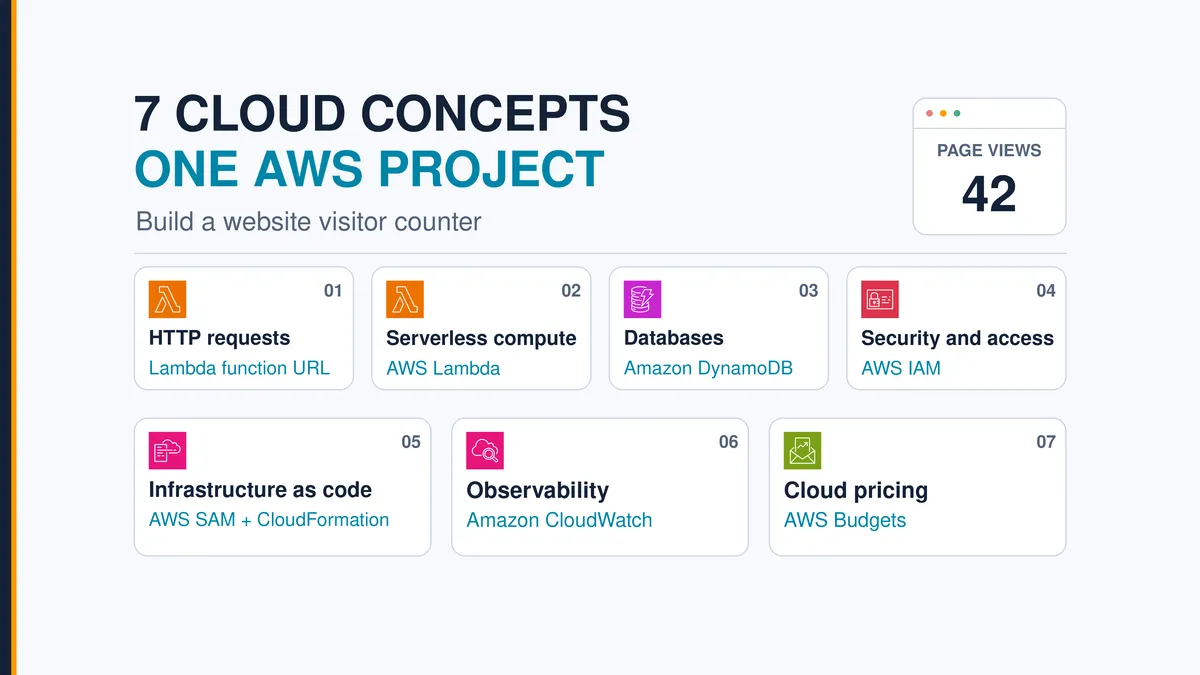
| Cloud concept | What you use | What you should be able to explain |
|---|---|---|
| 1. HTTP requests | Lambda function URL | How a browser sends a request and reads JSON |
| 2. Serverless compute | AWS Lambda | What runs your code without a server you manage |
| 3. Databases | Amazon DynamoDB | Where the count lives and how updates avoid lost increments |
| 4. Cloud security and access | AWS IAM | Who can call the function and what its code may change |
| 5. Infrastructure as code | AWS SAM and CloudFormation | How a file creates a repeatable environment |
| 6. Observability | Amazon CloudWatch | How requests, logs, and metrics help diagnose failures |
| 7. Cloud pricing | Service pricing and AWS Budgets | How allowances, credits, and alerts differ |
How does the AWS visitor counter work?

AWS visitor counter architecture, drawn with official AWS Architecture Icons. The narrow IAM role is a choice I made for this lab. Your account's default roles may grant more.
The browser calls a Lambda function URL, Lambda runs your code, and DynamoDB stores the count. IAM decides what each piece may do, but the request never passes through IAM as a separate hop. CloudWatch records each invocation. SAM deploys the whole setup, and a budget watches your costs on its own schedule.
Which 7 cloud concepts does this project teach?
1. HTTP requests: how does your page talk to AWS?
An HTTP request has a method, an address, headers, and sometimes a body. The response carries a status code, headers, and a body. HTTPS encrypts the connection.
Your page sends a
POST request because it changes the count. A successful response returns status 200 and JSON such as {"count":42}. Login forms and checkout buttons use this same request-and-response pattern.
The browser's Network tab links what you see on the page to the request behind it.
Try it: Open your browser's developer tools, select Network, and refresh. Find the POST request, its status, and its response body. MDN's HTTP overview covers the underlying web concepts.
2. Serverless compute: who runs your code?
AWS Lambda runs your function each time something invokes it. You supply the code and configuration, and AWS operates the servers underneath. With the on-demand setup in this guide, you pay per request and per unit of compute time, with no virtual machine idling between visits.
You still choose memory, set a timeout, handle errors, and plan for scaling limits. Serverless takes server administration off your plate, and you keep the engineering decisions.

Lambda runs the code. DynamoDB keeps the result.
Try it: Open the handler in the Lambda console and find the line that changes the count. Explain what triggers it. AWS lists what Lambda manages for you .
3. Databases: where does the count live?
Amazon DynamoDB stores data as items in tables. This lab needs one item: a key named
id with the value homepage, plus a number named views.Lambda can reuse an execution environment, so a variable in memory might survive between requests. You can't rely on that, because separate environments don't share memory. Keep the count in DynamoDB.
Two visitors arriving at once can trigger a classic bug. If both read 42 and both write back 43, you lose one increment. An atomic update asks the database to add one in a single operation.

Atomic updates prevent the lost-update race. A retried increment can still count twice.
This is the core operation in the handler:
1
2
3
4
5
6
7
8
result = table.update_item(
    Key={"id": "homepage"},
    UpdateExpression="ADD #views :one",
    ExpressionAttributeNames={"#views": "views"},
    ExpressionAttributeValues={":one": 1},
    ReturnValues="UPDATED_NEW",
)
count = int(result["Attributes"]["views"])
Try it: Close and reopen your page. The count should pick up where it left off. Then explain why atomic doesn't mean "exactly once": if your code repeats the same increment, DynamoDB adds another view. AWS documents this limit in its atomic-counter guidance . Use this pattern for a learning counter. A billing or ticket-inventory system needs stronger guarantees.
4. Cloud security and access (IAM): who can do what?
AWS Identity and Access Management (IAM) controls who can access which AWS resources. A permission works like a job badge: it should open the doors the job needs and no others.
This app asks two separate access questions. Can a caller invoke the function? Once the function runs, can it update the database? A public endpoint gives callers the ability to trigger your code. It doesn't hand them your database credentials.

The invocation policy answers who can call the function. The execution role answers what the function can change.
For this lab, create a dedicated execution role, the identity Lambda uses while it runs your code. Give it
dynamodb:UpdateItem on this one table and permission to write this function's logs. That's least privilege in practice.The new AWS signup experience can attach broader default roles meant for general-purpose code, so check before you trust them. Assign the lab role yourself and read every policy attached to it. A narrow policy added next to a broad one doesn't cancel the broad one. The IAM role manager documentation covers role selection, and AWS also explains how to scope roles down .
Try it: Find the table ARN (its unique AWS resource identifier) in the role's policy. Explain why the function has no need to delete the table.
5. Infrastructure as code: can you rebuild the setup?
Infrastructure as code (IaC) describes cloud resources in files. An AWS SAM template defines this app's function, URL, table, role, and log group. SAM builds on AWS CloudFormation, which creates and updates a group of resources called a stack.
You can review every change in version control, and cleanup starts from one stack instead of a hunt through the console.

Deployment creates the infrastructure once. Each visitor request uses it afterward.
Try it: Match each resource in
template.yaml to the architecture diagram. A redeploy recreates a deleted table empty, so IaC is no substitute for backups. The AWS SAM introduction has more detail.6. Observability: how do you find what broke?
Observability means using evidence from your app to understand its behavior. Logs record individual events. Metrics summarize activity such as invocation counts and duration. With the right permissions, Lambda sends its logs to Amazon CloudWatch.
If the number stops changing, start with the browser request, then find the matching backend log. A missing permission, a wrong table name, and a request that never reached Lambda each need a different fix.

Debug in order: browser request, backend log, then the configuration the log points to.
Try it: Find a successful request's ID and count in CloudWatch. As a controlled exercise, remove your lab role's table permission, watch the failure appear in the logs, and restore the permission through the template. Leave the managed roles from the signup experience alone. The Lambda logging guide explains how logs reach CloudWatch.
7. Cloud pricing: is this AWS project free?
For a low-traffic lab, Lambda and DynamoDB can stay inside their always-free monthly allowances if you configure DynamoDB as described below. Keep three things apart: your promotional credit balance, each service's recurring free allowance, and budget alerts.
Lambda's monthly free allowance is 1 million requests and 400,000 GB-seconds of compute. DynamoDB Standard includes 25 GB of storage plus 25 read and 25 write capacity units of provisioned capacity. Eligibility rules apply, and the allowances cover your whole account, so other workloads draw from them too. Check Lambda pricing and DynamoDB pricing .
Set DynamoDB to Standard table class, provisioned capacity, 1 read capacity unit and 1 write capacity unit. Provisioned capacity reserves throughput. It isn't a monthly request quota, and AWS charges for it while idle if you go past the free allocation. On-demand mode bills per request instead. One write unit also means a burst of traffic can get throttled.

Credits, free allowances, and budget alerts each do a different job. None of them makes usage unlimited.
Logs, deployment artifacts, data transfer, and optional features can use up credits or create charges on a paid plan. The Free Plan ends after six months or when its credits run out, whichever comes first, unless you upgrade. A service's ongoing free allowance doesn't keep an expired Free Plan open. The Free Tier FAQ has the current terms.
Try it: List the resources that keep existing after you close your browser. Then create a budget alert. AWS Budgets works from billing data that can lag behind your usage, and an email alert won't stop spending. Project spend limits on the paid plan are a separate feature. AWS explains how AWS Budgets works .
How to build an AWS visitor counter, step by step
You'll build this in two halves. First, run the static webpage on your computer with a counter that shows it isn't connected. Then create the AWS backend and connect it by filling in one value. That split shows you which part AWS adds.
Open an empty project folder in Kiro, Codex, Claude Code, or your preferred coding assistant. Steps 1 and 2 need only local files and a local web server. AWS credentials and Agent Toolkit come in Step 3.

The page runs locally first. The counter starts working once you connect the deployed backend.
Step 1: ask your assistant to build the static frontend
A static webpage is a set of files your browser loads: HTML for structure, CSS for appearance, and JavaScript for behavior. Static pages can still be interactive. Your JavaScript will call the AWS backend once it exists.
Paste this prompt into your coding assistant:
1
2
3
4
5
6
7
8
9
10
11
12
13
14
15
16
17
18
19
20
21
22
23
24
25
26
27
I'm learning cloud development. Build only the frontend of a website
page-view counter first. Do not create AWS resources or set up AWS yet.

Create one index.html with HTML, CSS, and plain JavaScript. Use a clean,
responsive layout with a heading, a "Total page views" card, a count,
and an accessible status message. No framework or build tool is needed.

Inside its script, include this clearly marked connection point:
// CONNECT YOUR AWS BACKEND HERE - after deployment
const API_URL = "";

While API_URL is empty, show an em dash for the count and the message
"Backend not connected yet". Explain that the webpage is running,
but it needs an AWS backend to save and retrieve the count.
Make no backend request in this state. Do not fake the count or use
localStorage to make the cloud feature appear to work.

Prepare a recordPageView() function for the future backend:
- When API_URL contains a valid HTTPS endpoint, send one POST per load.
- Send an empty JSON object and Content-Type: application/json.
- Expect a successful JSON response containing an integer count.
- Check response.ok, then display the returned count.
- Show loading and failure states. Do not retry automatically.
- Keep AWS credentials and SDKs out of the frontend.

Explain each part and point out API_URL, the fetch call, and where
the returned count is rendered. Stop after creating the local files.
Prefer a ready-made starting point? Use
index.html from the accompanying starter folder and ask your assistant to explain it. Its API_URL starts empty, so you follow the same sequence.Step 2: run localhost and inspect the missing connection
Ask your assistant:
1
2
3
4
5
6
7
8
Help me serve this folder at http://localhost:8000 and open index.html.
Check which local tools I have. If Python is available, use its simple
HTTP server. Explain the command and how to stop it.

Verify that the page loads and shows "Backend not connected yet".
Show me the empty API_URL in the code and explain why no AWS request
should appear in the browser's Network tab yet. Do not fill the URL
with a made-up endpoint or create a local mock backend.
From the folder containing
index.html, a typical command is:1
python3 -m http.server 8000 --bind 127.0.0.1On Windows, the command may be
py -m http.server 8000 --bind 127.0.0.1. Open http://localhost:8000 on your browser and leave the terminal running. Press Ctrl+C to stop the server later.Checkpoint: The page renders, and the count shows an em dash. You want this incomplete state at this point. The local server delivers your HTML, CSS, and JavaScript. It can't run an AWS function you haven't created yet, or save a shared count to a database that doesn't exist.
Find this exact connection point in
index.html:1
2
// CONNECT YOUR AWS BACKEND HERE - after deployment
const API_URL = "";Later, you'll paste the actual Lambda function URL from the deployment output between those quotes. That URL is a public address. It grants no AWS access on its own. The frontend never needs the table name, your AWS credentials, or the function's execution role.
Before you move on, find three places in the JavaScript: the empty
API_URL, the fetch(...) call that uses it, and the line that puts data.count on the page.Step 3: set up your AWS project and Agent Toolkit
With the local page running, sign up through the new AWS signup experience . Most new customers can start without a credit card, though availability and verification requirements vary. Confirm which plan AWS shows you.
For a fuller tour of signup, read Learn AWS Without a Surprise Bill: Start Free, Build Your First App . The steps below cover what this project needs.
Your project is the AWS environment that holds this app's resources. A Region is a geographic AWS location, and AWS Settings shows the Region assigned to your project. Eligible new customers get $100 in credits at signup and can earn up to $100 more through qualifying activities.
Open Explore AWS on Console Home and find two activities: the Lambda web app and the AWS Budgets cost budget. Each pays $20 in promotional credits (no cash value) to an eligible account that completes it. Follow the requirements and deadlines shown, then confirm completion there. AWS documents the activity requirements and credit rewards .
To connect your coding assistant:
- Open AWS Settings and select this project.
- Choose Create and manage cloud infrastructure, then Use your AWS credentials with AI coding tools.
- Select Copy agent prompt and paste that project-specific prompt into your assistant.
- Follow its setup and browser sign-in steps. Give the project a recognizable named profile and choose the matching project session.
Use AWS's project connection instructions alongside the Agent Toolkit quick start for Kiro, Codex, and Claude Code . Installation differs by assistant, so follow the current instructions for yours. Agent Toolkit gives your assistant AWS documentation access, skills, and tools. AWS doesn't charge for it, but your assistant's plan or model usage may cost money.
For a longer walkthrough of what Agent Toolkit does in your workflow, read Setting Up the Agent Toolkit for AWS in Kiro, Codex, Claude Code, and Cursor . The steps above are enough to continue this project.
Once setup is complete, give your assistant this verification prompt:
1
2
3
4
5
6
7
8
9
10
11
12
We already have the frontend working at http://localhost:8000.
Before building the backend, verify Agent Toolkit for AWS is available.
Use an AWS documentation tool to look up Lambda function URLs and show
the source. Separately, verify the AWS identity our deployment will use.

Tell me the named profile, account/project, and assigned Region.
Run aws sts get-caller-identity with that explicit profile and compare
the account to my intended project. Do not expose credentials.

Do not create cloud resources yet. Explain the difference between
connecting our coding assistant to AWS and connecting the webpage
to its backend. These are separate connections.
Checkpoint: Your assistant can pull AWS guidance and names the right project. Your webpage still says "Backend not connected yet." Agent Toolkit helps the assistant build the backend, and you still connect the page yourself in Step 6.
Step 4: choose SAM or CDK and read the template before you deploy
Your assistant will write two kinds of code. Application code increments the count. Infrastructure code creates the function, database, permissions, and endpoint.
| Tool | What you write | How it fits this project |
|---|---|---|
| AWS SAM (Serverless Application Model) | A template, usually in YAML, with shorthand for serverless resources and ordinary CloudFormation resources | A compact template.yaml for this small Lambda app; SAM CLI helps build, test, and deploy it |
| AWS CDK (Cloud Development Kit) | Infrastructure definitions in a language such as TypeScript or Python, using reusable building blocks called constructs | Useful if you prefer programming-language tooling; CDK synthesizes CloudFormation templates from those definitions |
Both tools create and update resources through AWS CloudFormation, and the counter behaves the same with either one. AWS has a SAM overview and a CDK overview .
This guide and its starter code use SAM, because one template maps cleanly onto the architecture diagram. Pick one tool for this deployment. If you'd rather use CDK, swap in the alternative prompt below and have your assistant generate an equivalent stack.
Step 5: ask the assistant to build the AWS backend with infrastructure as code
The frontend and backend need a shared agreement, called an API contract:
| Part | Our agreement |
|---|---|
| Request | HTTPS POST to the function URL, with Content-Type: application/json and body {} |
| Successful response | HTTP 200 and JSON containing count, for example {"count":42} |
| Browser origin | http://localhost:8000 |
Give the assistant this prompt:
1
2
3
4
5
6
7
8
9
10
11
12
13
14
15
16
17
18
19
20
21
22
23
24
25
26
27
28
29
30
31
32
33
34
35
36
37
38
39
40
41
Read our existing index.html first. Preserve its layout, API_URL
connection point, and POST/JSON contract. The page already runs at
http://localhost:8000 and should stay there for this lesson.

Build its AWS backend using AWS SAM infrastructure as code. Use
Agent Toolkit for current AWS documentation and my verified project
profile and assigned Region. Stay on my current account plan.

Create these files locally before deploying:
1. template.yaml defining the resources and their connections.
2. app.py containing the Python Lambda handler.
3. A README with build, deploy, verify, and cleanup commands.

Define a Lambda function with a public function URL. Accept POST only.
Use DynamoDB Standard, PROVISIONED capacity, 1 RCU and 1 WCU, with
key id=homepage and an atomic ADD on views. Return the integer count
as JSON. Handle errors and log request IDs. Do not automatically retry
an uncertain increment. Explain why atomic does not mean exactly-once.

Create and explicitly assign our own execution role, restricted to
UpdateItem on this table plus this function's log-writing permissions.
Do not modify managed roles. Set log retention to seven days.
Set function URL CORS to the exact origin http://localhost:8000.
Include both required public function-URL invocation permissions,
with InvokeFunction restricted to calls through the function URL.

Export the deployed endpoint as a stack output named FunctionUrl.
Leave API_URL empty until there is an actual successful deployment.
Do not host the frontend, add API Gateway, or add other application
services. Explain any deployment artifact storage or bootstrap
resources separately before creating them.

Walk me through the IaC file. Map each resource to our architecture,
explain how the function gets the table name, and explain who can call
the endpoint versus what the function may do. Describe costs and
what deleting the stack would remove, including data.

Validate the template and run local tests. Show the proposed changes
and exact deployment commands. Wait for approval before deploying.
Report access restrictions rather than broadening permissions or
changing account plans on your own.
Prefer CDK? Replace the SAM tool choice and file list in that prompt with this; keep the same backend requirements:
1
2
3
4
5
6
7
8
9
10
11
12
13
14
Use AWS CDK in TypeScript instead of SAM. Replace the SAM file list
with CDK project and stack source, app.py, and a README. Create one
CDK stack for the same design and API contract, including a FunctionUrl
stack output. Inspect the generated template with cdk synth; do not
hand-author a SAM template for this CDK path.
Show me the infrastructure source and the synthesized CloudFormation
template, then explain cdk synth, cdk diff, and cdk deploy.

Check whether this account and Region are already bootstrapped.
Before bootstrapping, explain its additional resources and permissions
and wait for approval. If project restrictions block it, report the
restriction and discuss using the SAM path without changing my plan.
Explain removal policies and what cleanup retains. Do not also deploy
a SAM stack for the same app.
CDK bootstrapping adds deployment resources to an account and Region, such as an asset bucket and IAM roles. They live outside your counter stack and stay behind when you delete it. AWS explains bootstrapping in the CDK guide.
Checkpoint: You can point to the function, table, role, logs, CORS settings, and URL output in the infrastructure definition. You can also say which file runs on each page visit (
app.py) and which file describes the AWS setup (template.yaml, or your CDK stack).Step 6: deploy the backend and connect the frontend
Once you understand the proposed changes, send this prompt:
1
2
3
4
5
6
7
8
9
10
11
12
13
Deploy the reviewed backend using our chosen IaC tool, the verified
profile, and the project's assigned Region. Show the deployment result.
If it fails, diagnose it and report what exists; do not invent a URL.

After the stack succeeds, retrieve its actual FunctionUrl output.
Replace only the empty API_URL string in index.html with that value.
Show the before-and-after code and explain why this is an endpoint
address, not a credential. Keep all AWS credentials out of the page.

Keep the frontend at http://localhost:8000. Help me reload it and
inspect the POST request, HTTP status, JSON count, and matching logs.
Explain the full path from browser to Lambda to DynamoDB and back.
Report PASS, FAIL, or NOT RUN with evidence for each check.
The edit is one line:
const API_URL = ""; gets your real deployed endpoint between the quotes. Don't paste an example URL from a tutorial.Checkpoint: Reload the page. You should see a loading state, then the number AWS returns. The HTML still runs locally, but the shared count lives in DynamoDB now. If you see an error state, diagnose the connection or backend. A fake number would only hide the problem.
CORS (cross-origin resource sharing) tells the browser which origins may read responses from another domain. Use the exact origin
http://localhost:8000. Opening the file directly or browsing to http://127.0.0.1:8000 changes the origin and triggers a CORS error. An OPTIONS preflight may appear before the POST. AWS documents function URL configuration and authorization requirements .The URL is public on purpose for this exercise. CORS doesn't authenticate anyone, and scripts outside your page can call the URL and run up usage. Keep private data out of the demo and delete the stack when you finish.
Step 7: test the app, review costs, and clean up
Finish with this prompt:
1
2
3
4
5
6
7
8
9
10
11
12
13
14
15
16
17
18
Help me verify the connected app. Record a baseline, then make three
successful sequential requests and compare the returned counts and
CloudWatch logs. Explain retries, other callers, and throttling before
claiming an exact count. Do not run a load test by default.

After I approve a controlled failure exercise, remove only our lab
role's UpdateItem permission through IaC, observe the failure, restore
the permission, and retest. Do not edit managed roles.

Help me follow my account's AWS Budgets credit activity, create a
monthly actual-cost alert, and verify the email recipient. Explain
credit treatment, notification delays, and why an alert is not a cap.
Check offered activity completion without promising a credit award.

When I am ready to finish, list everything deployment created and
what deletion removes or retains. Include counter data, deployment
artifacts, any CDK bootstrap resources, and the separate budget.
Wait for approval before deleting. Then verify what remains.
Keep your infrastructure definition and frontend in version control. With both saved, you can rebuild the backend from scratch, explain how the pieces connect, and trace a failure to its cause.
How do you know you learned the concepts?
Explain one complete request without looking at this guide. Show the POST in the browser, the updated DynamoDB item, the role's table permission, and the matching CloudWatch log, then point to where the SAM template defines each one. Finish by naming the free allowances you rely on and the one thing your budget alert can't do (stop spending).
If you can do that, you have portfolio material. Save screenshots of your own successful run and write up one failure you diagnosed.
Frequently asked questions
What is a good first AWS project for beginners?
A website visitor counter built with AWS Lambda and Amazon DynamoDB. It uses two main services and still covers HTTP requests, serverless compute, a database, IAM permissions, infrastructure as code, logging, and cost.
Is this AWS visitor counter free to run?
It can be. A low-traffic counter with DynamoDB on provisioned capacity (1 RCU, 1 WCU) fits the always-free Lambda and DynamoDB allowances. Other account usage, supporting resources, and plan eligibility can still create charges.
What happens when my Free Plan credits run out?
The Free Plan ends when its credits run out or after six months, whichever comes first, unless you upgrade to a paid plan. The always-free service allowances don't extend the Free Plan. On a paid plan, eligible usage inside those allowances stays free.
Does building this project earn $40 in AWS credits automatically?
No. Each $20 reward requires an eligible account and completion of the offered Lambda or AWS Budgets activity within its terms. Check completion in Explore AWS on Console Home.
Do I need an AI coding assistant to build it?
No. You can build from the starter files by hand. An assistant connected through Agent Toolkit for AWS can explain the files, look up current AWS guidance, and help you debug errors.
Does the counter track unique visitors?
No. It counts requests, so refreshes, bots, and repeated calls all add to the number. Unique-visitor analytics needs more design work, including privacy decisions.
What should you build next?
Start by hosting the frontend with AWS Amplify Hosting , then change the allowed CORS origin to the hosted address. Check hosting costs for that project on their own.
After that, add a separate counter for each page. Swapping the fixed
homepage key for a page identifier is a small first exercise in data modeling.If you repeat one part of this guide, make it the controlled failure in Step 7. Remove the permission, read the error in CloudWatch, and put it back until the fix feels routine.
Series: New To AWS Beginners Guide (5 articles)
- 2New To AWS Series: Learn 7 Cloud Concepts with this Beginner Project This article
Enjoyed reading this content? Let the author know!
Your likes, comments, shares, and saves help creators reach more builders.

Loading recommendations
Loading article