
Deploying SubSmart AI with AWS Amplify in 3 Hours
A technical breakdown of how I used AI-assisted coding and AWS Amplify to rapidly build and deploy a subscription manager SaaS.

The Hackathon Time Constraint
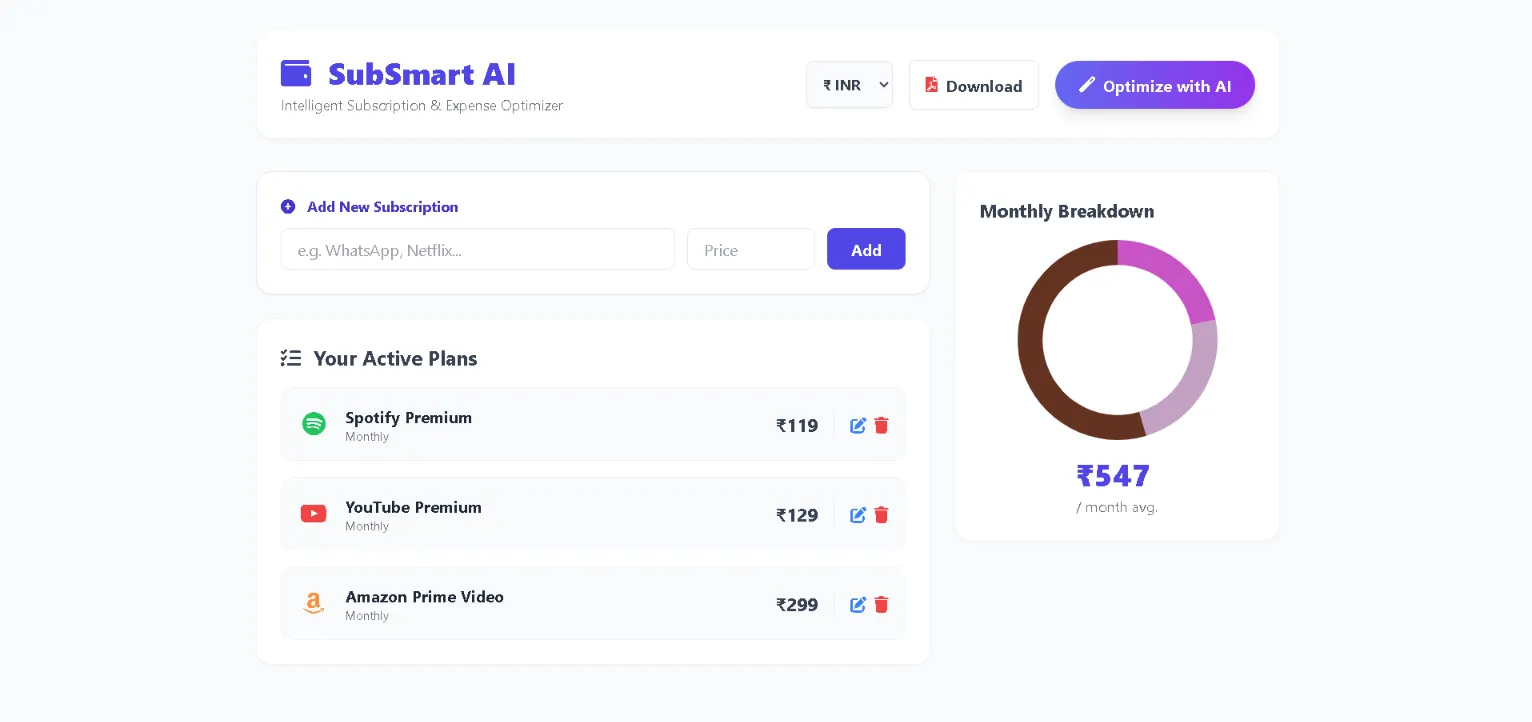
With the AWS Builder Center Hackathon deadline rapidly approaching, I had a concept but a very tight window for execution. My objective was to build SubSmart AI, an intelligent subscription and expense optimization tool.
The problem is common: "subscription fatigue." Users pay for multiple cloud services, SaaS tools, and streaming platforms, often losing track of aggregate monthly costs. My solution was a clean, interactive dashboard to track these expenses, featuring AI-driven insights for potential savings and a one-click PDF export functionality.
The primary challenge was building a production-ready frontend and deploying it securely to the cloud within a few hours. Here is a technical breakdown of how I utilized AI coding assistants alongside AWS Amplify to achieve this.
Phase 1: Rapid Prototyping with AI-Assisted Coding
Writing raw HTML, configuring Tailwind CSS classes, and integrating charting libraries like Chart.js manually would typically consume an entire day. To accelerate this, I utilized an AI coding assistant.
I provided a strict set of constraints: Generate a single-file, highly responsive web application using Tailwind CSS, integrate Chart.js for data visualization, and include html2pdf.js for report generation.
Within the first hour, I had a robust boilerplate. This allowed me to shift my focus from typing syntax to defining business logic. I spent my time implementing the core features:
- Developing a dynamic USD to INR currency conversion mechanism.
- Writing logic to automatically fetch and render brand icons based on user input (e.g., dynamically loading the Netflix logo when typed).
- Configuring the PDF export formatting for clean reporting.
Phase 2: Seamless Deployment via AWS Amplify
A functional local environment is only the first step; the application needed to be live and accessible. This is where AWS Amplify provided significant value.
Traditionally, provisioning a server, configuring DNS, and establishing CI/CD pipelines introduces substantial overhead. With AWS Amplify, deploying this client-side application took exactly three steps:
- Version Control: I committed my application code and README.md to a public GitHub repository.
- Environment Setup: In the AWS Management Console, I navigated to AWS Amplify, initialized a new app, and authenticated my GitHub repository.
- Deployment: I selected the main branch, retained the default build settings for static site hosting, and executed the deployment.
The entire process took under three minutes. AWS provisioned the resources, built the application, and deployed it behind a secure, globally available HTTPS endpoint with zero manual server configuration.
The Final Product
By combining AI for rapid frontend generation and AWS Amplify for frictionless deployment, SubSmart AI progressed from a concept to a live application in under three hours.
You can view the live deployment and review the source code below:
- Live Application: https://main.doade7rx69nr3.amplifyapp.com/
- Source Code: https://github.com/lgsach/subsmart-ai
Community Discussion
Building this project reinforced how tools like AWS Amplify significantly lower the barrier to entry for deploying startup concepts.
I would love to hear from other developers: What is your preferred feature within AWS Amplify, or which AWS service would you recommend integrating next to scale this application? Please share your thoughts in the comments.
Enjoyed reading this content? Let the author know!
Your likes, comments, shares, and saves help creators reach more builders.

Loading recommendations
Loading article