
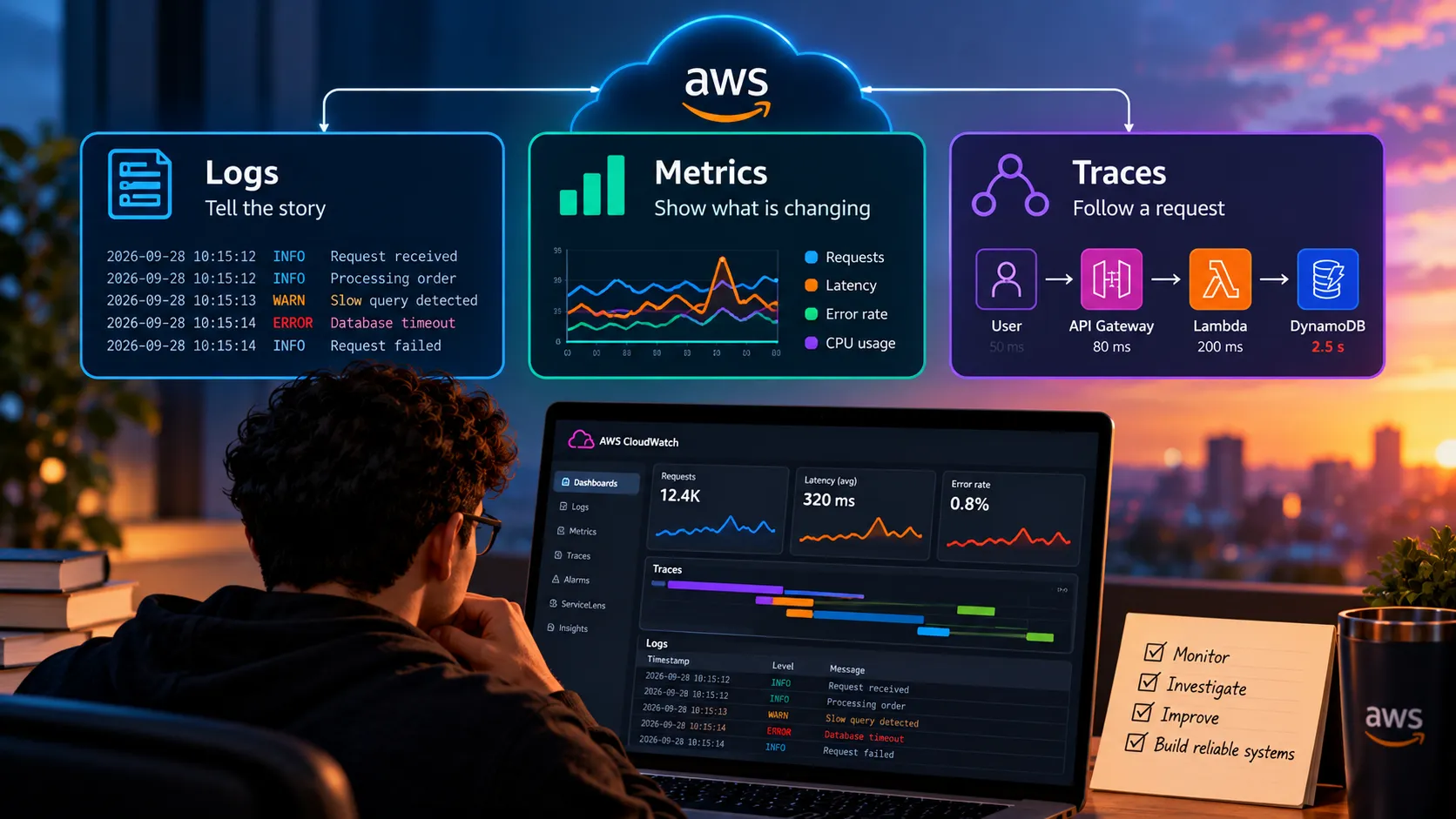
Observability in the Cloud: Why Logs, Metrics, and Traces Matter
Learn how logs, metrics, and traces help developers understand cloud applications, detect problems, troubleshoot failures, and improve reliability with observability on AWS.

Building an application is only part of the job.
Once the application is running in the cloud, another question becomes important:
How do we know what is happening inside the system?
When everything works, this question may seem simple.
But when users report errors, latency increases, an API starts failing, or infrastructure behaves unexpectedly, understanding what is happening becomes essential.
This is where observability comes in.
What is Observability?
Observability is the ability to understand the internal state of a system by analyzing the information it produces.
In practice, observability usually relies on three main pillars:
- Logs
- Metrics
- Traces
Together, they help developers and operations teams investigate failures, monitor performance, and understand how applications behave in production.
Logs Tell the Story
Logs are records generated by applications and infrastructure.
They may contain information such as:
- Errors
- Requests
- Authentication events
- Application events
- Exceptions
- Warnings
For example, if an API request fails, logs may help identify where the failure occurred.
A simple log might show:
User request receivedDatabase query startedDatabase timeoutRequest failedWithout logs, the only information we may have is that the application returned an error.
With logs, we begin to understand why.
Metrics Show What Is Changing
Metrics are numerical measurements collected over time.
They help us answer questions such as:
- How many requests are being processed?
- How much CPU is being used?
- How much memory is available?
- What is the average response time?
- How many errors are happening?
Metrics are especially useful for identifying trends.
For example:
Normal response time: 150 ms
Current response time: 1.8 seconds
That difference can indicate that something has changed in the system.
Metrics help us detect that change quickly.
Traces Follow a Request
Modern applications are often distributed across multiple services.
A single user request may pass through:
Frontend
↓
API Gateway
↓
Lambda Function
↓
Database
↓
Another Service
↓
API Gateway
↓
Lambda Function
↓
Database
↓
Another Service
If something becomes slow, identifying the exact source can be difficult.
Tracing helps follow the journey of a request across the system.
Instead of only knowing that the request took three seconds, we can identify where that time was spent.
For example:
API Gateway: 50 ms
Lambda: 200 ms
Database: 2.5 seconds
Now the problem becomes much easier to investigate.
Monitoring and Observability Are Not Exactly the Same
Monitoring usually tells us whether something known is happening.
For example:
CPU usage above 90%
Error rate above 5%
Application unavailable
Observability goes further.
It helps us investigate unexpected problems and ask new questions using the data the system already produces.
A useful way to think about it is:
Monitoring tells us that something is wrong.
Observability helps us understand why.
Both are important.
Observability on AWS
AWS provides several services that support observability.
One of the main services is Amazon CloudWatch.
CloudWatch can collect and analyze information such as:
- Metrics
- Logs
- Events
- Alarms
Applications can use CloudWatch to monitor infrastructure and application behavior.
For distributed tracing, AWS also provides capabilities that help visualize how requests travel through applications and services.
The specific tools may vary depending on the architecture, but the goal remains the same:
Make the system easier to understand.
A Simple Serverless Example
Imagine a serverless API built with:
User
↓
Amazon API Gateway
↓
AWS Lambda
↓
Amazon DynamoDB
↓
Amazon API Gateway
↓
AWS Lambda
↓
Amazon DynamoDB
Users begin reporting that the application is slow.
Without observability, we may only know that the experience is bad.
With metrics, we might discover that Lambda duration has increased.
With logs, we might find repeated database-related errors.
With traces, we might identify exactly which operation is creating the delay.
Each signal provides a different part of the answer.
Observability Helps Before Failures Too
Observability is not only useful after something breaks.
It can also help detect problems before they become critical.
For example, we may notice:
- Memory usage increasing over time
- Error rates slowly growing
- Requests becoming gradually slower
- Resource consumption increasing
- Unusual traffic patterns
These signals can help teams investigate issues earlier.
This changes operations from:
React after failure
to:
Detect and investigate before the impact becomes larger
Good Observability Requires Good Context
Collecting large amounts of data is not enough.
Logs need to be useful.
Metrics need to represent meaningful behavior.
Traces need enough context to connect operations.
For example, a log saying:
Error occurredis much less useful than:
Payment processing failed for request 8472 due to database timeoutThe goal is not simply generating more data.
The goal is generating information that helps explain system behavior.
Observability and Cost
There is also another important consideration.
Observability data has a cost.
Applications can generate large volumes of logs and metrics.
Collecting everything without a strategy can increase storage and monitoring expenses.
That means teams need to decide:
What information is important?
How long should logs be retained?
Which metrics should be monitored?
What level of detail is necessary?
Observability itself needs to be designed.
AI Can Help Analyze Operational Data
Artificial Intelligence is also starting to change how teams interact with observability data.
Large volumes of logs, metrics, and events can be difficult to analyze manually.
AI can help summarize incidents, identify unusual patterns, explain errors, and support troubleshooting.
But the same principle we see in software development applies here.
AI can help analyze the data.
The system still needs to produce good data in the first place.
Poor observability cannot be fixed simply by adding AI later.
Observability Improves Learning
Observability is also useful while learning cloud computing.
It helps us see what our applications are actually doing.
When building a project, checking logs and metrics can answer questions such as:
Did my Lambda execute?
How long did the function run?
Did the API receive the request?
Why did the request fail?
How much memory was used?
This turns infrastructure from something invisible into something we can inspect.
That makes debugging easier and improves our understanding of cloud systems.
A Useful Mental Model
A simple way to remember the three pillars is:
Logs tell us what happened.
Metrics tell us how much and how often.
Traces tell us where it happened.
Combined, they create a much clearer picture of application behavior.
Conclusion
Cloud applications are increasingly distributed, dynamic, and complex.
That makes it difficult to understand problems simply by looking at the source code.
Observability gives developers visibility into what their systems are actually doing.
Logs provide events and details.
Metrics reveal trends and changes.
Traces show how requests move across services.
Together, they help teams detect problems, investigate failures, improve performance, and operate applications with greater confidence.
Building a system is important.
Being able to understand that system when something goes wrong is just as important.
If we cannot see what the system is doing, we cannot reliably improve it.
#AWS #Observability #CloudComputing #AmazonCloudWatch #DevOps #SoftwareDevelopment
Enjoyed reading this content? Let the author know!
Your likes, comments, shares, and saves help creators reach more builders.

Loading recommendations
Loading article