
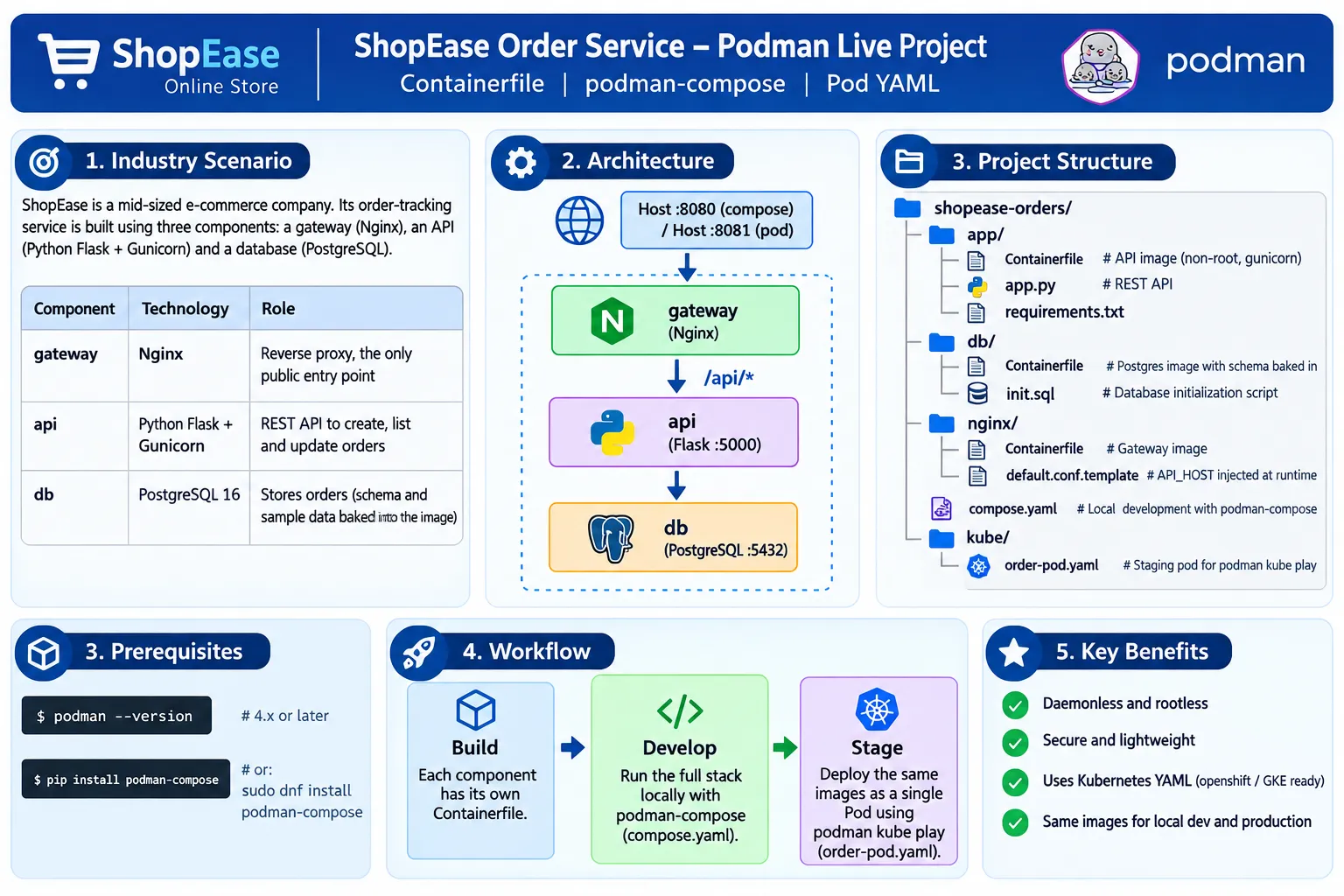
Building a Containerized E-Commerce Order Service with Podman
Explore the ShopEase Order Service, a containerized e-commerce application built with Podman. The project uses Nginx as a gateway, Flask and Gunicorn for the REST API, and PostgreSQL for data storage. Learn how to build images with Containerfiles, run the stack using podman-compose, and deploy the same images as a Pod using Kubernetes YAML with a secure and portable development-to-staging workflow.

Building a Containerized E-Commerce Order Service with Podman
Introduction
Modern applications are increasingly built as multiple services that can be developed, deployed, and managed independently. Containerization makes this approach easier by packaging applications and their dependencies into portable, isolated environments.
In this project, I built a containerized ShopEase Order Service using Podman. The application represents an e-commerce order-tracking system consisting of three components:
- Nginx – Reverse proxy and public gateway
- Python Flask + Gunicorn – REST API
- PostgreSQL 16 – Database
The project demonstrates how the same container images can be used in two different environments: local development using podman-compose and staging using a Podman Pod deployed from Kubernetes YAML.
Project Architecture
The ShopEase application follows a simple three-tier architecture:
1
2
3
4
5
6
7
8
9
10
11
12
13
14
15
16
17
18
19
20
21
22
23
24
25
                    Client
                      |
                HTTP :8080/:8081
                      |
                      v
             +----------------+
             |     Nginx      |
             |    Gateway     |
             | Reverse Proxy  |
             +-------+--------+
                     |
                   /api/*
                     |
                     v
             +----------------+
             |  Flask API     |
             |   Gunicorn     |
             |    :5000       |
             +-------+--------+
                     |
                     v
             +----------------+
             |  PostgreSQL    |
             |      :5432     |
             +----------------+
The Nginx gateway is the only component exposed to the host. Requests received by the gateway are forwarded to the Flask API, which communicates with PostgreSQL to read and modify order information.
This architecture provides a clear separation between the public entry point, application logic, and data storage.
Project Structure
The project uses the following directory structure:
1
2
3
4
5
6
7
8
9
10
11
12
13
14
15
16
17
18
19
shopease-orders/
│
├── app/
│   ├── Containerfile
│   ├── app.py
│   └── requirements.txt
│
├── db/
│   ├── Containerfile
│   └── init.sql
│
├── nginx/
│   ├── Containerfile
│   └── default.conf.template
│
├── compose.yaml
│
└── kube/
    └── order-pod.yaml
Each directory has a specific responsibility.
API Directory
The
app directory contains the Flask REST API.app.py
The API provides endpoints for:
1
2
3
4
5
GET    /api/health
GET    /api/orders
GET    /api/orders/<id>
POST   /api/orders
PATCH  /api/orders/<id>
The health endpoint verifies that the application can communicate with PostgreSQL.
The API also supports creating new orders and moving orders through different lifecycle states:
1
2
3
4
5
6
7
PLACED
   ↓
PACKED
   ↓
SHIPPED
   ↓
DELIVERED
The application obtains database configuration through environment variables instead of hard-coding the database host and credentials.
requirements.txt
The API uses Flask, Gunicorn, and the PostgreSQL driver:
1
2
3
flask==3.0.3
gunicorn==22.0.0
psycopg2-binary==2.9.9
API Containerfile
The API image is based on Python 3.12 Slim.
One important security practice demonstrated in the project is running the application as a non-root user:
1
USER 1001
The application also uses Gunicorn instead of Flask's development server:
1
gunicorn --bind 0.0.0.0:5000 --workers 2 app:app
This demonstrates several useful Containerfile practices including dependency layer caching, a non-root user, pinned base images, and a production WSGI server.
PostgreSQL Database
The
db directory contains the database configuration.The
init.sql file creates the orders table:1
2
3
4
5
6
7
8
CREATE TABLE IF NOT EXISTS orders (
id SERIAL PRIMARY KEY,
customer VARCHAR(100) NOT NULL,
item VARCHAR(100) NOT NULL,
quantity INTEGER NOT NULL CHECK (quantity > 0),
status VARCHAR(20) NOT NULL DEFAULT 'PLACED',
created_at TIMESTAMP NOT NULL DEFAULT NOW()
);
The project also includes sample orders so that the application can be tested immediately after deployment.
The database Containerfile uses:
1
postgres:16-alpine
and copies the initialization script into PostgreSQL's initialization directory.
Nginx Gateway
The
nginx directory contains the reverse-proxy configuration.Nginx listens on port
80 inside the container and forwards /api/ requests to the Flask API.The important part of the configuration is the use of:
1
API_HOST
The value changes depending on how the application is deployed.
With Compose:
1
API_HOST=api
With a Pod:
1
API_HOST=127.0.0.1
This is possible because containers in a Pod share the same network namespace and can communicate through localhost.
Running the Application with Podman Compose
For local development, the project uses
compose.yaml.The Compose configuration defines three services:
1
2
3
db
api
gateway
The API depends on the database, while the gateway depends on the API.
The gateway publishes:
1
8080:80
Therefore, the application can be accessed through:
1
http://localhost:8080
The API and database do not publish ports directly to the host.
The stack can be started with:
1
podman-compose up -d --build
The running services can then be checked using:
1
podman-compose ps
Testing the REST API
After the containers start, the health endpoint can be tested:
1
curl http://localhost:8080/api/health
The order list can be retrieved using:
1
curl http://localhost:8080/api/orders
A specific order can be retrieved using:
1
curl http://localhost:8080/api/orders/1
A new order can be created with:
1
2
3
curl -X POST http://localhost:8080/api/orders \
  -H "Content-Type: application/json" \
  -d '{"customer":"Rahul Mehta","item":"Laptop Stand","quantity":1}'
The order status can then be updated:
1
2
3
curl -X PATCH http://localhost:8080/api/orders/4 \
  -H "Content-Type: application/json" \
  -d '{"status":"SHIPPED"}'
These tests demonstrate communication between the client, Nginx, Flask API, and PostgreSQL database.
Deploying the Same Images as a Pod
One of the most useful parts of this project is deploying the same images using Podman Kubernetes YAML.
The project contains:
1
kube/order-pod.yaml
The YAML defines a Pod named:
1
shopease-orders
The Pod contains:
1
2
3
4
shopease-orders
├── db
├── api
└── gateway
The deployment can be started with:
1
podman kube play kube/order-pod.yaml
The Pod can be checked with:
1
podman pod ps
and its containers can be viewed with:
1
podman ps --pod --filter pod=shopease-orders
The staging deployment exposes the gateway on:
1
localhost:8081
Therefore, the API can be tested with:
1
curl http://localhost:8081/api/health
and:
1
curl http://localhost:8081/api/orders
Understanding the Networking Difference
One of the most important concepts demonstrated by this project is the difference between Compose networking and Pod networking.
In
podman-compose, services communicate using service names:1
2
API → db
Gateway → api
For example:
1
2
DB_HOST=db
API_HOST=api
Inside a Pod, the containers share the network namespace. Therefore:
1
2
DB_HOST=127.0.0.1
API_HOST=127.0.0.1
The application does not hard-code these values. Instead, they are supplied through environment variables.
This allows the same application images to work in both deployment models without changing the application code.
Security Considerations
The project demonstrates several container security practices.
Non-root application
The Flask application runs using user ID
1001 instead of root.Limited network exposure
Only the Nginx gateway publishes a host port.
The API and database remain internal services.
Runtime configuration
The gateway uses environment variables to determine the API destination.
Production application server
Gunicorn is used instead of Flask's built-in development server.
These practices are part of the project's Containerfile and deployment design.
Development-to-Staging Workflow
The overall workflow can be summarized as:
1
2
3
4
5
6
7
8
9
10
11
12
13
14
15
16
17
18
19
       Containerfiles
             |
             v
       Build Images
             |
             v
      Podman Compose
             |
             v
     Local Development
             |
             v
        API Testing
             |
             v
       Podman Kube
             |
             v
       Staging Pod
The major advantage of this approach is that the same images can be used in both development and staging. The deployment configuration changes, while the application images remain the same.
What I Learned from This Project
Working on this project helped me understand several practical containerization concepts:
- How to create separate Containerfiles for different application components.
- How to build and manage images with Podman.
- How to use
podman-composefor local multi-container development. - How containers communicate using service-name DNS.
- How Podman Pods provide shared networking between containers.
- How Kubernetes-style YAML can be used with
podman kube play. - Why environment variables are useful for deployment-specific configuration.
- How to expose only the required public service.
- How to run application containers as non-root users.
- How the same container images can move from development toward staging.
Important Consideration
The current project does not use persistent volumes for PostgreSQL. As a result, newly created orders are lost when the containers are removed.
A logical next improvement would be to add persistent storage for:
1
/var/lib/postgresql/data
The project also suggests several possible extensions, including adding an order-status filter, using Kubernetes Secrets for the database password, adding an API readiness probe, and running the Pod as a systemd service with Quadlet.
Conclusion
The ShopEase Order Service provides a practical example of building and running a multi-container application with Podman.
The project combines Nginx, Flask, Gunicorn, and PostgreSQL into a small e-commerce order service while demonstrating important containerization concepts such as image building, service networking, security, runtime configuration, Compose-based development, and Kubernetes-compatible Pod deployment.
The most valuable concept is the ability to build the application components once and then run the same images using different deployment models. This creates a foundation for moving containerized workloads from local development toward more advanced staging and orchestration environments.
Podman provides a useful workflow for learning these concepts through daemonless and rootless container management while also supporting Kubernetes-style YAML for Pod deployment.
Project: ShopEase Order Service
Technologies: Podman | Podman Compose | Python Flask | Gunicorn | Nginx | PostgreSQL | Kubernetes YAML
Technologies: Podman | Podman Compose | Python Flask | Gunicorn | Nginx | PostgreSQL | Kubernetes YAML
Enjoyed reading this content? Let the author know!
Your likes, comments, shares, and saves help creators reach more builders.

Loading recommendations
Loading article