
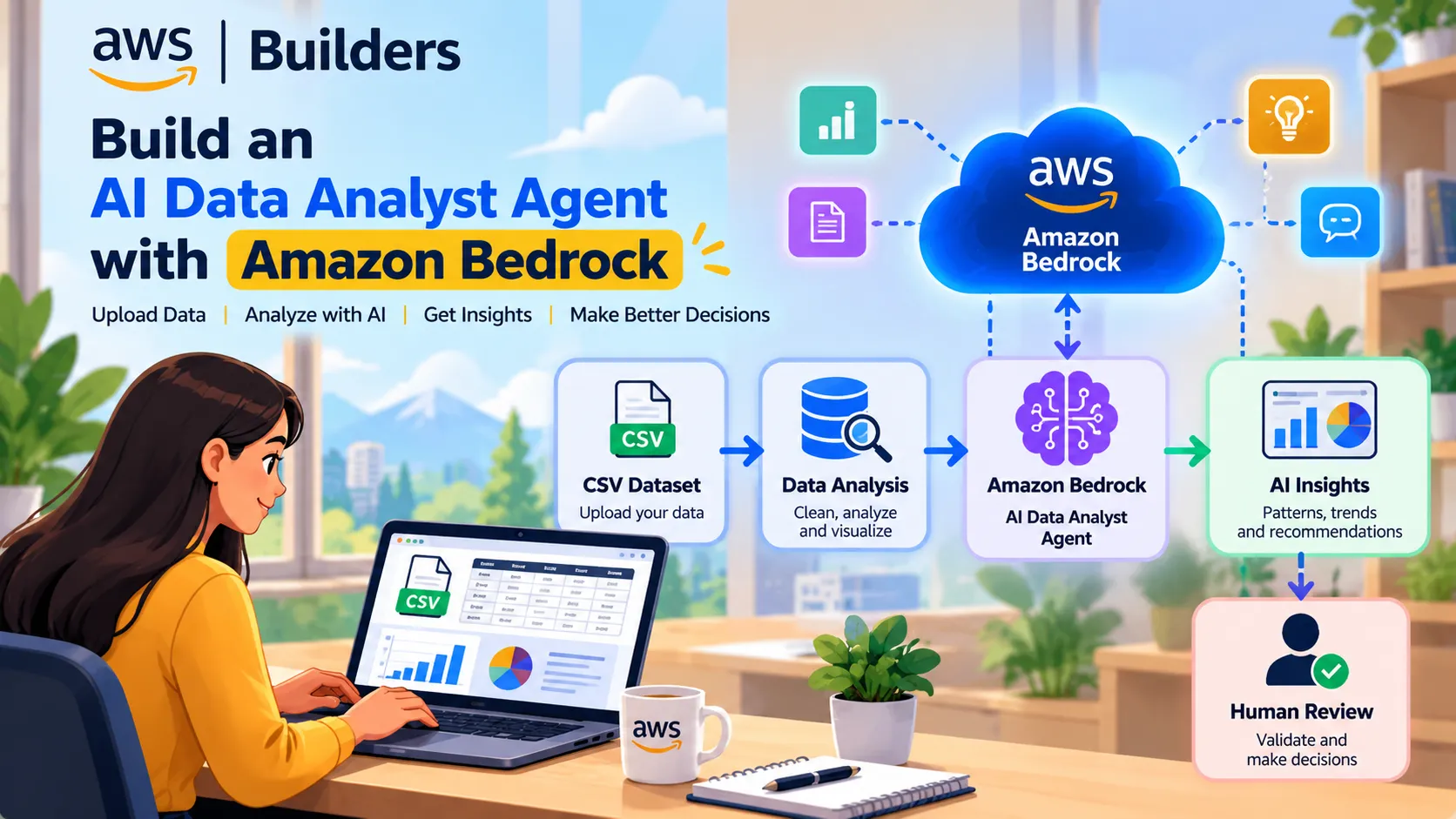
Build an AI Data Analyst Agent with Amazon Bedrock
Build an AI-assisted data analyst workflow that accepts a CSV dataset, performs data analysis with Python, and uses Amazon Bedrock to explain patterns, anomalies, and business insights. Learn how to combine deterministic analytics, generative AI, guardrails, and human validation in one practical architecture.
Build an AI Data Analyst Agent with Amazon Bedrock
A traditional data analyst workflow often looks like:
Load → Clean → Analyze → Visualize → Report
Generative AI can add another layer:
Ask questions → Analyze data → Explain results → Generate insights
In this project, we will build a simple AI Data Analyst Agent that combines Python-based analysis with Amazon Bedrock.
The important principle is:
Python calculates the facts. AI explains the facts. Humans validate important conclusions.
🏗️ Architecture
1
2
3
4
5
6
7
8
9
10
11
12
13
14
15
16
17
18
19
20
21
22
23
24
25
26
27
28
29
30
31
32
33
34
35
36
                  USER
                    │
                    ▼
             ┌─────────────┐
             │  CSV Upload │
             └──────┬──────┘
                    │
                    ▼
             ┌─────────────┐
             │    Pandas   │
             │ Clean Data  │
             └──────┬──────┘
                    │
                    ▼
             ┌─────────────┐
             │ Data Profiling│
             │ Statistics  │
             └──────┬──────┘
                    │
                    ▼
             ┌─────────────┐
             │ Amazon      │
             │ Bedrock     │
             └──────┬──────┘
                    │
                    ▼
          ┌──────────────────┐
          │ AI Data Analyst  │
          │ Insights         │
          └────────┬─────────┘
                   │
                   ▼
            Human Validation
                   │
                   ▼
             Final Insights
1. What Can the Agent Do?
Our AI Data Analyst can help answer questions such as:
- What are the most important patterns?
- Which columns contain missing values?
- What are the highest-performing categories?
- Are there unusual observations?
- What trends should be investigated?
- What business questions can be asked next?
- Can the analysis be summarized for a non-technical audience?
The agent should not invent statistics. Numerical calculations should come from Python and the dataset.
2. Prepare the Environment
Install the required libraries:
1
pip install pandas boto3
AWS documents Boto3 as an option for interacting with Amazon Bedrock APIs, and currently recommends the
bedrock-runtime endpoint with the Converse API for a unified interface across supported models.3. Load the Dataset
1
2
3
4
5
6
7
8
import pandas as pd

df = pd.read_csv("sales_data.csv")

print("Rows:", len(df))
print("Columns:", len(df.columns))

print(df.head())
The first step is always understanding the dataset before asking an AI model to interpret it.
4. Profile the Data
1
2
3
4
5
6
7
8
9
10
print(df.info())

print("\nMissing values:")
print(df.isnull().sum())

print("\nDuplicate rows:")
print(df.duplicated().sum())

print("\nStatistics:")
print(df.describe())
This gives us information about:
- Dataset size
- Data types
- Missing values
- Duplicate records
- Numeric distributions
- Basic statistics
5. Create an AI-Friendly Data Summary
Instead of sending thousands of rows directly to the model, create a compact analytical summary.
1
2
3
4
5
6
7
8
9
summary = {
    "rows": len(df),
    "columns": list(df.columns),
    "missing_values": df.isnull().sum().to_dict(),
    "duplicates": int(df.duplicated().sum()),
    "statistics": df.describe().to_dict()
}

print(summary)
This approach keeps the model focused on verified information.
6. Connect to Amazon Bedrock
1
2
3
4
5
6
import boto3

bedrock = boto3.client(
    "bedrock-runtime",
    region_name="YOUR_AWS_REGION"
)
Replace
YOUR_AWS_REGION with the AWS Region you are using.7. Create the Analyst Prompt
1
2
3
4
5
6
7
8
9
10
11
12
13
14
15
16
17
18
19
20
21
22
prompt = f"""
You are an AI Data Analyst.

Analyze the following verified dataset summary:

{summary}

Provide:

1. Important observations
2. Data quality issues
3. Potential anomalies
4. Important patterns
5. Questions that should be investigated
6. Three actionable insights

Rules:
- Do not invent statistics.
- Use only the supplied information.
- Clearly distinguish observations from assumptions.
- If the data is insufficient to answer something, say so.
"""
This last part is extremely important.
A good AI analyst should be able to say:
“There is not enough information in the dataset to determine this.”
rather than generating a confident but unsupported answer.
8. Use the Converse API
Amazon Bedrock's Converse API supports conversational interactions and provides a common interface across supported models.
Example:
1
2
3
4
5
6
7
8
9
10
11
12
13
14
15
16
17
18
19
20
21
response = bedrock.converse(
    modelId="YOUR_MODEL_ID",
    messages=[
        {
            "role": "user",
            "content": [
                {
                    "text": prompt
                }
            ]
        }
    ],
    inferenceConfig={
        "maxTokens": 1000,
        "temperature": 0.2
    }
)

answer = response["output"]["message"]["content"][0]["text"]

print(answer)
Replace:
1
YOUR_MODEL_ID
with a model available to your account and Region.
9. Add Natural-Language Questions
Now we can allow users to ask questions such as:
1
Which product category generated the most revenue?
or:
1
What unusual patterns should I investigate?
or:
1
Summarize this dataset for a business manager.
The application can combine the user's question with verified statistics before sending the request to the model.
1
2
3
4
5
6
7
8
9
10
11
12
13
14
15
user_question = input("Ask a question about your data: ")

prompt = f"""
You are a data analyst.

Dataset information:
{summary}

User question:
{user_question}

Answer using only the available dataset information.
Do not invent values.
If the information is insufficient, clearly state that.
"""
This creates a simple conversational data-analysis interface.
10. Add Visual Analysis
The agent becomes more useful when traditional analytics produces charts.
For example:
1
2
3
4
5
6
7
8
9
import matplotlib.pyplot as plt

df["Sales"].plot(kind="hist")

plt.title("Sales Distribution")
plt.xlabel("Sales")
plt.ylabel("Frequency")

plt.show()
The workflow becomes:
1
2
3
4
5
6
7
8
9
10
11
CSV
 ↓
Pandas
 ↓
Statistics
 ↓
Charts
 ↓
Amazon Bedrock
 ↓
Natural-language explanation
AI does not have to replace visualization.
It can explain what the visualization shows.
11. Add Data Quality Checks
Before generating insights, perform deterministic checks.
1
2
3
4
5
6
7
8
quality_report = {
    "missing_values": int(df.isnull().sum().sum()),
    "duplicate_rows": int(df.duplicated().sum()),
    "rows": len(df),
    "columns": len(df.columns)
}

print(quality_report)
You can also add checks for:
1
2
3
4
5
6
Invalid dates
Negative values
Unexpected categories
Extreme values
Incorrect data types
Empty columns
This makes the application more reliable.
12. Add Amazon Bedrock Guardrails
AI applications may receive sensitive or inappropriate input.
Amazon Bedrock Guardrails provides configurable safeguards for model inputs and outputs, including content filters, denied topics, sensitive-information filtering, and other controls.
Guardrails can also be associated with Bedrock agents.
Conceptually:
1
2
3
4
5
6
7
8
9
User Question
      ↓
Guardrail
      ↓
AI Analyst
      ↓
Guardrail
      ↓
Response
You can also use the
ApplyGuardrail API independently to evaluate text without invoking a foundation model.13. Human Validation
AI-generated insights should not automatically become business decisions.
A useful workflow is:
1
2
3
4
5
6
7
8
9
AI Insight
     ↓
Check Source Data
     ↓
Verify Calculation
     ↓
Review Context
     ↓
Accept / Modify / Reject
For example:
1
2
3
4
5
6
7
8
9
10
11
12
AI:
"Product A appears to have the highest sales."

Human:
Check the actual aggregation.

Python:
Product A = ₹1,250,000
Product B = ₹980,000

Human:
Accept.
The AI assists with interpretation, while the underlying calculation remains verifiable.
14. Turn It Into a Real Agent
The next step is allowing the AI to use analytical tools.
For example:
1
2
3
4
5
6
7
8
9
                    AI Analyst
                        │
        ┌───────────────┼───────────────┐
        ▼               ▼               ▼
   SQL Tool       Python Tool       Chart Tool
        │               │               │
        └───────────────┼───────────────┘
                        ▼
                   Final Insight
Possible tools:
get_dataset_schema()
Returns columns and data types.
run_statistics()
Calculates descriptive statistics.
run_groupby()
Calculates category-level metrics.
detect_anomalies()
Runs an anomaly-detection method.
create_chart()
Creates a visualization.
generate_report()
Produces a final analytical report.
15. Important AWS Architecture Note
If you are starting a new agent project, check the current Amazon Bedrock AgentCore documentation rather than building a new application around Bedrock Agents Classic. AWS currently states that Amazon Bedrock Agents Classic is in maintenance mode and is no longer open to new customers, while recommending Amazon Bedrock AgentCore for similar capabilities.
That makes the broader architecture:
1
2
3
4
5
6
7
8
9
10
11
12
13
14
15
16
17
18
19
User
 │
 ▼
AI Data Analyst
 │
 ├── Dataset Tools
 ├── Python Analysis
 ├── SQL
 ├── Visualization
 └── Report Generation
 │
 ▼
Risk / Guardrails
 │
 ▼
Human Validation
 │
 ▼
Final Answer
16. Example User Experience
Imagine uploading:
1
sales_data.csv
The user asks:
"Why did sales decrease?"
The system could respond:
1
2
3
4
5
6
7
8
9
10
11
12
13
14
15
16
17
Dataset:
12,450 rows

Finding:
Sales decreased by approximately 14% in the final month
compared with the previous month.

Possible contributing pattern:
The Electronics category showed the largest decline.

Data quality:
2.1% missing values were detected in the Region column.

Recommended investigation:
1. Compare regional sales.
2. Check Electronics inventory.
3. Compare discounts between the two months.
The important part is that the numerical findings come from the analytical layer, while Bedrock helps turn those findings into an understandable explanation.
17. Complete AI Data Analyst Workflow
1
2
3
4
5
6
7
8
9
10
11
12
13
14
15
16
17
18
19
20
21
22
23
24
25
26
27
28
29
30
31
32
33
34
35
36
              ┌──────────────┐
              │ CSV / Database│
              └───────┬──────┘
                      ↓
              ┌──────────────┐
              │ Data Quality │
              └───────┬──────┘
                      ↓
              ┌──────────────┐
              │ Python / SQL │
              │   Analysis   │
              └───────┬──────┘
                      ↓
              ┌──────────────┐
              │   AI Data    │
              │   Analyst    │
              └───────┬──────┘
                      ↓
              ┌──────────────┐
              │   Amazon     │
              │   Bedrock    │
              └───────┬──────┘
                      ↓
              ┌──────────────┐
              │ Guardrails   │
              └───────┬──────┘
                      ↓
              ┌──────────────┐
              │    Human     │
              │   Review     │
              └───────┬──────┘
                      ↓
              ┌──────────────┐
              │   Business   │
              │   Insights   │
              └──────────────┘
🚀 Where This Can Go Next
This basic prototype can become a full AI Data Analyst application with:
- 📁 CSV/Excel upload
- 💬 Natural-language questions
- 🐍 Python analysis
- 🗄️ SQL queries
- 📊 Automatic charts
- 🤖 Amazon Bedrock
- 🛡️ Guardrails
- 🔎 Anomaly detection
- 📝 Automated reports
- 👤 Human validation
- 📈 Streamlit dashboard
The result is not simply a chatbot.
It becomes an AI-assisted analytical workflow where the AI can help users move from raw data to understandable insights while keeping calculations and important decisions under control.
Final Takeaway
A useful AI Data Analyst should not replace the data analyst. It should extend the analyst's capabilities.
The strongest architecture is:
Data → Verified Analysis → AI Explanation → Human Validation → Decision
That combination brings together Python, SQL, statistics, visualization, Amazon Bedrock, and Responsible AI in one practical project.
Tags
#AWS #AmazonBedrock #AIAgents #DataScience #GenerativeAI #Python #DataAnalytics #ResponsibleAIEnjoyed reading this content? Let the author know!
Your likes, comments, shares, and saves help creators reach more builders.

Loading recommendations
Loading article