

Streaming Salesforce Events to AWS with Event Relay and EventBridge
An architecture for pushing Salesforce events into AWS with Salesforce Event Relay, the EventBridge partner integration, SQS, Lambda, and DynamoDB.

Background
Many organizations keep data in Salesforce and run their applications on AWS. Keeping the two in sync often goes through an integration platform such as Boomi or MuleSoft, which adds licensing cost and another system to run.
This article shows how to use Salesforce Event Relay and the Amazon EventBridge partner integration for Salesforce to synchronize data from Salesforce to AWS through EventBridge, without middleware.
In the example, when a customer is created in Salesforce, the customer details are sent to EventBridge and stored in DynamoDB for the AWS applications to use. The full code, including the Salesforce metadata and the CDK stack for the AWS side, is in the GitHub repo .
Architecture
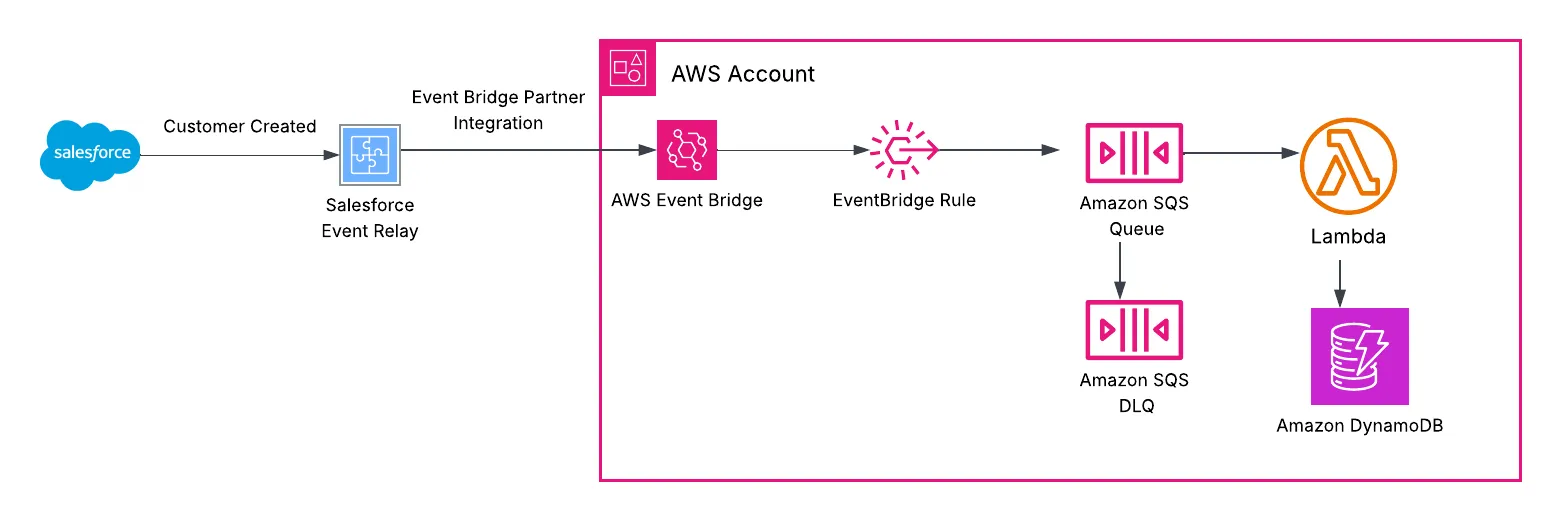
Salesforce
When a record is created, updated, or deleted, Salesforce can publish a platform event . A platform event is a message that systems outside Salesforce can subscribe to. Salesforce doesn't publish it on its own: a record-triggered Flow or an Apex trigger publishes the event when the record changes.
Published events go to the Salesforce event bus. Subscribers read events from the bus. The bus keeps events for 72 hours , which makes replay possible in case of an outage.
In this example, when a customer is created, Salesforce publishes a platform event called
Customer_Created__e with these fields:| Field | Type | Description |
|---|---|---|
Account_Id__c | Text(18) | Salesforce ID of the Account (customer) record |
Name__c | Text(255) | Customer name |
Industry__c | Text(40) | Customer industry |
CreatedDate | Date/Time | Standard field, set by Salesforce when the event is published |
CreatedById | Lookup(User) | Standard field, the user who published the event |
Salesforce Event Relay
Event Relay is a Salesforce feature that reads events from the Salesforce event bus and delivers them to Amazon EventBridge in your AWS account. Salesforce keeps track of the last event it delivered. After a transient error, such as a connectivity issue, the relay resumes from where it left off.
A relay is built from three Salesforce components:
- Named credential. It tells Salesforce where to deliver: your AWS account ID and region, written as a URL such as
arn:aws:US-EAST-1:123456789012. It contains no AWS keys and no IAM role. Salesforce is a registered EventBridge partner, so no AWS authentication is involved . The region must be uppercase. Once a relay uses the credential, you can't change the account or region without deleting and recreating the relay. - Channel. It decides what to deliver. A channel groups one or more event types, and each event type is added as a channel member. In this example the channel has one member,
Customer_Created__e. - Event relay. It connects one channel to one named credential, and it holds the recovery setting described in Recovery after an outage below. A new relay starts out stopped . After it's created, you can change only its state and recovery setting. A wrong channel or credential means deleting the relay and creating it again.
When you create the relay, Salesforce registers a partner event source in your AWS account, in a pending state. You associate that source with an event bus in AWS, then start the relay in Salesforce. Events start flowing at that point. That bus is a partner event bus, and it receives only the events from this relay. One relay maps to one channel, one partner event source, and one partner bus.
To configure each piece, follow Salesforce's guide Relay Events from Salesforce to Amazon EventBridge .
What arrives in AWS
This is a relayed event as EventBridge delivers it:
1
2
3
4
5
6
7
8
9
10
11
12
13
14
15
16
17
18
19
20
21
{

  "version": "0",

  "id": "6f33d717-8e35-4488-5690-89e681b5737c",

  "detail-type": "Customer_Created__e",

  "source": "aws.partner/salesforce.com/00D.../0YL...",

  "account": "123456789012",

  "time": "2026-10-13T19:23:23Z",

  "region": "us-east-1",

  "resources": [],

  "detail": {

    "payload": {

      "CreatedById": "005...",

      "CreatedDate": "2026-10-13T19:23:22.686Z",

      "Account_Id__c": "0015g00000AbCdEAAV",

      "Name__c": "Example Corp",

      "Industry__c": "Manufacturing"

    },

    "schemaId": "mVBhpA7tU9MCtBEbqjycBQ",

    "id": "118dab75-7b45-498e-8478-52d0324c1060"

  }

}sourcecontains the Salesforce org ID and channel ID.detail-typeis the Salesforce event name, which is what the rule matches on.- The fields are under
detail.payload, with their Salesforce API names. - The top-level
idcomes from EventBridge.detail.idcomes from Salesforce.
EventBridge rule
The rule matches
detail-type = Customer_Created__e and sends those events to the SQS queue.Amazon SQS queue and DLQ
The rule sends events to an SQS queue instead of invoking the Lambda directly, with a DLQ for messages that can't be processed. The queue absorbs bursts, lets you cap Lambda concurrency so DynamoDB isn't overloaded, and retries failed messages. Messages that keep failing stay in the DLQ, so you can redrive them after a fix.
Lambda and DynamoDB
The Lambda reads the customer details from the event and writes them to DynamoDB. That is where the AWS applications read the data from.
Design decisions
Recovery after an outage
If the relay hits an error it can't resume from, a recovery setting decides what happens (Error Recovery ):
LATEST(the default) skips events published during the outage.EARLIESTre-sends everything still retained on the Salesforce event bus, up to 72 hours.
For business data,
EARLIEST is usually the right choice, because a missed event means a customer the AWS applications don't know about. The cost is duplicates. Between EARLIEST recovery, EventBridge retries, and SQS retries, the same event can be delivered more than once, so the application must be designed to process duplicate messages. In this example, the Lambda writes with a conditional put keyed on the Account ID and treats an existing record as success, so duplicates never reach the DLQ.Small payloads
Salesforce documents a 256 KB limit for relayed events. Larger events aren't delivered to EventBridge. Hence, the event should carry only the record ID and the fields the AWS applications need.
Monitoring the relay
If the relay goes into an error state, delivery stops until Salesforce recovers. It retries periodically and resumes from where it left off, but it doesn't notify anyone (Relay status ). Monitor the relay by querying
EventRelayFeedback, a Salesforce object that holds the relay's status and error details.Cost
On the Salesforce side, Event Relay is included at no extra cost . Relayed events count toward the org's daily event delivery allocation. By default, that's 50,000 events a day for Unlimited and Performance editions and 25,000 for Enterprise Edition . If you need more, Salesforce sells a platform events add-on that raises it by 100,000 events a day.
On the AWS side, events arriving on the partner event bus are billed as partner events , at $1.00 per million events. Each 64 KB chunk of an event counts as one event.
Limits
- Salesforce edition. Event Relay is available in Enterprise, Unlimited, and Developer editions . It isn't available in Government Cloud. A free Developer Edition org is enough to build and test this example.
- Event types. Event Relay works with custom high-volume platform events , which is the default for any new custom platform event such as
Customer_Created__e. It also works with Change Data Capture and Real-Time Event Monitoring events. - AWS region. Event Relay can deliver only to default AWS regions . Default regions , such as
us-east-1, are enabled in every AWS account. Opt-in regions , such as Europe (Milan), have to be enabled first, and Event Relay doesn't support them. - Delivery allocation. Salesforce limits how many events an org can deliver in 24 hours, and every event the relay sends to EventBridge counts toward that limit . Other integrations that subscribe to events in the same org share it, so relay only the events AWS needs.
Enjoyed reading this content? Let the author know!
Your likes, comments, shares, and saves help creators reach more builders.

Loading recommendations
Loading article