
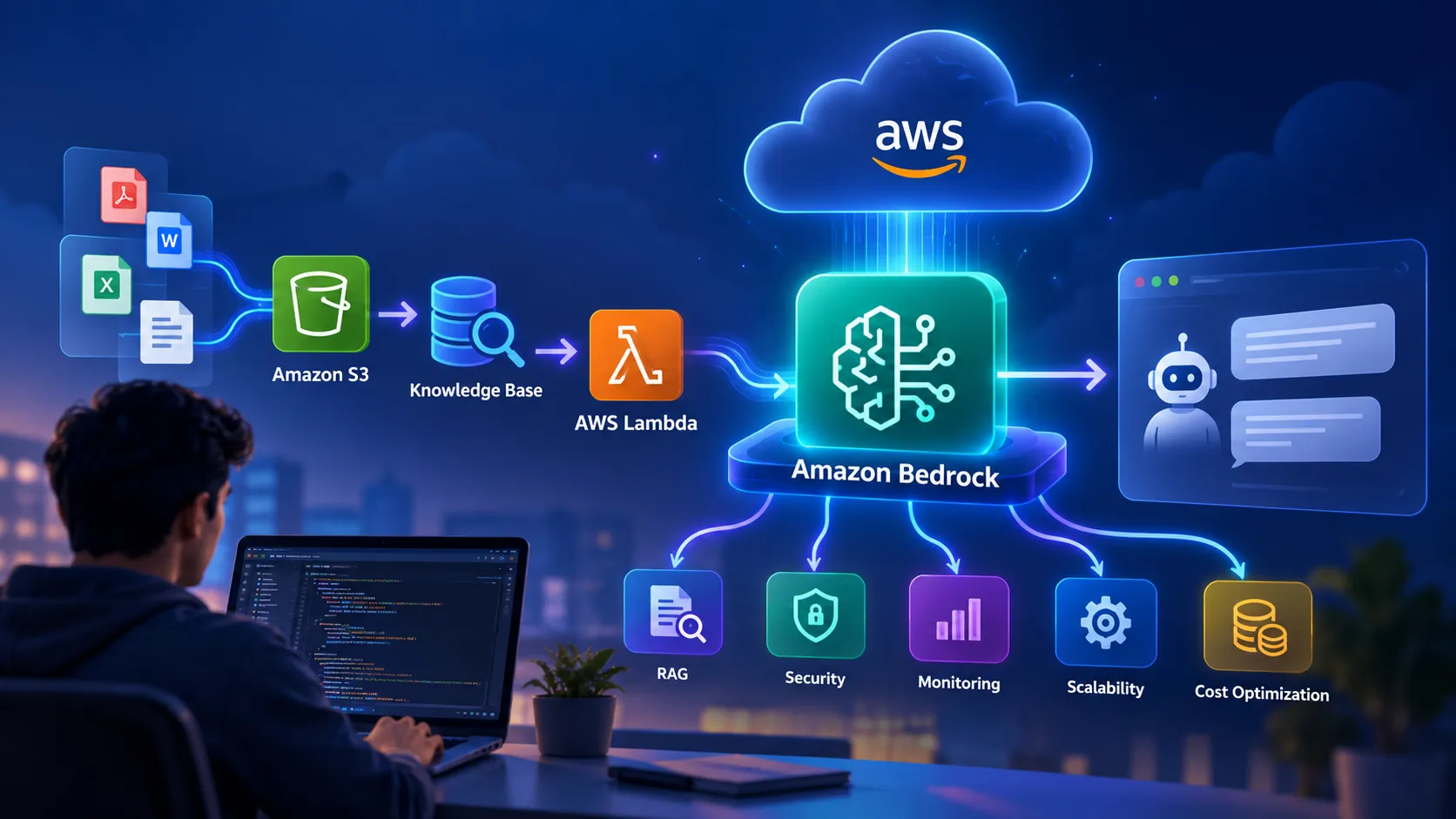
From AI Idea to Production: A Practical Guide to Building Generative AI Applications on AWS
Generative AI is easy to demonstrate but much harder to turn into a reliable application. This practical guide explains how to move from an AI idea to a production-ready solution using AWS Learn how Amazon Bedrock, Amazon S3, AWS Lambda, RAG, vector search, security, monitoring, and cost optimization fit together. Whether you're a student, developer, cloud engineer, or AI enthusiast, this guide focuses on the decisions that matter when building real-world Generative AI applications on AWS.
From AI Idea to Production: A Practical Guide to Building Generative AI Applications on AWS
Generative AI has changed the way we think about software.
A few years ago, building an intelligent application often meant collecting a large dataset, training a model, deploying it, and maintaining the infrastructure ourselves.
Today, developers can start with a foundation model and focus more on what the application should actually solve.
But there is an important difference between building an AI demo and building an AI application that people can depend on.
A chatbot that answers one question correctly is a demo.
A system that can securely use company data, handle thousands of requests, provide useful answers, recover from failures, control costs, and be monitored in production is an engineering system.
That's where AWS becomes interesting.
1. Start With the Problem, Not the Model
One of the easiest mistakes in Generative AI projects is starting with:
"Which LLM should I use?"
A better question is:
"What problem am I trying to solve?"
For example:
- Employees need answers from internal documents.
- Customers need 24/7 support.
- Developers need assistance understanding code.
- Teams need to summarize large collections of documents.
- Businesses want to extract information from unstructured data.
Once the problem is clear, the architecture becomes easier to design.
A simple Generative AI application can look like this:
User
↓
Application
↓
Prompt + Context
↓
Foundation Model
↓
Response
↓
Application
↓
Prompt + Context
↓
Foundation Model
↓
Response
But real-world applications usually need more than this.
2. Why Amazon Bedrock?
AWS provides managed services that can reduce the amount of infrastructure developers need to build and manage themselves.
Amazon Bedrock is useful for building Generative AI applications because developers can work with foundation models through managed APIs rather than managing the underlying model infrastructure themselves.
A typical application flow can look like this:
User
↓
Web / API Application
↓
AI Application Logic
↓
Amazon Bedrock
↓
Foundation Model
↓
AI Response
↓
Web / API Application
↓
AI Application Logic
↓
Amazon Bedrock
↓
Foundation Model
↓
AI Response
The important idea is that the model is only one component of the application.
A production-ready AI application also needs data, security, application logic, monitoring, reliability, and cost management.
3. The Real Challenge: Your Own Data
Suppose we build a company HR assistant.
An employee asks:
"How many days of annual leave can I take?"
A general-purpose LLM may understand what annual leave means.
But it doesn't automatically know your company's specific leave policy.
This is where Retrieval-Augmented Generation, commonly known as RAG, becomes useful.
Instead of asking the model to answer entirely from its existing knowledge, the application can:
- Receive the user's question.
- Search relevant company documents.
- Retrieve useful information.
- Provide that information as context to the model.
- Generate an answer based on the retrieved context.
The workflow becomes:
User Question
↓
Search / Retrieve
↓
Relevant Documents
↓
Context
↓
Foundation Model
↓
Generated Answer
↓
Search / Retrieve
↓
Relevant Documents
↓
Context
↓
Foundation Model
↓
Generated Answer
RAG can help make AI applications more grounded in an organization's own information.
4. Where Does Amazon S3 Fit?
Documents need somewhere to live.
Amazon S3 can be used as durable object storage for documents and other data used by an application.
For example:
Documents
↓
Amazon S3
↓
Processing / Indexing
↓
Retrieval System
↓
Relevant Context
↓
Amazon Bedrock
↓
AI Response
↓
Amazon S3
↓
Processing / Indexing
↓
Retrieval System
↓
Relevant Context
↓
Amazon Bedrock
↓
AI Response
The exact architecture will depend on the application, data volume, retrieval requirements, and security model.
The bigger lesson is simple:
Generative AI applications need data architecture, not just an LLM.
5. RAG vs Fine-Tuning
This is one of the most common decisions developers face when building AI applications.
RAG
RAG retrieves relevant external information and provides it to the model at inference time.
RAG can be useful when:
- Information changes frequently.
- You need answers grounded in documents.
- You want to update knowledge without retraining a model.
- The application needs access to private or domain-specific information.
Fine-Tuning
Fine-tuning changes model behavior by training on additional examples.
It can be useful when you need specialized behavior, formatting, or task performance.
The two approaches solve different problems.
A common mistake is thinking:
"I have company documents, so I should fine-tune the model."
Not necessarily.
If the main requirement is giving the model access to changing information, retrieval may be a more appropriate architectural approach.
The decision should be based on the actual requirement rather than choosing a technology simply because it is popular.
6. Where Does AWS Lambda Fit?
Not every component needs a continuously running server.
For event-driven or API-based workloads, AWS Lambda can execute application logic without requiring you to manage servers directly.
For example:
User
↓
API
↓
AWS Lambda
↓
Retrieve Context
↓
Amazon Bedrock
↓
Response
↓
API
↓
AWS Lambda
↓
Retrieve Context
↓
Amazon Bedrock
↓
Response
Lambda can be useful for connecting different parts of an AI application.
However, architecture should always be driven by requirements such as:
- Latency
- Execution duration
- Concurrency
- Workload pattern
- Cost
- Operational complexity
The goal isn't to use every AWS service.
The goal is to use the right services for the problem.
7. Security Cannot Be an Afterthought
This becomes especially important when an AI application works with private information.
Consider a company assistant that has access to:
- Employee records
- Internal documentation
- Financial information
- Customer information
A technically impressive AI system can still be a poor production system if sensitive data is exposed.
Security considerations should include:
- Identity and access management
- Least-privilege permissions
- Encryption
- Data access controls
- Logging and monitoring
- Protection of sensitive information
- Appropriate validation of model inputs and outputs
A useful principle is:
"The AI model should not automatically have access to everything the application can access."
Access should be deliberately designed.
Users should only be able to access the information they are authorized to see.
8. What About Hallucinations?
Large language models can sometimes generate information that sounds convincing but isn't supported by reliable evidence.
This is one reason why simply saying:
"Let's add an LLM."
is not enough.
A production system should consider several layers of protection.
Grounding
Provide relevant and trustworthy information to the model.
Validation
Check outputs where appropriate, especially when the output affects important decisions.
Retrieval Quality
If the retrieved context is incorrect or irrelevant, the final answer may also be incorrect.
Human Oversight
For high-impact decisions, sensitive workflows, or irreversible actions, human review may be appropriate.
Monitoring
Track failures and identify recurring patterns.
The important mindset is:
"Don't expect the model to be perfect. Design the system to handle imperfect model behavior."
9. Production AI Needs Observability
Imagine that an AI application suddenly starts giving poor answers.
Where do you look?
Is the problem:
- The user query?
- Document retrieval?
- Embeddings?
- The prompt?
- The model?
- Application code?
- Latency?
- An external dependency?
Without proper logging and monitoring, debugging becomes difficult.
A production AI system should therefore consider:
Request
↓
Application Logs
↓
Retrieval Metrics
↓
Model Metrics
↓
Latency
↓
Errors
↓
Cost
↓
Application Logs
↓
Retrieval Metrics
↓
Model Metrics
↓
Latency
↓
Errors
↓
Cost
Observability helps engineers understand how the system behaves and identify where failures are occurring.
This transforms AI from a black box into a system that engineers can actually operate and improve.
10. Cost Matters
An AI application can work perfectly and still be poorly designed if its operating cost is unsustainable.
Before deployment, consider:
- Number of requests
- Prompt size
- Response size
- Model selection
- Retrieval strategy
- Storage
- Compute
- Logging
- Data transfer
- Caching opportunities
A useful optimization principle is:
"Don't use the most expensive model for every task by default."
For example, simple classification or routing may not require the same model capability as a complex reasoning task.
The right choice depends on the application's requirements.
Good AI engineering means finding the right balance between:
Performance
↓
Accuracy
↓
Latency
↓
Cost
↓
Accuracy
↓
Latency
↓
Cost
11. Build a Small Version First
You don't need to build the entire architecture on day one.
Start with a simple version:
Question
↓
Application
↓
Amazon Bedrock
↓
Response
↓
Application
↓
Amazon Bedrock
↓
Response
Once the basic application works, add capabilities incrementally:
Question
↓
Application
↓
RAG
↓
Amazon Bedrock
↓
Response
↓
Monitoring
↓
Security
↓
Cost Optimization
↓
Application
↓
RAG
↓
Amazon Bedrock
↓
Response
↓
Monitoring
↓
Security
↓
Cost Optimization
This approach makes it easier to understand where problems come from and prevents unnecessary complexity.
A small working system is often more useful than a large architecture that has not been tested.
12. A Practical Generative AI Architecture
Putting the ideas together, a simplified architecture could look like this:
User
↓
Web / API Application
↓
AWS Lambda
↓
Retrieval / Application Logic
↓
Amazon S3 / Knowledge Sources
↓
Relevant Context
↓
Amazon Bedrock
↓
AI Response
↓
User
↓
Web / API Application
↓
AWS Lambda
↓
Retrieval / Application Logic
↓
Amazon S3 / Knowledge Sources
↓
Relevant Context
↓
Amazon Bedrock
↓
AI Response
↓
User
Additional AWS services can be introduced depending on requirements around APIs, storage, compute, security, observability, and data processing.
The important point is that architecture should evolve based on the requirements of the application.
13. The Engineering Mindset
The biggest lesson from building and exploring AI applications is that building with AI is not simply about choosing a powerful model.
A successful application requires thinking about:
Problem
↓
Data
↓
Model
↓
Architecture
↓
Security
↓
Reliability
↓
Cost
↓
Monitoring
↓
Data
↓
Model
↓
Architecture
↓
Security
↓
Reliability
↓
Cost
↓
Monitoring
The model is only one piece.
That's why the most interesting Generative AI projects are moving beyond simple chat interfaces toward applications that can retrieve information, use tools, interact with systems, and complete useful tasks.
The difference between an AI demo and an AI product is often the engineering around the model.
14. What Should You Build Next?
If you're learning Generative AI, don't stop at:
"I built a chatbot."
Try building something that solves a real problem.
Beginner: Document Q&A
Upload documents.
↓
Retrieve relevant information.
Retrieve relevant information.
↓
Generate an answer.
Generate an answer.
This teaches the fundamentals of document processing, retrieval, prompting, and model integration.
Intermediate: Knowledge Assistant
Add:
Authentication
↓
Document Retrieval
↓
Citations
↓
Monitoring
↓
User Feedback
↓
Document Retrieval
↓
Citations
↓
Monitoring
↓
User Feedback
This introduces more real-world engineering requirements.
Advanced: AI Agent
Allow the system to:
Understand the goal
↓
Plan the task
↓
Select authorized tools
↓
Execute actions
↓
Observe results
↓
Continue or finish the task
↓
Plan the task
↓
Select authorized tools
↓
Execute actions
↓
Observe results
↓
Continue or finish the task
This introduces a new class of engineering challenges around tool usage, permissions, reliability, validation, and monitoring.
15. From LLM to Agentic AI
A useful way to think about the progression is:
LLM
↓
RAG
↓
Production RAG
↓
Tool Use
↓
AI Agent
↓
Agentic Application
↓
RAG
↓
Production RAG
↓
Tool Use
↓
AI Agent
↓
Agentic Application
Each step adds capabilities and also introduces new engineering considerations.
A basic LLM generates content.
RAG gives the model access to external information.
Tool use allows the application to interact with external systems.
An AI agent can combine reasoning, retrieval, tools, and actions to work toward a goal.
The more autonomy we give an AI system, the more important security, validation, permissions, and monitoring become.
16. Think Beyond the Model
When starting a Generative AI project, it is tempting to focus almost entirely on the model.
But a real application involves much more.
Think about the complete flow:
User
↓
Application
↓
Authentication
↓
Data Retrieval
↓
Prompt / Context
↓
Model
↓
Validation
↓
Response
↓
Monitoring
↓
Application
↓
Authentication
↓
Data Retrieval
↓
Prompt / Context
↓
Model
↓
Validation
↓
Response
↓
Monitoring
Each stage can affect the final user experience.
A powerful model cannot compensate for poor data, incorrect retrieval, weak security, or a badly designed application.
17. A Practical Checklist for Production AI
Before moving an AI application into production, ask:
Problem
- Does the application solve a real problem?
- Is the expected outcome clearly defined?
Data
- Is the data reliable?
- Is the data up to date?
- Are users authorized to access it?
Model
- Is the selected model appropriate?
- Is the latency acceptable?
- Is the quality sufficient?
RAG
- Are relevant documents being retrieved?
- Is the retrieved context useful?
- Can answers be traced back to reliable information?
Security
- Are permissions properly controlled?
- Is sensitive information protected?
- Are access policies based on least privilege?
Reliability
- What happens when a service fails?
- What happens when the model produces an unexpected response?
- Is there a fallback mechanism where appropriate?
Monitoring
- Are errors being logged?
- Is latency being measured?
- Can you identify poor-quality responses?
Cost
- Are model usage and infrastructure costs monitored?
- Can unnecessary requests or large prompts be reduced?
These questions help turn an AI prototype into a more reliable engineering system.
Thank you for taking the time to read my article. I hope you found the insights useful and gained a better understanding of building Generative AI applications on AWS.
If you found this article helpful, please Like , Comment , and Share your thoughts or experiences. Your feedback and ideas can help make this discussion even more valuable for the AWS community.
# generative-ai# retreival-augmented-generation# amazon-bedrock# aws-lambda# artificial-intelligence
Any opinions in this article are those of the individual author and may not reflect the opinions of AWS.Enjoyed reading this content? Let the author know!
Your likes, comments, shares, and saves help creators reach more builders.

Loading recommendations
Loading article