
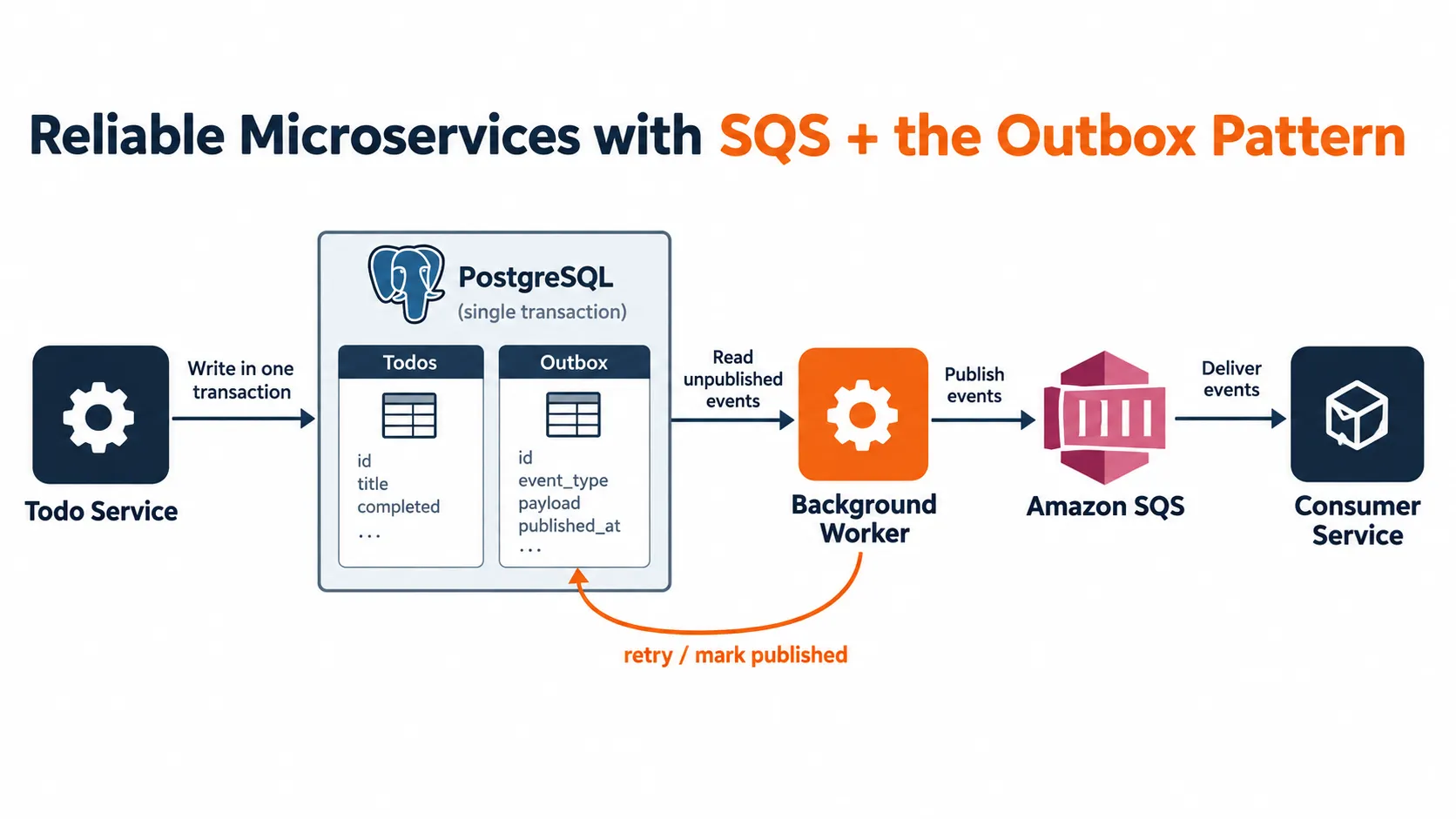
Building Reliable Microservices with Amazon SQS and the Outbox Pattern
How to make database changes and event delivery work together more reliably in an event-driven system

Microservices often need to notify one another when something important happens. For example, after a Todo service creates a task, it might send a
TodoCreated event so a notification service can email the user or an analytics service can record the activity.Amazon Simple Queue Service (Amazon SQS) is a managed message queue that lets services communicate asynchronously. But using a queue does not, by itself, guarantee that every database change will result in a message being sent. A service can save a change to its database and then fail before publishing the corresponding message.
The Outbox Pattern addresses this gap by recording the business change and the event that describes it in the same database transaction. A separate worker publishes the recorded event to SQS.The dual-write problem
Consider a service that creates a todo and then sends a message:
1. Insert the todo into PostgreSQL2. Send a TodoCreated message to Amazon SQSThese are two separate operations on two separate systems. A PostgreSQL transaction cannot also commit a message to SQS as part of that same transaction.
That creates two failure cases:
- The todo saves, but sending the message fails. The todo exists, but downstream services are never notified.
- The message sends, but the database transaction fails. Downstream services may act on a todo that was never saved.
This is often called the dual-write problem. Simply adding a
try/catch around the queue call does not remove the gap: the application can still crash between the database commit and the queue publish.How the Outbox Pattern works
The Outbox Pattern stores an event in an
outbox_events table in the same database transaction as the business change:One PostgreSQL transaction: 1. Insert the todo 2. Insert a TodoCreated event into the outbox 3. Commit both records togetherA separate background worker reads unpublished events from the outbox and sends them to SQS:
Background worker: 1. Claim pending events 2. Publish each event to SQS 3. Mark successfully published events 4. Retry failed events laterThe database transaction ensures that the todo and its event record either both commit or both roll back. This means the service has a durable record of the event it needs to publish, even if SQS is temporarily unavailable.
Designing the outbox table
A simple PostgreSQL table could look like this:
CREATE TABLE outbox_events (  id UUID PRIMARY KEY,  aggregate_type TEXT NOT NULL,  aggregate_id UUID NOT NULL,  event_type TEXT NOT NULL,  event_version INTEGER NOT NULL DEFAULT 1,  payload JSONB NOT NULL,  occurred_at TIMESTAMPTZ NOT NULL DEFAULT NOW(),  published_at TIMESTAMPTZ,  publish_attempts INTEGER NOT NULL DEFAULT 0,  next_attempt_at TIMESTAMPTZ NOT NULL DEFAULT NOW(),  last_error TEXT);
CREATE INDEX idx_outbox_events_pending  ON outbox_events (next_attempt_at, occurred_at)  WHERE published_at IS NULL;
The columns serve different purposes:
-
idis a unique identifier for the event. Consumers can use it to detect duplicates.
-
aggregate_typeandaggregate_ididentify the entity the event belongs to, such as a todo.
-
event_typedescribes what happened, such asTodoCreated.
-
event_versionsupports future changes to the event format.
-
payloadcontains the event data.
-
published_atrecords successful publication.
-
publish_attempts,next_attempt_at, andlast_errorhelp with retries and troubleshooting.
In a production schema, you may also add columns for worker claims or lease expiration, depending on how workers coordinate.
Writing the business change and event atomically
The application creates the todo and its outbox record using one database transaction. The example below uses placeholder query methods to show the order of operations:
async function createTodo(  input: CreateTodoInput,): Promise<Todo> {  return database.transaction(async (transaction) => {    const todo = await transaction.todos.insert({      title: input.title,      ownerId: input.ownerId,    });
    await transaction.outboxEvents.insert({      id: crypto.randomUUID(),      aggregateType: "Todo",      aggregateId: todo.id,      eventType: "TodoCreated",      eventVersion: 1,      payload: {        todoId: todo.id,        ownerId: todo.ownerId,        title: todo.title,      },    });
    return todo;  });}
The specific transaction API depends on the database library in use. The essential requirement is that both inserts use the same database transaction.
Keep event payloads intentional. Include the fields consumers need, but avoid sending sensitive data or exposing internal database details unnecessarily.
Publishing outbox events to Amazon SQS
A background worker polls the database for unpublished events and sends them to SQS. After SQS accepts a message, the worker marks its outbox row as published.
The order matters:
1. Publish the event to SQS2. Mark the outbox event as publishedIf the worker marks the event first and crashes before publishing, the event can be lost. Publishing first avoids that loss, but it creates a possible duplicate: SQS may accept the message, and then the worker may crash before recording success in PostgreSQL.
This is a key reliability trade-off. The Outbox Pattern provides durable event recording and supports at-least-once delivery. It does not make the database and SQS one atomic system, so consumers still need to tolerate duplicates.
Coordinating multiple workers
If multiple worker instances poll the same table, they must avoid processing the same row at the same time. One PostgreSQL approach is to claim rows using
FOR UPDATE SKIP LOCKED inside a short transaction:BEGIN;
SELECT id, event_type, payloadFROM outbox_eventsWHERE published_at IS NULL AND next_attempt_at <= NOW()ORDER BY occurred_atFOR UPDATE SKIP LOCKEDLIMIT 50;
-- Record a claim or update lease fields here.
COMMIT;SKIP LOCKED lets one worker skip rows that another worker has locked, which can help distribute work. In a production implementation, define what happens if a worker claims rows and then stops unexpectedly. A lease or claim timeout allows another worker to reclaim abandoned work.Avoid holding database locks open while making a network call to SQS. Instead, claim a batch, commit the claim, publish the messages, and then update each result. This keeps transactions short, though it means the claim and publish process needs clear recovery behavior.
Retrying failures
SQS or the network may be temporarily unavailable. A worker can retry failed publications with exponential backoff, increasing the delay between attempts and adding jitter to avoid many workers retrying together.
For example:
Attempt 1: wait a short intervalAttempt 2: wait longerAttempt 3: wait longer again...A failed event should remain unpublished until the send succeeds. Store the attempt count and a useful error summary so an operator can see what happened.
For events that keep failing, set a retry limit or alerting policy. The event should remain available for investigation or replay; silently discarding it defeats the purpose of the outbox.
Amazon SQS also supports dead-letter queues for messages that a consumer repeatedly fails to process. That is a separate stage from outbox publication: an outbox retry handles failure to publish, while a dead-letter queue handles repeated failure to consume.
Making consumers idempotent
Because a worker can publish the same event more than once, a consumer should be idempotent: processing a duplicate should not repeat the business effect.
A common approach is to maintain an inbox or processed-events table:
CREATE TABLE processed_events ( event_id UUID PRIMARY KEY, processed_at TIMESTAMPTZ NOT NULL DEFAULT NOW());When a consumer receives a message, it starts a database transaction, inserts the event ID, and applies the business change. If the event ID already exists, it treats the message as a duplicate and does not apply the change again.
The event record and the consumer’s business update should be committed together. Otherwise, the consumer can record that it processed an event but fail to apply the effect, or apply the effect and then fail before recording the event.
Choosing an SQS queue type
Amazon SQS offers Standard and FIFO queues. A Standard queue is designed for high throughput and at-least-once delivery; messages may occasionally be delivered more than once and ordering is not guaranteed.
A FIFO queue supports ordering within message groups and has deduplication features, but it still does not replace application-level reliability design. Consumers should be safe to retry, and the outbox should still track which events were successfully published.
Choose a queue based on the ordering, throughput, and deduplication requirements of the system. For example, if events for a specific todo must be handled in order, consider how you will group messages by that todo and ensure the consumer preserves the required ordering.
Observability and operations
Reliable delivery also requires being able to see when the system is falling behind or failing. Useful signals include:
- Number of unpublished outbox events.
- Age of the oldest unpublished event.
- Publication attempts and failure counts.
- SQS queue depth and age of the oldest queued message.
- Consumer success, retry, and dead-letter counts.
Log the event ID and correlation or request ID during publication and consumption. This makes it easier to follow one business action across the service, worker, queue, and consumer.
Plan for outbox table growth as well. Published rows may be archived or deleted after a retention period, once operational and replay requirements allow it.
When to use the Outbox Pattern
The pattern is useful when a service must reliably publish an event after changing its database. It is especially helpful when:
- Losing an event would leave services inconsistent.
- The queue or downstream service may be temporarily unavailable.
- The application needs retry, replay, or audit capabilities.
- Events are part of an asynchronous microservices workflow.
It adds a table, a worker, and operational responsibilities. For a small application with no asynchronous integration requirements, that added complexity may not be justified.
Conclusion
Amazon SQS lets services communicate asynchronously, while the Outbox Pattern ensures that the event to be published is recorded alongside the database change that produced it. A worker can then retry publication when dependencies fail.
The result is not a single transaction spanning PostgreSQL and SQS. Instead, it is a design that preserves events durably, accepts that delivery can be repeated, and relies on idempotent consumers to handle duplicates safely. Together, those practices provide a practical foundation for reliable event-driven microservices.
Enjoyed reading this content? Let the author know!
Your likes, comments, shares, and saves help creators reach more builders.

Loading recommendations
Loading article