
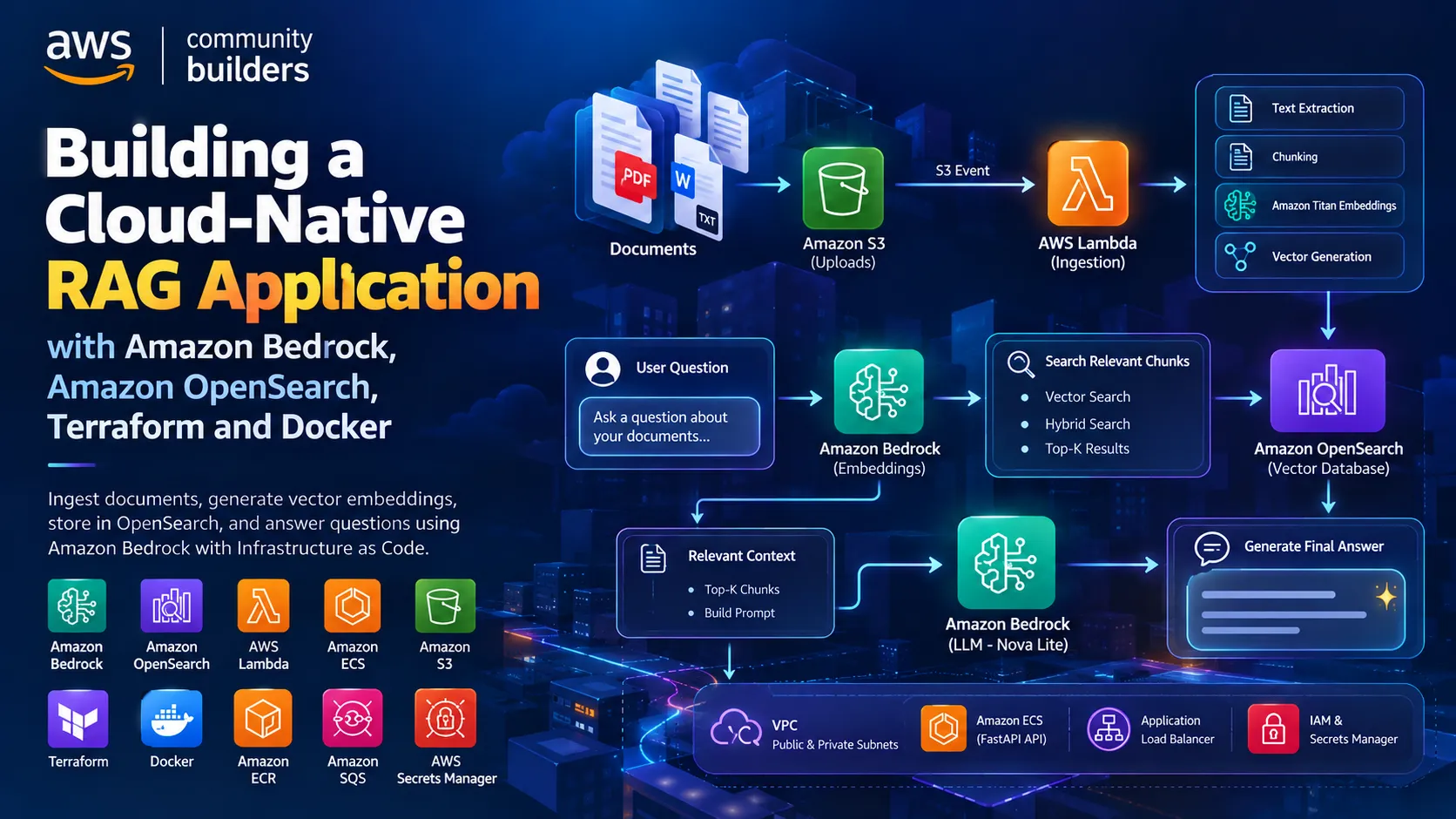
Building a Cloud-Native RAG Application with Amazon Bedrock and OpenSearch
Retrieval-Augmented Generation (RAG) is one of the most practical patterns for building AI applications that can answer questions using your own data.


However, connecting an application directly to a Large Language Model is not enough for many real-world use cases. The application also needs a reliable mechanism to retrieve relevant information before generating a response.
That is where Retrieval-Augmented Generation (RAG) comes in.
In this project, I built a RAG application that combines Amazon Bedrock, Amazon OpenSearch Service, FastAPI, Docker, Amazon ECS with Fargate, Amazon S3, AWS Lambda, Amazon ECR, Application Load Balancer, Amazon SQS, AWS Secrets Manager, AWS IAM and Terraform.
The project demonstrates the complete flow from document ingestion and embeddings to vector retrieval and AI-generated responses, while also applying cloud and DevOps practices.
What is RAG?
RAG stands for Retrieval-Augmented Generation.
The fundamental idea is simple:
Instead of asking an LLM to answer a question only from its pretrained knowledge, the application first searches a knowledge base for relevant information.
That information becomes context for the LLM.
The flow is:
User Question
↓
Question Embedding
↓
Vector Search
↓
Top-K Relevant Chunks
↓
Context + Question
↓
Amazon Bedrock LLM
↓
Final Answer
↓
Question Embedding
↓
Vector Search
↓
Top-K Relevant Chunks
↓
Context + Question
↓
Amazon Bedrock LLM
↓
Final Answer
This allows an application to work with information outside the model's original training data.
Project Architecture
The project has two major workflows:
Document ingestion
Question answering
Question answering
The high-level architecture looks like this:
1
2
3
4
5
6
7
8
9
10
11
12
13
14
15
16
17
18
19
20
21
22
23
                     USER
                       │
                       ▼
            ┌────────────────────┐
            │ Application Load   │
            │ Balancer            │
            └──────────┬─────────┘
                       │
                       ▼
            ┌────────────────────┐
            │ ECS Fargate        │
            │ FastAPI Application│
            └───────┬───────┬────┘
                    │       │
                    │       ▼
                    │  Amazon Bedrock
                    │  Embeddings / LLM
                    │
                    ▼
            Amazon OpenSearch
            Vector / Hybrid Search

           DOCUMENT INGESTION
Documents
│
▼
Amazon S3
│
▼
AWS Lambda
│
▼
Text Processing
│
▼
Chunking
│
▼
Amazon Bedrock
Titan Embeddings
│
▼
Amazon OpenSearch
Vector Index
│
▼
Amazon S3
│
▼
AWS Lambda
│
▼
Text Processing
│
▼
Chunking
│
▼
Amazon Bedrock
Titan Embeddings
│
▼
Amazon OpenSearch
Vector Index
Terraform provisions the infrastructure required for this architecture.
Technology Stack
Application
Python
FastAPI
REST API
Pydantic
AI
Amazon Bedrock
Amazon Titan Text Embeddings
Amazon Nova
Search
Amazon OpenSearch Service
k-NN Vector Search
HNSW
Cosine Similarity
Hybrid Search
AWS
Amazon VPC
Amazon ECS
AWS Fargate
Amazon ECR
Amazon S3
AWS Lambda
Application Load Balancer
Amazon SQS
AWS Secrets Manager
AWS IAM
AWS Systems Manager
DevOps
Docker
Terraform
Amazon Linux
Infrastructure as Code
Application
Python
FastAPI
REST API
Pydantic
AI
Amazon Bedrock
Amazon Titan Text Embeddings
Amazon Nova
Search
Amazon OpenSearch Service
k-NN Vector Search
HNSW
Cosine Similarity
Hybrid Search
AWS
Amazon VPC
Amazon ECS
AWS Fargate
Amazon ECR
Amazon S3
AWS Lambda
Application Load Balancer
Amazon SQS
AWS Secrets Manager
AWS IAM
AWS Systems Manager
DevOps
Docker
Terraform
Amazon Linux
Infrastructure as Code
- FastAPI Application Layer
The application is implemented using FastAPI.
It exposes REST endpoints for the RAG workflow.
The main API endpoints include:
GET /health
GET /ready
POST /ingest
POST /query
/health
GET /ready
POST /ingest
POST /query
/health
Used to determine whether the application process is running.
/ready
Used as a readiness endpoint for the deployed application.
/ingest
Used to ingest and index content.
/query
Used to submit questions to the RAG pipeline.
The query endpoint supports both:
vector
and
hybrid
retrieval modes.
This makes the backend flexible enough to support different retrieval strategies.
- API Authentication
The application supports API-key authentication through configuration.
When authentication is enabled, the client provides:
x-api-key
This API key is stored using AWS Secrets Manager instead of being hard-coded into the application.
That gives us a cleaner security model:
Client
↓
API
↓
Authentication
↓
Application
↓
API
↓
Authentication
↓
Application
For production environments, authentication should be combined with HTTPS, network restrictions, rate limiting and additional identity controls.
- Document Ingestion
RAG starts before a user asks a question.
The documents first need to be converted into data that can be searched efficiently.
The ingestion pipeline is:
Document
↓
Load
↓
Normalize
↓
Chunk
↓
Generate Embedding
↓
Store in OpenSearch
↓
Load
↓
Normalize
↓
Chunk
↓
Generate Embedding
↓
Store in OpenSearch
The project separates ingestion from query processing, which is an important architectural pattern.
- Chunking the Documents
Large documents should not normally be embedded as one giant block.
The application splits content into smaller chunks.
The project uses configurable values such as:
Chunk Size = 1000
Overlap = 150
Overlap = 150
The overlap is useful because important context can span across two adjacent chunks.
A simplified example:
Original Document
↓
┌───────────────┐
│ Chunk 1 │
└───────────────┘
overlap
┌───────────────┐
│ Chunk 2 │
└───────────────┘
overlap
┌───────────────┐
│ Chunk 3 │
└───────────────┘
↓
┌───────────────┐
│ Chunk 1 │
└───────────────┘
overlap
┌───────────────┐
│ Chunk 2 │
└───────────────┘
overlap
┌───────────────┐
│ Chunk 3 │
└───────────────┘
Chunking is one of the most important parts of RAG because retrieval quality depends heavily on how information is divided.
- Amazon Bedrock Embeddings
After chunking, each chunk is converted into a vector representation.
The project uses Amazon Bedrock and the default embedding model:
amazon.titan-embed-text-v2:0
The process is:
Text Chunk
↓
Amazon Titan Embedding Model
↓
Vector
↓
Amazon Titan Embedding Model
↓
Vector
The configured vector dimension is:
1024
The vector represents the semantic characteristics of the text.
This allows the application to search for meaning rather than only exact keywords.
- Why Embeddings Matter
Consider two questions:
How do I create an AWS storage bucket?
and:
How can I store objects in Amazon S3?
The wording is different, but the concepts are closely related.
A traditional keyword search may not always capture that relationship.
Vector embeddings allow the application to represent semantic meaning numerically.
Conceptually:
Text A
↓
Vector A
↓
Vector A
Text B
↓
Vector B
↓
Vector B
Similar meaning
↓
Vectors are relatively close
↓
Vectors are relatively close
That is the foundation of semantic retrieval.
- Amazon OpenSearch Vector Index
The generated vectors are stored in Amazon OpenSearch Service.
The project creates a vector index called:
rag-chunks
The indexed information includes the original text and its vector representation.
The vector configuration uses:
1024 dimensions
HNSW
Cosine similarity
k-NN vector search
HNSW
Cosine similarity
k-NN vector search
Conceptually:
OpenSearch Document
Text:
"Amazon S3 is an object storage service."
"Amazon S3 is an object storage service."
Vector:
[ ... 1024 values ... ]
[ ... 1024 values ... ]
Metadata:
Source information
Keeping the original text is important.
The vector helps us find the relevant document.
The actual text is what we eventually provide to the LLM as context.
- User Query Flow
Now suppose the user asks:
What is Amazon S3?
The application receives the question through FastAPI.
The flow becomes:
User Question
↓
FastAPI
↓
Amazon Bedrock Embedding
↓
Query Vector
↓
OpenSearch
↓
Similarity Search
↓
Relevant Chunks
↓
FastAPI
↓
Amazon Bedrock Embedding
↓
Query Vector
↓
OpenSearch
↓
Similarity Search
↓
Relevant Chunks
The query itself becomes a vector using the same embedding model used during ingestion.
This is important because the query and document chunks need to exist in the same embedding space for meaningful similarity comparisons.
- OpenSearch Similarity Search
Once the query vector is created, it is sent to OpenSearch.
OpenSearch compares that query vector against the stored vectors.
Conceptually:
1
2
3
4
5
6
7
8
9
10
11
12
                Query Vector
                     │
      ┌──────────────┼──────────────┐
      ▼              ▼              ▼
  Vector A        Vector B        Vector C
      │              │              │
      └──────────────┼──────────────┘
                     ▼
             Similarity Search
                     │
                     ▼
                Top-K Results
For example:
Chunk 7 → high similarity
Chunk 2 → high similarity
Chunk 15 → high similarity
Chunk 20 → lower similarity
Chunk 2 → high similarity
Chunk 15 → high similarity
Chunk 20 → lower similarity
The application retrieves the most relevant chunks rather than the entire knowledge base.
- What is Top-K?
Suppose the knowledge base contains:
10,000 document chunks
Sending all 10,000 chunks to the LLM would be inefficient.
Instead, the application retrieves only the most relevant results.
For example:
10,000 chunks
↓
OpenSearch Vector Search
↓
Top K = 5
↓
5 relevant chunks
↓
OpenSearch Vector Search
↓
Top K = 5
↓
5 relevant chunks
The selected chunks then become the context for generation.
This reduces unnecessary context and helps control latency and model usage.
- Hybrid Search
Pure vector search is powerful, but exact keywords can also be important.
Consider a query such as:
AML policy 2026
Terms such as:
AML
2026
2026
may carry specific meaning.
The project therefore supports both:
Vector Search
and:
Hybrid Search
Hybrid retrieval can be useful when queries contain:
Exact terminology
Acronyms
Product names
Policy names
Reference numbers
Domain-specific terms
Acronyms
Product names
Policy names
Reference numbers
Domain-specific terms
This gives the application more flexibility than using only semantic similarity.
- The Two Bedrock Operations
One of the most important concepts in this architecture is understanding why Amazon Bedrock is used for two different operations.
Operation 1 — Embeddings
Text
↓
Embedding Model
↓
Vector
Text
↓
Embedding Model
↓
Vector
Used during:
Document ingestion
Query processing
Semantic search
Operation 2 — Generation
Question + Context
↓
LLM
↓
Answer
Query processing
Semantic search
Operation 2 — Generation
Question + Context
↓
LLM
↓
Answer
Used during the final response generation.
So:
Bedrock Embeddings
↓
Retrieval
↓
Retrieval
Bedrock LLM
↓
Generation
↓
Generation
These are two different stages of the RAG pipeline.
- Context Construction
After OpenSearch returns the relevant chunks, the application combines them with the user's question.
Conceptually:
Context:
[Retrieved Chunk 1]
[Retrieved Chunk 2]
[Retrieved Chunk 3]
Question:
What is Amazon S3?
This becomes the input to the generative model.
The goal is to give the model the information it needs without sending the entire knowledge base.
- Amazon Nova for Generation
The project uses the default chat model:
amazon.nova-lite-v1:0
The final generation stage looks like:
Retrieved Context
+
User Question
↓
Amazon Bedrock
↓
Amazon Nova
↓
Generated Answer
+
User Question
↓
Amazon Bedrock
↓
Amazon Nova
↓
Generated Answer
The result is returned through the FastAPI API.
This creates the complete RAG loop:
Question
↓
Retrieve
↓
Provide Context
↓
Generate
↓
Answer
15. Amazon S3 as the Document Store
↓
Retrieve
↓
Provide Context
↓
Generate
↓
Answer
15. Amazon S3 as the Document Store
The project also provisions an Amazon S3 bucket for documents.
The bucket includes security controls such as:
Public access blocking
Server-side encryption
Versioning
Lifecycle management
TLS-only access
Server-side encryption
Versioning
Lifecycle management
TLS-only access
Documents are uploaded under a prefix such as:
uploads/
This provides a clear storage boundary for source documents.
- Event-Driven Ingestion with S3 and Lambda
One of the interesting parts of the architecture is the event-driven ingestion workflow.
When a document is uploaded to S3:
S3 Object Created
↓
AWS Lambda
↓
Document Processing
↓
Chunking
↓
Bedrock Embeddings
↓
OpenSearch
↓
AWS Lambda
↓
Document Processing
↓
Chunking
↓
Bedrock Embeddings
↓
OpenSearch
This means the ingestion process can become automated instead of relying entirely on manual execution.
The Lambda function uses the same application code image and is configured to execute the ingestion handler.
- Container-Based Lambda
An interesting implementation detail is that the ingestion Lambda is deployed using a container image.
That means the architecture can reuse the application image rather than maintaining a completely separate packaging approach.
Conceptually:
Application Image
│
├──────────────► ECS Fargate
│
└──────────────► Lambda
│
├──────────────► ECS Fargate
│
└──────────────► Lambda
The Lambda configuration overrides the entry point to invoke the ingestion handler.
This can help keep runtime dependencies consistent between components.
- Amazon SQS Dead-Letter Queue
Failures are expected in distributed systems.
For example:
Bedrock throttling
OpenSearch failure
Invalid document
Temporary AWS service error
OpenSearch failure
Invalid document
Temporary AWS service error
The project provisions an SQS Dead-Letter Queue for failed Lambda invocations.
The flow is:
S3 Event
↓
Lambda
↓
Processing
↓
Success ──────────► Complete
↓
Lambda
↓
Processing
↓
Success ──────────► Complete
Failure
↓
Retry
↓
Failure
↓
SQS DLQ
↓
Retry
↓
Failure
↓
SQS DLQ
This provides an operational path for investigating failed ingestion events instead of silently losing them.
- Docker Containerization
The application is containerized using Docker.
The image becomes the packaging unit for the application.
Application Code
↓
Docker Build
↓
Container Image
↓
Amazon ECR
↓
ECS Fargate
↓
Docker Build
↓
Container Image
↓
Amazon ECR
↓
ECS Fargate
Containerization gives us:
Consistent runtime
Portable deployment
Reproducible packaging
Easier scaling
Clear separation between application and infrastructure
20. Amazon ECR
Portable deployment
Reproducible packaging
Easier scaling
Clear separation between application and infrastructure
20. Amazon ECR
Amazon Elastic Container Registry stores the container image.
The flow is:
Docker Build
↓
Amazon ECR
↓
ECS
↓
Fargate
↓
Amazon ECR
↓
ECS
↓
Fargate
ECR provides a natural integration point between container builds and ECS deployments.
- Amazon ECS with Fargate
The FastAPI application runs using ECS and AWS Fargate.
The application is defined as an ECS task and managed through an ECS service.
The simplified architecture is:
Application Load Balancer
↓
ECS Service
↓
Fargate Task
↓
FastAPI
↓
ECS Service
↓
Fargate Task
↓
FastAPI
Fargate removes the need to manage the underlying EC2 servers for this application workload.
- Application Load Balancer
The Application Load Balancer provides the public application entry point.
Traffic flows through:
Internet
↓
ALB
↓
Target Group
↓
ECS Task
↓
FastAPI
↓
ALB
↓
Target Group
↓
ECS Task
↓
FastAPI
The target group uses the application's health endpoint:
/health
This allows the load balancer to determine whether a task is healthy.
- Health and Readiness
The application provides two operational endpoints:
/health
/ready
/ready
The health endpoint is useful for determining whether the process is alive.
The readiness endpoint provides a separate application readiness signal.
This distinction becomes especially useful as the application evolves toward more advanced deployment and orchestration patterns.
- Amazon VPC Design
The Terraform configuration provisions a VPC with public and private subnets across multiple Availability Zones.
A simplified view is:
1
2
3
4
5
6
7
8
9
10
11
12
13
14
15
16
17
18
19
20
21
                     Internet
                        │
                        ▼
              ┌──────────────────┐
              │       ALB        │
              └────────┬─────────┘
                       │
                Public Subnets
                       │
              ┌────────┴────────┐
              │                 │
              ▼                 ▼
       Private Subnet     Private Subnet
              │                 │
              └────────┬────────┘
                       │
                  ECS Fargate
                       │
                ┌──────┴──────┐
                ▼             ▼
           OpenSearch      AWS APIs
The design separates internet-facing components from application and search workloads.
- Security Groups
The architecture uses security groups to control traffic between components.
The ALB security group allows traffic from configured web CIDRs.
The application security group allows API traffic from the ALB security group.
OpenSearch access is also controlled through security-group relationships.
This gives us a traffic flow based on service relationships rather than simply opening every port everywhere.
- IAM Least Privilege
The project creates separate IAM roles for different workloads.
For example:
Lambda Role
ECS Execution Role
ECS Task Role
Builder Role
ECS Execution Role
ECS Task Role
Builder Role
This is important because the application code should not receive unnecessary AWS permissions.
The runtime policy includes access for tasks such as:
Reading documents from S3
Invoking Bedrock models
Accessing the OpenSearch index
Reading the API key from Secrets Manager
Invoking Bedrock models
Accessing the OpenSearch index
Reading the API key from Secrets Manager
The builder receives its own permissions for ECR and build-related operations.
This is a practical implementation of the least-privilege principle.
- AWS Secrets Manager
The API key is stored in AWS Secrets Manager.
The application retrieves the secret rather than storing it directly in source code.
This avoids patterns such as:
API_KEY="my-secret-key"
inside application files.
Instead:
Application
↓
AWS Secrets Manager
↓
Secret
↓
AWS Secrets Manager
↓
Secret
The ECS execution role and application role are granted the permissions required to access the secret.
- Securing Amazon S3
The S3 configuration includes several security controls.
Public Access
Public ACLs and public bucket policies are blocked.
Encryption
Server-side encryption is enabled.
Versioning
Object versioning is enabled.
Lifecycle
Non-current versions can be expired according to the configured lifecycle policy.
Transport Security
The bucket policy denies requests that do not use secure transport.
This is an example of implementing security controls through Infrastructure as Code.
- Optional EC2 Builder
The project includes an optional EC2 builder.
The purpose is to provide a dedicated environment for building and pushing the application image.
The builder:
Runs Amazon Linux
Installs Docker
Retrieves source from S3
Builds the container
Pushes the image to ECR
Installs Docker
Retrieves source from S3
Builds the container
Pushes the image to ECR
The builder does not require inbound SSH rules.
- AWS Systems Manager
The builder is designed to be managed through AWS Systems Manager Session Manager.
Instead of:
Internet
↓
SSH Port 22
↓
EC2
↓
SSH Port 22
↓
EC2
the management model becomes:
Administrator
↓
AWS Systems Manager
↓
EC2
↓
AWS Systems Manager
↓
EC2
The builder has no inbound security-group rules.
This reduces the need to expose SSH publicly and removes the need for managing a traditional SSH key pair for administrative access.
- IMDSv2
The builder EC2 instance also requires:
IMDSv2
This is configured through:
http_tokens = "required"
Using IMDSv2 is an important hardening measure for EC2 workloads.
The root disk is also configured as an encrypted gp3 volume.
- Infrastructure as Code with Terraform
The entire AWS environment is defined using Terraform.
The infrastructure is separated into logical components such as:
VPC
IAM
OpenSearch
ECS
ALB
Lambda
S3
ECR
Builder
IAM
OpenSearch
ECS
ALB
Lambda
S3
ECR
Builder
The deployment lifecycle becomes:
Terraform Code
↓
terraform init
↓
terraform plan
↓
terraform apply
↓
AWS Infrastructure
↓
terraform init
↓
terraform plan
↓
terraform apply
↓
AWS Infrastructure
This brings the same DevOps principles used for application code into cloud infrastructure.
- Why Infrastructure as Code Matters
Manual cloud configuration can lead to:
Configuration drift
Human error
Difficult environment replication
Difficult recovery
Inconsistent settings
Human error
Difficult environment replication
Difficult recovery
Inconsistent settings
Terraform allows the desired infrastructure state to be represented as code.
That means the infrastructure can be:
Version Controlled
+
Reviewed
+
Recreated
+
Automated
+
Reviewed
+
Recreated
+
Automated
This is especially useful when AI workloads involve multiple AWS services.
- RAG Quality Depends on Retrieval
A powerful LLM does not automatically guarantee a good RAG system.
Consider:
User Question
↓
Poor Retrieval
↓
Wrong Context
↓
LLM
↓
Poor Answer
↓
Poor Retrieval
↓
Wrong Context
↓
LLM
↓
Poor Answer
Therefore, improving RAG quality requires attention to:
Chunk size
Chunk overlap
Embedding model
Search strategy
Top-K
Metadata
Hybrid retrieval
Re-ranking
Chunk overlap
Embedding model
Search strategy
Top-K
Metadata
Hybrid retrieval
Re-ranking
The retrieval system is just as important as the generation model.
- Cost Considerations
There are several possible AWS cost components in this architecture:
Amazon Bedrock
Amazon OpenSearch
ECS Fargate
Application Load Balancer
Lambda
S3
EC2 Builder
Networking
Amazon OpenSearch
ECS Fargate
Application Load Balancer
Lambda
S3
EC2 Builder
Networking
The builder is intentionally optional.
Once the container image is already available in ECR, the builder can be disabled to avoid running it unnecessarily.
This is a simple example of designing infrastructure with cost management in mind.
Other optimization approaches include:
Avoiding unnecessary re-embedding
Right-sizing ECS resources
Right-sizing OpenSearch
Limiting retrieved chunks
Selecting appropriate Bedrock models
Applying S3 lifecycle policies
36. Reliability
Right-sizing ECS resources
Right-sizing OpenSearch
Limiting retrieved chunks
Selecting appropriate Bedrock models
Applying S3 lifecycle policies
36. Reliability
The application depends on several AWS services.
For example:
FastAPI
↓
Bedrock
↓
OpenSearch
↓
Bedrock
↓
OpenSearch
and:
S3
↓
Lambda
↓
Bedrock
↓
OpenSearch
↓
Lambda
↓
Bedrock
↓
OpenSearch
Transient failures can occur.
The embedding implementation accounts for AWS throttling and temporary service availability by retrying selected requests.
The ingestion pipeline also uses a failure destination through SQS.
For a larger production deployment, additional mechanisms could include:
Exponential backoff
Timeouts
Circuit breakers
Idempotent processing
Structured error handling
37. Observability
Timeouts
Circuit breakers
Idempotent processing
Structured error handling
37. Observability
A RAG application needs observability at multiple levels.
Application Metrics
Request count
HTTP errors
Latency
CPU
Memory
RAG Metrics
Embedding latency
Search latency
Retrieval count
Bedrock latency
Query failures
Token usage
Infrastructure Metrics
ECS task health
ALB target health
Lambda errors
SQS DLQ messages
OpenSearch health
Request count
HTTP errors
Latency
CPU
Memory
RAG Metrics
Embedding latency
Search latency
Retrieval count
Bedrock latency
Query failures
Token usage
Infrastructure Metrics
ECS task health
ALB target health
Lambda errors
SQS DLQ messages
OpenSearch health
A production implementation can extend this with CloudWatch dashboards and distributed tracing.
- Scaling the Application
The application can scale horizontally through ECS.
For example:
1
2
3
4
5
6
7
                ALB
                 │
      ┌──────────┼──────────┐
      │          │          │
      ▼          ▼          ▼
    ECS        ECS        ECS
   Task       Task       Task
The ECS service can scale the number of tasks based on workload.
OpenSearch can scale separately according to search requirements.
This separation between compute and retrieval infrastructure allows the system to evolve without tightly coupling both layers.
- CI/CD Opportunity
The architecture can be extended with a complete CI/CD pipeline.
A future workflow could be:
Developer
↓
Git Push
↓
CI Pipeline
↓
Tests
↓
Docker Build
↓
Security Scan
↓
Amazon ECR
↓
Terraform Plan
↓
Approval
↓
Terraform Apply
↓
ECS Deployment
↓
Git Push
↓
CI Pipeline
↓
Tests
↓
Docker Build
↓
Security Scan
↓
Amazon ECR
↓
Terraform Plan
↓
Approval
↓
Terraform Apply
↓
ECS Deployment
This would create an end-to-end DevOps lifecycle for the RAG platform.
- Future Improvements
Several improvements can be added as the project evolves.
Authentication
Integrate stronger identity solutions such as Amazon Cognito or an enterprise identity provider.
API Security
Add:
AWS WAF
Rate limiting
Request validation
HTTPS
Retrieval
Rate limiting
Request validation
HTTPS
Retrieval
Experiment with:
Re-ranking
Metadata filtering
Query expansion
Better hybrid retrieval
Observability
Metadata filtering
Query expansion
Better hybrid retrieval
Observability
Add:
CloudWatch dashboards
OpenTelemetry
Distributed tracing
AI-specific metrics
Deployment
OpenTelemetry
Distributed tracing
AI-specific metrics
Deployment
Add:
Multi-environment Terraform
Automated CI/CD
Blue/green deployment
Automated security checks
41. Complete Document Workflow
Automated CI/CD
Blue/green deployment
Automated security checks
41. Complete Document Workflow
The ingestion side can be summarized as:
1
                     DOCUMENT INGESTION
Document
│
▼
Amazon S3
│
▼
S3 Object Created Event
│
▼
AWS Lambda
│
▼
Text Extraction
│
▼
Chunking
│
▼
Amazon Bedrock
Titan Embeddings
│
▼
Vector
│
▼
Amazon OpenSearch
│
▼
Vector Index
42. Complete Query Workflow
│
▼
Amazon S3
│
▼
S3 Object Created Event
│
▼
AWS Lambda
│
▼
Text Extraction
│
▼
Chunking
│
▼
Amazon Bedrock
Titan Embeddings
│
▼
Vector
│
▼
Amazon OpenSearch
│
▼
Vector Index
42. Complete Query Workflow
The query path is:
1
                       USER QUERY
User
│
│ "What is Amazon S3?"
▼
Application Load Balancer
│
▼
ECS Fargate
│
▼
FastAPI
│
▼
Authentication
│
▼
Amazon Bedrock
Embedding Model
│
▼
Query Vector
│
▼
Amazon OpenSearch
│
▼
Top-K Relevant Chunks
│
▼
Context + Question
│
▼
Amazon Bedrock
│
▼
Amazon Nova
│
▼
Final Answer
│
▼
User
43. The Complete AWS Architecture
│
│ "What is Amazon S3?"
▼
Application Load Balancer
│
▼
ECS Fargate
│
▼
FastAPI
│
▼
Authentication
│
▼
Amazon Bedrock
Embedding Model
│
▼
Query Vector
│
▼
Amazon OpenSearch
│
▼
Top-K Relevant Chunks
│
▼
Context + Question
│
▼
Amazon Bedrock
│
▼
Amazon Nova
│
▼
Final Answer
│
▼
User
43. The Complete AWS Architecture
Putting everything together:
1
2
3
4
5
6
7
8
9
10
11
12
13
14
15
16
17
18
19
20
21
22
23
24
25
26
27
28
29
30
31
32
33
34
35
36
37
38
39
40
41
42
43
44
45
46
47
48
49
50
51
52
53
54
55
56
57
58
59
60
61
62
63
64
65
66
67
68
69
70
71
72
73
74
75
76
77
78
79
80
81
82
83
84
85
                        USERS
                          │
                          ▼
                ┌──────────────────┐
                │       ALB        │
                └────────┬─────────┘
                         │
                         ▼
                ┌──────────────────┐
                │ ECS / Fargate    │
                │ FastAPI          │
                └───────┬──────────┘
                        │
             ┌──────────┴──────────┐
             │                     │
             ▼                     ▼
    ┌─────────────────┐   ┌──────────────────┐
    │ Amazon          │   │ Amazon           │
    │ OpenSearch      │   │ Bedrock          │
    │                 │   │                  │
    │ Vector Search   │   │ Titan Embeddings │
    │ Hybrid Search   │   │ Amazon Nova      │
    └─────────────────┘   └──────────────────┘

                DOCUMENT PIPELINE

                ┌───────────────┐
                │ Amazon S3     │
                │ Documents     │
                └───────┬───────┘
                        │
                        ▼
                ┌───────────────┐
                │ AWS Lambda    │
                └───────┬───────┘
                        │
                        ▼
                ┌───────────────┐
                │ Chunking      │
                └───────┬───────┘
                        │
                        ▼
                ┌───────────────┐
                │ Bedrock       │
                │ Embeddings    │
                └───────┬───────┘
                        │
                        ▼
                ┌───────────────┐
                │ OpenSearch    │
                │ Vector Index  │
                └───────────────┘

                FAILURE HANDLING

                Lambda Failure
                      │
                      ▼
                   Retry
                      │
                      ▼
                  SQS DLQ

                SECURITY LAYER

                ┌────────────────┐
                │      IAM       │
                ├────────────────┤
                │ Secrets Manager│
                ├────────────────┤
                │ Security Groups│
                ├────────────────┤
                │ S3 Encryption  │
                └────────────────┘

              INFRASTRUCTURE LAYER

                   Terraform
                      │
      ┌───────────────┼────────────────┐
      ▼               ▼                ▼
     VPC             IAM          AWS Services
      │
      ├── Public Subnets
      └── Private Subnets
44. What This Project Demonstrates
This project brings multiple engineering disciplines together.
Generative AI
Amazon Bedrock
Retrieval
Amazon OpenSearch
Application Development
Python + FastAPI
Containers
Docker + ECR
Cloud Compute
ECS + Fargate
Event-Driven Architecture
S3 + Lambda + SQS
Security
IAM + Secrets Manager + VPC
Infrastructure Automation
Terraform
Amazon Bedrock
Retrieval
Amazon OpenSearch
Application Development
Python + FastAPI
Containers
Docker + ECR
Cloud Compute
ECS + Fargate
Event-Driven Architecture
S3 + Lambda + SQS
Security
IAM + Secrets Manager + VPC
Infrastructure Automation
Terraform
This is what makes the project useful from a DevOps and cloud-engineering perspective: the AI model is only one component of the complete platform.
- Key Takeaways
The most important lessons from this project are:
RAG is a complete system
It consists of:
Ingestion
+
Chunking
+
Embeddings
+
Vector Search
+
Context
+
Generation
Retrieval matters
+
Chunking
+
Embeddings
+
Vector Search
+
Context
+
Generation
Retrieval matters
The quality of the generated answer depends heavily on the relevance of the retrieved context.
Bedrock can serve different AI stages
Embedding Model
+
Generative Model
Embedding Model
+
Generative Model
can work together within the same RAG workflow.
OpenSearch is the retrieval layer
It stores vector representations and enables similarity-based retrieval.
AWS services can form a complete AI platform
S3, Lambda, OpenSearch, Bedrock, ECS, ECR, ALB, IAM and Secrets Manager can be combined into a cohesive architecture.
Terraform makes the architecture repeatable
The infrastructure can be deployed, reviewed and managed as code.
DevOps is critical for AI
A real AI application still needs:
Security
Networking
Containers
IAM
CI/CD
Observability
Scaling
Cost Management
Infrastructure as Code
Final Thoughts
Networking
Containers
IAM
CI/CD
Observability
Scaling
Cost Management
Infrastructure as Code
Final Thoughts
Building a RAG application changed the way I think about Generative AI projects.
The question is not only:
"Which LLM should I use?"
The larger engineering questions are:
How will I ingest the data?
How will I retrieve the right context?
How will I secure the API?
How will I deploy the application?
How will I handle failures?
How will I scale it?
How will I monitor it?
How will I reproduce the infrastructure?
This project brings those questions together using AWS-native services and DevOps practices.
The final architecture combines:
Amazon Bedrock + OpenSearch + FastAPI + ECS Fargate + S3 + Lambda + SQS + IAM + Secrets Manager + Terraform
into a practical cloud-native RAG platform.
For me, the biggest takeaway is simple:
Building Generative AI for production is not only about the model. It is about the complete engineering system around the model.
#AWS #AWSCommunityBuilders #AmazonBedrock #GenerativeAI #RAG #AmazonOpenSearch #ECS #Fargate #Terraform #AWSLambda #AmazonS3 #DevOps #CloudComputing #AI #MachineLearning
Enjoyed reading this content? Let the author know!
Your likes, comments, shares, and saves help creators reach more builders.

Loading recommendations
Loading article