
Don't Give Your LLM the Database: Safer Text-to-SQL on AWS
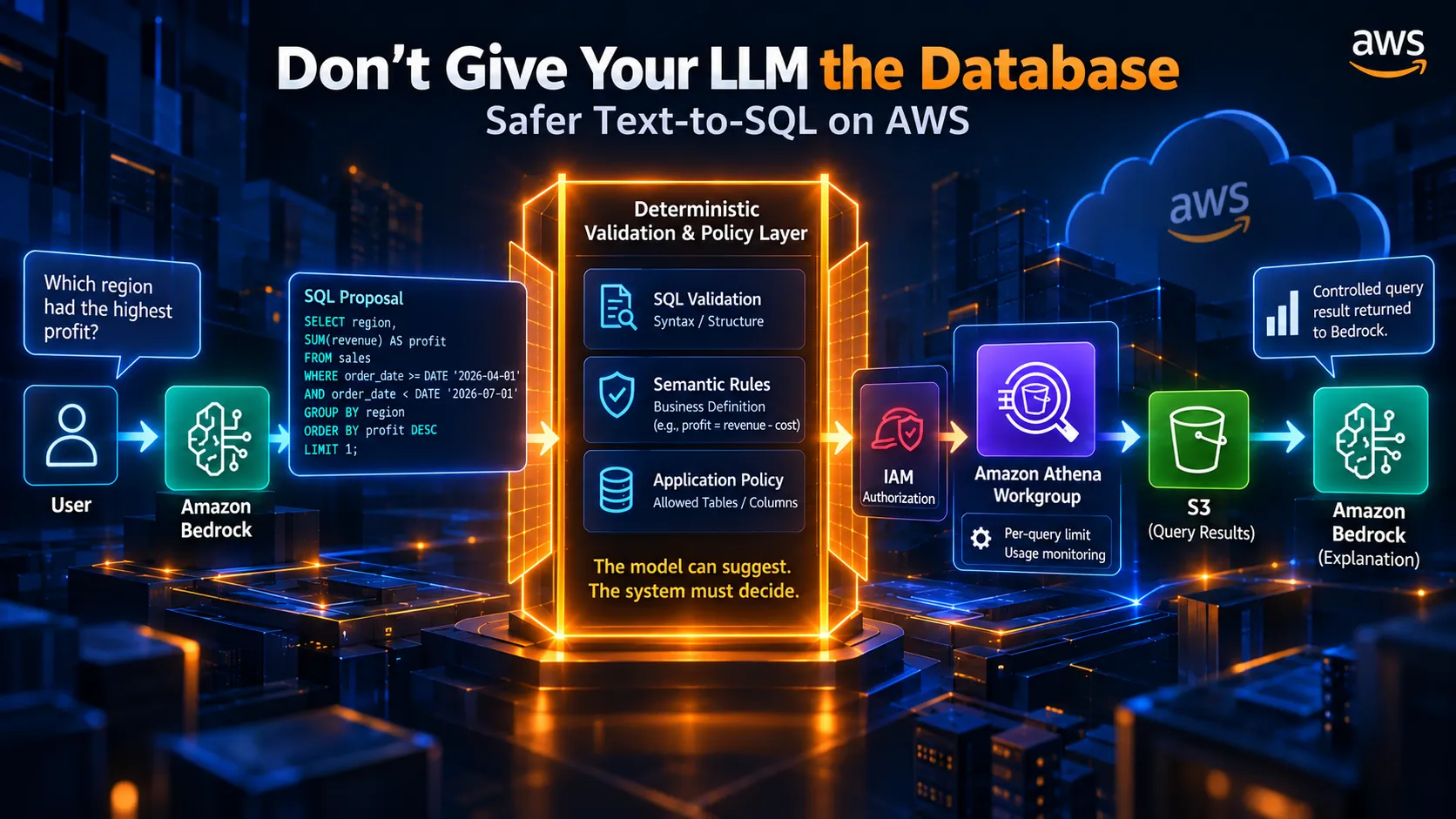
An LLM can generate SQL that parses, executes, and still answers the wrong business question. This article builds a student-scale AWS pattern where Amazon Bedrock proposes SQL, deterministic validation decides whether it is allowed, Athena executes approved queries, and authorization, cost, and semantic limits remain explicit.

Ask an AI assistant:
“Which region had the highest profit in Q2 2026?”
It generates SQL.
The query parses. Athena can execute it. The result may even look reasonable.
It can still be wrong.
That is the part of text-to-SQL that interests me most. The hard problem is not only getting an LLM to write SQL. It is deciding what the application does after the model writes it.
Suppose a
sales table contains:| Column | Meaning |
|---|---|
order_id | Order identifier |
order_date | Order date |
region | Sales region |
category | Product category |
revenue | Revenue |
cost | Cost |
quantity | Units sold |
The business defines profit as:
1
2
profit = revenue - cost
A model could produce:
1
2
3
4
5
6
7
8
9
10
SELECT

    region,

    SUM(revenue) AS profit

FROM sales

WHERE order_date >= DATE '2026-04-01'

  AND order_date < DATE '2026-07-01'

GROUP BY region

ORDER BY profit DESC

LIMIT 1;
Nothing is obviously wrong with the syntax.
The problem is the meaning.
revenue is not profit.Athena can parse and execute SQL within its supported engine and permissions. It does not know that this organization's definition of profit is
revenue - cost.That gives us four different questions:
1
2
3
4
5
6
7
8
Can the query run?

        ↓

Does it mean what the user intended?

        ↓

Is it allowed to run?

        ↓

Is it reasonable to run?
Those questions should not all be delegated to the model.
The model can suggest. The system must decide.
What Changes in the Architecture
The naïve design is:
1
2
3
4
5
6
7
8
9
10
User

  ↓

LLM

  ↓

SQL

  ↓

Athena

  ↓

Answer
The model's output becomes an executable action.
A safer design inserts a control boundary:
1
2
3
4
5
6
7
8
9
10
11
12
13
14
15
16
17
18
User

  ↓

AWS Lambda

  ↓

Amazon Bedrock

  ↓

SQL proposal

  ↓

Deterministic validation + policy

  ↓

Athena Workgroup

  ↓

Query result

  ↓

Amazon Bedrock

  ↓

Answer
The responsibilities stay separate.
Amazon Bedrock interprets the natural-language question and proposes SQL.
The application decides whether that proposal satisfies the SQL policy.
AWS services provide infrastructure authorization, data access, execution, storage, and monitoring.
This separation is also consistent with AWS's current text-to-SQL guidance, which discusses structured generation, deterministic validation, business context, and downstream authorization as distinct parts of the solution.
For this prototype, I would keep the scope deliberately narrow:
- one approved table
- a known schema
- a restricted statement/table/column surface
- deterministic validation before execution
- explicit ambiguity handling
- Athena workgroup scan controls
- execution measurements
The goal is not to build a universal SQL firewall. A small policy that can be tested is more useful than a large policy whose behavior is difficult to explain.
Step 1: Prepare the Data
A synthetic dataset is enough to demonstrate the design:
1
2
3
4
5
6
7
8
9
10
11
12
13
14
15
16
17
18
19
20
21
22
23
24
25
26
27
28
29
import pandas as pd

import numpy as np


rng = np.random.default_rng(42)

n = 5000


df = pd.DataFrame({

    "order_id": np.arange(1, n + 1),

    "order_date": pd.to_datetime(

        rng.choice(

            pd.date_range("2026-01-01", "2026-06-30"),

            size=n

        )

    ).date,

    "region": rng.choice(

        ["North", "South", "East", "West"],

        size=n

    ),

    "category": rng.choice(

        ["Electronics", "Home", "Books", "Fitness"],

        size=n

    ),

    "revenue": np.round(rng.uniform(20, 1200, size=n), 2),

    "cost": np.round(rng.uniform(10, 900, size=n), 2),

    "quantity": rng.integers(1, 8, size=n)

})


df.to_parquet("sales.parquet", index=False)
For this snippet, install a Parquet engine such as PyArrow before calling
to_parquet().Upload the Parquet file to Amazon S3 and register the table through the AWS Glue Data Catalog. Athena uses Glue Data Catalog metadata such as databases, tables, partitions, and columns when querying data in S3.
Parquet is useful for analytical workloads because its columnar layout, compression, and predicate pushdown can reduce unnecessary reads. Partitioning can also reduce data processed when queries use appropriate partition predicates.
A simple layout is:
1
2
3
4
5
6
s3://your-bucket/

├── curated/

│   └── sales/

│       └── *.parquet

└── athena-results/
The sample layout is intentionally unpartitioned; partitioning is a separate optimization for larger datasets.
That layout does not guarantee a cheap query. Scan volume still depends on the query, columns referenced, filtering, file organization, compression, and partitioning.
Step 2: Ask Bedrock for a Proposal
The wording of the model interaction matters.
Do not make the model responsible for execution:
“Run this question against the database.”
Instead:
“Propose one SQL query using this schema.”
Amazon Bedrock's Converse API supports structured output through
outputConfig.textFormat with JSON Schema for supported models. Model and Region compatibility still needs to be checked before deployment.Here,
schema_text and question are application inputs:1
2
3
4
5
6
7
8
9
10
11
12
13
14
15
16
17
18
19
20
21
22
23
24
25
26
27
28
29
30
31
32
33
34
35
36
37
38
39
40
41
42
43
44
45
46
47
48
49
50
51
52
53
54
55
56
57
58
59
60
61
62
63
64
65
66
67
68
69
70
71
72
73
74
75
76
77
78
79
import json
import os
import boto3
bedrock = boto3.client(
"bedrock-runtime",
region_name=os.environ["AWS_REGION"]
)
MODEL_ID = os.environ["BEDROCK_MODEL_ID"]
SCHEMA = {
"type": "object",
"properties": {
"sql": {"type": "string"},
"needs_clarification": {"type": "boolean"},
"reason": {"type": "string"}
},
"required": [
"sql",
"needs_clarification",
"reason"
],
"additionalProperties": False
}
response = bedrock.converse(
modelId=MODEL_ID,
system=[{
"text": (
"Generate analytical SQL for Amazon Athena. "
"Use only the supplied schema. "
"Generate one query. "
"Never invent tables or columns. "
"If the question is ambiguous, set "
"needs_clarification to true and leave sql empty."
)
}],
messages=[{
"role": "user",
"content": [{
"text": (
f"Schema:\n{schema_text}\n\n"
f"Question:\n{question}"
)
}]
}],
outputConfig={
"textFormat": {
"type": "json_schema",
"structure": {
"jsonSchema": {
"name": "sql_proposal",
"description": "Proposed analytical SQL",
"schema": json.dumps(SCHEMA)
}
}
}
}
)
content = (
response.get("output", {})
.get("message", {})
.get("content", [])
)
raw = next(
(part["text"] for part in content if "text" in part),
None
)
if raw is None:
raise RuntimeError(
"Bedrock did not return a text proposal."
)
proposal = json.loads(raw)
Before validation, the application must consume the structured decision:
1
2
3
4
5
6
7
8
9
10
11
12
13
def handle_proposal(proposal: dict):

    if proposal["needs_clarification"]:

        return {

            "status": "clarification_required",

            "message": proposal["reason"],

        }


    approved_sql = validate_sql(proposal["sql"])

    return {

        "status": "validated",

        "sql": approved_sql,

    }
An ambiguous request therefore stops in the application flow instead of silently continuing to SQL validation or execution. The returned
reason becomes the basis for the clarification response.Structured output makes the model-to-application handoff predictable. It does not prove that the SQL is correct, authorized, or semantically meaningful.
That distinction is the reason the next layer exists.
Step 3: Validate the SQL Before Execution
For the prototype, define a deliberately small policy:
1
2
3
4
5
6
7
8
9
10
11
12
Exactly one statement

SELECT only

One approved table

Approved columns only

No wildcard references

No JOIN

No subquery

No CTE

No set operations

No explicit catalog/database/schema qualification

No Athena external-function clause
SQLGlot provides AST parsing and inspection facilities, including an Athena dialect. Its AST traversal tools are useful for enforcing an application's policy, but parsing itself is not the same thing as validating a query against a real database.
1
2
3
4
5
6
7
8
9
10
11
12
13
14
15
16
17
18
19
20
21
22
23
24
25
26
27
28
29
30
31
32
33
34
35
36
37
38
39
40
41
42
43
44
45
46
47
48
49
50
51
52
53
54
55
56
57
58
59
60
61
62
63
64
65
66
67
68
69
70
71
72
73
74
75
76
77
78
79
80
81
82
83
84
85
86
87
88
89
90
91
92
93
94
95
96
97
98
99
100
101
102
103
104
105
106
107
108
109
110
111
112
113
114
115
116
117
118
119
120
121
122
123
124
125
126
127
128
129
130
import re


from sqlglot import parse, exp

from sqlglot.errors import ParseError


ALLOWED_TABLE = "sales"


ALLOWED_COLUMNS = {

    "order_id",

    "order_date",

    "region",

    "category",

    "revenue",

    "cost",

    "quantity"

}


EXTERNAL_FUNCTION_RE = re.compile(

    r"\bUSING\s+EXTERNAL\s+FUNCTION\b",

    re.IGNORECASE

)


def validate_sql(sql: str) -> str:

    if EXTERNAL_FUNCTION_RE.search(sql):

        raise ValueError(

            "Athena external functions are outside this prototype's scope."

        )


    try:

        statements = parse(sql, read="athena")

    except ParseError as exc:

        raise ValueError("SQL could not be parsed.") from exc


    if len(statements) != 1:

        raise ValueError(

            "Only one SQL statement is allowed."

        )


    tree = statements[0]


    if not isinstance(tree, exp.Select):

        raise ValueError(

            "Only SELECT queries are allowed."

        )


    if tree.find(exp.Star):

        raise ValueError(

            "Wildcard references are disabled."

        )


    if tree.find(exp.Join):

        raise ValueError(

            "JOINs are outside this prototype's scope."

        )


    if tree.find(exp.Subquery):

        raise ValueError(

            "Subqueries are outside this prototype's scope."

        )


    if tree.find(exp.CTE):

        raise ValueError(

            "CTEs are outside this prototype's scope."

        )


    tables = list(tree.find_all(exp.Table))


    if len(tables) != 1:

        raise ValueError(

            "Exactly one approved table is required."

        )


    table = tables[0]


    if table.name.lower() != ALLOWED_TABLE:

        raise ValueError(

            "The referenced table is not allowed."

        )


    if table.db or table.catalog:

        raise ValueError(

            "Qualified table references are disabled."

        )


    table_alias = table.alias_or_name.lower()


    projection_aliases = {

        projection.alias.lower()

        for projection in tree.expressions

        if isinstance(projection, exp.Alias)

    }


    order = tree.args.get("order")


    order_alias_columns = set()


    if order:

        order_alias_columns = {

            id(column)

            for column in order.find_all(exp.Column)

            if (

                not column.table

                and not column.db

                and not column.catalog

                and column.name.lower() in projection_aliases

            )

        }


    for column in tree.find_all(exp.Column):

        if id(column) in order_alias_columns:

            continue


        if column.catalog or column.db:

            raise ValueError(

                "Qualified column references are disabled."

            )


        if column.name.lower() not in ALLOWED_COLUMNS:

            raise ValueError(

                f"Column is not allowed: {column.name}"

            )


        if column.table and column.table.lower() != table_alias:

            raise ValueError(

                f"Column qualifier is not allowed: {column.table}"

            )


    return sql.strip()
The validator is intentionally restrictive.
The alias handling is important. SQLGlot represents a projection such as
SUM(revenue) AS profit as an alias expression, while column references remain Column nodes. A bare ORDER BY profit therefore needs to be interpreted in the context of the projection aliases rather than blindly treated as a physical source column.The revised validator collects explicit projection aliases and permits them only when they appear as unqualified references within
ORDER BY. It still validates the underlying projection expression itself, so an alias cannot be used to hide an unauthorized source column.The same distinction matters for qualification. SQLGlot exposes catalog, database, table, and column components separately in its AST, so production-oriented validation should check those components rather than inspect only the final column name.
The external-function check is deliberately different. For this prototype, the clause is rejected with a targeted lexical check before AST validation. That is a simplified prototype shortcut, not a claim that string matching provides complete SQL policy enforcement. A production validator should define and enforce its complete supported function and extension surface using parser-aware policy, or explicitly reject unsupported syntax before execution.
Athena supports external UDFs and other Athena-specific functionality, which is exactly why this boundary needs to be explicit.
The original query:
1
2
3
4
SELECT region, SUM(revenue) AS profit

FROM sales

...
can still pass these structural checks because
revenue is an allowed column and the query uses one approved table.That is not a parser failure.
It is a semantic problem.
A Small Semantic Layer
The semantic layer can begin with explicit business definitions:
1
2
profit → SUM(revenue - cost)
Conceptually:
1
2
3
4
5
6
7
8
Requested metric

      ↓

Approved metric definition

      ↓

Normalized SQL expression

      ↓

Match / reject
A small prototype can make that control flow concrete. The following is illustrative pseudocode rather than a drop-in semantic engine:
1
2
3
4
5
6
7
8
9
10
11
12
13
14
15
SEMANTIC_RULES = {

    "profit": "SUM(revenue - cost)"

}


def semantic_check(metric: str, generated_expression: str):

    expected = SEMANTIC_RULES.get(metric)


    if expected is None:

        raise ValueError("No approved definition exists for this metric.")


    if normalize_expression(generated_expression) != normalize_expression(expected):

        raise ValueError("Generated expression does not match the approved metric definition.")


    return True
Here,
normalize_expression() stands for parser-aware normalization of the relevant expression. The application would extract the generated metric expression after structural validation, then compare it with the approved definition before execution.The important shift is that business meaning becomes application policy instead of model intuition.
For example, if the requested metric is
profit, an application can require the generated expression to match the approved definition SUM(revenue - cost). A production semantic validator would normalize and compare AST expressions rather than rely on string matching.This is deliberately a small prototype example, not a complete semantic engine or proof of semantic correctness.
Step 4: Execute Only Approved SQL
Once the query passes validation, submit it to Athena.
Athena's
StartQueryExecution API returns a QueryExecutionId. GetQueryExecution can then be used to poll status and inspect execution statistics.1
2
3
4
5
6
7
8
9
10
11
12
13
14
15
16
17
18
19
20
21
22
23
24
25
26
27
28
29
30
31
32
33
34
35
36
37
38
39
40
41
42
43
44
45
46
47
48
49
50
51
52
53
54
55
56
57
import os
import time
import boto3
athena = boto3.client(
"athena",
region_name=os.environ["AWS_REGION"]
)
DATABASE = os.environ["ATHENA_DATABASE"]
WORKGROUP = os.environ["ATHENA_WORKGROUP"]
def run_query(sql: str, timeout_seconds: int = 60):
query_id = athena.start_query_execution(
QueryString=sql,
QueryExecutionContext={
"Database": DATABASE
},
WorkGroup=WORKGROUP
)["QueryExecutionId"]
deadline = time.monotonic() + timeout_seconds
while True:
execution = athena.get_query_execution(
QueryExecutionId=query_id
)["QueryExecution"]
state = execution["Status"]["State"]
if state in {"SUCCEEDED", "FAILED", "CANCELLED"}:
break
if time.monotonic() >= deadline:
athena.stop_query_execution(
QueryExecutionId=query_id
)
raise TimeoutError(
"Athena query timed out."
)
time.sleep(1)
if state != "SUCCEEDED":
raise RuntimeError(
execution["Status"].get(
"StateChangeReason",
"Query did not succeed."
)
)
return {
"query_id": query_id,
"statistics": execution.get("Statistics", {})
}
To pass the actual rows to the final model call, retrieve them explicitly:
1
2
3
4
5
6
7
8
9
10
11
12
13
14
15
16
17
18
19
20
21
22
23
24
25
26
27
28
29
30
31
32
33
34
35
36
37
38
39
40
41
42
43
44
45
46
47
48
49
50
51
52
53
54
55
56
57
58
59
60
61
62
63
64
def get_query_results(

    query_id: str,

    max_rows: int = 50,

    max_payload_bytes: int = 64_000,

):

    results = []

    next_token = None

    column_names = None

    payload_size = 0


    while True:

        params = {

            "QueryExecutionId": query_id,

            "MaxResults": 1000

        }


        if next_token:

            params["NextToken"] = next_token


        response = athena.get_query_results(**params)

        result_set = response.get("ResultSet", {})


        if column_names is None:

            column_info = result_set.get("ResultSetMetadata", {}).get(

                "ColumnInfo", []

            )

            column_names = [

                info.get("Label") or info.get("Name")

                for info in column_info

            ]


        page_rows = result_set.get("Rows", [])


        # Some Athena result responses include a heading row.

        if page_rows and column_names:

            first_values = [

                cell.get("VarCharValue", "")

                for cell in page_rows[0].get("Data", [])

            ]

            if first_values == column_names:

                page_rows = page_rows[1:]


        for row in page_rows:

            values = [

                cell.get("VarCharValue")

                for cell in row.get("Data", [])

            ]

            item = dict(zip(column_names or [], values))

            item_size = len(json.dumps(item, separators=(",", ":")).encode("utf-8"))


            if (

                len(results) >= max_rows

                or payload_size + item_size > max_payload_bytes

            ):

                return results


            results.append(item)

            payload_size += item_size


        next_token = response.get("NextToken")


        if not next_token:

            return results
The transformation uses Athena's column metadata for headings, converts row values into ordinary result objects, follows
NextToken pagination, and stops at explicit row and payload limits. The final model therefore receives a deliberately shaped result such as:1
2
3
4
5
[
{"region": "North", "profit": "12345.67"},
{"region": "West", "profit": "11890.12"}
]
GetQueryResults returns result rows and supports pagination through NextToken. Access to the S3 query-results location is also part of the overall permission boundary: a principal with s3:GetObject on that results location can retrieve the stored results even without the Athena GetQueryResults permission. Restrict the result bucket or prefix to the principals that should be able to read those outputs.The Athena workgroup should be configured with the intended result location and execution settings.
The Lambda role should also follow least-privilege IAM. IAM determines which AWS resources the workload is allowed to access; the validator determines whether a particular SQL statement matches the application's policy.
Neither replaces the other.
Step 5: Put Cost Controls Outside the Model
A query can be syntactically correct, semantically reasonable, and authorized and still be expensive.
Under Athena's per-query SQL pricing model, AWS currently lists $5 per TB of data scanned. Athena also offers a capacity-based pricing model, so the $5/TB rate does not apply to every Athena workload. S3 and Glue charges can apply separately.
Keep Athena's two workgroup data-usage mechanisms distinct:
- A per-query data-usage control limits the amount of data scanned by an individual query and cancels that query when the threshold is exceeded.
- Workgroup-wide data-usage alerts monitor aggregate data scanned across queries over a configured period and can trigger alerts; they do not by themselves cancel queries.
- A canceled query can still incur Athena charges for the data scanned before cancellation.
So the cost boundary is:
1
2
3
4
5
6
7
8
9
10
Generated SQL

      ↓

Validation

      ↓

Athena Workgroup

      ├── Per-query data limit

      └── Workgroup-wide usage monitoring

      ↓

Execution
Data layout is part of the same discussion.
Parquet, compression, predicate pushdown, and appropriate partitioning can reduce unnecessary data processing.
Do not confuse
LIMIT with a complete cost-control strategy. Returning fewer rows and processing less source data are different concerns.Step 6: Keep the Final Model Call Away from the Database
After Athena returns the rows, Bedrock can explain them to the user.
The important design decision is that the second model call receives the controlled result, not unrestricted database access.
1
2
3
4
5
6
7
8
9
10
11
12
Question

   ↓

Bedrock → SQL proposal

   ↓

Validator

   ↓

Athena

   ↓

Controlled result

   ↓

Bedrock → Explanation
A summarization instruction can be as simple as:
1
2
3
Answer only from the supplied query result.

Do not invent values or unsupported facts.
The result should also be minimized before it reaches the final model. In a production implementation, cap row and payload sizes where appropriate, prefer aggregated results when the answer only requires an aggregate, remove unnecessary sensitive fields, and send only the information needed for the final explanation.
The model is now performing language generation over a result that has already passed through the execution path.
That is a much smaller trust boundary than giving the model direct authority over the database.
Break the System Before You Trust It
A diagram is not an experiment.
The prototype becomes useful when you deliberately try to make it fail. Because this article does not include measured execution results, the table below is a validation plan, not a benchmark report.
| Test case | Expected Behavior |
|---|---|
| Valid analytical question | Proposal passes validation and is eligible for execution |
| Unknown column | Rejected before Athena |
| Unknown table | Rejected before Athena |
DELETE FROM sales | Rejected by the SELECT-only policy |
| Wildcard query | Rejected by the policy |
| JOIN / subquery / CTE | Rejected by this prototype |
Set operation such as UNION | Rejected because the root query is not a single SELECT |
| Athena external-function clause | Rejected by the prototype's explicit lexical guard |
| Deliberately broad scan | Per-query control can cancel it when the configured threshold is exceeded; workgroup-wide monitoring can alert on aggregate usage |
| Ambiguous question | Clarification requested |
SUM(revenue) AS profit | May pass structural validation; semantic policy must reject the mismatch |
That last case is the most important one.
A
DELETE is obviously dangerous and easy to reject.A query that quietly answers the wrong business question is harder.
For example:
“What were our best sales?”
Could mean highest revenue, highest profit, highest quantity, or fastest growth.
A system that silently chooses one definition may return perfectly valid SQL and still fail the user.
What We Measure
Do not label planned behavior as measured performance.
For each real test, record:
1
2
3
4
5
6
7
8
9
10
11
Question

Expected interpretation

Generated SQL

Validation decision

QueryExecutionId

DataScannedInBytes

EngineExecutionTimeInMillis

Returned result

Final answer

Pass / Fail
Athena exposes fields such as
DataScannedInBytes and EngineExecutionTimeInMillis, making them useful operational measurements after an actual execution.The distinction is simple:
1
2
Expected behavior ≠ Observed behavior
A test case is not a benchmark.
Where This Prototype Stops
This design does not guarantee semantic correctness.
It does not provide complete SQL security.
It does not implement complete multi-user authorization.
It does not cover every Athena SQL feature or every prompt-injection path.
It also does not become trustworthy because the model returned valid JSON. Structured output solves output-format constraints; it is not an authorization mechanism.
Amazon Bedrock Guardrails can detect prompt attacks and provide additional input/output safeguards, but they are defense in depth rather than a replacement for application policy or AWS permissions.
For multi-user analytics, access decisions should be tied to identity and enforced downstream.
For S3-backed analytical data, AWS Lake Formation provides row-, column-, and cell-level filtering for supported integrations.
That is a much stronger place to enforce data access than relying on an AI-generated
WHERE clause.What I Would Add for Production
The first improvement would be a richer semantic layer.
A schema tells the model:
1
2
3
4
5
6
revenue

cost

quantity

region

order_date
It does not automatically define:
1
2
3
4
5
profit

active customer

completed order

fiscal quarter
Those business definitions need to be explicit.
The second improvement would be a richer SQL policy.
Instead of simply banning joins and subqueries, production policy could define:
1
2
3
4
5
6
7
8
9
allowed tables

allowed columns

allowed joins

allowed functions

allowed extensions

sensitive fields

query shape

user permissions
The third improvement would be a permanent evaluation set:
1
2
3
4
5
6
7
8
9
10
11
12
Question

   ↓

Expected interpretation

   ↓

Expected result

   ↓

Generated SQL

   ↓

Validation decision

   ↓

Observed result
Run those tests whenever the model, prompt, semantic metadata, or policy changes.
Finally, log enough information to reconstruct each execution:
1
2
3
4
5
6
7
8
9
10
11
12
13
14
15
16
Question

   ↓

Model proposal

   ↓

Validation decision

   ↓

Executed SQL

   ↓

Athena QueryExecutionId

   ↓

Scanned bytes

   ↓

Latency

   ↓

Final response
Those logs need their own access controls and retention rules because observability data can contain sensitive information.
The query result path matters too. Athena stores query results in an S3 result location, and access to that location is therefore part of the security boundary.
The Production Lesson
There are three responsibilities, even if the implementation spans more than three AWS components.
The model interprets flexible language and produces a proposal.
The application applies deterministic semantic and SQL policy.
The AWS data plane enforces infrastructure authorization, storage access, execution controls, and observability through services such as IAM, S3, Glue, Athena, Workgroups, and CloudWatch.
The important design principle is simple:
Model output is an input to the system, not authority over the system.
That principle extends beyond SQL. The same boundary matters whenever an AI system can call an API, access sensitive information, send a message, modify infrastructure, execute code, or trigger a workflow.
Conclusion
Natural-language analytics is often presented as:
1
2
3
4
5
6
Question

   ↓

AI

   ↓

Answer
A more dependable design is:
1
2
3
4
5
6
7
8
9
10
11
12
13
14
15
16
17
18
Natural language

       ↓

Amazon Bedrock

       ↓

SQL proposal

       ↓

Deterministic validation

       ↓

Authorization

       ↓

Cost controls

       ↓

Athena

       ↓

Controlled result

       ↓

Explanation
The interesting engineering work is not getting an LLM to write SQL.
It is deciding what happens after it writes the SQL.
The model can suggest. The system must decide.
Sources
- AWS — Text-to-SQL solution powered by Amazon Bedrock
- AWS — Get validated JSON results from models - Amazon Bedrock
- AWS — Converse - Amazon Bedrock API Reference
- AWS — Configure per-query and per-workgroup data usage controls - Amazon Athena
- AWS — Amazon Athena pricing
- AWS — GetQueryResults - Amazon Athena
- AWS — QueryExecutionStatistics - Amazon Athena
- AWS — Use AWS Glue Data Catalog to connect to your data - Amazon Athena
- AWS — Use columnar storage formats - Amazon Athena
- AWS — Detect prompt attacks with Amazon Bedrock Guardrails
- AWS — Data filtering and cell-level security in Lake Formation
- SQLGlot — AST and dialect documentation
Enjoyed reading this content? Let the author know!
Your likes, comments, shares, and saves help creators reach more builders.

Loading recommendations
Loading article