
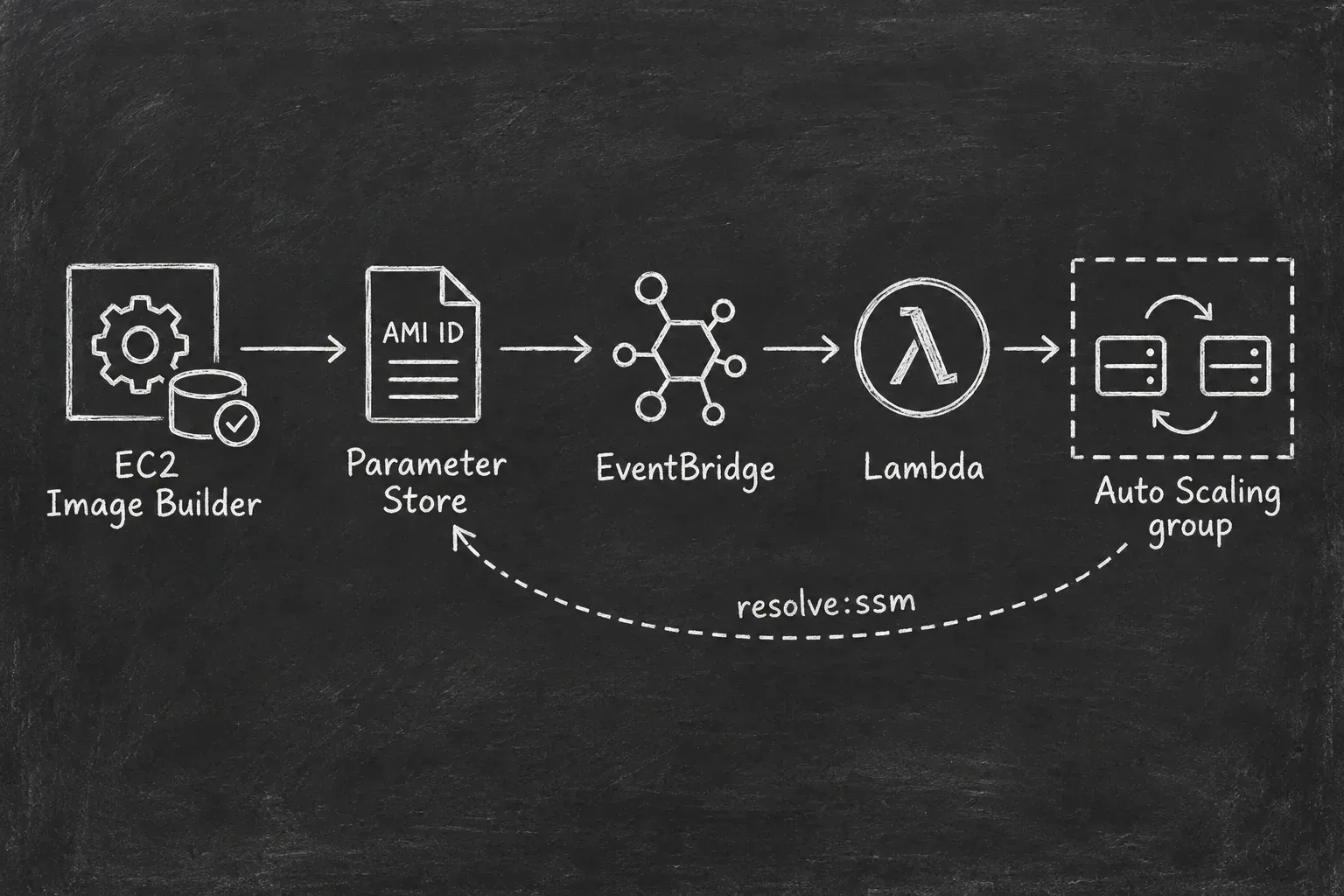
AMI rollouts with EC2 Image Builder and Parameter Store
Build an AMI with EC2 Image Builder, publish its ID to Parameter Store, and trigger an Auto Scaling instance refresh. Terraform examples and results from a tested lab.

Building a new AMI is only part of updating EC2 instances. We still need to tell the Auto Scaling group to use it and replace the instances running the old image. EC2 Image Builder can write the output AMI ID to a parameter during distribution. A launch template can reference that parameter directly. The remaining part is to start an instance refresh when the value changes, which is not something natively supported by AWS.
Also, my spouse has recently bought paid ChatGPT subscription which goes with Codex. So I decided to give it a try and asked to build a small Terraform lab. I provided it with the instruction how it should look like and what I want and it nailed it.
The full code is in ami-ssm-asg-refresh . Below are the parts that connect the services and the results from the test.
How it works
1
2
3
4
5
6
7
8
9
10
11
12
13
14
15
16
17
18
19
20
21
22
23
  ┌───────────────────┐
  │ EC2 Image Builder │
  └─────────┬─────────┘
            │ Publish AMI ID
            ▼
  ┌───────────────────┐
  │  Parameter Store  │◄─────────────────────┐
  └─────────┬─────────┘                      │
            │ Update event                   │
            ▼                                │
  ┌───────────────────┐                      │
  │    EventBridge    │                      │
  └─────────┬─────────┘                      │
            │                                │
            ▼                                │
  ┌───────────────────┐                      │
  │      Lambda       │                      │
  └─────────┬─────────┘                      │
            │ Instance refresh               │
            ▼                                │
  ┌───────────────────┐                      │
  │ Auto Scaling group│──── resolve:ssm ─────┘
  └───────────────────┘
Image Builder builds and tests the AMI before publishing its ID. Lambda validates the AMI and checks the ASG before calling
StartInstanceRefresh. New instances use the launch template's resolve:ssm reference to read the current AMI ID from Parameter Store.Updating the parameter changes which AMI future launches use. It does not replace existing instances by itself. The instance refresh handles that part.
The lab has two
t3.micro instances running Amazon Linux 2023, one public subnet, and no inbound security group rules. Instances have public addresses for outbound access, and I use Systems Manager to check the release marker. There is no load balancer or application in this test.Create the AMI parameter
Terraform first creates a parameter containing a regional Amazon Linux 2023 AMI. This gives the Auto Scaling group a valid image before the first Image Builder run.
1
2
3
4
5
6
7
8
9
10
11
12
13
14
15
data "aws_ssm_parameter" "amazon_linux_2023" {
  name = "/aws/service/ami-amazon-linux-latest/al2023-ami-kernel-default-x86_64"
}

resource "aws_ssm_parameter" "ami" {
  name      = "/imagebuilder/ami-ssm-asg-refresh/ami"
  type      = "String"
  data_type = "aws:ec2:image"
  tier      = "Standard"
  value     = data.aws_ssm_parameter.amazon_linux_2023.value

  lifecycle {
    ignore_changes = [value]
  }
}
ignore_changes = [value] is needed here. Terraform creates and manages the parameter resource, while Image Builder updates its value after each successful build and test. Without this setting, a later Terraform apply could overwrite the published AMI with the value from the bootstrap data source.The
aws:ec2:image data type adds AMI validation. AWS checks the format and whether the AMI is available in the account. This validation is asynchronous, so a successful API response does not mean the parameter is ready to use. AWS documents this behavior here .The lab waits 30 seconds after parameter creation before creating the ASG. That is a bootstrap delay for this example. A more robust setup should check that the parameter is readable before continuing.
Let Image Builder publish the AMI ID
The Image Builder recipe has a build component that writes
/etc/asg-refresh-lab-release with the release ID and UTC build timestamp. Its test component checks Amazon Linux 2023, the expected marker, and whether the SSM Agent is enabled.The distribution configuration publishes the resulting AMI ID to the parameter:
1
2
3
4
5
6
7
8
9
10
11
12
13
14
15
16
17
18
19
20
21
resource "aws_imagebuilder_distribution_configuration" "lab" {
  name = var.name

  distribution {
    region = var.aws_region

    ami_distribution_configuration {
      name = "${var.name}-${var.release_id}-{{ imagebuilder:buildDate }}"

      ami_tags = {
        Project = var.name
        Release = var.release_id
      }
    }

    ssm_parameter_configuration {
      data_type      = "aws:ec2:image"
      parameter_name = aws_ssm_parameter.ami.name
    }
  }
}
This uses Image Builder's native SSM output support . The pipeline references this distribution configuration and has image tests enabled.
The permissions belong on the Image Builder execution role. In this repo, that role has
EC2ImageBuilderExecutionPolicy, plus ssm:PutParameter for the exact parameter ARN and ec2:DescribeImages for AMI validation. It is separate from the instance profile attached to the build and test instances. These are the documented SSM output prerequisites .The parameter write happens during distribution, after the build and test workflows pass. It can happen before the overall Image Builder image resource reports
AVAILABLE. I check both the parameter and the image status when inspecting a run.Keep the parameter reference in the launch template
The relevant launch template setting is one line:
1
image_id = "resolve:ssm:${aws_ssm_parameter.ami.name}"
For this lab, the stored value in the template is:
1
resolve:ssm:/imagebuilder/ami-ssm-asg-refresh/ami
Auto Scaling resolves the parameter when it launches instances. Lambda does not create a new launch template version for each AMI. AWS supports this directly .
This also means a normal scale-out can use the newly published AMI before the existing instances have finished refreshing. The parameter controls future launches as well as refresh replacements.
Start a refresh on parameter updates
The EventBridge rule matches the exact parameter name, account, Region, and
Update operation:1
2
3
4
5
6
7
8
9
10
11
event_pattern = jsonencode({
source = ["aws.ssm"]
detail-type = ["Parameter Store Change"]
account = [data.aws_caller_identity.current.account_id]
region = [var.aws_region]
detail = {
name = [aws_ssm_parameter.ami.name]
operation = ["Update"]
}
})The initial
Create event does not match, so bootstrapping the parameter does not start a refresh.Lambda reads the current parameter value and version, then validates the AMI. It must be available, owned by the lab account, use
x86_64, and have the expected Project tag. The function also checks the event fields again.The rule does not identify who wrote the parameter. An update from an operator can trigger the same path, which is how recovery works. Permission to write this parameter is therefore permission to select an AMI for future launches. The Lambda checks are not a replacement for controlling that access, and they do not independently prove that an image passed the pipeline tests.
Before starting a refresh, the function compares the AMIs of the current ASG instances with the parameter:
- If every instance already uses the target AMI, it returns
already-current. - If a refresh is active, it returns
deferred-active-refresh. - Otherwise, it starts a rolling refresh.
Reserved concurrency is one, and the function also handles
InstanceRefreshInProgress if another caller starts a refresh between the check and the API call.The refresh request uses these preferences:
1
2
3
4
5
6
7
8
9
10
11
response = clients.autoscaling.start_instance_refresh(
    AutoScalingGroupName=settings.asg_name,
    Strategy="Rolling",
    Preferences={
        "MinHealthyPercentage": 100,
        "MaxHealthyPercentage": 150,
        "InstanceWarmup": 120,
        "SkipMatching": False,
        "AutoRollback": False,
    },
)
With desired capacity two, the 100% minimum and 150% maximum allow one extra instance during replacement. Auto Scaling launches a replacement and waits for health and warmup before continuing. The instance refresh documentation explains these settings.
This lab uses EC2 health checks only. A successful refresh tells me the instances were replaced, but it does not prove an application stayed available.
What happened in the test
To run the same lab, clone the repo and copy
terraform.tfvars.example to terraform.tfvars. The example defaults to ap-southeast-2. Use Terraform, AWS CLI credentials for your sandbox account, and the same AWS profile for Terraform and the helper scripts.1
2
3
4
5
6
7
8
git clone https://github.com/wiseelf/ami-ssm-asg-refresh.git
cd ami-ssm-asg-refresh
cp terraform.tfvars.example terraform.tfvars
# Edit terraform.tfvars for your account and Region before deploying.
./scripts/deploy.sh
./scripts/wait-for-baseline.sh
./scripts/inspect.shTerraform created 39 resources. The baseline had two healthy instances using
ami-0354c98ae10b02961, and the parameter was at version 1. There were no instance refreshes yet.Then I started the image build:
1
./scripts/start-build.sh
The script returns the image build ARN and a command to inspect its status. After the build and refresh finished, I ran:
1
2
3
./scripts/inspect.sh
./scripts/verify-release.sh v1
./scripts/capture-evidence.sh
These are the timestamps from the run, converted to UTC.
| Event | Time, UTC |
|---|---|
| Parameter updated to version 2 | 23:06:57.276 |
| Instance refresh started | 23:07:16 |
| Instance refresh completed | 23:12:29 |
The refresh started about 19 seconds after the parameter update and took 5 minutes 13 seconds. These are timings from this run, not a delivery guarantee.
The parameter now contained
ami-0ee4df2a150e436d7. Image Builder reported AVAILABLE, and the refresh reported Successful at 100%. Both original instance IDs had been replaced.The release check used SSM Run Command to read the marker from both new instances:
1
2
i-01fd3c3489fc0fc3a ami-0ee4df2a150e436d7: release=v1
i-0bc6d8da0cfeb8a37 ami-0ee4df2a150e436d7: release=v1
I did not call
start-instance-refresh manually during this run. The recorded commands show the image build followed by inspection of the completed refresh.The repo also includes steps for a v2 rollout, duplicate-event checks, a deliberately failed image test, recovery, and a Terraform drift check. I did not run those scenarios in this session.
Limits of the direct parameter reference
There are restrictions to consider before using this for an application. An ASG whose launch template uses an SSM AMI parameter cannot use instance refresh desired configuration, skip matching, or warm pools. That is why the request above omits
DesiredConfiguration and sets SkipMatching to false. AWS lists these restrictions here .Native instance refresh rollback is also unavailable with an SSM AMI alias. This lab additionally uses
$Default for the launch template version, which has its own rollback restriction. Rollback requires a compatible configuration and numbered launch template versions .The recovery script instead writes a previous valid lab AMI to the parameter. That update triggers a new refresh. It refuses to change the parameter while another refresh is active.
The other limit is that the parameter value can change during a rollout. Suppose the first replacement launches with v1, then another build publishes v2. A later replacement can resolve v2 from the same parameter. Logging the parameter version in Lambda does not pin the refresh to that version.
For this reason, the lab assumes serial builds. Wait for the current build and refresh to finish before starting the next one.
deferred-active-refresh is only a logged result. The function does not queue the new target for later processing.Parameter Store events are emitted on a best-effort basis . The repo has separate SQS destinations for EventBridge delivery failures and Lambda execution failures, but neither can recover an event that was never emitted. If the parameter and instances differ without an active refresh, the manual check is:
1
./scripts/reconcile.sh
For a production rollout that needs a fixed AMI and native rollback, I would resolve the parameter once, put the literal AMI ID into a numbered launch template version, and use that version in the refresh desired configuration. I would also add application health checks and a persistent way to process updates that arrive during a refresh. That changes the design, but it gives each rollout a specific image to deploy.
Cleanup order matters
Disable automation while the outputs still exist, and save the Region and project name before destroying the stack:
1
2
3
4
5
6
export AWS_REGION="$(terraform output -raw aws_region)"
export PROJECT_NAME="$(terraform output -raw project_name)"

./scripts/disable-automation.sh
./scripts/inspect.sh
./scripts/cleanup-generated-images.sh
Wait until there are no active image builds or instance refreshes. Then remove the Terraform resources and the generated images:
1
2
terraform destroy
./scripts/cleanup-generated-images.sh --execute
The first cleanup call only prints an inventory. The
--execute call deregisters account-owned AMIs tagged for this project and deletes their snapshots, after checking that no non-terminated instances use them.The generated AMI and its EBS snapshot remained after Terraform destroy in my test. The cleanup script removed them separately. Keep this step in the runbook, because destroying the Image Builder pipeline does not remove the images it built.
Enjoyed reading this content? Let the author know!
Your likes, comments, shares, and saves help creators reach more builders.

Loading recommendations
Loading article