
Agents for Humans: Building RoboStrands, a Voice-Guided Robot Assistant
How I connected Strands Agents SDK, local voice AI, and a trained robot arm to turn spoken requests into supervised physical actions—with human approval before every rollout.


From a trained robot to a usable assistant
A robot can learn a task and still be cumbersome to operate. Launching a trained policy may involve long commands, hardware settings, and switching between software environments.
For the Agents for Humans hackathon, I built RoboStrands to explore a more natural interaction: speak a request, review the task, and approve the robot’s execution.
The intended users are laboratory technicians and small-workcell operators who need to run an already-trained robot routine. My goal was to simplify the launch workflow while keeping the operator in control.
What I built
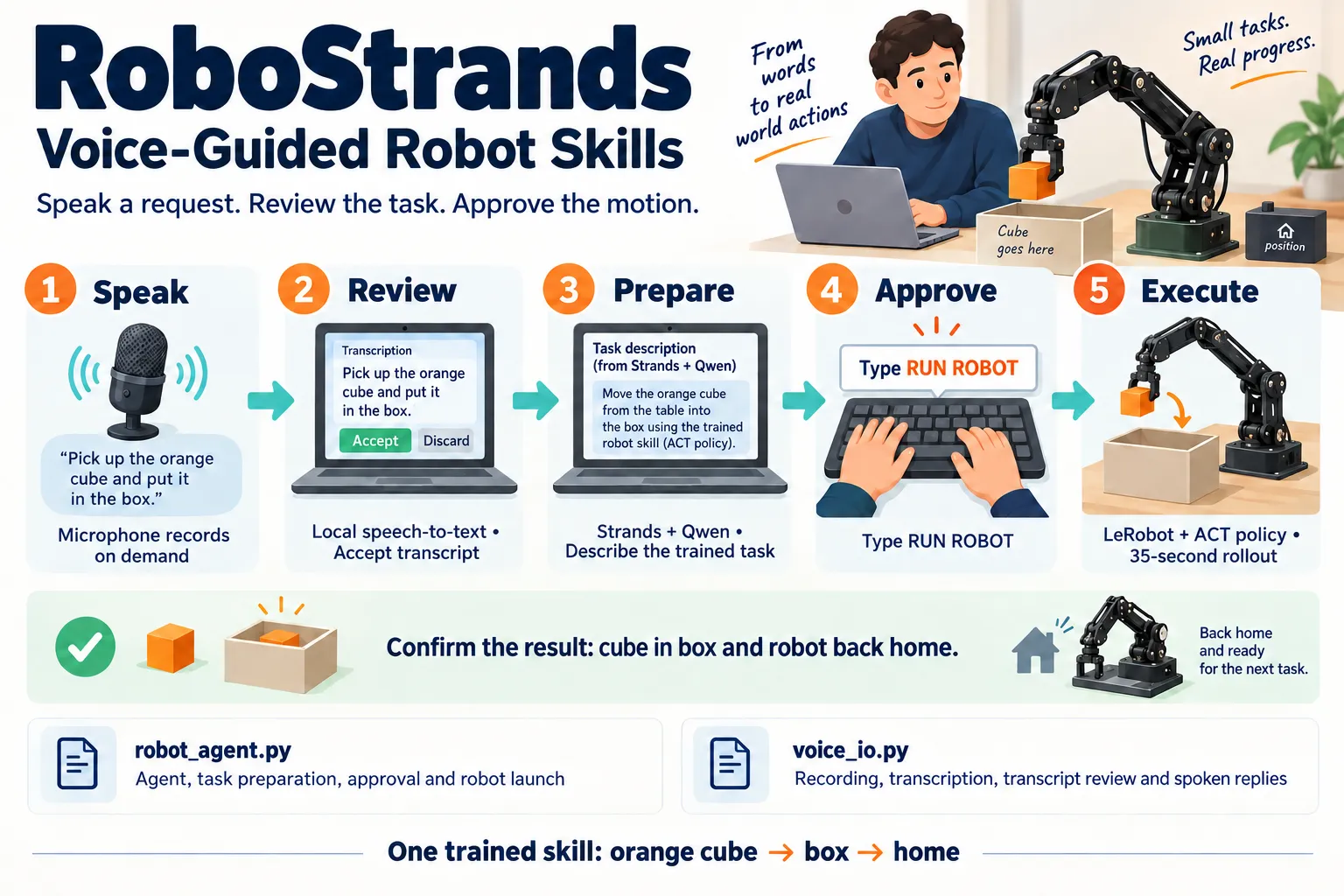
RoboStrands connects a local voice interface to an SO101 follower robot arm using Strands Agents SDK.
The current prototype supports one trained skill:
Pick up the orange cube, place it in the box, and return home.
The workflow is:
- The operator speaks through a ReSpeaker Lite microphone.
- Local speech recognition converts the recording into text.
- The operator reviews and accepts the transcript.
- The Strands agent prepares the supported task.
- The operator types
RUN ROBOT. - LeRobot launches the trained policy.
- The operator confirms the physical result.
The demonstration completed with operator-confirmed pick-and-place and return home.
How Strands connects the pieces
Strands Agents SDK connects the conversation to a Python preparation tool. A local Qwen model, served through Ollama, interprets the request and can select that tool.
The tool returns a description of the fixed task. It does not move or simulate the robot.
A separate Python step checks that preparation occurred and requires keyboard approval before launching the trained ACT policy through LeRobot. Camera observations feed the policy that controls the arm.
This separation matters: the language model handles conversation and task preparation, while the trained policy handles movement.
For this build, I used Strands with a local Ollama model provider. The demonstrated runtime does not use Amazon Bedrock or an AgentCore deployment.
Adding voice
The voice interface uses faster-whisper for local English transcription and eSpeak for spoken replies.
Recording starts only after the operator presses Enter. The transcript must be accepted before it reaches the agent, and temporary audio files are removed after transcription.
Short recordings sometimes captured incomplete requests. A ten-second recording window worked better in the demonstrated interaction.
The microphone is off during robot motion, so voice is not an emergency-stop mechanism.
The biggest challenges
My laptop has limited GPU memory. Running the language model and robot policy required coordinating resources. Before launching LeRobot, the application requests that Ollama unload Qwen; if that command fails, the rollout is cancelled.
Another challenge was separating successful software execution from successful physical work. A process can finish without proving that the cube reached the box. RoboStrands therefore asks the operator to check the result and does not automatically retry.
I also added 21 passing offline tests covering approval gates, dry-run behavior, transcript handling, and failure paths.
What I learned and what comes next
An agent connected to hardware needs more than a useful response. It needs clear boundaries between understanding, preparation, approval, execution, and verification.
RoboStrands currently demonstrates one supervised skill on my configured hardware. It is a prototype, not a safety-certified industrial system.
Next, I want to make the configuration portable, document and package the custom LeRobot runtime and checkpoint access, measure repeatability, and add more independently tested skills.
The broader idea is simple: make trained robot capabilities easier for people to request, with a clear decision point before physical action.
Watch the demo and explore the code
AI assistance was used for implementation, testing, documentation, and explanatory illustrations.
Enjoyed reading this content? Let the author know!
Your likes, comments, shares, and saves help creators reach more builders.

Loading recommendations
Loading article