
How To: Run a 25,000 RPS Distributed Load Test on AWS with Kiro CLI
A complete, reproducible walkthrough: from an empty AWS account to a geographically distributed load test hitting 25,000 requests per second across two regions — deployed, configured, executed, and reported entirely through natural-language prompts to Kiro CLI. Every step below was executed live.

What you'll build
By the end of this guide you will have:
- The open-source Distributed Load Testing on AWS solution deployed in your account via CloudFormation — driven by Kiro CLI.
- A Locust test written in Python targeting your API.
- A production test running from two AWS regions simultaneously, sustaining 25,000 RPS.
- Results collected through the solution's MCP Server, queried in natural language.
- An executive HTML dashboard generated by Kiro from the MCP data.
- A clear view of how much a 1,000,000-request test actually costs.
Prerequisites
- An AWS account with permissions to create CloudFormation stacks (IAM, ECS/Fargate, Lambda, Step Functions, DynamoDB, S3, CloudFront).
- Kiro CLI installed and authenticated.
- AWS credentials configured (
aws configureor SSO) in your shell. - An HTTP endpoint you're allowed to load test (your own API — never test a system you don't own).
The solution is maintained by AWS and deployed via CloudFormation. Its source and templates live at github.com/aws-solutions/distributed-load-testing-on-aws .
The architecture, briefly
Distributed Load Testing (DLT) uses API Gateway + Lambda for orchestration, Step Functions to manage test execution, and ECS Fargate tasks to generate the actual load. The web console runs on CloudFront + S3. The 2026 version adds three big things over the original 2022 release:
- Native multi-region testing — spin up Fargate load generators in additional regions from a single control plane.
- Locust and k6 support — in addition to JMeter. Locust is pure Python, so complex scenarios take just a few lines.
- An optional MCP Server (via Amazon Bedrock AgentCore Gateway) — so AI assistants like Kiro can query results and generate reports through the Model Context Protocol.
Deploy the solution with Kiro CLI
Instead of clicking through the CloudFormation console, filling parameters, and polling for completion, hand the whole thing to Kiro. Open Kiro CLI in your terminal and give it a single natural-language instruction:
1
2
3
4
5
6
Deploy the Distributed Load Testing solution in my AWS account to
validate 25,000 requests per second. Read the official AWS solution
documentation to get the latest CloudFormation template URL, verify my
credentials and default region, create the stack with sensible admin
parameters, monitor the deployment until it completes, and give me the
web console URL when done.
Kiro will:
- Read the AWS solution documentation to find the current template URL.
- Verify your identity with
aws sts get-caller-identity. - Create the stack with
aws cloudformation create-stack, passing the admin email and console parameters. - Poll
describe-stacksuntilCREATE_COMPLETE. - Return the CloudFront console URL from the stack outputs.
A deployment that normally takes ~15 minutes of manual console work becomes one conversation with zero manual AWS Console interaction. You'll get a temporary password by email; log into the console URL Kiro gives you.
Under the hood Kiro runs standard AWS CLI calls. You can ask it to "show me the exact commands before running them" if you want to review each step — a good habit when creating infrastructure.
Create the Locust test with Kiro
Locust describes load scenarios as Python classes. Ask Kiro to generate one for your endpoint:
1
2
3
Create a Locust test file targeting https://api.example.com/health.
One task that issues a GET request, with a short wait time between
requests. Keep it minimal so I can upload it to the DLT console.
Kiro produces a clean, ready-to-upload file:
1
2
3
4
5
6
7
8
from locust import HttpUser, task, between
class ApiUser(HttpUser):
wait_time = between(0.1, 0.5)
def health_check(self):
self.client.get("/health")Five lines, generated in seconds. This is the payload each Fargate task will execute concurrently.
Run a smoke test first
Never jump straight to 25k RPS. Validate the pipeline end to end with a tiny test. In the DLT web console, open Create Test Scenario and:
- Select Locust as the framework.
- Upload the Python file from step 2.
- Configure 1 region, 1 task, 10 concurrent users.
Start it. Watch the Task Status bar move from Provisioning to Running, and the real-time metrics (average response time, virtual users) ramp up. When it finishes green, your pipeline is validated and you're ready to scale.
Enable a second region
To generate geographically distributed load, add another region. Ask Kiro:
1
2
3
4
Enable sa-east-1 (São Paulo) as an additional test region for my DLT
deployment. Download the regional CloudFormation template from the main
stack's S3 bucket and deploy it there, creating the VPC, subnets, ECS
cluster and security groups needed for Fargate tasks.
Kiro fetches the regional template referenced by the main stack and deploys it to
sa-east-1, provisioning the networking and ECS resources Fargate needs. This takes about 3 minutes. You now have load generators available in us-east-1 and sa-east-1.Configure and run the production test (25,000 RPS)
Now the real thing. The throughput you reach is a function of tasks × concurrent users × per-request efficiency. To sustain ~25k RPS against a light endpoint, distribute roughly 45 Fargate tasks across your two regions — for example 23 tasks in us-east-1 and 22 in sa-east-1 — with 200 concurrent users per task.
| Parameter | Value |
|---|---|
| Framework | Locust |
| Regions | us-east-1, sa-east-1 |
| Tasks per region | ~22–23 (≈45 total) |
| Concurrent users / task | 200 |
| Total virtual users | ≈ 9,000 |
| Ramp-up | 1 minute |
| Hold | 5 minutes |
Launch it. In the console you'll see every task go green — e.g. 23 Running in Virginia and 22 in São Paulo, zero failures — orchestrating containers on two continents against your API simultaneously. This is something a single local JMeter installation simply cannot reproduce.
Enable the MCP Server and connect Kiro
The 2026 version ships an optional MCP Server. Enable it with a single stack parameter update, then register it in Kiro:
1
2
3
4
Update my DLT CloudFormation stack to enable the MCP Server parameter,
wait for the update to complete, then configure the resulting MCP
endpoint in my Kiro CLI settings so you can query my test scenarios
and results directly.
Once configured, Kiro has direct access to all scenarios, test runs, results, and artifacts through the Model Context Protocol. No more clicking around dashboards — you just ask:
1
Show me the results of my production test scenario.
And you get structured data back instantly: per-region breakdowns, percentiles, throughput over time.
Generate the executive dashboard
Finally, turn raw results into something a stakeholder can read in 30 seconds:
1
2
3
4
5
Create an executive HTML report from my production test scenario using
the DLT MCP tools. Include response-time percentiles, requests per
second over time, the per-region distribution, total requests, error
rate, and a clear pass/fail verdict against a 25,000 RPS target.
Use interactive charts.
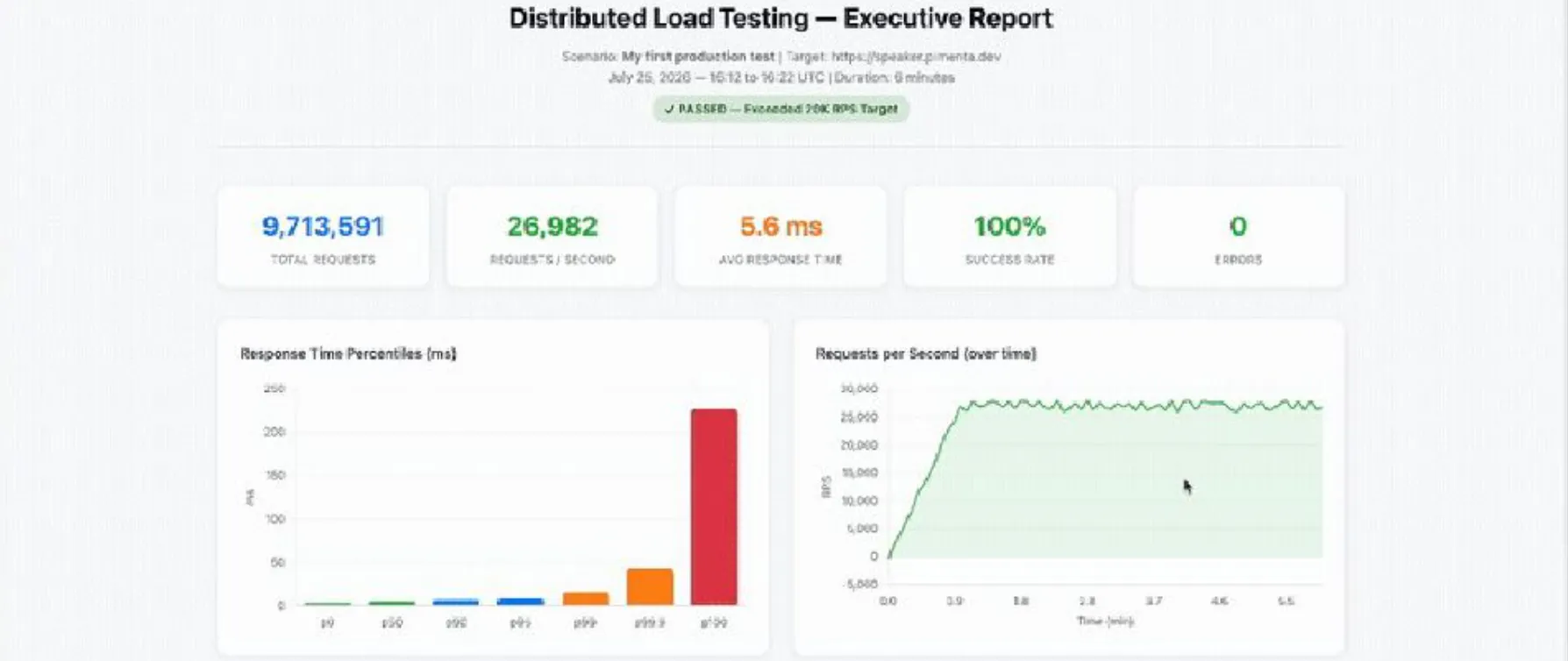
Kiro queries the scenario details via MCP, retrieves the run results with per-region breakdown, and generates a full HTML report with interactive charts and a verdict. In our live run the report showed 26,982 RPS achieved — 35% above the 25,000 target — with zero errors and 5.6 ms average response time across both regions. That's the kind of evidence that gives a team confidence to approve a production launch.
How much does 1,000,000 requests cost?
The cost of a DLT run is dominated by ECS Fargate — the load generators. Everything else (Lambda, Step Functions, DynamoDB) is rounding error per run. Let's compute a concrete example: a single test that sends 1,000,000 requests at 25,000 RPS across two regions.
The math
At 25,000 RPS, 1,000,000 requests take just 40 seconds of actual load. But you don't bill only the load window — Fargate bills from image pull until task termination, and in practice each task lives ~5 minutes (300s) once you include provisioning, a 1-minute ramp-up, the hold, and Fargate's minimum billing. The DLT default task is 2 vCPU + 4 GB memory.
Fargate on-demand rates (Linux/x86, per hour):
| Region | vCPU-hour | GB-hour | Cost per task-hour (2 vCPU + 4 GB) |
|---|---|---|---|
| us-east-1 | $0.04048 | $0.004445 | $0.09874 |
| sa-east-1 (São Paulo) | $0.05056 | $0.005555 | $0.12334 |
With ~45 tasks (23 in us-east-1, 22 in sa-east-1), each billed for 300 seconds:
| Component | Calculation | Cost (USD) |
|---|---|---|
| Fargate — us-east-1 | 23 tasks × $0.09874 × (300/3600) | $0.189 |
| Fargate — sa-east-1 | 22 tasks × $0.12334 × (300/3600) | $0.226 |
| Lambda + Step Functions + DynamoDB | orchestration, per run | ~$0.004 |
| Total per 1M-request test run | ≈ $0.42 |
Roughly forty-two cents to fire a million requests at 25k RPS from two continents. Even accounting for variability in task count and duration, a run like this lands well under a dollar.
Watch the recurring costs, not the run. The run itself is cheap; the traps are the things that persist after it. Each test scenario creates a CloudWatch dashboard per region that costs $3.00/month each until deleted (the free tier covers only 3 dashboards). The base solution also idles at about $30.90/month with default settings, and the optional MCP Server (AgentCore Gateway + Lambda) adds roughly $5–$20/month. Delete unused test scenarios through the console to remove their dashboards.
Cost takeaways
- Per-run compute is tiny — you pay per second for short-lived Fargate tasks.
- São Paulo (
sa-east-1) Fargate is ~25% pricier than Virginia — factor region choice into large campaigns. - The real monthly bill comes from idle base infrastructure and leftover CloudWatch dashboards, not from the tests themselves.
- To cut per-run cost further, reduce task vCPU/memory for light endpoints, or use fewer tasks with more users per task.
Why this workflow matters
The point isn't just that DLT is powerful — it's that the entire lifecycle (deploy, configure, scale to multi-region, collect, report) collapsed into a conversation. Kiro read the docs, ran the CLI, orchestrated CloudFormation across regions, pulled results through MCP, and produced a stakeholder-ready dashboard. The engineer stays in the driver's seat making decisions; the AI handles the mechanical execution.
Load testing answers the most critical question before you go to production: "can my system handle it?" With this setup, answering it is a five-minute, sub-dollar conversation.
Resources
Slides of my talk about DLT:**** https://speakerdeck.com/flap/distributed-load-testing-na-aws
Solution: github.com/aws-solutions/distributed-load-testing-on-aws
Official cost page: DLT on AWS — Cost
Speaker: pimenta.dev
Solution: github.com/aws-solutions/distributed-load-testing-on-aws
Official cost page: DLT on AWS — Cost
Speaker: pimenta.dev
#AWS #LoadTesting #Kiro #MCP #Fargate #Locust #DevOps #Performance #AIAgents #DLT
Enjoyed reading this content? Let the author know!
Your likes, comments, shares, and saves help creators reach more builders.

Loading recommendations
Loading article