
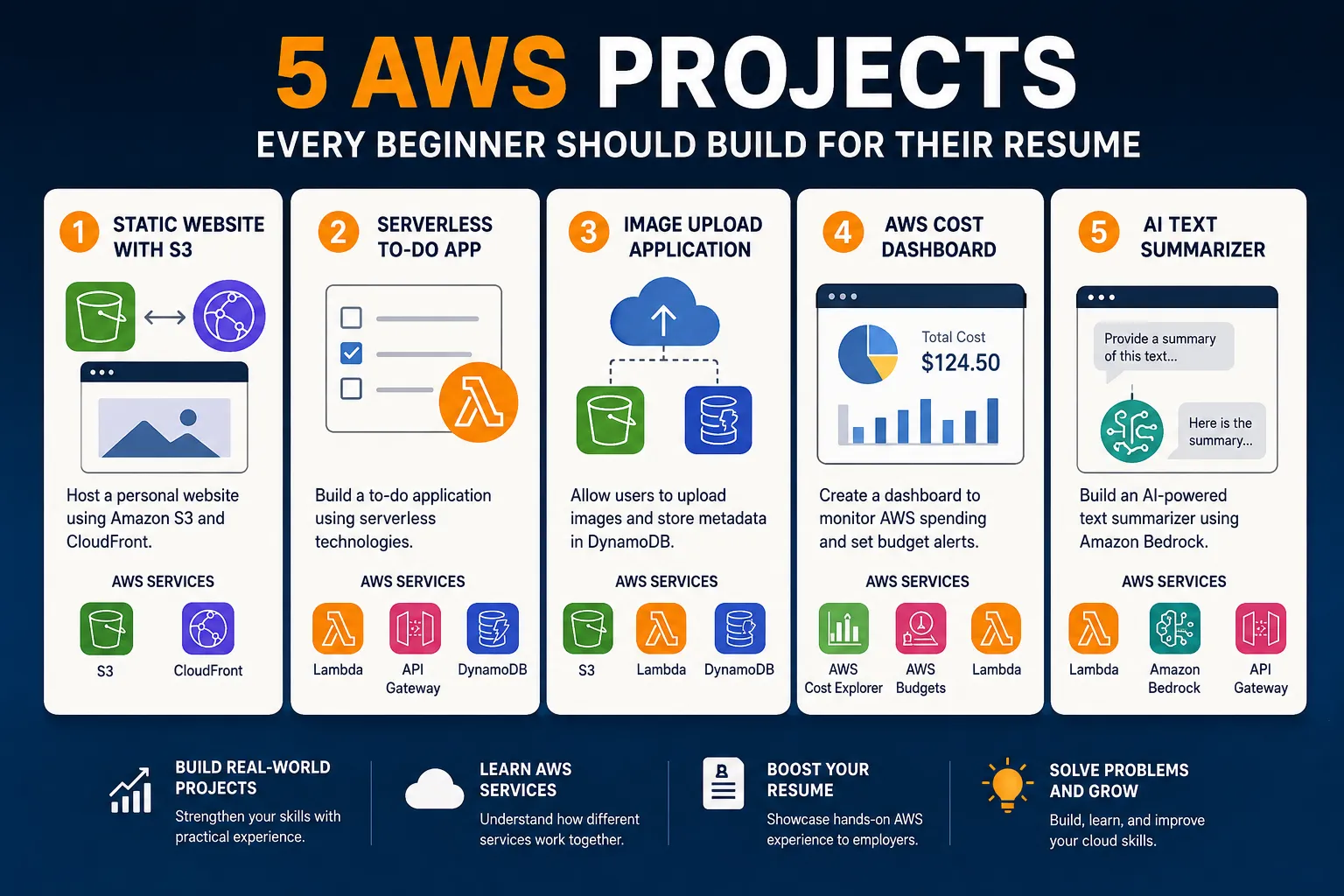
5 AWS Projects Every Beginner Should Build for Their Resume
If you're learning AWS, you've probably watched tutorials, completed a few labs, and created an AWS account. But there's one question that eventually comes up: “What should I actually build?” Learning AWS services one by one is useful, but building projects is where things start to make sense. A project forces you to connect different services, troubleshoot problems, understand architecture, and make decisions on your own.

AWS Certified Cloud Practitioner | Aspiring Cloud Support Engineer
5 AWS Projects Every Beginner Should Build for Their Resume
1. Host a Static Website on Amazon S3
Let's start with one of the simplest AWS projects.
Build a personal website and host it using Amazon S3.
Your website could be anything:
- A personal portfolio
- A resume website
- A landing page
- A simple blog
- A project showcase
The basic architecture is straightforward:
text
User|vAmazon CloudFront|vAmazon S3|vWebsite
You can start with just HTML and CSS. Once the website works, you can add CloudFront to improve performance and learn about content delivery.
What you'll learn
This small project introduces several important cloud concepts:
- Amazon S3
- Static website hosting
- CloudFront
- DNS
- IAM permissions
- HTTPS
- Cloud architecture
Why it's useful for your resume
Instead of simply writing:
“I learned Amazon S3.”
You can say:
“Built and deployed a static portfolio website using Amazon S3 and CloudFront.”
That's a much more practical demonstration of your skills.
2. Build a Serverless To-Do Application
Once you're comfortable with S3, try building a small serverless application.
A To-Do application is a great beginner project because the functionality is simple, but the architecture teaches you several important AWS concepts.
For example:
text
User|vWeb Application|vAmazon API Gateway|vAWS Lambda|vAmazon DynamoDB
The user should be able to:
- Create a task
- View tasks
- Mark a task as completed
- Delete a task
The frontend can be hosted on S3, while Lambda handles the backend logic.
DynamoDB stores the tasks.
What you'll learn
This project gives you experience with:
- AWS Lambda
- API Gateway
- DynamoDB
- S3
- IAM
- REST APIs
- Serverless architecture
The most important concept here is that you don't need to manage a traditional server.
You write your application code, deploy it to Lambda, and AWS handles the underlying infrastructure.
A good resume description
“Developed a serverless To-Do application using AWS Lambda, API Gateway, DynamoDB, and S3.”
That's already a much stronger project than a simple local To-Do application.
3. Create an Image Upload Application
Here's a project that is simple enough for a beginner but introduces an important real-world pattern.
Build a website where users can upload images.
For example:
Upload a profile picture → Store the image in Amazon S3 → Save information about the image in DynamoDB.
The architecture could look like this:
text
User|vWeb Application|vAPI Gateway|vLambda|+-----------> S3|+-----------> DynamoDB
Amazon S3 stores the actual image.
DynamoDB can store information such as:
text
File nameUpload dateUser IDFile typeS3 object key
What you'll learn
You'll start working with:
- S3 buckets
- S3 objects
- Lambda
- API Gateway
- DynamoDB
- IAM
- File uploads
- Metadata
You can make the project more interesting by adding authentication later.
For example:
User → Login → Upload Image → View Uploaded Images
At that point, you've started building something that resembles a real cloud application.
4. Build a Simple AWS Cost Monitoring Dashboard
This is one of my favorite projects for beginners because it solves a problem that almost every new AWS user eventually encounters:
“Where is my AWS money going?”
Build a small dashboard that displays your AWS spending information.
A simple version could show:
text
AWS Cost DashboardCurrent Month: $X.XXEC2 $X.XXS3 $X.XXLambda $X.XXOther $X.XX
You can use AWS billing and cost-management capabilities to collect the information and present it through a simple dashboard.
What you'll learn
This project introduces you to:
- AWS billing
- Cost management
- IAM
- APIs
- Data processing
- Dashboards
- Monitoring
More importantly, you'll start thinking about AWS from a real-world operations perspective.
Cloud isn't only about deploying applications.
It's also about understanding how much those applications cost.
A useful improvement
Add a budget alert so you know when spending reaches a particular threshold.
For example:
text
$0 ───── $5 ───── $10 ───── $20↑Alert
This makes the project considerably more useful.
5. Build a Simple AI Application with Amazon Bedrock
Now let's add some Generative AI.
You don't need to build a complicated AI agent as your first project.
Start with something simple.
For example, build an AI text summarizer.
The user enters:
text
A long piece of text...
Your application sends it to Amazon Bedrock.
The AI returns:
text
Summary:A short explanation of the original text.
A simple architecture could be:
text
User|vWeb Application|vAPI Gateway|vAWS Lambda|vAmazon Bedrock|vAI Response
What you'll learn
You'll get hands-on experience with:
- Amazon Bedrock
- Generative AI
- Lambda
- API Gateway
- IAM
- API requests
- Prompt engineering
Once the basic application works, you can turn it into something more impressive.
For example:
AI Resume Analyzer
Upload a resume → Analyze skills → Compare against a job description → Identify skill gaps.
Or:
AI Study Assistant
Enter study material → Generate a summary → Create questions → Generate a quiz.
These projects are much more interesting to discuss during an interview because they combine traditional cloud services with Generative AI.
How I Would Build These Projects
Don't try to build all five in one week.
A better approach is to increase the complexity gradually.
Project 1
Static Website
Learn:
S3 → CloudFront → DNS
↓
Project 2
Serverless To-Do App
Learn:
API Gateway → Lambda → DynamoDB
↓
Project 3
Image Upload App
Learn:
S3 → Lambda → DynamoDB → APIs
↓
Project 4
Cost Dashboard
Learn:
AWS APIs → IAM → Cost Management → Visualization
↓
Project 5
AI Application
Learn:
Lambda → API Gateway → Amazon Bedrock
By the end, you won't just know individual AWS services.
You'll understand how different services fit together.
Don't Just Build It — Document It
This is something many beginners overlook.
If you're building projects for your resume, document the project while you're building it.
For each project, include:
1. Architecture diagram
Show how the AWS services communicate.
2. GitHub repository
Keep your source code organized.
3. README
Explain:
- What the project does
- Why you built it
- AWS services used
- Architecture
- How to deploy it
- Screenshots
- What you learned
4. Problems you encountered
Don't hide the problems.
If you spent two hours figuring out an IAM permission issue, write about it.
That's actually valuable.
5. Improvements
Explain what you would add next.
For example:
“The current version doesn't have authentication. My next step would be to add Amazon Cognito.”
That shows that you understand where the project could go next.
What Makes an AWS Project Good for a Resume?
You don't need a huge project with 20 AWS services.
A good beginner project should demonstrate three things:
You built something.
You understand how it works.
You can explain the decisions you made.
For example, saying:
“Used 15 AWS services in my project.”
isn't necessarily impressive.
But saying:
“I chose DynamoDB because the application uses simple key-value access patterns and doesn't require complex relational queries.”
shows actual understanding.
That's what you should aim for.
One More Tip: Don't Ignore Security
Even when you're experimenting, get into the habit of thinking about security.
Avoid things like:
- Putting AWS access keys directly in your code
- Making every resource publicly accessible
- Giving IAM users unnecessary permissions
- Uploading credentials to GitHub
- Ignoring billing alerts
Learning good practices early will save you a lot of trouble later.
And always clean up resources when you're finished experimenting so you don't accidentally leave paid resources running.
Final Thoughts
You don't need an advanced AWS project to demonstrate that you understand cloud computing.
Start small.
Build something.
Break it.
Fix it.
Then improve it.
If you're completely new to AWS, I'd recommend starting with the S3 static website, then moving to the serverless To-Do application.
Once you're comfortable with Lambda, API Gateway, and DynamoDB, try the AI application with Amazon Bedrock.
The goal isn't to collect AWS services.
The goal is to learn how to use AWS to solve problems.
And that's the skill that matters when you're building your first cloud portfolio.
Enjoyed reading this content? Let the author know!
Your likes, comments, shares, and saves help creators reach more builders.

Loading recommendations
Loading article