
Building a 3-Agent Research Assistant with Strands Agents SDK and Amazon Bedrock
A student’s hands-on walkthrough of building a multi-agent research assistant in Python, with an orchestrator delegating to researcher, writer, and reviewer agents on Amazon Bedrock.

Introduction
I'm an Information Technology student who likes experimenting with AI agents. Most tutorials I found showed a single agent doing a single job, so I wanted to see how multiple agents can work together on AWS. In this article I build a small research assistant where one orchestrator agent delegates work to three specialists, all powered by a model on Amazon Bedrock using the Strands Agents SDK. Note that this is for beginners who know basic Python and want a first multi-agent project on AWS.
What we're building
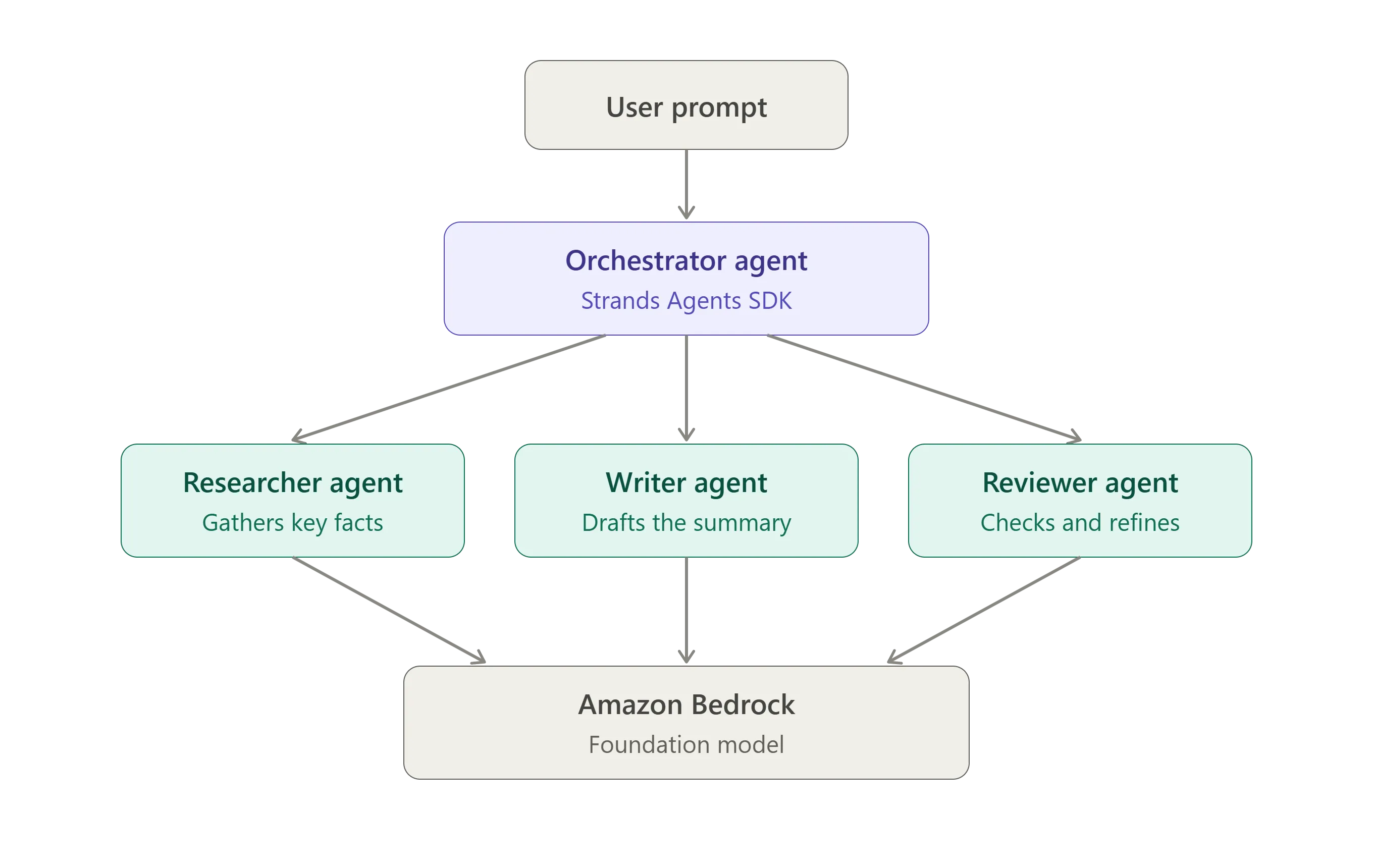
A command-line assistant that takes a topic and returns a short, reviewed summary:
- Orchestrator agent: receives the request and decides who does what.
- Researcher agent: gathers key facts about the topic.
- Writer agent: turns those facts into a clear summary.
- Reviewer agent: checks the draft for errors and unclear parts.
Prerequisites
- An AWS account and an IAM user or role allowed to invoke Bedrock models
- AWS credentials configured locally (
aws configureor IAM Identity Center) - Access to a foundation model in Amazon Bedrock in your chosen region
- Python 3.10 or newer
Step 1: Set up the project
1
2
3
4
mkdir research-assistant && cd research-assistant

python -m venv .venv

source .venv/bin/activate   # Windows: .venv\Scripts\activate

pip install strands-agents strands-agents-tools
Step 2: Choose your Bedrock model
In the Bedrock console, open the model catalog, confirm you have access to a model, and copy its model ID. I used the same model for every agent to keep things simple.
Step 3: Build the specialist agents
The key idea is the "agents as tools" pattern: each specialist is a normal agent wrapped in a function that the orchestrator can call.
1
2
3
4
5
6
7
8
9
10
11
12
13
14
15
16
17
18
19
20
21
22
23
24
25
26
27
28
29
30
31
32
33
34
35
36
37
38
from strands import Agent, tool
from strands.models import BedrockModel
model = BedrockModel(
model_id="YOUR_MODEL_ID",
region_name="YOUR_REGION",
temperature=0.3,
)
def researcher_agent(topic: str) -> str:
"""Research a topic and return the key facts as short bullet points."""
agent = Agent(
model=model,
system_prompt="You are a careful researcher. Return 5-7 factual bullet points. "
"If you are unsure about something, say so.",
)
return str(agent(topic))
def writer_agent(notes: str) -> str:
"""Turn research notes into a clear, beginner-friendly summary."""
agent = Agent(
model=model,
system_prompt="You are a technical writer. Write a clear summary of about "
"150 words for a beginner audience.",
)
return str(agent(notes))
def reviewer_agent(draft: str) -> str:
"""Review a draft for errors or unclear parts and return an improved version."""
agent = Agent(
model=model,
system_prompt="You are a strict editor. Fix mistakes and unclear wording. "
"Return only the improved text.",
)
return str(agent(draft))Step 4: Add the orchestrator
1
2
3
4
5
6
7
8
9
10
11
12
13
orchestrator = Agent(

    model=model,

    system_prompt=(

        "You coordinate a research workflow. For every topic: "

        "1) call researcher_agent, 2) pass its output to writer_agent, "

        "3) pass the draft to reviewer_agent, 4) return the reviewed text."

    ),

    tools=[researcher_agent, writer_agent, reviewer_agent],

)


if __name__ == "__main__":

    topic = input("Topic: ")

    print(orchestrator(f"Create a reviewed summary about: {topic}"))
Run it with
python app.py.Cost and cleanup
This runs locally, so there are no servers to delete. The only cost is Bedrock usage, so I kept prompts short while testing.
What's next
- Give the researcher a real tool (web search or a knowledge base) instead of relying on the model's own knowledge
- Deploy the workflow on AWS (for example, AWS Lambda) behind an API
- Add logging to see how agents hand work to each other
Conclusion
Splitting work across small, focused agents made the system easier to prompt and debug than one giant prompt. If you try this, I'd love to hear what topic you test it on. Share your results in the comments!
Enjoyed reading this content? Let the author know!
Your likes, comments, shares, and saves help creators reach more builders.

Loading recommendations
Loading article