
Change 6 Characters in Terraform and Save 20% on EC2 Costs Instantly 💪
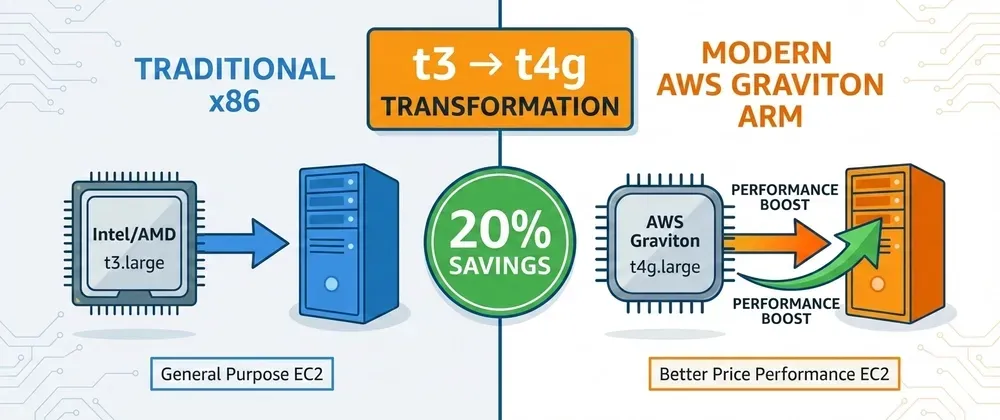
AWS Graviton instances (ARM) cost 20% less than x86 and often perform better. Here's how to migrate with Terraform—usually just changing t3 to t4g.
Series: Save on AWS with Terraform (21 articles)
- …
- 11Change 6 Characters in Terraform and Save 20% on EC2 Costs Instantly 💪 This article

AWS Graviton instances (ARM) cost 20% less than x86 and often perform better. Here's how to migrate with Terraform—usually just changing t3 to t4g.
Real talk: Are you still using t3, m5, or c5 instances?
You're overpaying. By at least 20%.
AWS Graviton instances (ARM-based) cost significantly less and often perform better than equivalent x86 instances:
1
2
3
4
5
t3.large:  $0.0832/hour = $60.74/month
t4g.large: $0.0672/hour = $49.06/month
Difference: $11.68/month = $140/year

Per instance. Multiply by your fleet size.
The migration? Change
t3 to t4g in your Terraform. That's it. 🎉Let me show you how.
💰 The Graviton Advantage
AWS Graviton processors (ARM) offer:
- 20-40% better price-performance than x86
- Up to 40% better performance for many workloads
- 60% less energy consumption (bonus: eco-friendly!)
Pricing comparison:
| Instance Type | x86 ($/hour) | Graviton ($/hour) | Savings |
|---|---|---|---|
| t3.medium → t4g.medium | $0.0416 | $0.0336 | 19% |
| t3.large → t4g.large | $0.0832 | $0.0672 | 19% |
| t3.xlarge → t4g.xlarge | $0.1664 | $0.1344 | 19% |
| m5.large → m6g.large | $0.096 | $0.077 | 20% |
| c5.large → c6g.large | $0.085 | $0.068 | 20% |
| r5.large → r6g.large | $0.126 | $0.1008 | 20% |
Pattern: Replace the
5 with 6g or 3 with 4g. Save 20%.🎯 Who Should Migrate?
Perfect candidates:
- ✅ Web servers (Nginx, Apache)
- ✅ Application servers (Node.js, Python, Go, Ruby)
- ✅ Containerized workloads (Docker, ECS, EKS)
- ✅ CI/CD runners
- ✅ Databases (Postgres, MySQL, Redis work great on ARM)
- ✅ Caching layers (Redis, Memcached)
Requires testing:
- ⚠️ Legacy Java apps (usually fine, but test)
- ⚠️ .NET Framework (use .NET Core instead)
- ⚠️ Compiled binaries without ARM support
Not compatible (yet):
- ❌ Windows workloads (x86 only)
- ❌ Software with x86-only dependencies
🛠️ Terraform Migration
Single Instance (Simplest)
Before:
1
2
3
4
5
6
7
8
resource "aws_instance" "app" {
  ami           = "ami-0c55b159cbfafe1f0"  # x86 AMI
  instance_type = "t3.large"

  tags = {
    Name = "app-server"
  }
}
After:
1
2
3
4
5
6
7
8
resource "aws_instance" "app" {
  ami           = "ami-0d5eff06f840b45e9"  # ARM AMI
  instance_type = "t4g.large"  # Changed from t3

  tags = {
    Name = "app-server"
  }
}
Deploy:
1
2
3
4
terraform apply

# EC2 will be recreated with Graviton instance
# Annual savings: $140 per instance
Auto Scaling Group (Production-Ready)
Before:
1
2
3
4
5
6
7
8
9
10
11
12
13
14
15
16
17
resource "aws_launch_template" "app" {
  name_prefix   = "app-"
  image_id      = data.aws_ami.amazon_linux_2_x86.id
  instance_type = "t3.large"

  # ... other config
}

data "aws_ami" "amazon_linux_2_x86" {
  most_recent = true
  owners      = ["amazon"]

  filter {
    name   = "name"
    values = ["amzn2-ami-hvm-*-x86_64-gp2"]
  }
}
After:
1
2
3
4
5
6
7
8
9
10
11
12
13
14
15
16
17
resource "aws_launch_template" "app" {
  name_prefix   = "app-"
  image_id      = data.aws_ami.amazon_linux_2_arm.id
  instance_type = "t4g.large"  # Changed from t3

  # ... other config
}

data "aws_ami" "amazon_linux_2_arm" {
  most_recent = true
  owners      = ["amazon"]

  filter {
    name   = "name"
    values = ["amzn2-ami-hvm-*-arm64-gp2"]  # Changed to arm64
  }
}
Multi-Architecture Module
1
2
3
4
5
6
7
8
9
10
11
12
13
14
15
16
17
18
19
20
21
22
23
24
25
26
27
28
29
30
31
32
33
34
35
36
37
38
39
40
41
42
43
44
45
46
47
48
49
50
51
# modules/ec2-instance/main.tf

variable "instance_family" {
  description = "Instance family (t3, t4g, m5, m6g, etc.)"
  type        = string
  default     = "t4g"  # Default to Graviton
}

variable "instance_size" {
  description = "Instance size (medium, large, xlarge)"
  type        = string
}

locals {
  # Determine architecture from instance family
  is_graviton = can(regex(".*g$", var.instance_family))
  architecture = local.is_graviton ? "arm64" : "x86_64"
}

data "aws_ami" "amazon_linux_2" {
  most_recent = true
  owners      = ["amazon"]

  filter {
    name   = "name"
    values = ["amzn2-ami-hvm-*-${local.architecture}-gp2"]
  }

  filter {
    name   = "architecture"
    values = [local.architecture]
  }
}

resource "aws_instance" "this" {
  ami           = data.aws_ami.amazon_linux_2.id
  instance_type = "${var.instance_family}.${var.instance_size}"

  tags = {
    Name         = "instance-${var.instance_family}"
    Architecture = local.architecture
  }
}

output "instance_id" {
  value = aws_instance.this.id
}

output "architecture" {
  value = local.architecture
}
Usage:
1
2
3
4
5
6
7
8
9
10
11
12
13
14
15
16
17
# main.tf

# Graviton instance (default)
module "app_server" {
  source = "./modules/ec2-instance"

  instance_family = "t4g"
  instance_size   = "large"
}

# x86 instance (if needed for compatibility)
module "legacy_server" {
  source = "./modules/ec2-instance"

  instance_family = "t3"
  instance_size   = "large"
}
ECS/EKS Migration
ECS on EC2:
1
2
3
4
5
6
7
8
9
10
11
12
13
14
15
16
17
18
19
20
21
22
# Just change the instance type in launch template
resource "aws_launch_template" "ecs" {
  name_prefix   = "ecs-"
  image_id      = data.aws_ami.ecs_optimized_arm.id
  instance_type = "t4g.large"  # Changed from t3

  user_data = base64encode(<<-EOF
    #!/bin/bash
    echo ECS_CLUSTER=${aws_ecs_cluster.main.name} >> /etc/ecs/ecs.config
  EOF
  )
}

data "aws_ami" "ecs_optimized_arm" {
  most_recent = true
  owners      = ["amazon"]

  filter {
    name   = "name"
    values = ["amzn2-ami-ecs-hvm-*-arm64-ebs"]
  }
}
EKS Node Group:
1
2
3
4
5
6
7
8
9
10
11
12
13
14
15
16
resource "aws_eks_node_group" "graviton" {
  cluster_name    = aws_eks_cluster.main.name
  node_group_name = "graviton-nodes"
  node_role_arn   = aws_iam_role.node.arn
  subnet_ids      = var.private_subnet_ids

  instance_types = ["t4g.large"]  # Graviton

  scaling_config {
    desired_size = 3
    max_size     = 5
    min_size     = 1
  }

  # EKS automatically uses correct AMI for architecture
}
📊 Real-World Savings
Example 1: Web Application (10 instances)
Before (t3.large):
1
2
10 × t3.large × $0.0832/hour × 730 hours = $607/month
Annual: $7,284
After (t4g.large):
1
2
3
4
10 × t4g.large × $0.0672/hour × 730 hours = $490/month
Annual: $5,886

Savings: $117/month = $1,398/year (19% reduction!)
Example 2: Microservices (50 instances)
Before (mix of t3/m5):
1
2
3
4
30 × t3.xlarge = $365/month
20 × m5.large  = $140/month
Total: $505/month
Annual: $6,060
After (Graviton):
1
2
3
4
5
6
30 × t4g.xlarge = $295/month
20 × m6g.large  = $112/month
Total: $407/month
Annual: $4,884

Savings: $98/month = $1,176/year (19% reduction!)
Example 3: Kubernetes Cluster (100 nodes)
Before (m5.2xlarge nodes):
1
2
100 × m5.2xlarge × $0.384/hour × 730 hours = $28,032/month
Annual: $336,384
After (m6g.2xlarge):
1
2
3
4
100 × m6g.2xlarge × $0.308/hour × 730 hours = $22,484/month
Annual: $269,808

Savings: $5,548/month = $66,576/year (20% reduction!) 💰
🎓 Migration Checklist
Phase 1: Planning (1 hour)
- [ ] Audit current instance types
- [ ] Check application compatibility (most apps just work)
- [ ] Identify AMI requirements (arm64 vs x86_64)
- [ ] Plan testing approach
Phase 2: Testing (1-2 days)
- [ ] Deploy test instance with Graviton
- [ ] Run application tests
- [ ] Performance benchmarking
- [ ] Verify all dependencies work
Phase 3: Migration (varies)
- [ ] Update Terraform configuration
- [ ] Deploy to dev environment
- [ ] Deploy to staging
- [ ] Deploy to production (rolling update)
- [ ] Monitor performance and costs
💡 Pro Tips
1. Use Latest Amazon Linux 2 AMIs
1
2
3
4
5
6
7
8
9
10
11
12
13
14
data "aws_ami" "amazon_linux_2_arm" {
  most_recent = true
  owners      = ["amazon"]

  filter {
    name   = "name"
    values = ["amzn2-ami-hvm-*-arm64-gp2"]
  }

  filter {
    name   = "state"
    values = ["available"]
  }
}
Amazon Linux 2 has excellent ARM support out of the box.
2. Docker Multi-Arch Builds
1
2
3
4
5
6
7
8
9
10
# Build for both architectures
FROM --platform=$BUILDPLATFORM node:18-alpine AS builder

# Your app code
COPY . .
RUN npm ci && npm run build

FROM node:18-alpine
COPY --from=builder /app/dist ./dist
CMD ["node", "dist/index.js"]
1
2
# Build multi-arch image
docker buildx build --platform linux/amd64,linux/arm64 -t myapp:latest .3. Start with Non-Critical Workloads
- Dev/test environments first
- CI/CD runners
- Non-customer-facing services
- Then move to production
4. Monitor Performance
1
2
3
4
5
6
7
8
9
10
11
12
13
14
resource "aws_cloudwatch_metric_alarm" "cpu" {
  alarm_name          = "graviton-high-cpu"
  comparison_operator = "GreaterThanThreshold"
  evaluation_periods  = 2
  metric_name         = "CPUUtilization"
  namespace           = "AWS/EC2"
  period              = 300
  statistic           = "Average"
  threshold           = 80

  dimensions = {
    InstanceId = aws_instance.app.id
  }
}
5. Use Graviton for RDS Too
1
2
3
4
5
6
7
8
resource "aws_db_instance" "postgres" {
  engine         = "postgres"
  engine_version = "15.3"
  instance_class = "db.t4g.large"  # Graviton for RDS!

  allocated_storage = 100
  storage_type      = "gp3"
}
RDS Graviton saves 20% on database costs too!
⚠️ Common Gotchas
1. AMI Must Match Architecture
1
2
3
4
5
6
7
# WRONG - x86 AMI with Graviton instance
instance_type = "t4g.large"
ami           = "ami-xxx"  # x86 AMI = fails

# RIGHT - ARM AMI with Graviton instance
instance_type = "t4g.large"
ami           = "ami-yyy"  # arm64 AMI = works
2. Check Your Container Images
1
2
3
4
5
6
# Verify multi-arch support
docker manifest inspect nginx:latest

# Should show both architectures:
# - linux/amd64
# - linux/arm64
3. Some Software Requires Recompilation
If you compile custom software, ensure ARM toolchain:
1
2
3
4
# Use correct compiler
gcc -march=armv8-a  # For ARM
# vs
gcc -march=x86-64   # For x86
🚀 Quick Start
1
2
3
4
5
6
7
8
9
10
11
12
13
14
15
16
17
18
19
20
21
# 1. Find current instance types
terraform state list | grep aws_instance

# 2. Update instance_type
# Change: t3 → t4g, m5 → m6g, c5 → c6g

# 3. Update AMI to arm64
# Change AMI filter to include "arm64"

# 4. Test in dev
terraform plan
terraform apply

# 5. Verify it works
ssh user@instance
uname -m  # Should show "aarch64"

# 6. Roll out to production
# Use rolling update for zero downtime

# 7. Watch savings accumulate 💰
🎯 Quick Reference
Instance Type Mapping
| x86 Instance | Graviton Equivalent | Savings |
|---|---|---|
| t3.nano | t4g.nano | 20% |
| t3.micro | t4g.micro | 20% |
| t3.small | t4g.small | 20% |
| t3.medium | t4g.medium | 19% |
| t3.large | t4g.large | 19% |
| t3.xlarge | t4g.xlarge | 19% |
| t3.2xlarge | t4g.2xlarge | 19% |
| m5.large | m6g.large | 20% |
| m5.xlarge | m6g.xlarge | 20% |
| c5.large | c6g.large | 20% |
| r5.large | r6g.large | 20% |
AMI Filters
1
2
3
4
5
6
7
8
9
10
11
12
13
14
15
16
17
# Amazon Linux 2
filter {
  name   = "name"
  values = ["amzn2-ami-hvm-*-arm64-gp2"]
}

# Ubuntu
filter {
  name   = "name"
  values = ["ubuntu/images/hvm-ssd/ubuntu-*-arm64-server-*"]
}

# ECS Optimized
filter {
  name   = "name"
  values = ["amzn2-ami-ecs-hvm-*-arm64-ebs"]
}
🎯 Summary
The Opportunity:
- 20% instant savings on EC2 costs
- Often better performance
- Lower energy consumption
The Migration:
- Change instance type: t3 → t4g
- Update AMI to arm64
- Test and deploy
The Result:
- Typical savings: $1,000-60,000/year
- Implementation time: Hours to days
- Ongoing benefit: Forever
Stop overpaying for x86 instances. Switch to Graviton and save 20% instantly. 💪
Migrated to Graviton? How much are you saving? Share in the comments! 💬
Follow for more AWS cost optimization with Terraform! 🚀
Series: Save on AWS with Terraform (21 articles)
- …
- 11Change 6 Characters in Terraform and Save 20% on EC2 Costs Instantly 💪 This article
Enjoyed reading this content? Let the author know!
Your likes, comments, shares, and saves help creators reach more builders.

Loading recommendations
Loading article